[HowTo] reboot / turn off your frozen computer: REISUB/REISUO

Difficulty: ★★☆☆☆

This tutorial was created because people are using a hard power off during freezes, so this will teach you how to turn off your computer when everything is frozen using softer means.
So whenever you see someone saying they had to “Power Off” or “Hard Reset” their system without doing a REISUB, please send them here! :innocent:

If you’re reading this in response to a question, please click the green link above this text to bring you to the full unabridged text of the tutorial.


If you can read this line, you’re all set, and you already are where you need to be! :+1:

Please click the  ►to expand that section below:

REISUB (reboot)

REISUB (also known as the magic SysRq key ) is a mnemonic for:

and is a gentle way of rebooting your system by doing the following:

  • Switch the keyboard from R aw mode, used by programs such as X11 and SVGALib, to XLATE (translate) mode
  • Send an E nd signal (SIGTERM) to all processes, except the boot process, allowing all processes to end gracefully
  • Send an I nstant kill (SIGKILL) to all processes, except the boot process, forcing all processes to end .
  • S ync all mounted filesystems, allowing them to write all data to disk.
  • U nmount and remount all mounted filesystems in read-only mode.
  • Re B oot the system

In fact, the only data you lose is since your last [auto]save as the system is shut down gracefully.

Before you read any further, ensure all your work is saved!

How to invoke the REISUB procedure?
First we have to unlock the SysRq key so:

  • Execute echo kernel.sysrq=1 | sudo tee --append /etc/sysctl.d/99-sysctl.conf
    I don't want any stinking commands editing my files for me!
    • Oh, you’re the manual kind of person and wants to document why you’re doing this, right? :+1:
    • Add to your /etc/default/grub in the GRUB_CMDLINE_LINUX_DEFAULT parameter the sysrq_always_enabled=1 variable instead of executing the above command
  • Execute sudo update-grub
  • Reboot normally and come back here to read the rest of the blurb… :wink:

There is a special Sys tem R e q uest key on most keyboards called SysRq on all English language and most international keyboards.

Expand this for the translation for some International keyboards

:it: Stamp (or Stampa on old Olivetti keyboards)
:de: S-Abf
:mexico: PetSis (maybe also other :es: keyboards, please confirm)
:earth_africa: Feed back in a comment below if you have found yours that is not mentioned here. :innocent:

  • On full-size keyboards, it’s called by pressing Alt+SysRq
  • On most laptop keyboards it’s called by pressing Fn+Alt+PrtSc
  • On some keyboards, if none of the above Alt combinations work or the SysRq key is missing, please also try:
    • Alt+PrtSc
    • Alt Gr+PrtSc
    • Ctrl+Alt+PrtSc

Once you’ve located your SysRq key, please keep the Alt key pressed and then release the SysRq.

Now lightly tap these keys waiting between 1 second (fast, new machines) and 6 seconds (older or resource-starved machines¹) in-between keypresses : R E I S U B

There! If you actually followed the above instructions, your system just rebooted gracefully and you did not damage your HDD (if you still have one) by forcing it into PARK mode forcefully nor was your EXT4 or NTFS transaction journal rolled back.

Congratulations!

:innocent: :+1: :clap:

REISUO (Turn off)
  1. Read the REISUB section above and then you’ll know what this means:
  2. R E I S U O will turn your machine O ff instead of re B ooting it…
Light tap on power button (<5 seconds)
  1. Sometimes (If only the UI is frozen), you can still switch to one of the TTYs by pressing Ctrl+Alt+F2 or F3, … and gently tap the power button there.
  2. To do the same from within your Desktop Environment (DE) this has to be set up beforehand!
    So to ensure that your power button effectively shuts down your computer instead of going to sleep / Hibernate / … in the future , follow these steps for your DE:
  • In Gnome:

    Details
    • To immediately trigger the Power Off modal dialog, execute the following command:

      gnome-session-quit --power-off
      

      The Power Off modal dialog will appear with options to Cancel or Power Off. Otherwise it will power off automatically after 60 seconds.

    • To set this as the default power button behavior, execute the following command:

      gsettings set org.gnome.settings-daemon.plugins.power power-button-action 'interactive'
      
  • In KDE:

    Details
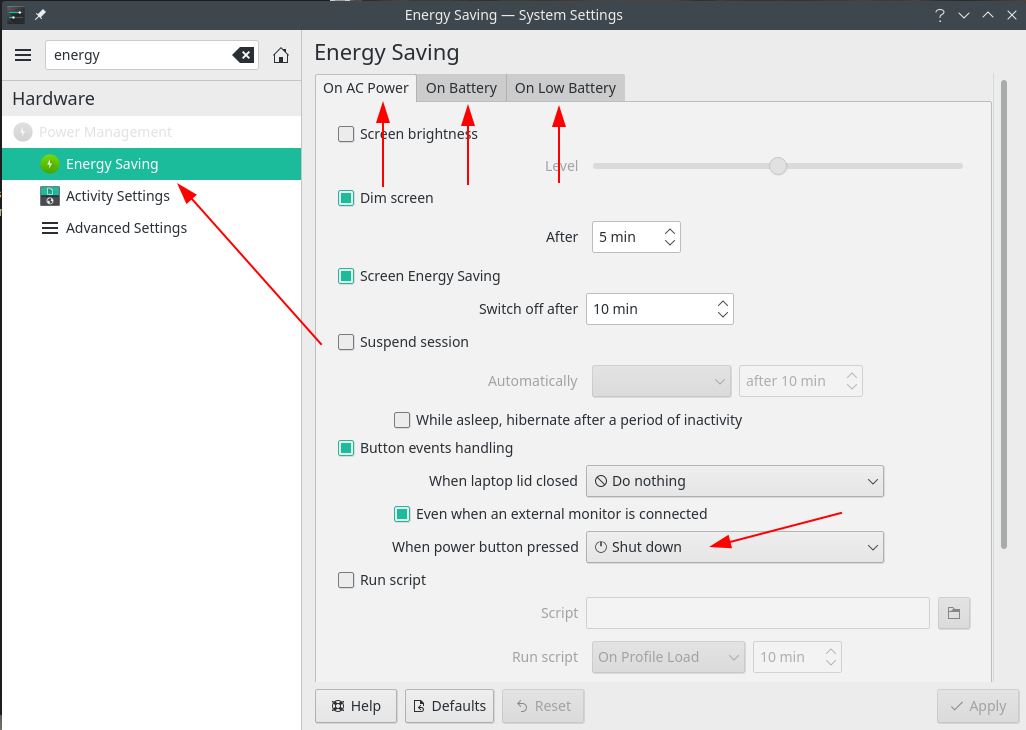
    • Go to System Settings
    • Type energy
    • Click Energy Saving
    • in all of the On AC Power, On Battery and On Battery tabs, set the check-mark on Button events handling and the Even when an external monitor is connected
    • When power button pressed to Shut Down as per below screenshot:
    • Click Apply
  • In XFCE:

    Details
    • Go to the Applications menu or System settings
    • Clock Power Manager
    • From When Power Button is pressed: select Shutdown.
That’s it! If all of your data is saved, just press the power button lightly and your system will shut down gracefully from now on!

Keep power button suppressed (>5 seconds)

See section “Pull circuit breaker on House / Street / Block” below…

Yank power cord from a laptop without battery or a PC without UPS

See section “Pull circuit breaker on House / Street / Block” below…

Pull circuit breaker on House / Street / Block

Please! Do not do this!
Unless you’re using ZFS or BTRFS and have ensured they use redundancy, you will lose data because every time you press the power button and don’t boot an external Linux USB to fsck your /, your system becomes more and more damaged until you’re in for a re-install!

Maybe not the first time, maybe not the second time, but eventually, you will!

Use REISUB, REISUO or a light tap instead!

Happy safe computing! :+1:

Note 1: How long you have to wait in-between keystrokes is a function of your hardware speed and how busy a system is. For my laptop it’s 1 second, for servers, I wait 3 seconds but we have been notified that on some resource-starved machines it can take up to 10 6 seconds. :man_shrugging:
Note 2: For the full

91 Likes
Random freezes occur to be fixed only by hard reset
System freeze upon power unplug
Anyone have crashes with too many tabs open?
[Stable Update] 2020-08-28 - Kernels, Systemd, PAM, PAMBASE, KDE-git, Deepin, Pamac, Nvidia 450.66, LibreOffice 7.0
Sleep on lid close is not suspending system
Locking up not sure why
Pacman is 0 bytes after interrupted update. Black screen on login
How to debug / fix / workaround system freeze?
Epic store on wine grey screen
System periodically freezes flooding the logs
Black Screen when waking up from sleep
What's the password to login inside manjaro
Monitor Stopped Working Suddenly -- Displays at login, not after
Freeze with log entry: kernel NULL pointer dereference
Memtest 86 showing at startup
System is randomly freezing
Gnome freezes everyday
System Freezes/Overheats on Idle - AMD GPU, KDE Wayland, Kernel 6.12/6.6.94
Keyboard stops working after laptop goes to sleep
System crashes every 1-2 days
Linux LTS 5.10 Gnome lock screen crash
Frequent Freezing
Can't launch softwares, then desktop get stuck
After the login screen the display just turns black and the monitors show “no signal”
Anyone have crashes with too many tabs open?
System froze during kernel update, now not booting
Dual Boot: Boot error
Manjaro freezes sometimes if Youtube is used (Firefox)
Xserver/GPU crashes
My system freeze since last update
Kdenlive Version 20.08.1 crashes and freezes my desktop
Battery Drain while Turned Off?
Sleep mode + high system load = crash
Issues after user switching from GUI, eg. logout/login
[Testing Update] 2020-10-16 - Kernels, KDE-git, Mesa, Python, Haskell
Random screen freezes but can still use mouse/shortcuts
Black Screen in the middle of working
Only dummy sound after hard reset
How to remote ssh into my PC?
Only dummy sound after hard reset
Game randomly shuts off monitor, but pc is still on
Display goes black, Kernel 5.9 & disconnecting HDMI
Manjaro does not boot to desktop, cannot access command line, just hangs at company logo. Hard reboot fixes the issue
[Stable Update] 2020-12-03 - Xorg-Server, Plasma 5.20.4, Cinnamon 4.8.0, Deepin, KDE-git
Issue after newest Update booting
NVidia HDMI not an option for audio output
Random System Freezes XFCE linux59
ShortCut to cancel systemd?
How to change kernel.sysrq to 0?
Manjaro Gnome Edition often crashing/freezing
Black screen with "/dev/sda1 clean" message
My Prisma OS is frozen (as we speak) what do I do?
Random Freezing/Not responding
Black screen with cursor after screen is off
Display freezing where system continues to run
System freeze - initiated partial shutdown before freeze on XFCE / LightDM / xfwm4
Manjaro Hibernation Freezes with Black Screen
Lots of applications refuse to start (VLC, SSR, Graphical software management Network manager...)
System Freeze - suche nach Ursache
Multiple Monitors Causes Freezing
[How to] Help a new forum member solve problems
Random crashes after changing laptop power settings
Manjaro KDE plasma Freezes
Failure reading sector 0x9a2e8 from `hd0'
System boots to a black screen after a hard reset, goes away after removing the amdgpu-experimental package
[Testing Update] 2021-09-11 - Kernels, LibreOffice, Browsers, Pamac, Pacman, Pipewire, Steam
System freezes frequently
Hibernate fails ocassionally
Manjaro Gnome (on Wayland) freezes on login using AMD Graphics
Linux 5.10: HDMI doesn't work on Dell laptop
Screen going off when booting
[Stable Update] 2021-07-23 - Kernels, Nvidia, Mesa, Wine, Firefox, Thunderbird, Virtualbox
My system keeps freezing
KDE Plasma randomly crashes on Manjaro
Random system freezes Intel i5 + NVIDIA graphics?
My bluetooth does not work lenovo legion 5 (5ACH6-82JW001PTA)
What should I consider before updating Kernel 5.10 - 5.13?
Manjaro freezes several times in a Day
System Gets Unresponsive (KDE)
I force shutdown while computer was restarting, after an update
When I restart the manjaro kde and it stuck in codes, what should I do?
Manjaro boots slow gets stuck and hangs
Plasmashell dumps core when disconnecting a third (hdmi) display
Android Studio RAM usage increases constantly until it maxes out and freezes
GDM not showing user / password promt (top bar and mouse visible)
System won't wake up from Sleep or Hibernate?
Asus laptop unable to wake/resume from sleep/suspend
Suspend not working after last update
When launching application with AMD dgpu system freezes
Laptop suspend not working and freezes in black screen then overheating
Sleep and Hibernation failures
Is there a simple way to set up dynamic wallpaper switching in Sway for dual displays?
System freeze after backup, annoying to recover from
Help a n00b out! system frozen
[Stable Update] 2021-10-16 - Haskell, Python, KDE Gear, KDE Framework, Thunderbird
How to solve a large number of "Unsafe Shutdowns"?
Every second time now I reopen my laptop after closing the lid it's stuck on login screen
Laptop blacked out, unresponsive during/after 19-11-2021 OS update
System monitor consumes an enormous amount of Memory
System freeze with 5.16-rc
File system or partition error, can't boot Manjaro
Interrupted update, Xorg startup issues and graphics driver installation
Normal boot stuck, but via bios it work
Manjaro startet nicht nach frischer Installation und anschließend Update
Update hung installing updates
Blank screen/freeze after lock then login
REISUB doesn't work, but REISUO does
Manjaro KDE 21.2.0-211220-linux515, Artefakte und Absturz
`Refreshing AUR` stage downloads a 9.3 MiB file and eats about 1.5 GiB of RAM memory
Stuck on …. : clean, …/… files, …/… blocks
Caught in a mount/umount loop that prevented reboot
It's not saving to the disk?
No input methods work when reaching Login screen
Games makes screen blank
Gnome not providing a login prompt
My install doesn't boot
What is the keyboard combination for SysRq on a Thinkpad T400p?
Stuck at a blackscreen after restart
Manjaro won't shutdown/reboot sometimes, ^@^@^@^@^@^@^@ stays on display
Manjaro crashed and it can't load the OS properly anymore
Shutdown sometimes freezes laptop?
Timeshift: Only one snapshot left after "forced" shutdown
Games freezes mid game along with display and few applications
Failed to start file system check on /dev/disk/by-uuid/a
Cannot update due to dependency issues
Got stuck at ASUS logo after reboot GDM
PC hard frozen with no responce
Randomly freeze on boot and after suspend
Power button not doing anything when in battery mode
New pending updates break my system
GBD.Bus.Error.org.xfce
Every second time now I reopen my laptop after closing the lid it's stuck on login screen
Long shut down (~20 min) with error messages
Manjaro gets stuck at boot splash (sometimes)
Issues with fresh installation of Manjaro
Manjaro kde random freeze/crash
Manjaro freezing randomly on several diferent kernals
System random freezes
Desktop settings and latte dock resets after reboot(after system crash while gaming)
My computer with Manjaro xfce edition freezes
Random crashes during startup and shutdown
System sometimes stuck during boot
Unable to shutdown with AMD Radeon 7800XT
[Stable Update] 2022-10-10 - Kernels, Octopi, Deepin, GlibC, Haskell, Python; Nvidia 520.56.06
System boots to black screen after a weird system crash
Waking up issue for radeon 6600xt
My PC cannot shut down
Caps Lock light indication
System gets stuck
Hard drive isn't mounting after forcing power off
I don’t know how to locate SysRq
PC froze and now erratically hangs after forced shutdown at the mains
System freezes on KDE Wayland, stable on X11
Manjaro randomly hangs on boot before KDE splash screen
Emergency mode from bad poweroff on encrypted disk => boot-efi / Local File System
System slow even after a restart, but not after a shutdown/power on
Out of memory, lead a lot of times to a freezing system but for the first time i have a error that only lead to a crashing application
Questions about manjaro screen turning black and the impact of shutting down pressing power button
System is freezing randomly. Do i need to move out of manjaro?
Don't have write permissions to $BUILDDIR
Desktop system locks up when suspending with kernel 6.1.7
Laptop stalls after 15-20 minutes
Kernel won’t start: can’t even boot up
Stuck in " [finished] terminate plymouth boot screen
Problem with sleep mode after last update
Needing help to login
Kwin effects restart when playing Terraria
Freezes when waking from suspend
Funny bug in KDE system settings/energy management: It's there in German, gone in English
Error Logging Into Plasma After Hard Reboot
Unable to boot or use chroot
Enable fingerprint scanner
Whole system freezes while playing Age of Empires IV
Freeze on suspend with kernel 6.11
Manjaro kde random freeze/crash
Cannot restart (but can shut down and start up)
Manjaro won't boot after update -- can't switch TTY
Bug: KDE Autologin + Android on USB = Crash
Firefox flickering issue with NVIDIA graphics card under Wayland
Telegram crashing when i am opening media
Desktop Icons disappeared, icons in taskbar not working, slow log in
Seeking advice: Is there a keyboard shortcut to gently reboot from a freeze?
[Stable Update] 2026-01-04 - Manjaro 26.0, Mesa, Firefox, LibreOffice, COSMIC
Stuck at Boot Loader
Blue Screen Of Death on freshly-installed system
Unable to shutdown with AMD Radeon 7800XT
Full system freeze on new install after some time
RTX 4060 - PC don't wake up after sleep (KDE)
Unable to boot/black screen after botched update
Boot stuck seeing "disabling IRQ #0"
Computer unexpectedly freezes
System hangs/crashes/sometimes reboots
Impossible to restart or shut down the machine (never completed)
PC Crashing when playing various games
System freeze | RT Throttling activated
Laptop freeze and needs a hard reboot when ethernet is connected
Had an idea after borking my system with "sudo reboot -h 15" non existing command
KDE, Stability of Manjaro
System freeze after login. I can't do anything else
I can't shutdown or reboot my computer without long-pressing the power button
Kernel panic on linux 6.9 manjaro
Gpu crashes when I play games or when I use the system
My system gets stuck at boot screen (sometimes)
Hybrid sleep doesn't resume after battery drain
Btrfs snapshots disappearing from timeshift
Alma Freezes While Installing Packages
After installation I can only see one partition and its a read only
System crash/frozen ~5min after gaming (related to Flatpak nvidia driver)
Polkit dialog freezes on authentication if screen was blanked before authenticating
System freezes on hibernation using Gnome 40.3 tk: GTK 3.24.30
Black screen every time after restoring a Timeshift snapshot
Need to reboot after start
Black screen every time after restoring a Timeshift snapshot
Disk error, system crash
Unable to wake from Suspend
[Stable Update] 2024-07-29 - Kernels, Virtualbox, Wine, KDE Frameworks
System crash/frozen ~5min after gaming (related to Flatpak nvidia driver)
How to debug / fix / workaround system freeze?
Can't turn off laptop and can't see battery icon
Issues with power down and Boot up KDE plasma
Machine randomly locking up after system update
Is this an error that I have both amd-ucode and intel-ucode installed
Display doesnt come back after turning monitors off and back on
Mouse and display not recognised after turning off computer when frozen
Frequent desktop lock-ups when dragging smplayer window, since 2024-10-10
Mouse and display not recognised after turning off computer when frozen
[Stable Update] 2024-10-10 - Kernels, Pacman 7.0, KDE Frameworks 6.6, Virtualbox 7.1.2, Mesa
Schwarzer Bildschirm nach Standby
Monitor doesn't turn on after exiting sleep mode
System stays on black screen after locking
Stuck on boot splash screen after Stable Update 2025-03-24
[Stable Update] 2025-03-24 - NVIDIA, PipeWire, Mesa, Firefox, Thunderbird, KDE Frameworks
System will not shut down fully or freezes after idling for a while
ERROR: Bailing out
Sudden freezes after Stable Update 2025.06.23
Plasma-wayland freezing problem with 2nd monitor
What should I do after a fresh install of Manjaro?
VirtualBox is stuck at 20%
Cannot boot heavier games anymore
Manjaro verweigert den Shutdown wegen eines externen Laufwerks
KDE Plasma 6.3.6 Shutdown Issue
How can a disk drive cause Manjaro to freeze
Totally broken system after December 2025 Stable Update
Spectacle causes my display to cut out
Machine randomly locking up after system update
[Stable Update] 2021-04-18 - Kernels, Mesa, Wine, Plasma5, KDE Frameworks, LibreOffice, Bluez
Manjaro randomly freezes becoming totally unresponsive (whith audio loop)
Having issues with new manjaro kde installation
Failed to load kernel modules, I was trying to set up virtual machine when this massacre happened
Mounting an encrypted secondary drive stopped working
[Stable Update] 2021-04-09 - Kernels, Systemd, Gnome 40 Apps, Mesa 21.0.1, Kernels, Browsers
Sometimes, I cannot login with my password without restarting computer
Random screen freezes but can still use mouse/shortcuts
Stuck on clean... files... blocks in one kernel but not in other
Can't shutdown/reboot/suspend system
Backlight issue somehow stops the loading of Manjaro
System gets stuck very often
Can't shutdown/reboot/suspend system
[Stable Update] 2021-03-18 - Kernels, Plasma, Frameworks, LibreOffice, Firefox, Systemd
Dell Precision 7530 with Dell WD19DC dock not able to set monitors layout
Manjaro frozen after login from suspend/sleep
Black screen with "/dev/sda1 clean" message

A post was split to a new topic: REISUB doesn’t always work

2 posts were split to a new topic: REISUB not working during boot

Just wanted to say that Alt + PrtSc on the Drop: SHIFT keyboard (with stock firmware/keymap) did the trick.

Also, to save anybody else the google, /etc/default/grub is where GRUB_CMDLINE_LINUX_DEFAULT can be modified. I spent more than a few min looking in /etc/grub.d/

1 Like

That’s in the tutorial now. Thanks for the feed-back.

Furthermore: all remarks from 2020-08-17 → 2020-09-20 have been deleted to keep the conversation clean for new users.

When using the sysctl.d approach - you can immediately apply the config

# sysctl --system

or

# sysctl -p /etc/sysctl.d/99-sysctl.conf

Yes, you’re 100% correct, but they have to add a GRUB_CMDLINE_LINUX_DEFAULT parameter, so they have to reboot anyway, so I left that out for simplicity.

:scream:

But you wrote OR, so what it is? Grub or sysctl or both?

OR changed to XOR.

:stuck_out_tongue_winking_eye:

looks like the command for light tab on power button on gnome doesn’t work anymore:

$ gsettings set org.gnome.settings-daemon.plugins.power button-power 'shutdown'
No such key “button-power”
1 Like

What’s the output of:

gsettings list-recursively | grep --ignore-case button
inxi --admin --full | grep Desktop

:question:

(I’m on KDE nowadays)

output of `gsettings list-recursively | grep --ignore-case button`
$gsettings list-recursively | grep --ignore-case button
org.cinnamon.desktop.interface buttons-have-icons false
org.gnome.shell.extensions.arcmenu override-menu-button-active-background-color false
org.gnome.shell.extensions.arcmenu custom-menu-button-icon ''
org.gnome.shell.extensions.arcmenu menu-button-active-backgroundcolor 'rgba(238,238,236,0.18)'
org.gnome.shell.extensions.arcmenu custom-menu-button-text 'Applications'
org.gnome.shell.extensions.arcmenu override-menu-button-color false
org.gnome.shell.extensions.arcmenu menu-button-hover-color 'rgb(214,214,214)'
org.gnome.shell.extensions.arcmenu custom-menu-button-icon-size 20.0
org.gnome.shell.extensions.arcmenu menu-button-active-color 'rgb(240,240,240)'
org.gnome.shell.extensions.arcmenu menu-button-color 'rgb(240,240,240)'
org.gnome.shell.extensions.arcmenu menu-button-hover-backgroundcolor 'rgba(238,238,236,0.1)'
org.gnome.shell.extensions.arcmenu override-menu-button-hover-color false
org.gnome.shell.extensions.arcmenu button-padding -1
org.gnome.shell.extensions.arcmenu menu-button-disable-rounded-corners false
org.gnome.shell.extensions.arcmenu enable-menu-button-arrow false
org.gnome.shell.extensions.arcmenu override-menu-button-active-color false
org.gnome.shell.extensions.arcmenu override-menu-button-hover-background-color false
org.gnome.shell.extensions.arcmenu menu-button-appearance 'Icon'
org.gnome.shell.extensions.arcmenu show-activities-button false
org.gnome.shell.extensions.arcmenu menu-button-icon 'Arc_Menu_Icon'
org.gnome.calculator button-mode 'programming'
org.gnome.desktop.peripherals.trackball scroll-wheel-emulation-button-lock false
org.gnome.desktop.peripherals.trackball scroll-wheel-emulation-button 0
org.gnome.shell.extensions.openweather use-text-on-buttons false
org.gnome.desktop.peripherals.touchpad tap-button-map 'default'
org.cinnamon.settings-daemon.peripherals.mouse middle-button-enabled true
org.cinnamon.desktop.wm.preferences mouse-button-modifier '<Alt>'
org.cinnamon.desktop.wm.preferences resize-with-right-button true
org.cinnamon.desktop.wm.preferences mouse-button-zoom-modifier '<Alt>'
org.cinnamon.desktop.wm.preferences button-layout 'menu:minimize,maximize,close'
org.gnome.shell.extensions.dash-to-panel show-activities-button false
org.gnome.shell.extensions.dash-to-panel show-apps-button-context-menu-titles @as []
org.gnome.shell.extensions.dash-to-panel show-apps-button-context-menu-commands @as []
org.gnome.shell.extensions.dash-to-panel showdesktop-button-width 7
org.cinnamon.settings-daemon.plugins.xsettings buttons-have-icons false
org.gnome.settings-daemon.plugins.power power-button-action 'suspend'
org.cinnamon.settings-daemon.plugins.power button-hibernate 'hibernate'
org.cinnamon.settings-daemon.plugins.power button-power 'suspend'
org.cinnamon.settings-daemon.plugins.power button-suspend 'suspend'
org.gnome.desktop.wm.preferences mouse-button-modifier '<Super>'
org.gnome.desktop.wm.preferences resize-with-right-button false
org.gnome.desktop.wm.preferences button-layout 'appmenu:minimize,maximize,close'
org.gnome.shell.extensions.dash-to-dock show-show-apps-button true
io.github.GnomeMpv use-skip-buttons-for-playlist false
io.github.celluloid-player.Celluloid use-skip-buttons-for-playlist false
org.gnome.evolution.shell buttons-style 'toolbar'
org.gnome.evolution.shell buttons-hide @as []
org.gnome.evolution.shell buttons-visible-sub true
org.gnome.evolution.shell buttons-visible true
org.gnome.login-screen disable-restart-buttons false
org.gnome.nautilus.preferences mouse-back-button 8
org.gnome.nautilus.preferences mouse-forward-button 9
org.gnome.nautilus.preferences mouse-use-extra-buttons true
org.gtk.Settings.EmojiChooser recent-emoji [(([uint32 128721], 'stop sign', ''), uint32 0), (([129300], 'thinking face', ':thinking:'), 0), (([128578], 'slightly smiling face', ':slight_smile:'), 0), (([128517], 'grinning face with sweat', ':sweat_smile:'), 0), (([128526], 'smiling face with sunglasses', ':sunglasses:'), 0), (([127969], 'house with garden', ':house_with_garden:'), 0), (([127968], 'house', ':house:'), 0), (([128161], 'light bulb', ':bulb:'), 0), (([128515], 'grinning face with big eyes', ':smiley:'), 0), (([128173], 'thought balloon', ':thought_balloon:'), 0), (([128172], 'speech balloon', ':speech_balloon:'), 0), (([128495], 'right anger bubble', ':anger_right:'), 0), (([128488], 'left speech bubble', ''), 0), (([128307], 'white square button', ':white_square_button:'), 0), (([128433], 'computer mouse', ':mouse_three_button:'), 0), (([128187], 'laptop computer', ':computer:'), 0), (([128421], 'desktop computer', ':desktop:'), 0), (([127822], 'red apple', ':apple:'), 0), (([127970], 'office building', ':office:'), 0)]
org.nemo.preferences mouse-forward-button 9
org.nemo.preferences mouse-use-extra-buttons true
org.nemo.preferences mouse-back-button 8
org.gnome.shell.extensions.unite show-window-buttons 'maximized'
org.gnome.shell.extensions.unite window-buttons-theme 'default-dark'
org.gnome.shell.extensions.unite window-buttons-placement 'auto'
org.gnome.shell.extensions.unite hide-activities-button 'auto'
ca.desrt.dconf-editor.Settings mouse-back-button 8
ca.desrt.dconf-editor.Settings mouse-use-extra-buttons true
ca.desrt.dconf-editor.Settings mouse-forward-button 9
$ inxi --admin --full | grep Desktop
  Desktop: GNOME 40.5 tk: GTK 3.24.30 wm: gnome-shell dm: GDM 40.1
1 Like

2 posts were split to a new topic: Converted to personal message

It’s org.gnome.settings-daemon.plugins.power power-button-action for GNOME 40.5.

:bowing_man:

Edited that into the tutorial just now…

:bed: :zzz: :first_quarter_moon_with_face:

$ gsettings set org.gnome.settings-daemon.plugins.power power-button-action 'shutdown'
The provided value is outside of the valid range

it’s not too important for me, I can still use the tty way

1 Like

The Gnome devs did it again: taking away functionality that used to exist before (and one of the reasons I migrated away from them). Took me a couple of weeks of rallying votes / comments from a ton of people last time they removed this exact functionality (~3 years ago), so:

  • file a bug and say you want to be able to shut down your machine in an emergency (I used the example of :beer: spilled over my keyboard back then)
  • You might get lucky and find a Foster-drinking :australia: dev that agrees with you.

:grin:

1 Like

The current options are 'nothing', 'suspend', 'hibernate' or 'interactive'. When setting it to 'interactive', it presents the Power Off modal dialog and will power off automatically in 60 seconds. The user can choose Cancel or Power Off.

2 Likes

If,
A = “Add to your /etc/default/grub . . .”
B = “Execute echo kernel.sysrq=1 | sudo tee --append /etc/sysctl.d/99-sysctl.conf
C = “Execute sudo update-grub
D = “Reboot normally”,
where do I have to put the parentheses in the ill-expressed statement of A XOR B AND C AND D? (Seriously asking).

Another part that I am not sure 100% understanding is in the key press sequences

am I supposed to press one of those Alt combinations and then release the keys other than the Alt, and with Alt key still pressed I should press the REISUB key sequences with the mentioned interval?

1 Like

just restating what has to be done:

either do A
followed by C - as is always necessary when /etc/default/grub is changed and you want the change to take effect

or
do B
(create and edit the file /etc/sysctl.d/99-sysctl.conf)

D - whichever option of the two above you chose
reboot afterwards to have the changes in effect

You don’t have to reboot if you do this as well:
echo "1" > /proc/sys/kernel/sysrq
as root
This gives you the functionality immediately - but it “doesn’t stick”, doesn’t survive a reboot.
That’s what either A+C or B will do …

it’s a three key combination each time - for each individual letter
(for me - but you can test, so you know the procedure once you need it)

Each key combination does a part of the process to relatively safely reboot an unresponsive system.

Keyboard shortcuts - ArchWiki

2 Likes

You mean the complete step should be
Alt+SysRq+R wait x seconds,
Alt+SysRq+E wait x seconds,
Alt+SysRq+I wait x seconds,
Alt+SysRq+S wait x seconds,
Alt+SysRq+U wait x seconds,
Alt+SysRq+B
If so, during the x seconds waiting, can I release the three keys previously pressed?
Now, my laptop doesn’t have SysRq key, do I have to replace each instance of SysRq with one of the alternative key combinations above?

How do I test it in the normal situation, i.e. while my laptop is not frozen?

1 Like