[Stable Update] 2025-12-08 - 25.1 Anh-Linh Preview

Hello community, here we have another set of package updates. Welcome to our new development cycle of Manjaro 25.1.0, code-named ‘Anh-Linh’.We will focus on Plasma 6.5 series and will introduce GNOME 49, maybe Cosmic 1.0 (Beta).

We managed to stabilize ‘Anh-Linh’ enough to release this update to our stable branch. However, users of Plasma and GNOME may lose their X11 session support. Therefore read our Known issues and solutions section before restarting your systems!

Current Promotions

Recent News

Valkey to replace Redis in the [extra] Repository

2025-04-17 - Andrew Crerar

Valkey, a high-performance key/value datastore, will be replacing redis in the [extra] repository. This change is due to Redis modifying its license from BSD-3-Clause to RSALv2 and SSPLv1 on March 20th, 2024.

Arch Linux Package Maintainers intend to support the availability of the redis package for roughly 14 days from the day of this post, to enable a smooth transition to valkey. After the 14 day transition period has ended, the redis package will be moved to the AUR. Also, from this point forward, the redis package will not receive any additional updates and should be considered deprecated until it is removed.

Users are recommended to begin transitioning their use of Redis to Valkey as soon as possible to avoid possible complications after the 14 day transition window closes.

Arch Linux - News: Valkey to replace Redis in the [extra] Repository

Previous News
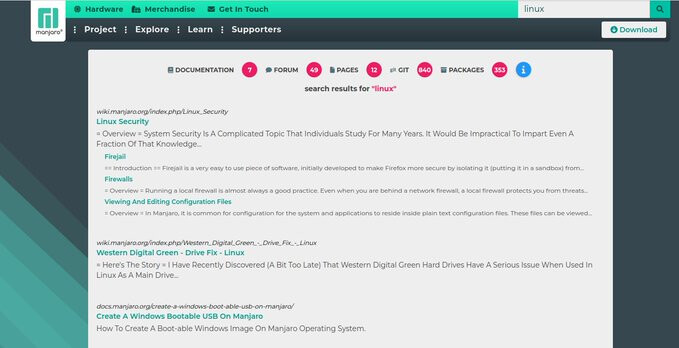
Finding information easier about Manjaro

Finding information easier about Manjaro always has been a topic that needed to be solved. With our new search we have put all Manjaro data accessible in one place and divided by sections so it makes it easier to digest: News – Manjaro
Notable Package Updates

Additional Info

Python 3.13 info

:information_source: You will need to rebuild any AUR Python packages that install files to site-packages or link to libpython3.12.so.

Print a list of of packages that have files in /usr/lib/python3.12/ :

pacman -Qoq /usr/lib/python3.12/

Rebuild them all at once:*

pamac build $(pacman -Qoq /usr/lib/python3.12)

Use rebuild-detector to see if anything else needs to be rebuilt:

 checkrebuild

* It’s recommended to clean your build cache first with pamac clean --build-files

Info about AUR packages

:warning: AUR (Arch User Repository) packages are neither supported by Arch nor Manjaro. Posts about them in Announcements topics are off-topic and will be flagged, moved or removed without warning.

For help with AUR packages, please create a new topic in Support > AUR and a helpful volunteer may be able to assist you.

Get our latest daily developer images now from Github: Plasma, GNOME, XFCE. You can get the latest stable releases of Manjaro from CDN77.

ISOs including this update can be found here:

Anh-Linh 25.1-pre1 (2025-12-08)

Download XFCE

Full

https://download.manjaro.org/xfce/25.1-pre1/manjaro-xfce-25.1-pre1-251208-linux618.iso
https://download.manjaro.org/xfce/25.1-pre1/manjaro-xfce-25.1-pre1-251208-linux618.iso.sig
https://download.manjaro.org/xfce/25.1-pre1/manjaro-xfce-25.1-pre1-251208-linux618.iso.sha1
https://download.manjaro.org/xfce/25.1-pre1/manjaro-xfce-25.1-pre1-251208-linux618.iso.sha256
https://download.manjaro.org/xfce/25.1-pre1/manjaro-xfce-25.1-pre1-251208-linux618.iso.torrent
https://download.manjaro.org/xfce/25.1-pre1/manjaro-xfce-25.1-pre1-251208-linux618.iso.pkgs

Minimal

https://download.manjaro.org/xfce/25.1-pre1/manjaro-xfce-25.1-pre1-minimal-251208-linux618.iso
https://download.manjaro.org/xfce/25.1-pre1/manjaro-xfce-25.1-pre1-minimal-251208-linux618.iso.sig
https://download.manjaro.org/xfce/25.1-pre1/manjaro-xfce-25.1-pre1-minimal-251208-linux618.iso.sha1
https://download.manjaro.org/xfce/25.1-pre1/manjaro-xfce-25.1-pre1-minimal-251208-linux618.iso.sha256
https://download.manjaro.org/xfce/25.1-pre1/manjaro-xfce-25.1-pre1-minimal-251208-linux618.iso.torrent
https://download.manjaro.org/xfce/25.1-pre1/manjaro-xfce-25.1-pre1-minimal-251208-linux618.iso.pkgs

Minimal (linux66)

https://download.manjaro.org/xfce/25.1-pre1/manjaro-xfce-25.1-pre1-minimal-251208-linux66.iso
https://download.manjaro.org/xfce/25.1-pre1/manjaro-xfce-25.1-pre1-minimal-251208-linux66.iso.sig
https://download.manjaro.org/xfce/25.1-pre1/manjaro-xfce-25.1-pre1-minimal-251208-linux66.iso.sha1
https://download.manjaro.org/xfce/25.1-pre1/manjaro-xfce-25.1-pre1-minimal-251208-linux66.iso.sha256
https://download.manjaro.org/xfce/25.1-pre1/manjaro-xfce-25.1-pre1-minimal-251208-linux66.iso.torrent
https://download.manjaro.org/xfce/25.1-pre1/manjaro-xfce-25.1-pre1-minimal-251208-linux66.iso.pkgs

Minimal (linux612)

https://download.manjaro.org/xfce/25.1-pre1/manjaro-xfce-25.1-pre1-minimal-251208-linux612.iso
https://download.manjaro.org/xfce/25.1-pre1/manjaro-xfce-25.1-pre1-minimal-251208-linux612.iso.sig
https://download.manjaro.org/xfce/25.1-pre1/manjaro-xfce-25.1-pre1-minimal-251208-linux612.iso.sha1
https://download.manjaro.org/xfce/25.1-pre1/manjaro-xfce-25.1-pre1-minimal-251208-linux612.iso.sha256
https://download.manjaro.org/xfce/25.1-pre1/manjaro-xfce-25.1-pre1-minimal-251208-linux612.iso.torrent
https://download.manjaro.org/xfce/25.1-pre1/manjaro-xfce-25.1-pre1-minimal-251208-linux612.iso.pkgs

Download GNOME

Full

https://download.manjaro.org/gnome/25.1-pre1/manjaro-gnome-25.1-pre1-251208-linux618.iso
https://download.manjaro.org/gnome/25.1-pre1/manjaro-gnome-25.1-pre1-251208-linux618.iso.sig
https://download.manjaro.org/gnome/25.1-pre1/manjaro-gnome-25.1-pre1-251208-linux618.iso.sha1
https://download.manjaro.org/gnome/25.1-pre1/manjaro-gnome-25.1-pre1-251208-linux618.iso.sha256
https://download.manjaro.org/gnome/25.1-pre1/manjaro-gnome-25.1-pre1-251208-linux618.iso.torrent
https://download.manjaro.org/gnome/25.1-pre1/manjaro-gnome-25.1-pre1-251208-linux618.iso.pkgs

Minimal

https://download.manjaro.org/gnome/25.1-pre1/manjaro-gnome-25.1-pre1-minimal-251208-linux618.iso
https://download.manjaro.org/gnome/25.1-pre1/manjaro-gnome-25.1-pre1-minimal-251208-linux618.iso.sig
https://download.manjaro.org/gnome/25.1-pre1/manjaro-gnome-25.1-pre1-minimal-251208-linux618.iso.sha1
https://download.manjaro.org/gnome/25.1-pre1/manjaro-gnome-25.1-pre1-minimal-251208-linux618.iso.sha256
https://download.manjaro.org/gnome/25.1-pre1/manjaro-gnome-25.1-pre1-minimal-251208-linux618.iso.torrent
https://download.manjaro.org/gnome/25.1-pre1/manjaro-gnome-25.1-pre1-minimal-251208-linux618.iso.pkgs

Minimal (linux66)

https://download.manjaro.org/gnome/25.1-pre1/manjaro-gnome-25.1-pre1-minimal-251208-linux66.iso
https://download.manjaro.org/gnome/25.1-pre1/manjaro-gnome-25.1-pre1-minimal-251208-linux66.iso.sig
https://download.manjaro.org/gnome/25.1-pre1/manjaro-gnome-25.1-pre1-minimal-251208-linux66.iso.sha1
https://download.manjaro.org/gnome/25.1-pre1/manjaro-gnome-25.1-pre1-minimal-251208-linux66.iso.sha256
https://download.manjaro.org/gnome/25.1-pre1/manjaro-gnome-25.1-pre1-minimal-251208-linux66.iso.torrent
https://download.manjaro.org/gnome/25.1-pre1/manjaro-gnome-25.1-pre1-minimal-251208-linux66.iso.pkgs

Minimal (linux612)

https://download.manjaro.org/gnome/25.1-pre1/manjaro-gnome-25.1-pre1-minimal-251208-linux612.iso
https://download.manjaro.org/gnome/25.1-pre1/manjaro-gnome-25.1-pre1-minimal-251208-linux612.iso.sig
https://download.manjaro.org/gnome/25.1-pre1/manjaro-gnome-25.1-pre1-minimal-251208-linux612.iso.sha1
https://download.manjaro.org/gnome/25.1-pre1/manjaro-gnome-25.1-pre1-minimal-251208-linux612.iso.sha256
https://download.manjaro.org/gnome/25.1-pre1/manjaro-gnome-25.1-pre1-minimal-251208-linux612.iso.torrent
https://download.manjaro.org/gnome/25.1-pre1/manjaro-gnome-25.1-pre1-minimal-251208-linux612.iso.pkgs

Download KDE

Full

https://download.manjaro.org/kde/25.1-pre1/manjaro-kde-25.1-pre1-251208-linux618.iso
https://download.manjaro.org/kde/25.1-pre1/manjaro-kde-25.1-pre1-251208-linux618.iso.sig
https://download.manjaro.org/kde/25.1-pre1/manjaro-kde-25.1-pre1-251208-linux618.iso.sha1
https://download.manjaro.org/kde/25.1-pre1/manjaro-kde-25.1-pre1-251208-linux618.iso.sha256
https://download.manjaro.org/kde/25.1-pre1/manjaro-kde-25.1-pre1-251208-linux618.iso.torrent
https://download.manjaro.org/kde/25.1-pre1/manjaro-kde-25.1-pre1-251208-linux618.iso.pkgs

Minimal

https://download.manjaro.org/kde/25.1-pre1/manjaro-kde-25.1-pre1-minimal-251208-linux618.iso
https://download.manjaro.org/kde/25.1-pre1/manjaro-kde-25.1-pre1-minimal-251208-linux618.iso.sig
https://download.manjaro.org/kde/25.1-pre1/manjaro-kde-25.1-pre1-minimal-251208-linux618.iso.sha1
https://download.manjaro.org/kde/25.1-pre1/manjaro-kde-25.1-pre1-minimal-251208-linux618.iso.sha256
https://download.manjaro.org/kde/25.1-pre1/manjaro-kde-25.1-pre1-minimal-251208-linux618.iso.torrent
https://download.manjaro.org/kde/25.1-pre1/manjaro-kde-25.1-pre1-minimal-251208-linux618.iso.pkgs

Minimal (linux66)

https://download.manjaro.org/kde/25.1-pre1/manjaro-kde-25.1-pre1-minimal-251208-linux66.iso
https://download.manjaro.org/kde/25.1-pre1/manjaro-kde-25.1-pre1-minimal-251208-linux66.iso.sig
https://download.manjaro.org/kde/25.1-pre1/manjaro-kde-25.1-pre1-minimal-251208-linux66.iso.sha1
https://download.manjaro.org/kde/25.1-pre1/manjaro-kde-25.1-pre1-minimal-251208-linux66.iso.sha256
https://download.manjaro.org/kde/25.1-pre1/manjaro-kde-25.1-pre1-minimal-251208-linux66.iso.torrent
https://download.manjaro.org/kde/25.1-pre1/manjaro-kde-25.1-pre1-minimal-251208-linux66.iso.pkgs

Minimal (linux612)

https://download.manjaro.org/kde/25.1-pre1/manjaro-kde-25.1-pre1-minimal-251208-linux612.iso
https://download.manjaro.org/kde/25.1-pre1/manjaro-kde-25.1-pre1-minimal-251208-linux612.iso.sig
https://download.manjaro.org/kde/25.1-pre1/manjaro-kde-25.1-pre1-minimal-251208-linux612.iso.sha1
https://download.manjaro.org/kde/25.1-pre1/manjaro-kde-25.1-pre1-minimal-251208-linux612.iso.sha256
https://download.manjaro.org/kde/25.1-pre1/manjaro-kde-25.1-pre1-minimal-251208-linux612.iso.torrent
https://download.manjaro.org/kde/25.1-pre1/manjaro-kde-25.1-pre1-minimal-251208-linux612.iso.pkgs


Our current supported kernels

  • linux54 5.4.302 [EOL]
  • linux510 5.10.247
  • linux515 5.15.197
  • linux61 6.1.159
  • linux66 6.6.119
  • linux612 6.12.61
  • linux617 6.17.11
  • linux618 6.18.0
  • linux61-rt 6.1.158_rt58
  • linux66-rt 6.6.116_rt66
  • linux612-rt 6.12.57_rt14
  • linux617-rt 6.17.5_rt7

Package Changes (12/7/25 23:59 CET)

  • stable core x86_64: 152 new and 152 removed package(s)
  • stable extra x86_64: 7048 new and 7233 removed package(s)
  • stable multilib x86_64: 110 new and 130 removed package(s)

A list of all changes can be found here.

  • No issue, everything went smoothly
  • Yes there was an issue. I was able to resolve it myself.(Please post your solution)
  • Yes i am currently experiencing an issue due to the update. (Please post about it)
0 voters

Check if your mirror has already synced:


17 Likes

Known issues and solutions

This is a wiki post; please edit as necessary.
Please, consider subscribing to the Stable Updates Announcements RSS feed


Please RTFT (Read This Fine Thread) first before reporting the same issues over and over again!

Note: Do not forget to review your .pacnew files:

:warning: Prepare the update beforehand

Preparation steps
  1. Create a list of custom packages for later reference
    pamac list --foreign > ~/alien-pkgs.txt
    
  2. Remove all foreign packages
    pamac remove $(pamac list --foreign --quiet)
    
  3. Remove all orphans and other unneeded packages
    pamac remove --orphans --unneeded
    
  4. Run a simulated update
    pamac update --dry-run
    
  5. Looking good? Repeat the above without --dry-run
    reboot
    
  6. Consult the list of packages created in the first step and rebuild only those you really need

:arrow_right: 2025-12-08

Make sure to fully update grub also on MBR/EFI

On some UEFI systems the fallback EFI entry wont get updated. Hence either ignore the grub update completely and do a system reboot or make sure it got properly updated by running install-grub followed by update-grub after the system update and before a reboot to avoid issues like grub_memcpy not found.

For reinstallation the Anh-Linh ISOs are recommended, which can be found in the first post and include this update already.

Dark theming on XFCE for gtk4 apps and flatpaks (again)

The symlinking for the fixing of the dark theme for some flatpaks (which ignore the env variable) and parts of gtk4 apps might not be enough anymore. For example the graphs in gnome-system-monitor stay white.
So after

mkdir -p ~/.config/gtk-4.0/
ln -sf /usr/share/themes/Matcha-dark-sea/gtk-4.0/{assets,gtk.css,gtk-dark.css} ~/.config/gtk-4.0/

also do (it was not supposed to work anymore, but it does)

gsettings set org.gnome.desktop.interface gtk-theme Adwaita-dark
gsettings set org.gnome.desktop.interface color-scheme prefer-dark

After this you might have to go to the Appearence settings and set the theme back to Matcha dark sea to fix the xfce apps (but the gnome apps will stay dark).

mkinitcpio v40 disabled fallback image creation for new installs

mkinitcpio v40, packaging changes and kernel-install - Arch-dev-public - lists.archlinux.org
This is only affects new installs as we can’t change the hook files on existing installs.

To disable fallback image creation on older installed systems

  • Change PRESETS=('default' 'fallback') line to PRESETS=('default') in the respective .preset files in /etc/mkinitcpio.d/.
  • Regenerate initramfs - sudo mkinitcpio -P
  • Update boot loader - sudo update-grub

Warning
Disabling all fallback initramfs generation will deprive you of another option to boot into the system in case a default initramfs fails. Before proceeding, make sure you have a bootable installation medium for rescue purposes on hand.

pacman-mirrors 5.2 released. Please read the release notes

Release Notes: v5.2 · Applications / pacman-mirrors · GitLab

waydroid >= 1.5.4-3 update may require manual intervention

The waydroid package prior to version 1.5.4-2 (including aur/waydroid) creates Python byte-code files (.pyc) at runtime which were untracked by pacman. This issue has been fixed in 1.5.4-3, where byte-compiling these files is now done during the packaging process.

As a result, the upgrade may conflict with the unowned files created in previous versions. If you encounter errors like the following during the update:

error: failed to commit transaction (conflicting files)

waydroid: /usr/lib/waydroid/tools/pycache/init.cpython-313.pyc exists in filesystem

waydroid: /usr/lib/waydroid/tools/actions/pycache/init.cpython-313.pyc exists in filesystem

waydroid: /usr/lib/waydroid/tools/actions/pycache/app_manager.cpython-313.pyc exists in filesystem

You can safely overwrite these files by running the following command:

pacman -Syu --overwrite /usr/lib/waydroid/tools/\*__pycache__/\*

dovecot >= 2.4 requires manual intervention

The dovecot 2.4 release branch has made breaking changes which result in it being incompatible with any <= 2.3 configuration file.

Thus, the dovecot service will no longer be able to start until the configuration file was migrated, requiring manual intervention.

For guidance on the 2.3-to-2.4 migration, please refer to the following upstream documentation: Upgrading Dovecot CE from 2.3 to 2.4

Furthermore, the dovecot 2.4 branch no longer supports their replication feature, it was removed.

For users relying on the replication feature or who are unable to perform the 2.4 migration right now, we provide alternative packages available in [extra]:

  • dovecot23
  • pigeonhole23
  • dovecot23-fts-elastic
  • dovecot23-fts-xapian

The dovecot 2.3 release branch is going to receive critical security fixes from upstream until stated otherwise.

zabbix >= 7.4.1-2 may require manual intervention

Starting with 7.4.1-2, the following Zabbix system user accounts (previously shipped by their related packages) will no longer be used. Instead, all Zabbix components will now rely on a shared zabbix user account (as originally intended by upstream and done by other distributions):

  • zabbix-server
  • zabbix-proxy
  • zabbix-agent (also used by the zabbix-agent2 package)
  • zabbix-web-service

This shared zabbix user account is provided by the newly introduced zabbix-common split package, which is now a dependency for all relevant zabbix-* packages.

The switch to the new user account is handled automatically for the corresponding main configuration files and systemd service units.

However, manual intervention may be required if you created custom files or configurations referencing to and / or being owned by the above deprecated users accounts, for example:

  • PSK files used for encrypted communication
  • Custom scripts for metrics collections or report generations
  • sudoers rules for metrics requiring elevated privileges to be collected

Those should therefore be updated to refer to and / or be owned by the new zabbix user account, otherwise some services or user parameters may fail to work properly, or not at all.

Once migrated, you may remove the obsolete user accounts from your system.

Plasma 6.5 will need manual intervention if you are on X11

On Plasma 6.5 the wayland session will be the only one installed when the users does not manually specify kwin-x11.

With the recent split of kwin into kwin-wayland and kwin-x11, users running the old X11 session needs to manually install plasma-x11-session after the system update completed, or they will not be able to login. Currently pacman is not able to figure out your personal setup, and it wouldn’t be ok to install plasma-x11-session for every one using Plasma.

GNOME 49 is here and wayland is the default

With GNOME 49 there is no X11 session anymore. X11 support got disabled. It will get removed with GNOME 50 anyway. You still can use X11 applications via XWayland as usual, however running GNOME under X11 is not possible anymore.

.NET packages may require manual intervention

2025-12-11 - George Rawlinson

The following packages may require manual intervention due to the upgrade from 9.0 to 10.0:

  • aspnet-runtime
  • aspnet-targeting-pack
  • dotnet-runtime
  • dotnet-sdk
  • dotnet-source-built-artifacts
  • dotnet-targeting-pack

pacman may display the following error failed to prepare transaction (could not satisfy dependencies) for the affected packages.

If you are affected by this and require the 9.0 packages, the following commands will update e.g. aspnet-runtime to aspnet-runtime-9.0:

pacman -Syu aspnet-runtime-9.0

pacman -Rs aspnet-runtime

Arch Linux - News: .NET packages may require manual intervention

2025-10-06

Apache - hardening override configuration

/etc/systemd/system/httpd.service.d/hardening.conf

Change the values to suit your use case

To disable a hardening change a value to either off or false and restart the service

[Service]
# These are the settings from service file `httpd.service`, providing some extra
# hardening and security. If this conflicts with your use case uncomment below and
# configure as required.

#NoNewPrivileges=on
#PrivateDevices=on
#PrivateTmp=on
#ProtectHome=on

Also see → Apache HTTP Server - ArchWiki

2025-08-30

Libreoffice 25.8.0.4 crashes on opening files

In case you experience immediate crash of Libreoffice Writer ver 25.8.0.4 (or other office apps and versions too?) on opening every already saved .docx file (or other formats too?), the workaround may be to switch from the Microsoft Tabbed toolbar to the standard old look. View -> User interface... until the bug is fixed.

This might or might not be fixed in 25.8.1 since there are several similar bugs in the bugtracker, one is fixed and one not until ver. 26. I guess some input from test or unstable branch users will help here.

Graphical issues on older hardware (Black screen, Flickering) due to mesa 25.2.x update

It seems on older hardware the mesa 25.2.x update created some regressions which may result in black screens or flickering. Some older Nvidia cards with nouveau driver seem to be affected.

You can try to use the 25.1.x series of Mesa via this repo. Simply place it on top of [extra] in your /etc/pacman.conf file and use sudo pacman -Syuu to downgrade.

[mesa-251]
SigLevel = PackageRequired
Server = https://download.manjaro.org/pkgs/mesa

If you have no graphical session available you can access the bootloader by pressing ESC key during boot and select the bootloader entry. Press CTRL+E for edit and search for the words quiet and splash. Delete those and add 3 to the line. Then execute CTRL+x to start your session. You will land in a text console TTY. Login with your user.

Edit the /etc/pacman.conf with nano: sudo nano /etc/pacman.conf. Perform the downgrade and reboot.

2025-08-11

Wrong default action removing phonon-qt6-vlc

Pacman usually provides pretty sane default answers and the user can just hit Enter, but today i noticed the following:

looking for conflicting packages...
:: phonon-qt6-vlc-0.12.0-5 and phonon-qt5-vlc-0.12.0-3 are in conflict. Remove phonon-qt5-vlc? [y/N] y

The default is No, which will leave the old and deprecated package. This is obviously not what we want, so answer Y here.

Grub gained security fixes. Updating it may be risky

When Manjaro updates the grub package the actual installed binaries in master boot record (MBR) or UEFI won’t get updated. This is however needed to apply recent security fixes added to grub. Therefore we created Install-grub: a new way to keep your EFI/MBR in-sync with grub package to make it easier.

A more manual approach can be found here: [root tip] [How To] Primer on handling a grub package update

We also have it documented in our wiki on how to manually install grub when a disaster happens: GRUB/Restore the GRUB Bootloader - Manjaro. So if you are not experienced with it you can either ignore that extra step or have an install media at hand to recover as needed.

See also on how to create a boot media to install Manjaro fresh: Burn an ISO File - Manjaro. Those who want to get install medias having this update included may look for 25.0 ISOs when released or here: Releases · manjaro/release-review · GitHub

Remember, update-grub only updates the boot menu and install-grub is a script helper to install or reinstall grub on most case automatically via grub-install. All grub installations can be with a risk when not done properly as the user will change low level system parts and can easily break their systems.

Note: most likely grub was initially installed by an installer and therefore the user doesn’t know how grub got installed. So if you are unsure simply skip a reinstallation of grub.

Additional information can be found here.

Grub - Error: grub_is_using_legacy_shim_lock_protocol not found

The issue Error: grub_is_using_legacy_shim_lock_protocol not found is caused when the EFI firmware is pointing to the fallback /EFI/boot/bootx64.efi which is not updated automatically.

When it happens the efi-stub /EFI/Manjaro/grubx64.efi must be copied to /EFI/boot/ as bootx64.efi and this is what the install-grub script is designed for: Install-grub: a new way to keep your EFI/MBR in-sync with grub package

Booting from a live ISO running install-grub in chroot I may result in

WARNING: EFI directory not found! Grub couldn't be installed.

You can verified your mounts for $esp and check the /sys/firmware/efi/efivars.

efibootmgr can be used to create an efi entry pointing to the efi-stub in /EFI/Manjaro/grubx64.efi and manually generated grub.cfg using grub-mkconfig.

Example run of install-grub

[manjaro user]# install-grub
[D] GRUB 2 EFI-x64 found
[D] Checking EFI-Directory: /boot/efi
[D] Found EFI Bootloader: /boot/efi/EFI/Manjaro/grubx64.efi
[D] Found EFI Fallback: /boot/efi/EFI/boot/bootx64.efi
Install command will be: grub-install --no-nvram --target=x86_64-efi --efi-directory=/boot/efi --bootloader-id=Manjaro --recheck --force
Do you want to proceed? (yes/no) yes
ok, we will proceed
Grub will be installed on: EFI
Installing for x86_64-efi platform.
Installation finished. No error reported.
Update Grub Menu
Do you want to proceed? (yes/no) yes
ok, we will proceed
Generating grub configuration file ...
Found theme: /usr/share/grub/themes/manjaro/theme.txt
Found linux image: /boot/vmlinuz-6.15-x86_64
Found initrd image: /boot/amd-ucode.img /boot/initramfs-6.15-x86_64.img
Found initrd fallback image: /boot/initramfs-6.15-x86_64-fallback.img
Found linux image: /boot/vmlinuz-6.12-x86_64
Found initrd image: /boot/amd-ucode.img /boot/initramfs-6.12-x86_64.img
Found initrd fallback image: /boot/initramfs-6.12-x86_64-fallback.img
Warning: os-prober will not be executed to detect other bootable partitions.
Systems on them will not be added to the GRUB boot configuration.
Check GRUB_DISABLE_OS_PROBER documentation entry.
Adding boot menu entry for UEFI Firmware Settings ...
Found memtest86+ image: /boot/memtest86+/memtest.bin
/usr/bin/grub-probe: warning: unknown device type nvme1n1.
Found memtest86+ EFI image: /boot/memtest86+/memtest.efi
/usr/bin/grub-probe: warning: unknown device type nvme1n1.
done
Warning: GRUB bootloader at /boot/efi/EFI/Manjaro was updated,
but it seems like you are not using it by default.
Please check your EFI boot priorities!

Example

[manjaro user]# efibootmgr
BootCurrent: 000A
Timeout: 1 seconds
BootOrder: 000A,0001,0003,0008,0009,0002,0004,0000,0007,0006,0005
Boot0000  Lenovo Cloud  PciRoot(0x0)/Pci(0x1,0x1)/Pci(0x0,0x0)/MAC(047bcba9026a,0)/IPv4(0.0.0.0,0,DHCP,0.0.0.0,0.0.0.0,0.0.0.0)/Uri(https://download.lenovo.com/pccbbs/cdeploy/efi/boot.efi)
Boot0001* UEFI OS       HD(1,GPT,519fa53d-c862-4efb-948b-eee1a5d9c584,0x1000,0x96000)/\EFI\BOOT\BOOTX64.EFI0000424f
Boot0002  UEFI: HTTP IPv4 Marvell AQtion 10Gbit Network Adapter PciRoot(0x0)/Pci(0x1,0x1)/Pci(0x0,0x0)/MAC(047bcba9026a,0)/IPv4(0.0.0.0,0,DHCP,0.0.0.0,0.0.0.0,0.0.0.0)/Uri()0000424f
Boot0003* UEFI: PXE IPv4 Marvell AQtion 10Gbit Network Adapter  PciRoot(0x0)/Pci(0x1,0x1)/Pci(0x0,0x0)/MAC(047bcba9026a,0)/IPv4(0.0.0.0,0,DHCP,0.0.0.0,0.0.0.0,0.0.0.0)0000424f
Boot0004  UEFI: HTTP IPv6 Marvell AQtion 10Gbit Network Adapter PciRoot(0x0)/Pci(0x1,0x1)/Pci(0x0,0x0)/MAC(047bcba9026a,0)/IPv6([::],0,Static,[::],[::],64)/Uri()0000424f
Boot0005* Generic Usb Device    VenHw(99e275e7-75a0-4b37-a2e6-c5385e6c00cb)
Boot0006* CD/DVD Device VenHw(99e275e7-75a0-4b37-a2e6-c5385e6c00cb)
Boot0007  Win VDI Boot  PciRoot(0x0)/Pci(0x1,0x1)/Pci(0x0,0x0)/MAC(047bcba9026a,0)/IPv4(0.0.0.0,0,DHCP,0.0.0.0,0.0.0.0,0.0.0.0)/Uri(https://download.lenovo.com/pccbbs/cdeploy/vdiboot/efi/vdi.efi)
Boot0008* UEFI: PXE IPv6 Marvell AQtion 10Gbit Network Adapter  PciRoot(0x0)/Pci(0x1,0x1)/Pci(0x0,0x0)/MAC(047bcba9026a,0)/IPv6([::],0,Static,[::],[::],64)0000424f
Boot0009* UEFI: KingstonDataTraveler 3.0PMAP, Partition 2       PciRoot(0x0)/Pci(0x3,0x1)/Pci(0x0,0x0)/Pci(0x8,0x0)/Pci(0x0,0x1)/USB(7,0)/HD(2,GPT,9bea21dc-4f71-6934-996a-cdea67030e7b,0x6f6ffd8,0x10000)0000424f
Boot000A* Manjaro Linux HD(1,GPT,519fa53d-c862-4efb-948b-eee1a5d9c584,0x1000,0x96000)/\EFI\MANJARO\GRUBX64.EFI

Set boot order (example)

[manjaro user]# efibootmgr --bootorder 000A,0001,0000
BootCurrent: 000A
Timeout: 1 seconds
BootOrder: 000A,0001,0000
Boot0000  Lenovo Cloud  PciRoot(0x0)/Pci(0x1,0x1)/Pci(0x0,0x0)/MAC(047bcba9026a,0)/IPv4(0.0.0.0,0,DHCP,0.0.0.0,0.0.0.0,0.0.0.0)/Uri(https://download.lenovo.com/pccbbs/cdeploy/efi/boot.efi)
Boot0001* UEFI OS       HD(1,GPT,519fa53d-c862-4efb-948b-eee1a5d9c584,0x1000,0x96000)/\EFI\BOOT\BOOTX64.EFI0000424f
Boot0002  UEFI: HTTP IPv4 Marvell AQtion 10Gbit Network Adapter PciRoot(0x0)/Pci(0x1,0x1)/Pci(0x0,0x0)/MAC(047bcba9026a,0)/IPv4(0.0.0.0,0,DHCP,0.0.0.0,0.0.0.0,0.0.0.0)/Uri()0000424f
Boot0003* UEFI: PXE IPv4 Marvell AQtion 10Gbit Network Adapter  PciRoot(0x0)/Pci(0x1,0x1)/Pci(0x0,0x0)/MAC(047bcba9026a,0)/IPv4(0.0.0.0,0,DHCP,0.0.0.0,0.0.0.0,0.0.0.0)0000424f
Boot0004  UEFI: HTTP IPv6 Marvell AQtion 10Gbit Network Adapter PciRoot(0x0)/Pci(0x1,0x1)/Pci(0x0,0x0)/MAC(047bcba9026a,0)/IPv6([::],0,Static,[::],[::],64)/Uri()0000424f
Boot0005* Generic Usb Device    VenHw(99e275e7-75a0-4b37-a2e6-c5385e6c00cb)
Boot0006* CD/DVD Device VenHw(99e275e7-75a0-4b37-a2e6-c5385e6c00cb)
Boot0007  Win VDI Boot  PciRoot(0x0)/Pci(0x1,0x1)/Pci(0x0,0x0)/MAC(047bcba9026a,0)/IPv4(0.0.0.0,0,DHCP,0.0.0.0,0.0.0.0,0.0.0.0)/Uri(https://download.lenovo.com/pccbbs/cdeploy/vdiboot/efi/vdi.efi)
Boot0008* UEFI: PXE IPv6 Marvell AQtion 10Gbit Network Adapter  PciRoot(0x0)/Pci(0x1,0x1)/Pci(0x0,0x0)/MAC(047bcba9026a,0)/IPv6([::],0,Static,[::],[::],64)0000424f
Boot0009* UEFI: KingstonDataTraveler 3.0PMAP, Partition 2       PciRoot(0x0)/Pci(0x3,0x1)/Pci(0x0,0x0)/Pci(0x8,0x0)/Pci(0x0,0x1)/USB(7,0)/HD(2,GPT,9bea21dc-4f71-6934-996a-cdea67030e7b,0x6f6ffd8,0x10000)0000424f
Boot000A* Manjaro Linux HD(1,GPT,519fa53d-c862-4efb-948b-eee1a5d9c584,0x1000,0x96000)/\EFI\MANJARO\GRUBX64.EFI
Potential issues with toolchain update due to glibc 2.42

Whenever the toolchain gets updated, your system more or less switches to new versions of low level basic system package, which can soft-brick your system when not updated properly.

A more static release model of the likes of Debian or Ubuntu, only update the toolchain with major release updates. With Arch and Manjaro, this happens more often without a major release announcement.

Kernels and other system relevant parts need to been updated when that happens. glibc is used by more than 4955 packages.

To add a safety net to your system, you can install pacman-static:

sudo pacman -U https://mirrors.manjaro.org/repo/pool/overlay/pacman-static-7.0.0.r6.gc685ae6-8-x86_64.pkg.tar.xz

… and maintain the system as usual via sudo pacman-static -Syu, even when the regular pacman might trow glibc errors: With update I see glibc errors

phonon-qt5 and phonon-qt5-gstreamer packages got dropped to AUR

Those packages used to be in the repo, but they were dropped to the AUR because they’re still qt5-based and no longer required by any of the official packages — with the exception perhaps that they might be a dependency of something installed from the AUR.

2025-07-12

SDDM may crash with Nvidia drivers

In some case Nvidia drivers need the following workaround in /etc/environment to launch SDDM properly:

MESA_LOADER_DRIVER_OVERRIDE=zink

Warning: ksystemstats: local (6.4.0-1) is newer than extra

If you get this warning, run the following command in order to downgrade the installed package with the higher version to the version currently in the repository… :point_down:

 sudo pacman -Syuu
VLC does not play (certain) videos

For this update, the VLC packages were split up, and not all codecs may be installed on your system. You can install the additional codecs individually, or install the vlc-plugins-all meta-package, which will pull in all available plugins.

 sudo pacman -S vlc-plugins-all
linux-firmware-meta replaces linux-fimware

With the linux-firmware-meta package, all of the firmware is now split up into individual packages, which are all installed as dependencies of linux-firmware-meta.

If you wish to uninstall the firmware packages that you don’t need — e.g. linux-firmware-nvidia — including the meta package itself, then be sure to mark the firmware packages you wish to keep as explicitly installed, or else pacman will regard them as orphans, which would be dangerous when cleaning out your real orphans.

 sudo pacman -D --asexplicit <name-of-package(s)>

2025-06-23

Breaking changes to wine and wine-staging

Transition to the new WoW64 wine and wine-staging

2025-06-16
We are transitioning the wine and wine-staging package to a pure wow64 build. This change removes the dependency on the multilib repository for wine and wine-staging.
The main reason for this is to align with upstream Wine development, which simplifies packaging and the dependency chain.
Potential Issues:

  • OpenGL Performance: A known limitation of the new WoW64 mode is reduced performance for 32-bit applications that use OpenGL directly
  • Breaking Changes: Existing 32-bit prefixes needs to be recreated
    If you are facing issues with 32 bit prefixes, please recreate these and reinstall the application.
Possible breaking changes to pacman-mirrors

:warning: With pacman-mirrors 5.0-1, the global mirrors.json data file has been moved from /usr/share/pacman-mirrors to /var/lib/pacman-mirrors.
:warning: This move introduces a possible breaking change if you have custom scripts relying on the mirrors data file. If this is the case, then simply create a symlink from the new location under /var/lib back to the old location, i.e. /usr/share.

ln -s /var/lib/pacman-mirrors /usr/share/

:information_source: The moving of the file is the only change and has been made to make it possible for users to have their /usr-tree on a separate read-only partition or btrfs subvolume.

xkeyboard-config 2.45 issue with symlinks

You may fail to upgrade from 2.44 to 2.45 due to some changes to symlinks. A discussion about it can be found here: Cannot update xkeyboard-config to 2.45 / Pacman & Package Upgrade Issues / Arch Linux Forums

The solution is to update the AUR packages depending on xkeyboard-config or move the files to the new folder /usr/share/xkeyboard-config-2.

More information about it here: xkeyboard-config 2.45 issue with symlinks (#1) · Issues · Arch Linux / Packaging / Packages / xkeyboard-config · GitLab

avahi-discover python script may fail to discover services

avahi-discover fails when attempting to write the discovered services to a sqlite database in /usr/lib/avahi due to lack of permissions.

The issue can be reproduced using a pristine Arch LInux system - it appears from the issues at GitHub - avahi/avahi: Avahi - Service Discovery for Linux using mDNS/DNS-SD – compatible with Bonjour the issue is known - but not fixed.

Use of dbm causes problems with Python 3.13 · Issue #670 · avahi/avahi · GitHub
Fix issue with dbm.sqlite3 on readonly directories by mickael9 · Pull Request #698 · avahi/avahi · GitHub

Even though the issue has been known to upstream since december 2024, the behaviour on unstable branch has changed fairly recently - perhaps 4 weeks.

Temporary workaround
The workaround it is not optimal - but if you rely on avahi discover service - it will work

Move /usr/lib/avahi to /var/lib and symlink it back to /usr

sudo mv /usr/lib/avahi /var/lib/ && sudo ln -s /var/lib/avahi /usr/lib/

Change the ownership of the folder /var/lib/avahi including files

sudo chown root:avahi /var/lib/avahi -R

Change permissions to allow avahi group to write into the folder including the existing db file

sudo chmod g+w /var/lib/avahi -R

Finally add yourself to the avahi group

sudo gpasswd -a $USER avahi

Logoff and login to activate the new group.

Topic in German section
Avahi zeroconf browser zeigt nichts an


Previous stable update threads:

Stable Updates

​​

4 Likes

2 posts were split to a new topic: Graphic aftefacts after 2025-12-08 Stable Update

7 posts were split to a new topic: Discussion about the 2025-12-08 Stable Update

pamac says…

Warning: installing kwin (6.5.3-2) breaks dependency ‘kwin-x11’ required by plasma-x11-session
Add plasma-x11-session to remove

See above:

error: failed retrieving file 'multilib.db' from ftp.lysator.liu.se : The requested URL returned error: 404
resolving dependencies...
looking for conflicting packages...
error: failed to prepare transaction (could not satisfy dependencies)
:: installing audit (4.1.2-1) breaks dependency 'audit=4.0.5' required by lib32-audit
:: installing expat (2.7.3-1) breaks dependency 'expat=2.7.2' required by lib32-expat
:: installing libcap (2.77-1) breaks dependency 'libcap=2.76' required by lib32-libcap
:: installing libelf (0.194-1) breaks dependency 'libelf=0.193' required by lib32-libelf
:: installing pcre2 (10.47-1) breaks dependency 'pcre2=10.46' required by lib32-pcre2

:+1:t2:

@deemon I think you already have the answer to your problem … wait or switch.

1 Like

Note that in this update, PostgreSQL will be updated from 17.5-5 → 18.1-1. PostgreSQL databases don’t generally update automatically, so it is maybe a good time to make a backup, while waiting for the warning to be removed.

See the PostgreSQL docs for ways to upgrade: PostgreSQL: Documentation: 18: 18.6. Upgrading a PostgreSQL Cluster

I generally dump all the data, create new databases, and import all the data. To dump the data from a database I use:

pg_dump -Z 9 -f dump-file-name.sql.gz database-name

After upgrading and creating a fresh database, populate the database with the saved data:

cat dump-file-name.sql.gz | gunzip | psql database-name
1 Like

pacman -S and flatpak update went well

all ~740 packacges updated, and then I checked forum :slight_smile: all works well so far (~20 minuts). I’m running Wayland only for few months

EU 4 works, Firefox works, EVE Online works (wine version), OnlyOffice works, Steam games work

Some things related to KDE Plasma stuff still not working, but that’s not a Manjaro thing (open window on saved position, that has an option in X11)

Noticing this thread, I will wait with update on my notebooks till tomorrow or till green light is given

1 Like

I’m having Browser issues ie Firefox works but neither Brave or Chromium will load and that doesn’t appear an X11 issue. Update works perfectly other than this one odd issue. I should have added that I’m running KDE Plasma Wayland.

I have XFCE. The update went well, except one thing. I use the guake terminal that could be toggled with F12. Now F12 doesn’t work, it doesn’t bring up guake. If I launch guake-toggle from another terminal, guake becomes visible. But F12 stopped working.

Pamac showed chrome as the single package to update. Instead got whole system updated. Cursor scaling is now broken on KDE, plus I’m seeing persistan rendering artifacts on screen.

I too use Guake but on Cinnamon. For me F12 still works thankfully

Near perfect update for me (I see manjaro-green :wink: ). sole hiccup: I had to reenable automatic logins on kde. after the upgrade manual logins were required. Thx for the hard work!

5 Likes

After upgrade I was greeted by black screen and only visible cursor in the left top corner (after grub then…. grub was fine and green like always). Although I don’t use X11, just in case installed plasma-x11-session. Did not help. But since I am not using Manjaro restricted mesa (so mesa files were not upgraded with the upgrade or “held back”), I decided before timeshifting back to try fresh mesa build with autogit and voila… got sddm GUI back. First time ever for me where I wasn’t able to get back to GUI “because mesa too old” error or something… it just didn’t work with 2 month old mesa :face_with_diagonal_mouth:

2 Likes

Partial updates are not supported and sometimes mesa is needed to be more current …

2 Likes

I wish you stopped fearing mesa hw accelerated codecs… so we didn’t have to compile or steal them from other projects. But I do understand.

mesa is shipped from Arch since months …