Hello community, here we have another set of package updates. This will be mostly the last update to our Zetar release cycle. Please test it thru and let us know if there are any issues left …
Current Promotions
Get the latest Gaming Laptop by Slimbook powered by Manjaro: Slimbook Manjaro III
Protect your personal data, keep yourself safe with Surfshark VPN: See current promotion
As of Linux 6.15.11, the 6.15 series is now EOL (End Of Life). Please install 6.16 stable and/or 6.12 LTS (Long Term Support).
Valkey to replace Redis in the [extra] Repository
2025-04-17 - Andrew Crerar
Valkey, a high-performance key/value datastore, will be replacing redis in the [extra] repository. This change is due to Redis modifying its license from BSD-3-Clause to RSALv2 and SSPLv1 on March 20th, 2024.
Arch Linux Package Maintainers intend to support the availability of the redis package for roughly 14 days from the day of this post, to enable a smooth transition to valkey. After the 14 day transition period has ended, the redis package will be moved to the AUR. Also, from this point forward, the redis package will not receive any additional updates and should be considered deprecated until it is removed.
Users are recommended to begin transitioning their use of Redis to Valkey as soon as possible to avoid possible complications after the 14 day transition window closes.
Manjaro, like many other open-source projects, relies on the generosity of its community through donations and corporate sponsorships to support its growth and development. These donations are essential in covering the various expenses incurred in the operations of the project such as server costs, software development tools, infrastructure expenses, training, flying people to events or conferences and the salaries of key developers. With the help of these donations, Manjaro is able to secure the necessary financial stability that allows the project to continuously improve and remain active. If you love Manjaro, consider to donate!
As you might have seen some of our team were able to attend FOSDEM 2023 and the conference proved to be incredibly productive for us. See our blog post for more.
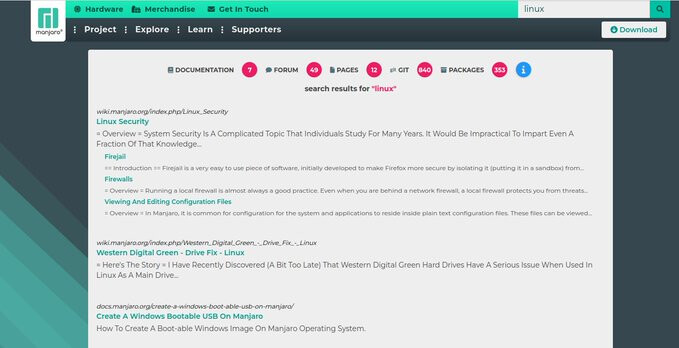
Finding information easier about Manjaro always has been a topic that needed to be solved. With our new search we have put all Manjaro data accessible in one place and divided by sections so it makes it easier to digest: News – Manjaro
You will need to rebuild any AUR Python packages that install files to site-packages or link to libpython3.12.so.
Print a list of of packages that have files in /usr/lib/python3.12/ :
pacman -Qoq /usr/lib/python3.12/
Rebuild them all at once:*
pamac build $(pacman -Qoq /usr/lib/python3.12)
Use rebuild-detector to see if anything else needs to be rebuilt:
checkrebuild
* It’s recommended to clean your build cache first with pamac clean --build-files
Info about AUR packages
AUR (Arch User Repository) packages are neither supported by Arch nor Manjaro. Posts about them in Announcements topics are off-topic and will be flagged, moved or removed without warning.
For help with AUR packages, please create a new topic in Support > AUR and a helpful volunteer may be able to assist you.
pacman-mirrors version 5.1
Deprecation of --geoip in favor of -tz/--timezone.
This internal change make mirror-list generation use your system’s configured timezone - when applicable - without using an IP location provider.
More privacy..
2025-08-24
Graphical issues on older hardware (Black screen, Flickering) due to mesa 25.2.x update
It seems on older hardware the mesa 25.2.x update created some regressions which may result in black screens or flickering. Some older Nvidia cards with nouveau driver seem to be affected.
You can try to use the 25.1.x series of Mesa via this repo. Simply place it on top of [extra] in your /etc/pacman.conf file and use sudo pacman -Syuu to downgrade.
[mesa-251]
SigLevel = PackageRequired
Server = https://download.manjaro.org/pkgs/mesa
If you have no graphical session available you can access the bootloader by pressing ESC key during boot and select the bootloader entry. Press CTRL+E for edit and search for the words quiet and splash. Delete those and add 3 to the line. Then execute CTRL+x to start your session. You will land in a text console TTY. Login with your user.
Edit the /etc/pacman.conf with nano: sudo nano /etc/pacman.conf. Perform the downgrade and reboot.
2025-07-24
grub update - watch out
Before you reboot - ensure to run install-grub script to sync the efi-stubs and recreate the grub config.
Warning: ksystemstats: local (6.4.0-1) is newer than extra
If you get this warning, run the following command…
sudo pacman -Syuu
VLC does not play (certain) videos
For this update, the VLC packages were split up, and not all codecs may be installed on your system. You can install the additional codecs individually, or install the vlc-plugins-all meta-package, which will pull in all available plugins.
After this update my system broke. I was not experiencing any issues before this.
I first noticed that the wireless network was missing and as I started to dig around to see the logs after some (5-10min) everything went downhill.
The system stopped responding where I would wait even 5min for top or dmesg, and even the output of the commands were all messed up.
I could not power-off or reboot my system, it had to be forcibly powered off in every case.
The kworker/1:0-events was working 100% which might be saying something, but I don’t know for sure.
I tested with 2 kernels that I had, it was the same issues:
   * linux615
   * linux616
Sorry I couldn’t provide more details since the system was unusable.
I then proceeded with live usb image (everything worked from the live session), chrooted and switched to stable branch and downgraded.
After switching to stable branch, everything worked like a charm again.
Why are three versions of nVidia all being installed? I haven’t run this update since this just seems wrong. I’ll wait a few days to see what others are seeing.
They are just the module IDs for mhwd (the Manjaro Hardware Detection Library), which is used for installing drivers.
I currently have 5 mhwd-nvidia* packages installed on my AMD system:
pamac search -i mhwd-nvidia
mhwd-nvidia-575xx  575.64.05-2                                extra
    MHWD module-ids for nvidia 575.64.05
mhwd-nvidia-570xx  570.190-3                                  extra
    MHWD module-ids for nvidia 570.190
mhwd-nvidia-470xx  470.256.02-15                              extra
    MHWD module-ids for nvidia 470.256.02
mhwd-nvidia-390xx  390.157-21                                 extra
    MHWD module-ids for nvidia 390.157
mhwd-nvidia  580.82.09-1                                      extra
    MHWD module-ids for nvidia 580.82.09
I think the same would be applicable for all Manjaro users, as they are all required by the MHWD database (mhwd-db):
pamac info mhwd-db
Name                  : mhwd-db
Version               : 20250918-1
Description           : Manjaro Linux Hardware Detection Database
URL                   : https://gitlab.manjaro.org/applications/mhwd-db
Licenses              : GPL-3.0-or-later
Repository            : extra
Installed Size        : 42.8 kB
Groups                : --
Depends On            : libnotify mhwd-amdgpu mhwd-ati mhwd-nvidia>=455 mhwd-nvidia-390xx mhwd-nvidia-470xx
                        mhwd-nvidia-570xx mhwd-nvidia-575xx nvidia-driver-assistant
Optional Dependencies : --
Required By           : mhwd
Optional For          : --
Provides              : --
Replaces              : --
Conflicts With        : --
Packager              : Philip Mueller <philm@manjaro.org>
Build Date            : Thu 18 Sep 2025 21:33:53
Install Date          : Fri 19 Sep 2025 04:11:12
Install Reason        : Explicitly installed
Validated By          : Signature
Backup files          : --
I believe the mhwd-nvidia-570xx & mhwd-nvidia-575xx packages were added due to issues some users were having with the most recent mhwd-nvidia version (currently v580). Those users can now install the slightly older v570 or v575 Nvidia drivers.
 You will need to rebuild any AUR Python packages that install files to site-packages or link to
  AUR (Arch User Repository) packages are neither supported by Arch nor Manjaro. Posts about them in Announcements topics are off-topic and will be flagged, moved or removed without warning.
 2025-09-02