I had wifi now i dont

for some reason after the recent update i not longer have the wifi applet, i dont understand why, the headers are there the wifi networks are still saved in the network manager but the kernel no longer detect the card, i went on bios and set wifi enabled from auto and nothing

i spammed the AI and so far they dont know any solution …

[  735.345892] Intel(R) Wireless WiFi driver for Linux
iwlwifi-so-a0-jf-b0-72.ucode.xz
iwlwifi-so-a0-jf-b0-73.ucode.xz
iwlwifi-so-a0-jf-b0-74.ucode.xz
iwlwifi-so-a0-jf-b0-77.ucode.xz
iwlwifi-ty-a0-gf-a0-59.ucode.xz
iwlwifi-ty-a0-gf-a0-66.ucode.xz
iwlwifi-ty-a0-gf-a0-72.ucode.xz
iwlwifi-ty-a0-gf-a0-73.ucode.xz
iwlwifi-ty-a0-gf-a0-74.ucode.xz
iwlwifi-ty-a0-gf-a0-77.ucode.xz
iwlwifi-ty-a0-gf-a0-78.ucode.xz
iwlwifi-ty-a0-gf-a0-79.ucode.xz
iwlwifi-ty-a0-gf-a0-81.ucode.xz
iwlwifi-ty-a0-gf-a0-83.ucode.xz
iwlwifi-ty-a0-gf-a0-84.ucode.xz
iwlwifi-ty-a0-gf-a0-86.ucode.xz
iwlwifi-ty-a0-gf-a0-89.ucode.xz
iwlwifi-ty-a0-gf-a0.pnvm.xz

TL4-edit: removed picture spam

How to Request Support

Tips and Tricks

Resources


Tip:

As a new member, you may want to subscribe to notifications for the Stable Updates category. Every bundled update, whether it’s for Manjaro Testing or Manjaro Stable, always comes accompanied by a dedicated announcement thread.

  • The first post of the thread contains the changes with regard to the previous bundled update.

  • The second post of the thread details the potential problems, and how to deal with them.

  • The announcement thread also always contains a poll (in the first post), and a summary of past issues (in the second post), for those who’ve skipped an update — which is not advised with a rolling-release distribution, but it does happen. :wink:

1 Like

the wifi works on windows 11 and endevour OS live iso, while Gemini/claude 4, say hardware damage the fact that it works on other OS and i 3 weeks ago i had the wifi connection running say something is odd

my feeling is something related to the migration from linux-firmware (linux-firmware (20250508.788aadc8-2)) → linux-firmware-meta, i had a bunch or orphaned packages

You had?
Past tense?
You did remove them?

None of those could have been firmware - if you have the meta package installed, you’ll still have all the firmware packages.

Going by feelings is not productive.

In /var/log/pacman.log there will be everything recorded that has been altered, added or removed.

1 Like

yep

i did feed that and other logs to chatgpt, gemini, claude and they conclude the wi-fi module is broken but works on windows and on endevour OS

Orphans are, by definition, packages not used or needed by any other.

Don’t ask AI - it doesn’t know.
It (or you, relying on it) may get lucky sometimes - usually not.

There is a wiki here on the forum - and there is the Arch wiki, which is applicable in almost all cases to Manjaro as well.

What is it that you mean?
Which desktop environment are we talking about?
Gnome?
Xfce4?
Cinnamon?
Plasma? (my crystal ball says this is the least likely :wink: )

as always:
inxi -zv8
would have made that question unnecessary

You may have lost the applet by mistake. :man_shrugging:
It should be easily possible to add it again to whatever system tray or panel you use.

Alternative:
open a terminal and type:
nmtui

for the time being, until you (or we) can figure something out

1 Like

sry for late reply vacation and stuff

there is no standard DE, bspwm atm

Network:
  Device-1: Realtek RTL8126 5GbE vendor: Micro-Star MSI driver: r8169
    v: kernel pcie: gen: 3 speed: 8 GT/s lanes: 1 port: e000 bus-ID: 06:00.0
    chip-ID: 10ec:8126 class-ID: 0200
  IF: enp6s0 state: up speed: 1000 Mbps duplex: full mac: <filter>
  IP v4: <filter> type: noprefixroute scope: global broadcast: <filter>
  Device-2: Qualcomm WCN785x Wi-Fi 7 320MHz 2x2 [FastConnect 7800]
    vendor: Foxconn Band Simultaneous Wireless driver: ath12k_pci v: N/A
    modules: ath12k pcie: gen: 3 speed: 8 GT/s lanes: 2 bus-ID: 07:00.0
    chip-ID: 17cb:1107 class-ID: 0280
  IF: wlp7s0 state: down mac: <filter>
  Info: services: NetworkManager, systemd-timesyncd, wpa_supplicant
  WAN IP: <filter>
Bluetooth:
  Device-1: Foxconn / Hon Hai driver: btusb v: 0.8 type: USB rev: 1.1
    speed: 12 Mb/s lanes: 1 mode: 1.1 bus-ID: 3-12:5 chip-ID: 0489:e10a
    class-ID: e001
  Report: btmgmt ID: hci0 rfk-id: 0 state: up address: N/A

nmtui let me pick old saved wifis i put the password and nothing happens

Is it possible that you’re missing some firmware packages that you accidentally removed?
That could be the reason your Wi-Fi isn’t working.
:footprints:

1 Like

nmtui comes up with a four items menu:

Edit a connection
Activate a connection
Set system hostname
Radio
and also:
Quit

With Radio you can enable/disable the WiFi
With Edit a connection you can add new connections or edit existing ones (change password, for instance)

Your WiFi interface seems to be down (switched off)
but the driver appears to be present.
Did you try the Radio menu item and see whether that is the case - and try to switch it on …?

2 Likes
ip link show

3: wlp7s0: <NO-CARRIER,BROADCAST,MULTICAST,UP> mtu 1500 qdisc noqueue state DOWN

ip link set wlp7s0 up does nothing

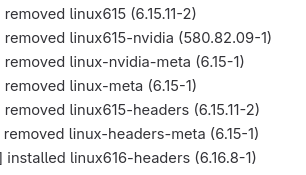
i am going to remove 615 kernel headers and meta packages

edit removed 615, purged orphans, rebooted in 616 and the wifi works

Hi @KA6T5Q ,
Please, consider to remove linux615.

linux615 6.15.11 [EOL]
1 Like

This topic was automatically closed 3 days after the last reply. New replies are no longer allowed.