so just downloaded the witcher 3 today, my laptop has 5070 ti, so i generally put my laptop on hybrid graphics from my bios setup, started with it and kept using it, generally games run on 5070ti, watchdogs 2 and plague tale resonance ran well without changing any settings, but witcher 3 is not running well, the frames rate is below 5 percent and i cannot use dlss, i figured the game is running on integrated graphics, I tried to look for it in settings to change the graphics card option, i guess withcher 3 doesnt provide that, and later i figured i would install mango hud and check it out, maybe mango hud doesnt work with nvidea gpus, the fan rpm is zero and most of the vitals are zero except gpu usage, cpu details are showing up fine, but under the gpu vitals, its showing the name of the integrated grapics and not discrete grapics, I am somewhat of a newbie tho, i figured i would change the default gpu in the bios to discrete graphics, now the game is not opening at all… any possible fix??
A few users in the related GamingOnLinux article comments mentioned similar issues. I haven’t tried playing the new Remastered version yet, but I’m planning to soon.
MangoHud works just fine with NVIDIA GPUs, by the way.
Please post your system info as outlined here:
Provide logs and initial steps taken to solve the problem.
Especially Before posting to any Web forum, check if it has a Search feature. If it does, try a couple of keyword searches for something like your problem; it just might help. If you did a general Web search before (as you should have), search the forum anyway; your Web-wide search engine might not have all of this forum indexed recently.
update: on discrete graphics, the game is launching on proton version 10 but there is no display, its just black screen, i tried skipping the launcher as some of the forums mentioned, its not working. i havent played the game after installing linux on my laptop, i wanted to wait for remastered version, so i cannot tell if the issue is with the game’s relaunch or it doesnt work well with linux like hellblade, actually hell blade is also a little glitchy but playable, framerate drops drastically and the raytracing works as well eventhough it decreased the framerate (compared to windows), but the game is not that much intresting, so i am not concerned about hell blade. so even if my laptop is in hybrid mode in my bios. the games can run on discrete gpu and raytracing can function as well, i havent installed hybrid nvidia driviers throgh mhwd, installer keeps breaking mid way and rolls back for some reason, so I have only installed normal nvidia drivers. I’m no expert but do i have to do something with proton 10?? there is no display but there is audio and the game inputs are working, like the skip button is working and i can see that through audio cues.
and also i have to stay on unstable branch becasue i need kernel 7.3rc4 to have my laptop’s audio functioning properly, my laptop’s audio firmware is not given by default, therefore I have to manually copy the file to lib/firmware and the old kernel does not have required config to read the firmware, either i had to recompile the kernel which i am not gonna do because I am not an expert in software and all, or choose to have kernel 7.3 or above and the required config is in rc4, so i was told to stay on unstable branch till stable release comes out.
❯ inxi -zv8
System:
Kernel: 7.3.0-rc5-1-MANJARO arch: x86_64 bits: 64 compiler: gcc v: 16.2.1
clocksource: tsc avail: acpi_pm
parameters: BOOT_IMAGE=/@/boot/vmlinuz-7.3-x86_64
root=UUID=8fd34e48-8a2e-47d1-8e74-6791a02f90fb rw rootflags=subvol=@
quiet splash apparmor=1 security=apparmor udev.log_priority=3
Desktop: GNOME v: 50.5 tk: GTK v: 3.24.52 wm: gnome-shell
tools: gsd-screensaver-proxy dm: GDM v: 50.3 Distro: Manjaro
base: Arch Linux
Machine:
Type: Laptop System: LENOVO product: 83F5 v: Legion Pro 7 16IAX10H
serial: <superuser required> Chassis: type: 10 v: Legion Pro 7 16IAX10H
serial: <superuser required>
Mobo: LENOVO model: LNVNB161216 v: SDK0T76461 WIN
serial: <superuser required> part-nu: LENOVO_MT_83F5_BU_idea_FM_Legion Pro
7 16IAX10H uuid: <superuser required> Firmware: UEFI vendor: LENOVO
v: Q7CN77WW date: 02/11/2026
Battery:
ID-1: BAT0 charge: 86 Wh (98%) condition: 87.8/99.9 Wh (87.9%) volts: 17.4
min: 15.52 model: Sunwoda L24D4PC1 type: Li-poly serial: <filter> charging:
status: not charging type: fast avail: fast,long_life,standard cycles: 241
Memory:
System RAM: total: 32 GiB available: 30.77 GiB used: 6.43 GiB (20.9%)
Message: For most reliable report, use superuser + dmidecode.
Array-1: capacity: 64 GiB slots: 2 modules: 2 EC: None
max-module-size: 32 GiB note: est.
Device-1: Controller0-ChannelA-DIMM1 type: DDR5 detail: synchronous
size: 16 GiB speed: 6400 MT/s volts: curr: 1 width (bits): data: 64
total: 64 manufacturer: Micron Technology part-no: MTC8C1084S1VC64BD1 K
serial: <filter>
Device-2: Controller0-ChannelB-DIMM1 type: DDR5 detail: synchronous
size: 16 GiB speed: 6400 MT/s volts: curr: 1 width (bits): data: 64
total: 64 manufacturer: Micron Technology part-no: MTC8C1084S1VC64BD1 K
serial: <filter>
PCI Slots:
Permissions: Unable to run dmidecode. Root privileges required.
CPU:
Info: model: Intel Core Ultra 9 275HX bits: 64 type: MCP arch: Arrow Lake
level: v3 note: check built: 2024+ process: Intel 20a (2nm) family: 6
model-id: 0xC6 (198) stepping: 2 microcode: 0x122
Topology: cpus: 1x dies: 1 clusters: 12 cores: 24 smt: <unsupported>
cache: L1: 2 MiB desc: d-12x32 KiB, 8x48 KiB; i-20x64 KiB L2: 40 MiB
desc: 8x3 MiB, 4x4 MiB L3: 36 MiB desc: 1x36 MiB
Speed (MHz): avg: 2200 min/max: 800/5400:5300:4700 scaling:
driver: intel_pstate governor: powersave cores: 1: 2200 2: 2200 3: 2200
4: 2200 5: 2200 6: 2200 7: 2200 8: 2200 9: 2200 10: 2200 11: 2200 12: 2200
13: 2200 14: 2200 15: 2200 16: 2200 17: 2200 18: 2200 19: 2200 20: 2200
21: 2200 22: 2200 23: 2200 24: 2200 bogomips: 147456
Flags: 3dnowprefetch abm acpi adx aes aperfmperf apic arat
arch_capabilities arch_lbr arch_perfmon art avx avx2 avx_vnni bmi1 bmi2
bts bus_lock_detect clflush clflushopt clwb cmov constant_tsc cpuid
cpuid_fault cx16 cx8 de ds_cpl dtes64 dtherm dts ept ept_ad erms est f16c
flexpriority flush_l1d fma fpu fsgsbase fsrm fxsr gfni hfi ht hwp
hwp_act_window hwp_epp hwp_notify hwp_pkg_req ibpb ibrs ibrs_enhanced ibt
ida intel_pt invpcid lahf_lm lam lass lm mca mce md_clear mmx monitor
movbe movdir64b movdiri msr mtrr nonstop_tsc nopl nx ospke pae pat pbe
pcid pclmulqdq pdcm pdpe1gb pebs pge pku pln pni popcnt pse pse36 pts
rdpid rdrand rdseed rdt_a rdtscp rep_good sdbg sep serialize sha_ni smap
smep smx split_lock_detect ss ssbd sse sse2 sse4_1 sse4_2 ssse3 stibp
syscall tm tm2 tpr_shadow tsc tsc_adjust tsc_deadline_timer
tsc_known_freq umip user_shstk vaes vme vmx vnmi vpclmulqdq vpid waitpkg
wbnoinvd x2apic xgetbv1 xsave xsavec xsaveopt xsaves xtopology xtpr
Vulnerabilities:
Type: gather_data_sampling status: Not affected
Type: ghostwrite status: Not affected
Type: indirect_target_selection status: Not affected
Type: itlb_multihit status: Not affected
Type: l1tf status: Not affected
Type: mds status: Not affected
Type: meltdown status: Not affected
Type: mmio_stale_data status: Not affected
Type: old_microcode status: Not affected
Type: reg_file_data_sampling status: Not affected
Type: retbleed status: Not affected
Type: spec_rstack_overflow status: Not affected
Type: spec_store_bypass mitigation: Speculative Store Bypass disabled via
prctl
Type: spectre_v1 mitigation: usercopy/swapgs barriers and __user pointer
sanitization
Type: spectre_v2 mitigation: Enhanced / Automatic IBRS; IBPB:
conditional; PBRSB-eIBRS: Not affected; BHI: BHI_DIS_S
Type: srbds status: Not affected
Type: tsa status: Not affected
Type: tsx_async_abort status: Not affected
Type: vmscape mitigation: IBPB before exit to userspace
Graphics:
Device-1: Intel Arrow Lake-S [Intel Graphics] vendor: Lenovo driver: i915
v: kernel alternate: xe arch: Xe2-LPG process: TSMC n3 (3nm) built: 2025+
ports: active: none empty: DP-1,DP-2 bus-ID: 00:02.0 chip-ID: 8086:7d67
class-ID: 0300
Device-2: NVIDIA GB205M [GeForce RTX 5070 Ti Mobile] vendor: Lenovo
driver: nvidia v: 615.71.09 alternate: nouveau,nvidia_drm
non-free: 550-6xx.xx+ status: current (as of 2026-07) arch: Lovelace
code: AD1xx process: TSMC n4 (5nm) built: 2022+ pcie: gen: 1
speed: 2.5 GT/s lanes: 16 link-max: gen: 5 speed: 32 GT/s ports:
active: eDP-1 empty: DP-3,HDMI-A-1 bus-ID: 02:00.0 chip-ID: 10de:2f58
class-ID: 0300
Device-3: Syntek Integrated Camera driver: uvcvideo type: USB rev: 2.0
speed: 480 Mb/s lanes: 1 mode: 2.0 bus-ID: 3-11:6 chip-ID: 174f:11b5
class-ID: fe01 serial: <filter>
Display: wayland server: Xwayland v: 24.1.13 compositor: gnome-shell
driver: gpu: nv_platform,nvidia,nvidia-nvswitch display-ID: 0 screens: 1
Screen-1: 0 s-res: 2560x1600 s-size: <missing: xdpyinfo>
Monitor-1: eDP-1 model: Samsung ATNA60HU01-0 built: 2024 res:
mode: 2560x1600 hz: 240 scale: 100% (1) dpi: 191 gamma: 1.2 chroma: red:
x: 0.682 y: 0.318 green: x: 0.220 y: 0.725 blue: x: 0.141 y: 0.039 white:
x: 0.314 y: 0.329 size: 340x220mm (13.39x8.66") diag: 405mm (15.9")
modes: 2560x1600
EDID-Warnings: 1: parse_edid: unknown tag 112 2: parse_edid: unknown tag
112
API: EGL v: 1.5 hw: drv: intel iris drv: nvidia platforms: device: 0
drv: nvidia device: 2 drv: iris device: 3 drv: swrast gbm: drv: nvidia
surfaceless: drv: nvidia wayland: drv: nvidia x11: drv: nvidia
inactive: device-1
API: OpenGL v: 4.6.0 compat-v: 4.6 vendor: nvidia mesa v: 615.71.09
glx-v: 1.4 direct-render: yes renderer: NVIDIA GeForce RTX 5070 Ti Laptop
GPU/PCIe/SSE2 memory: 11.66 GiB display-ID: :0.0
API: Vulkan v: 1.4.357 layers: 13 device: 0 type: discrete-gpu name: NVIDIA
GeForce RTX 5070 Ti Laptop GPU driver: nvidia v: 615.71.09
device-ID: 10de:2f58 surfaces: N/A device: 1 type: integrated-gpu
name: Intel Graphics (ARL) driver: mesa intel v: 26.2.3-arch1.1
device-ID: 8086:7d67 surfaces: N/A
Info: Tools: api: eglinfo, glxinfo, vulkaninfo
gpu: nvidia-settings,nvidia-smi x11: xprop,xrandr
Audio:
Device-1: NVIDIA GB205 High Definition Audio driver: snd_hda_intel v: kernel
pcie: gen: 5 speed: 32 GT/s lanes: 16 bus-ID: 02:00.1 chip-ID: 10de:2f80
class-ID: 0403
Device-2: Intel 800 Series Family Audio Context Engine vendor: Lenovo
driver: snd_hda_intel v: kernel alternate: snd_sof_pci_intel_mtl
bus-ID: 80:1f.3 chip-ID: 8086:7f50 class-ID: 0403
API: ALSA v: k7.3.0-rc5-1-MANJARO status: kernel-api with: aoss
type: oss-emulator tools: alsactl,alsamixer,amixer
Server-1: sndiod v: N/A status: off tools: aucat,midicat,sndioctl
Server-2: JACK v: 1.9.22 status: off tools: N/A
Server-3: PipeWire v: 1.6.9 status: active with: 1: pipewire-pulse
status: active 2: wireplumber status: active 3: pipewire-alsa type: plugin
tools: pactl,pw-cat,pw-cli,wpctl
Network:
Device-1: Intel Ethernet I226-V vendor: Lenovo driver: igc v: kernel pcie:
gen: 2 speed: 5 GT/s lanes: 1 port: N/A bus-ID: 81:00.0 chip-ID: 8086:125c
class-ID: 0200
IF: enp129s0 state: down mac: <filter>
Device-2: Intel Wi-Fi 7 AX1775 /AX1790 /BE20 /BE401/BE1750 2x2
driver: iwlwifi v: kernel pcie: gen: 4 speed: 16 GT/s lanes: 1
bus-ID: 82:00.0 chip-ID: 8086:272b class-ID: 0280
IF: wlp130s0f0 state: up mac: <filter>
IP v4: <filter> type: dynamic noprefixroute scope: global
broadcast: <filter>
IP v6: <filter> type: dynamic noprefixroute scope: global
IP v6: <filter> type: noprefixroute scope: link
Info: services: NetworkManager, systemd-timesyncd, wpa_supplicant
WAN IP: <filter>
Bluetooth:
Device-1: Intel BE200 Bluetooth driver: btusb v: 0.8 type: USB rev: 2.0
speed: 12 Mb/s lanes: 1 mode: 1.1 bus-ID: 3-14:7 chip-ID: 8087:0036
class-ID: e001
Report: btmgmt ID: hci0 rfk-id: 2 state: up address: <filter> bt-v: 5.4
lmp-v: 13 status: discoverable: no pairing: no class-ID: 6c010c
Logical:
Message: No logical block device data found.
RAID:
Message: No RAID data found.
Drives:
Local Storage: total: 2.31 TiB used: 586.92 GiB (24.8%)
SMART Message: Required tool smartctl not installed. Check --recommends
ID-1: /dev/nvme0n1 maj-min: 259:0 vendor: SK Hynix model: HFS001TEJ9X115N
size: 953.87 GiB block-size: physical: 512 B logical: 512 B speed: 63.2 Gb/s
lanes: 4 tech: SSD serial: <filter> fw-rev: 51020A12 temp: 41.9 C
scheme: GPT
ID-2: /dev/nvme1n1 maj-min: 259:3 vendor: SK Hynix model: HFS001TEJ9X115N
size: 953.87 GiB block-size: physical: 512 B logical: 512 B speed: 63.2 Gb/s
lanes: 4 tech: SSD serial: <filter> fw-rev: 51020A12 temp: 37.9 C
scheme: GPT
ID-3: /dev/sda maj-min: 8:0 vendor: SanDisk model: USB 3.2Gen1
size: 460.2 GiB block-size: physical: 512 B logical: 512 B type: USB
rev: 3.2 spd: 5 Gb/s lanes: 1 mode: 3.2 gen-1x1 tech: N/A serial: <filter>
fw-rev: 1.00
Message: No optical or floppy data found.
Partition:
ID-1: / raw-size: 953.57 GiB size: 953.57 GiB (100.00%)
used: 586.91 GiB (61.5%) fs: btrfs dev: /dev/nvme0n1p2 maj-min: 259:2
label: N/A uuid: 8fd34e48-8a2e-47d1-8e74-6791a02f90fb
ID-2: /boot/efi raw-size: 300 MiB size: 299.4 MiB (99.80%)
used: 12.6 MiB (4.2%) fs: vfat dev: /dev/nvme0n1p1 maj-min: 259:1 label: N/A
uuid: 1435-77E5
ID-3: /home raw-size: 953.57 GiB size: 953.57 GiB (100.00%)
used: 586.91 GiB (61.5%) fs: btrfs dev: /dev/nvme0n1p2 maj-min: 259:2
label: N/A uuid: 8fd34e48-8a2e-47d1-8e74-6791a02f90fb
ID-4: /var/cache raw-size: 953.57 GiB size: 953.57 GiB (100.00%)
used: 586.91 GiB (61.5%) fs: btrfs dev: /dev/nvme0n1p2 maj-min: 259:2
label: N/A uuid: 8fd34e48-8a2e-47d1-8e74-6791a02f90fb
ID-5: /var/log raw-size: 953.57 GiB size: 953.57 GiB (100.00%)
used: 586.91 GiB (61.5%) fs: btrfs dev: /dev/nvme0n1p2 maj-min: 259:2
label: N/A uuid: 8fd34e48-8a2e-47d1-8e74-6791a02f90fb
Swap:
Alert: No swap data was found.
Unmounted:
ID-1: /dev/nvme1n1p1 maj-min: 259:4 size: 16 MiB fs: <superuser required>
label: N/A uuid: N/A
ID-2: /dev/nvme1n1p2 maj-min: 259:5 size: 953.85 GiB fs: ntfs label: Data
uuid: 423A76013A75F271
USB:
Hub-1: 1-0:1 info: hi-speed hub with single TT ports: 1 rev: 2.0
speed: 480 Mb/s (57.2 MiB/s) lanes: 1 mode: 2.0 chip-ID: 1d6b:0002
class-ID: 0900
Hub-2: 2-0:1 info: super-speed hub ports: 2 rev: 3.1
speed: 20 Gb/s (2.33 GiB/s) lanes: 2 mode: 3.2 gen-2x2 chip-ID: 1d6b:0003
class-ID: 0900
Hub-3: 3-0:1 info: hi-speed hub with single TT ports: 16 rev: 2.0
speed: 480 Mb/s (57.2 MiB/s) lanes: 1 mode: 2.0 chip-ID: 1d6b:0002
class-ID: 0900
Device-1: 3-2:2 info: Lenovo Idea5003 type: HID driver: hid-generic,usbhid
interfaces: 2 rev: 2.0 speed: 12 Mb/s (1.4 MiB/s) lanes: 1 mode: 1.1
power: 100mA chip-ID: 17ef:f006 class-ID: 0300 serial: <filter>
Device-2: 3-3:3 info: Integrated Express Lenovo Lighting
type: keyboard,HID driver: hid-generic,usbhid interfaces: 2 rev: 2.0
speed: 12 Mb/s (1.4 MiB/s) lanes: 1 mode: 1.1 power: 100mA
chip-ID: 048d:c193 class-ID: 0300
Device-3: 3-4:4 info: Integrated Express ITE Device(8258) type: keyboard
driver: hid-generic,usbhid interfaces: 1 rev: 2.0 speed: 12 Mb/s (1.4 MiB/s)
lanes: 1 mode: 1.1 power: 100mA chip-ID: 048d:c197 class-ID: 0301
Device-4: 3-7:5 info: HP HyperX Pulsefire Haste 2 Core Wireless
type: mouse,keyboard,HID driver: hid-generic,usbhid interfaces: 3 rev: 2.0
speed: 12 Mb/s (1.4 MiB/s) lanes: 1 mode: 1.1 power: 500mA
chip-ID: 03f0:0ab5 class-ID: 0300
Device-5: 3-11:6 info: Syntek Integrated Camera type: video
driver: uvcvideo interfaces: 3 rev: 2.0 speed: 480 Mb/s (57.2 MiB/s)
lanes: 1 mode: 2.0 power: 500mA chip-ID: 174f:11b5 class-ID: fe01
serial: <filter>
Device-6: 3-14:7 info: Intel BE200 Bluetooth type: bluetooth driver: btusb
interfaces: 2 rev: 2.0 speed: 12 Mb/s (1.4 MiB/s) lanes: 1 mode: 1.1
power: 100mA chip-ID: 8087:0036 class-ID: e001
Hub-4: 4-0:1 info: super-speed hub ports: 10 rev: 3.1
speed: 20 Gb/s (2.33 GiB/s) lanes: 2 mode: 3.2 gen-2x2 chip-ID: 1d6b:0003
class-ID: 0900
Device-1: 4-3:2 info: SanDisk 3.2Gen1 type: mass storage driver: uas
interfaces: 1 rev: 3.2 speed: 5 Gb/s (596.0 MiB/s) lanes: 1
mode: 3.2 gen-1x1 power: 896mA chip-ID: 0781:55a3 class-ID: 0806
serial: <filter>
Sensors:
System Temperatures: cpu: 38.5 C mobo: N/A
Fan Speeds (rpm): cpu: 0 fan-2: 0 fan-4: 0
Repos:
Packages: 1359 pm: pacman pkgs: 1311 libs: 376 tools: gnome-software,pamac
pm: flatpak pkgs: 48
Active pacman repo servers in: /etc/pacman.d/mirrorlist
1: https://ftp.tsukuba.wide.ad.jp/Linux/manjaro/unstable/$repo/$arch
2: https://ftp.psnc.pl/linux/manjaro/unstable/$repo/$arch
3: https://mirrors.sonic.net/manjaro/unstable/$repo/$arch
4: https://manjaro.grena.ge/unstable/$repo/$arch
Processes:
CPU top: 5 of 599
1: cpu: 30.2% command: brave pid: 24331 mem: 546.4 MiB (1.7%)
2: cpu: 14.1% command: brave pid: 24378 mem: 401.0 MiB (1.2%)
3: cpu: 12.2% command: brave pid: 26259 mem: 290.8 MiB (0.9%)
4: cpu: 10.6% command: brave pid: 25413 mem: 355.9 MiB (1.1%)
5: cpu: 10.3% command: brave pid: 25469 mem: 282.2 MiB (0.8%)
Memory top: 5 of 599
1: mem: 636.7 MiB (2.0%) command: steamwebhelper pid: 20985 cpu: 1.3%
2: mem: 546.4 MiB (1.7%) command: brave pid: 24331 cpu: 30.2%
3: mem: 487.4 MiB (1.5%) command: ./steamwebhelper pid: 20841 cpu: 0.1%
4: mem: 483.0 MiB (1.5%) command: gnome-shell pid: 3790 cpu: 4.3%
5: mem: 401.0 MiB (1.2%) command: brave pid: 24378 cpu: 14.1%
Info:
Processes: 599 Power: uptime: 1h 12m states: freeze,mem,disk suspend: deep
avail: s2idle wakeups: 1 hibernate: platform avail: shutdown, reboot,
suspend, test_resume image: 12.18 GiB services: gsd-power,
power-profiles-daemon, upowerd Init: systemd v: 261 default: graphical
tool: systemctl
Compilers: N/A Shell: Zsh v: 5.9.2 running-in: kgx inxi: 3.3.41
~
❯ LANG=C lscpu
Architecture: x86_64
CPU op-mode(s): 32-bit, 64-bit
Address sizes: 42 bits physical, 48 bits virtual
Byte Order: Little Endian
CPU(s): 24
On-line CPU(s) list: 0-23
Vendor ID: GenuineIntel
Model name: Intel(R) Core(TM) Ultra 9 275HX
CPU family: 6
Model: 198
Thread(s) per core: 1
Core(s) per socket: 24
Socket(s): 1
Stepping: 2
Microcode version: 0x122
CPU(s) scaling MHz: 33%
CPU max MHz: 5400.0000
CPU min MHz: 800.0000
BogoMIPS: 6144.00
Flags: fpu vme de pse tsc msr pae mce cx8 apic sep mtrr pge mca cmov pat pse36 clflush dts acpi mmx fxsr sse sse2 ss h
t tm pbe syscall nx pdpe1gb rdtscp lm constant_tsc art arch_perfmon pebs bts rep_good nopl xtopology nonstop_ts
c cpuid aperfmperf tsc_known_freq pni pclmulqdq dtes64 monitor ds_cpl vmx smx est tm2 ssse3 sdbg fma cx16 xtpr
pdcm pcid sse4_1 sse4_2 x2apic movbe popcnt tsc_deadline_timer aes xsave avx f16c rdrand lahf_lm abm 3dnowprefe
tch cpuid_fault ssbd ibrs ibpb stibp ibrs_enhanced tpr_shadow flexpriority ept vpid ept_ad fsgsbase tsc_adjust
bmi1 avx2 smep bmi2 erms invpcid rdt_a rdseed adx smap clflushopt clwb intel_pt sha_ni xsaveopt xsavec xgetbv1
xsaves split_lock_detect user_shstk avx_vnni lass lam wbnoinvd dtherm ida arat pln pts hwp hwp_notify hwp_act_w
indow hwp_epp hwp_pkg_req hfi vnmi umip pku ospke waitpkg gfni vaes vpclmulqdq rdpid bus_lock_detect movdiri mo
vdir64b fsrm md_clear serialize arch_lbr ibt flush_l1d arch_capabilities
Virtualization features:
Virtualization: VT-x
Caches (sum of all):
L1d: 768 KiB (20 instances)
L1i: 1.3 MiB (20 instances)
L2: 40 MiB (12 instances)
L3: 36 MiB (1 instance)
NUMA:
NUMA node(s): 1
NUMA node0 CPU(s): 0-23
Vulnerabilities:
Gather data sampling: Not affected
Ghostwrite: Not affected
Indirect target selection: Not affected
Itlb multihit: Not affected
L1tf: Not affected
Mds: Not affected
Meltdown: Not affected
Mmio stale data: Not affected
Old microcode: Not affected
Reg file data sampling: Not affected
Retbleed: Not affected
Spec rstack overflow: Not affected
Spec store bypass: Mitigation; Speculative Store Bypass disabled via prctl
Spectre v1: Mitigation; usercopy/swapgs barriers and __user pointer sanitization
Spectre v2: Mitigation; Enhanced / Automatic IBRS; IBPB conditional; PBRSB-eIBRS Not affected; BHI BHI_DIS_S
Srbds: Not affected
Tsa: Not affected
Tsx async abort: Not affected
Vmscape: Mitigation; IBPB before exit to userspace
~ ✔
❯ mhwd -li
> Installed PCI configs:
--------------------------------------------------------------------------------
NAME VERSION FREEDRIVER TYPE
--------------------------------------------------------------------------------
video-linux 2024.05.06 true PCI
video-nvidia 2026.03.05 false PCI
Warning: No installed USB configs!
~
❯ mhwd-kernel -li
Currently running: 7.3.0-rc5-1-MANJARO (linux73)
The following kernels are installed in your system:
* linux72
* linux73
~ ✔
❯ lsb_release -sirc
ManjaroLinux 26.1.3 Bian-May
~ ✔
Perhaps try adding nvidia-prime %command% to the game launch options to make sure it’s using your dedicated GPU. The package name is also nvidia-prime if you don’t have it installed yet.
Also try Proton 11 or Experimental if you haven’t yet.
yeah, i have tried several versions of proton inclusing cachy os proton, on versions 10 and 11 the game is opeing but no video
oh and i tried nviedia-prime command thing already, it doesent even launch the game
I wonder why video-nvidia shows false in the freedriver column. What is installed – nvidia-dkms or nvidia-open-dkms? For the 5070 you’ll need the open version.
Did you try
sudo mhwd -i pci video-hybrid-intel-nvidia-prime
I think you also need to reboot afterwards. If the command should fail, please post its failure output here.
oh and i switched to discrete gpu completely and im using 5070ti laptop gpu
❯ sudo mhwd -i pci video-hybrid-intel-nvidia-prime
[sudo] password for kittayya_in:
Error: config 'video-hybrid-intel-nvidia-prime' conflicts with config(s): video-nvidia
You mean on Manjaro you tried cachy os proton??? How do you run the game - via steam or a different launcher or without launcher?
But why since you have a hybrid system? Perhaps it’ll be a good idea to first define what you want to have.
This is normal. The old configuration has to be removed first. So first define what configuration you want, then we can work towards it. What driver is installed the open one or the proprietary one - this is essential because the proprietary one may cause issues. Again for 5070 ensure that you have nvidida-open-dkms.
through proton plus I have installed cachy os proton
how do i install nvidia dkms drivers, i installed the drivers through manjaro settings manager, i avoid using terminal as much as possible, i just use my pc for text processing and gaming, i do not tinker with software much… i would like to have hybrid configuraiton
hey, hi, how should i install nvidis-open-dkms drivers
i cant uninstall any of these, it says one thing is dependent on another
❯ pamac list --installed | grep nvidia
linux-firmware-nvidia                            20260916-1                  core      108.6 MB
linux-nvidia-open-meta                           7.2-1                       extra
linux72-nvidia-open                              615.71.09-5                 extra     14.3 MB
linux73-nvidia-open                              615.71.09-0.5               extra     14.3 MB
mhwd-nvidia                                      615.71.09-1                 extra     1.1 kB
mhwd-nvidia-390xx                                390.157-33                  extra     1.9 kB
mhwd-nvidia-470xx                                470.256.02-21               extra     1.8 kB
mhwd-nvidia-580xx                                580.178.04-1                extra     1.9 kB
nvidia-driver-assistant                          0.23.48.01-7                extra     994.9 kB
nvidia-settings                                  615.71.09-1                 extra     1.8 MB
nvidia-utils                                     615.71.09-1                 extra     994.1 MB
Sorry, this is the right package - i confused it with the dkms package (again) which is only for building custom kernels.
If this is still the case, so if you didn’t change your BIOS to discrete only, then i think your configuration and settings are all fine. You don’t need to change anything which would impact everything if it is only a single game that doesn’t work as expected.
Regarding witcher 3 i would try to run it with its default launcher - don’t know whether you bought it in steam or gog. I think protonplus merely adds another layer of possible failures - did you install it as flatpak or from the AUR?
i run games on steam, i think its aur one, i just used gnome’s add/remove software application to install steam, so i think it defaulted to aur
❯ flatpak info com.valvesoftware.Steam

error: com.valvesoftware.Steam/*unspecified*/*unspecified* not installed
❯ which steam

/usr/bin/steam
❯ pacman -Q steam

steam 1.0.0.87-2
steam is in the repo. I asked about proton plus - this is not in the repo. So it comes from AUR or perhaps flatpak.
So i would run witcher 3 from steam just like it is without interfering with proton plus.
Nah, cachy proton shows up in steam parameters.
So I tried launcher skip as some comments in protondb mentioned, tried switching few proton versions and others, it runs on proton 10 and 11 but there is only audio. Normally it keeps running better on igpu if my laptop is on hybrid mode, everything works fine but I can’t turn up the resolution or run on medium settings, everything just low runs on 22 fps.
Now that you reminded me, the drivers i installed is not hybrid, (not intel-nvidia-prime, just nvidia-video), is there a possibility to switch? I tried to switch but dependency issues keep popping up.
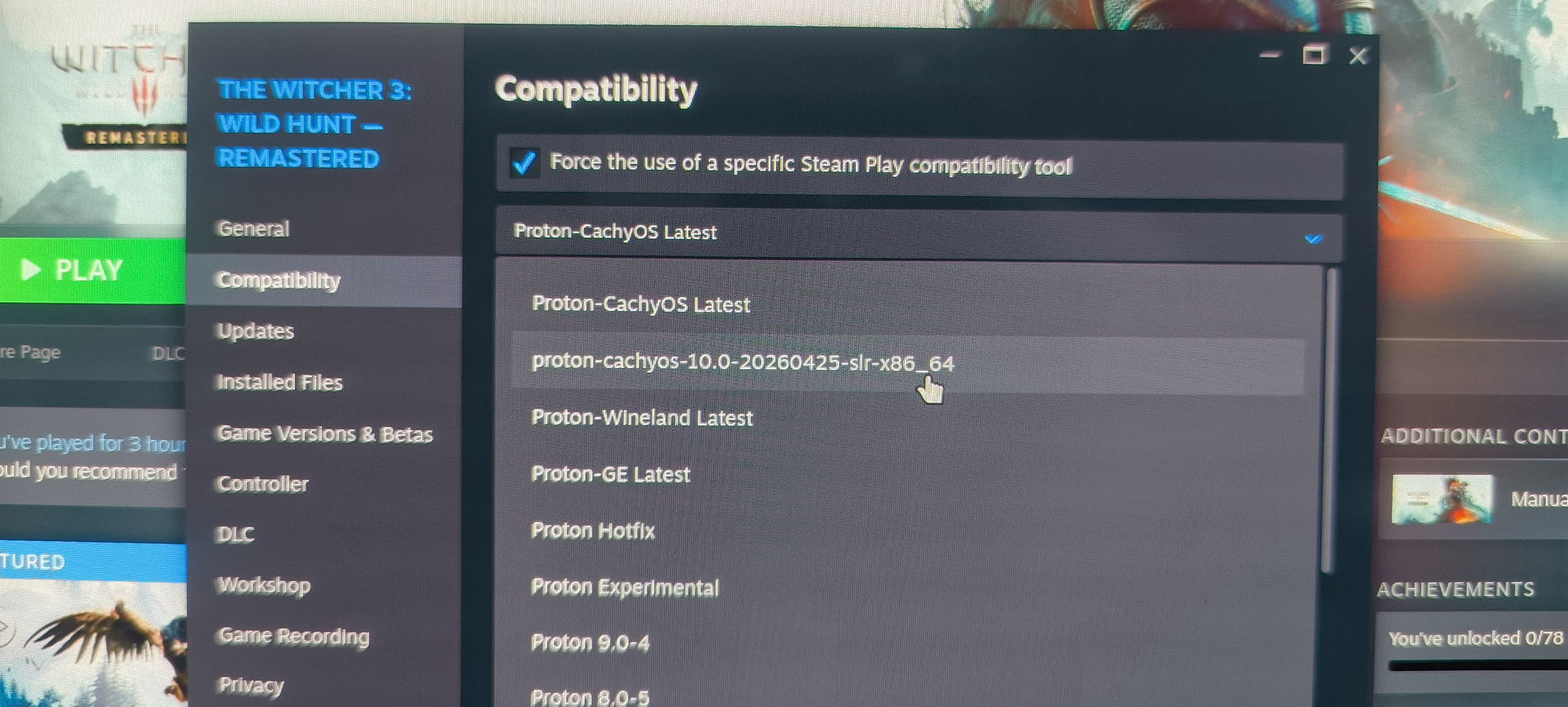
I don’t think this forcing to use something else makes sense. Normally the whole proton plus stuff shouldn’t be needed. I reckon the cause is different - i mean you wrote the game comes up using the internal intel gpu and hence it will be much too slow.
In steam under game properties for witcher 3 search for the launch options field (could be in the general tab). There try to paste the following
__NV_PRIME_RENDER_OFFLOAD=1 __GLX_VENDOR_LIBRARY_NAME=nvidia VK_DRIVER_FILES=/usr/share/vulkan/icd.d/nvidia_icd.json %command%
maybe also check whether /usr/share/vulkan/icd.d/nvidia_icd.json actually exists. I would also run with steam’s proton version without forcing overwrites.
i remember playing the non Remastered version just fine,but it wasn’t a laptop.
if you have the possibility,i would recommend a separate disk or partition with Windows on it so you don’t have to deal with trying to fix various issues and incompatibilities with games you install.
that’s what i did.
Try force install nvidia driver before changing anything, i had similar issue on ubuntu and manjaro with some games force install solved that
yeah it exists
 ls /usr/share/vulkan/icd.d/
intel_hasvk_icd.json  intel_icd.json  nouveau_icd.json  nvidia_icd.json  radeon_icd.json
hey, the runs now, now how do i use this command along with mango hud??
i still cannot tinker the settings but i can see the framerate go up and it is smooth for the most part, using nvidea hairworks kinda sucks and it is inconsistent, even turning off the one setting, the game runs pretty well.