Found a new disaster! ntfs-3g has been updated 25.2.26, and now I can not access my complete document (banking etc..) container any more with veracrypt. I also can not downgrade it due to conflict with ntfsprogs. Veracrypt: mount: /mnt/veracrypt1: unbekannter Dateisystemtyp »ntfs3«. Further I always have graphics problems until I disable picom with Super+P. I need to do that every time. It seems Manjaro is not AMD-Ryzen friendly?!
I run Manjaro on three different AMD Ryzen systems - no problems.
- Lenovo T495
- Lenovo x13 AMD
- Lenovo P620 with R9700 GPU
As for your ntfs issue
- ntfs3 is the kernel driver
- ntfs-3g is the userspace driver
Which one you use is specified by the mount command.
An alternative is to blacklist the kernel driver - which will make the userspace driver default.
To blacklist the kernel driver create a file /etc/modprobe.d/blacklist-ntfs3.conf
blacklist ntfs3
That said - I strongly advise you to use the mabox distributions forum for your questions.
This is the error you would get if you have a pending restart after a kernel update.
2 Likes
1.)The issue is not mabox related, more arch-linux or manjaro. I did already blacklist ntfs3. I was using ntfs-3g. But now one decided to upgrade ntfs-3g and introduce ntfsprogs as a new component. This now breaks the method veracrypt is accessing the container.
There was definitely no pending restart, the system was fresh booted.
I need to stay on an older version of veracrypt (1.25.9), as I have a huge collection of truecrypt containers and converting them all to veracrypt needs quite a few days of work.
2.)I am now on my old system, it is running picom enabled, renderer backend glx without issues. No glue, why this is not working (empty windows - no content) after update.
3.) Why do you think mabox forum can help better? They are in the end of the chain.
Because a downstream will add configuration not present on a stock Manjaro - and therefore you should use their forum.
The same reason that a Manjaro user should never use the Arch Linux BBS.
1 Like
You just have to adjust the veracrypt mounting options with the name of the new driver. Since you are not the first to report this, search the forum for recent topics about veracrypt. I just can’t put the answers to all possible questions in the second post of the update announcement.
Here it is, no charge (this time):
2 Likes
Great, but that seems only possible when mounting with a command line and not with the veracrypt gui. I was happy that family members could do this with the gui, they will definitely not going to use command line. So the root cause seems that the ntfs-3g update now uses ntfs instead of ntfs3 in API - right?
No, it cannot be. ntfs and ntfs3 are kernel-level drivers, while ntfs-3g is a userspace driver, making use of the fuse (“filesystem in userspace”) framework.
The problem is most likely that you are specifying the wrong filesystem type in the mount options.
2 Likes
Sorry, but I do not specifying any type, I am using the same veracrypt gui as before (no update to veracrypt) and veracrypt says: unknown filesystem type ‘ntfs3’. My container file and veracrypt did not change, but ntfs-3g did update from version 2022 to 2026.2.25 (April 21, 2026).
Maybe you have the filesystem type set on auto? That confuses veracrypt. It has to be ntfs (without numbers).
1 Like
Then veracrypt is obviously trying to mount the filesystem as ntfs3. This could be because that’s how you defined it in /etc/fstab.
If you do not have an entry for said filesystem in /etc/fstab, then you should check your veracrypt configuration for why it attempts to use ntfs3.
5 Likes
I would recommend to refresh your veracrypt Partitions from NTFS to ExFat or even better to ext4.
You might want to use a older Manjaro Live Boot Image and mount your Veracrypt drive from the GUI there.
You probably should also disable your LAN/Wireless Connecting after booting in a older iso, because of the missing security updates!
So just download/install Veracrypt directly after booting and disable your outgoing connecting, right after.
Then mount your veracrypt drive and backup your files in unecrypted area and create a new Veracrypt with another drive for example.
The information you provide is scattered and incomplete - all I have understood until now is that veracrypt complains about ntfs3 but how is the layout
- is it a partition using ntfs which contains your containers?
- is it a volume - a veracrypt partition - with ntfs inside?
- is it a number of containers inside a volume (veracrypt partition)?
There is many possible layouts and unless you are a little more specific it is not possible to provide a meaningful answer.
In response to my early suggestion to blacklist ntfs3
You replied
No, I don’t think so, when
the root cause seems to be your decision to blacklist ntfs3 which I - based on your comment - assume you did before creating the current topic.
Check the GUI Settings menu and verify if you need to change the Mount Options used
Since you have blacklisted ntfs3 - you would need to use ntfs-3g as driver.
Perhaps you need to re-assess your earlier decision on blacklisting ntfs3 driver.
Have you looked at the VeraCrypt#Troubleshooting - ArchWiki?
If it is a container stored on a partition formatted with ntfs filesystem - you will to mount the ntfs filesystem before you open/mount the container.
testing
 $ pamac search ntfs-3g
libntfs-3g  2026.2.25-1 [Installed]                                                                      extra
    NTFS-3G core library
ntfs-3g  2026.2.25-1 [Installed]                                                                         extra
    NTFS FUSE driver
 $ pamac search veracrypt
veracrypt  1.26.24-3 [Installed]                                                                         extra
    Disk encryption with strong security based on TrueCrypt
I have not blacklisted ntfs3 on my system - and I have no issues with veracrypt.
I just created a veracrypt container using the first partition of an 64G USB stick and formatted it with NTFS - then opened the container - no issues.
I wiped the disk and created
- a single ntfs formatted partition
- mounting the ntfs partition work as expected
- using veracrypt gui
- create test containers formatted with ntfs
- no issues creating those
- no issues mounting them either
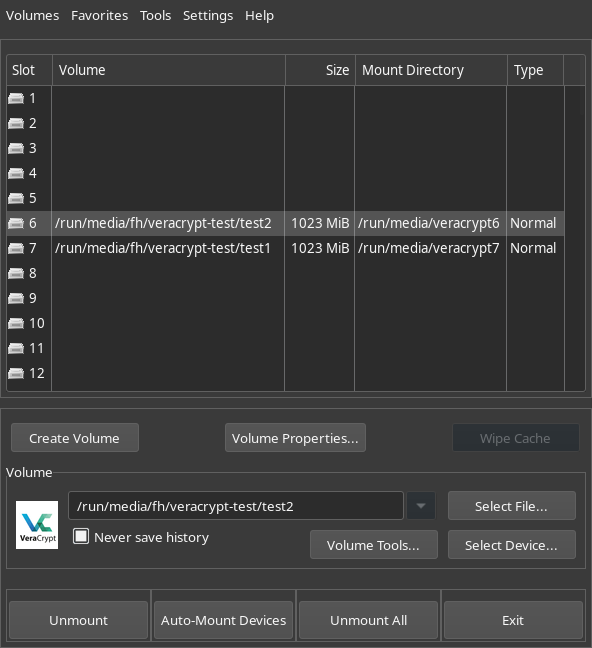
1 Like
Just a quick short anwer, as I run out of time today.
I blacklistet ntfs3 years ago, after I lost a lot of files on a NTFS partition. Since then I used ntfs-3g. I copied the container file to ext4 partition, this did not change the error message. The container is created with truecrypt 10 years ago. That time was choosing NTFS a default I think. It worked with this configuration 3+ years, I excluded veracrypt from updates when it does not support truecrypt anymore. Everything was stable. Since ntfs-3g had an update recently and the last version was 2022, for me it looks that the new ntfs-3g might use the label NTFS instead of NTFS3 now, so veracrypt cant find NTFS3 and issues a error message. I plan to rerun the update with excluding ntfs-3g, picom, veracrypt again and see if this leads to a system, I can do work with. Next will be to test another kernel, althrough I found that 6.1 should get support until 2027, but maybe this is not meant the way, that a fix of polkit problems is provided. Regarding graphics I saw some issues entered on the github picom page recently. As it worked perfectly I do not see a reason to update picom.
I’m afraid your logic is flawed. ntfs-3g does not use and has never used either ntfs or ntfs3.
As I told you earlier, ntfs and ntfs3 are drivers running in the kernel. ntfs-3g is a completely separate driver running in userspace — i.e. in Ring 3 of the processor core — on top of the fuse framework, which itself is a kernel interface for running (all kinds of) drivers in userspace.
In GNU/Linux, the reason for running drivers in userspace is most commonly the licensing of the drivers. Linux — the kernel — is licensed under the GNU GPLv2, which implies that anything being included in the kernel — i.e. running in Ring 0 of the processor core — be licensed under GPLv2.
ntfs-3g has a different license, and therefore it must be run in userspace, where every process runs in its own isolated address space.
6.1 is a long-term-support kernel (LTS), which means that it will continue receiving bug fixes and security patches until — in this case — December 2027. However, this does not mean that it will receive extra functionality.
The polkit problem is the result of polkit having come to rely on functionality provided only in newer kernels — I’m not sure, but I think one needs at least 6.12 — and thus 6.1 will have a problem with the new polkit implementation, given that the authorization helper now no longer requires being set SUID.
SUID is a security hazard, because it allows the executable file to always be run with the privileges of the owner, regardless of who starts it. As such, a root-owned executable file with SUID will always run with root privileges.
Therefore, the number of executable files with SUID set should always be limited where possible. And newer kernels do allow polkit to work without SUID, but kernel 6.1 does not.
Quite frankly, I’m detecting an unusual and puzzling reluctance within you to simply switch to a newer LTS kernel. Newer kernels don’t tend to break things — it’s the older kernels which usually do.
On account of picom, please start a separate thread about that. I’ve already split off the veracrypt/ntfs posts from your original thread, so that it can be dedicated to your kernel/polkit problem.
The rule on this forum is “one problem per thread, and per user”. 
4 Likes
Note on kernels: although officially supported till 27 from kernel developers, this doesn’t mean manjaro will support it that long (prepare mentally it will not be the case). There are lot of other things around a kernel that have to be adapted, the kernel is also modified - a lot of work on distro level after the kernel leaves kernel.org.
Note on ntfs: the name of the filesystem type and the driver are different things. In the newer kernels, 7+, a lot of work is done on the ntfs3 driver. Maybe it is time to unblock it after so many years.
1 Like
I acknowledge that everything usually has a reasonable background, but this is often not apparent to a simple user. It would be nicer if polkit recognized the version of the kernel and at least issued a reasonable message that helps the user progress.
Regarding ntfs3-error, this is the message veracrypt gives me. So maybe this tool is the problem and no one knows why it worked before.
I think I can avoid veracrypt at all and try to mount my old truecrypt containers with
Mod: free of charge code format, do not get used to it 
sudo cryptsetup open --type tcrypt "$CONTAINER" "$MAP_NAME"
sudo mount "/dev/mapper/$MAP_NAME" "$MOUNT_POINT"
sudo chown -R $USER:$USER "$MOUNT_POINT"

lsblk -f says FSTYPE ntfs
1 Like
Does this mean that you are using an outdated version of veracrypt?
If yes, it could be that the combination of outdated veracrypt with current versions of the kernel and the drivers causes problems
3 Likes
So you have an unsupported partially upgraded system. Also, you did not mention to use truecrypt containers. How could you expect that updating the system without updating veracrypt could work on the long term? Either you should have frozen the whole system (and better avoid any internet connection afterwards  ), you copy over the content of the containers to a freshly prepared veracrypt container with fully updated system incl. veracrypt package or you think about other tools to open your truecrypt containers, such as zulucrypt (from AUR) which also provides a GUI.
4 Likes
He actually mentioned both early on.
However, I forgot that it was mentioned earlier. 
1 Like
The problem was that it is common recommendation to use this old veracrypt version for truecrypt containers. But with help of Mistral and Google AI, I found this method to get rid of veracrypt. Is ntfs in the kernels still managed by Paragon? I found ntfs-3g is from tuxera inc. and since I use Linux (comming from MS-W10) I never had a single problem using it. So trust level is much higher. For me it seems that this is just a naming thing, what end of 2025 was called ntfs3 is now called ntfs. Maybe this is more correct, but breaks older tools, and forces everybody to update.