After switching to branch Testing and receiving an update to Plasma 6.4.5, I noticed some improvements in the behavior of the interface. Anyway, still some strange things like this one.
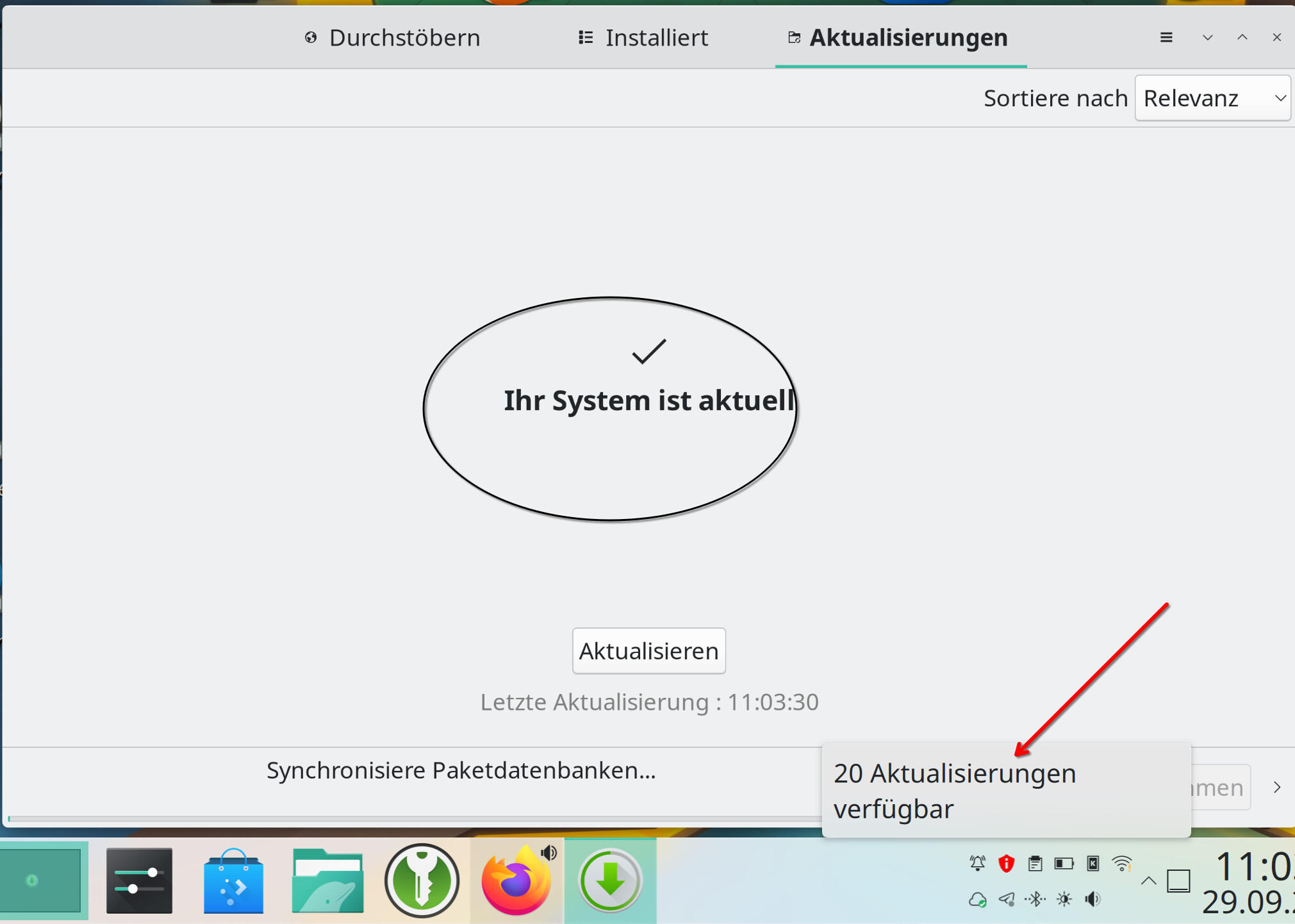
The update status within the App Launcher differs from the one in the package manager. What might be the reason. This is quite irritating and time-consuming. On a parallel installation on an older notebook
with Fedora KDE this does not happen.
:: Paketdatenbanken werden synchronisiert …
core ist aktuell
extra ist aktuell
multilib ist aktuell
:: Vollständige Systemaktualisierung wird gestartet …
Es gibt nichts zu tun
*Additional information: This was after a reboot of the system plus an update. After the reboot the information in app launcher and the one in the Package Manager no longer differed.
*and by the way: Neither Shutdown nor Restart worked via the menu selection. I had to switch of my notebook. A behavior I had before some time ago.
I’ll rephrase @ManjaroDevOps reply: They don’t share source of truth. Plasma’s Discover usage is discouraged, simply don’t use it. We have Pamac for GUI if you are allergic to CLI. That notification icon is pamac-tray, which shares the source of truth with pamac and thus, pacman.
So, what exactly would be the solution? Replace what is shown in the System Tray and how? As a user, I cannot always check two or three different information sources as “Discover” sometimes shows deviating status as well.
The information presented in your original topic are both correct - but from different perspectives.
It may even be that one is wrong but the underlying service has not caught up with the new set of data - the only way of confirming is to close the apps and reload them.
Like 2 persons on each side of a street - and one car passing.
One say it came from left to right - the other say it came from right to left.
Don’t confuse yourself.
Use Discover on Fedora and Pamac Manager on Manjaro or use the same operating system on all your computers.
A status should always tell me the current status of the system, meaning up-to-date or to be up-to-dated after an action in pacman manager. If the metadata differs there should be a solution for that otherways the whole information in the tray does not help me keep my system in the correct update status.
pacman is the native package manager for Arch based distributions.
pacman provides a library libalpm which is the foundation for Pamac Manager.
Please see pacman - ArchWiki to learn how to use the package management on Manjaro.
As I said above - there is to states
system state (local metadata)
mirror state (mirror metadata)
Those may not be identical - and this creates two possible outcomes.
If you download the new metadata - you must update the system - otherwise your system will - upon installation of an arbitrary application - enter a partially upgraded state - and that state is unsupported - please see above link til Arch Wiki.
That is why pamac-tray is not updating the local metadata - but uses a separate copy of the mirror metadata to deduce whether updates is available for the current system state.
This is how it is - and it may be difficult to understand - one just have to accept that it is how it is.
That might have happened if support from Framework for Fedora KDE had been available at the time I installed it. Now I am the owner of some of the fastest notebooks (and repair friendly) on the market but the operating system slows me down.
And believe me, I am someone who encourages people in my not that small bubble to leave Windows behind.
Arch Linux and by inheritance Manjaro has outperformed any other OS I have tested.
I got me feet wet decades ago with Suse Linux and RedHat and Mandrake and Ubuntu - it was only when I discovered Arch Linux more than 10 years ago I realised how good Linux could be.
haha I might test it. If I throw away the Mint installation that I do have installed on this machine here in parallel. (By-the-way: Mint is fast, but I do not really like Cinnamon)
To be honest: When switching from Windows 11 to Linux because one no longer wants to follow M$ I would expect to get a better and faster “user experience” (I like this silly wording…). That’s the reason why I insist!
This question about “Discover” I do have to clarify because I really do not want to look at three information sources, a waste of time!
Simply get used to update just using CLI pacman command and you will be fine. The pamac GUI might be fine to get info about packages, it will never outperform the precision functionality of the original Arch update approach provided by pacman command. Just my 2 cents…
pamac-tray may not receive the status right away when either the cli application pamac or the UI application pamac-gtk had updated your system. pamac-tray is an indicator application which refreshes its status on a given schedule. @Heinrich20 you may open an issue for the UI application to sync status with pamac-tray when an update is done. Mostly you have to reboot the system anyway …
Indeed rebooting the system after update is the only right thing to do. After rebooting the pamac tray refreshes and will be correct. Probably that is why nobody complained about this bug anyways.(At least that is why i didn’t complain, although i noticed).


 that must be Fedora …