Hello Manjaro user community, here we have another set of package updates. We are continuing our development of the upcoming release of ‘Bian-May’ which can be expected end of April, beginning of May. Development speed may be a little slower the upcoming weeks. However, still let us know any issues you may found thus far …
Current Promotions
- Get the latest Gaming Laptop by Slimbook powered by Manjaro: Slimbook Manjaro III
- Protect your personal data, keep yourself safe with Surfshark VPN: See current promotion
Recent News
New in Manjaro GNOME!
When choosing an accent color in Settings, the folder colors will now change automatically to match when using the Papirus Dark or Papirus Light icon theme.
To try it out, install gnome-shell-extension-papirus-folders-colorizer from Add/Remove Software, logout / login and enable Papirus Folder Colorizer from Extensions.
Or, if you prefer the command line:
Install:
sudo pacman -Syu gnome-shell-extension-papirus-folders-colorizer
Enable the extension:
gnome-extensions enable papirus-folders-colorizer@NiffirgkcaJ.github.com
Logout:
gnome-session-quit --logout
Also, when applying accent colors from Layout Switcher settings, it will also set the matching folder color. Requires accent-color-change r172.c761c84-2 or newer.
KDE Plasma users with SDDM can now migrate to Plasma Login Manager
After ensuring plasma-login-manager 6.5.90-1 (or newer) is installed, run the following:
sudo pacman -Syu plasma-login-manager
systemctl disable sddm
systemctl enable plasmalogin
sudo pacman -R sddm-kcm sddm
NVIDIA 590 driver drops Pascal support
With the update to driver version 590, the NVIDIA driver no longer supports Pascal (GTX 10xx) GPUs or older.
Impact: Updating the NVIDIA packages on systems with Pascal, Maxwell, or older cards will fail to load the driver, which may result in a broken graphical environment.
Intervention required for Pascal/older users: Users with GTX 10xx series and older cards must switch to a legacy driver to maintain support:
- Install the official
linuxXXX-nvidia-575xx,linuxXXX-nvidia-570xx, or related DKMS packages.
- Manjaro 26.0 Anh-Linh released
- Manjaro Summit public Alpha now available
- As of Linux 5.4.302, the 5.4 series is now EOL (End Of Life). Please install 5.10 LTS (Long Term Support) or 5.15 LTS.
- As of Linux 6.16.12, the 6.16 series is now EOL (End Of Life). Please install 6.18 LTS (Long Term Support) and/or 6.12 LTS.
- As of Linux 6.17.13, the 6.17 series is now EOL (End Of Life). Please install 6.18 LTS (Long Term Support) and/or 6.12 LTS.
- As of Linux 6.19.14, the 6.19 series is now EOL (End Of Life). Please install 7.0, and/or 6.18 LTS (Long Term Support) and/or 6.12 LTS.
Previous News
- Roman was at Froscon and had a talk about Manjaro
- Initial preview of Manjaro Immutable is now available!
- Roman published our new Website
- Philip was at Computex and showed off the OrangePi Neo
- Manjaro Team member @romangg has a new library project with a guest post on Phoronix.
- Some Manjaro team members attended FOSDEM 2024 and we showed off a prototype of the upcoming Orange Pi Neo Handheld Gaming Console!
- Check out the new Manjaro Slimbook Hero!
- Manjaro, like many other open-source projects, relies on the generosity of its community through donations and corporate sponsorships to support its growth and development. These donations are essential in covering the various expenses incurred in the operations of the project such as server costs, software development tools, infrastructure expenses, training, flying people to events or conferences and the salaries of key developers. With the help of these donations, Manjaro is able to secure the necessary financial stability that allows the project to continuously improve and remain active. If you love Manjaro, consider to donate!
- As you might have seen some of our team were able to attend FOSDEM 2023 and the conference proved to be incredibly productive for us. See our blog post for more.
- Arch Linux and Manjaro on TUXEDO computers - Arch Linux and Manjaro on TUXEDO computers - TUXEDO Computers
- Linux, Judo, unicycles and … Baywatch?! How Vivaldi and Manjaro aim above the ordinary. | Vivaldi Browser
- https://frame.work/blog/spotlight-on-manjaro-linux-interview-with-the-team
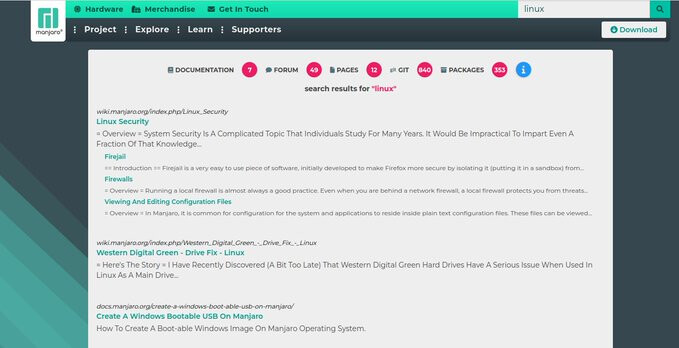
Finding information easier about Manjaro
Finding information easier about Manjaro always has been a topic that needed to be solved. With our new search we have put all Manjaro data accessible in one place and divided by sections so it makes it easier to digest: News – Manjaro
Notable Package Updates
- Most Kernels got updated
- Note that
linux619is now marked EOL
- Note that
- Heroic Games Launcher 2.21.0
- WebKitGTK 2.52.3
- Mesa 26.0.5
- VirtualBox 7.2.8
- Firefox 150.0
- PipeWire 1.6.4
- LXQt 2.4.0
- COSMIC Epoch 1.0.11
Additional Info
Python 3.14 info
 You will need to rebuild any AUR Python packages that install files to site-packages or link to
 libpython3.13.so.
Print a list of of packages that have files in /usr/lib/python3.13/ :
pacman -Qoq /usr/lib/python3.13/
Rebuild them all at once:*
pamac build $(pacman -Qoq /usr/lib/python3.13)
Use rebuild-detector to see if anything else needs to be rebuilt:
checkrebuild
* It’s recommended to clean your build cache first with pamac clean --build-files
Info about AUR packages
 AUR (Arch User Repository) packages are neither supported by Arch nor Manjaro. Posts about them in Announcements topics are off-topic and will be flagged, moved or removed without warning.
For help with AUR packages, please create a new topic in Support > AUR and a helpful volunteer may be able to assist you.
Get our latest daily developer images now from Github: Plasma, GNOME, XFCE. You can get the latest stable releases of Manjaro from CDN77.
Our current supported kernels
- linux510 5.10.252
- linux515 5.15.202
- linux61 6.1.168
- linux66 6.6.134
- linux612 6.12.83
- linux618 6.18.24
- linux619 6.19.14 [EOL]
- linux70 7.0.1
- linux61-rt 6.1.167_rt62
- linux66-rt 6.6.133_rt73
- linux612-rt 6.12.79_rt17
- linux617-rt 6.17.5_rt7
Package Changes (4/23/26 19:19 CEST)
- testing core x86_64: 24 new and 24 removed package(s)
- testing extra x86_64: 1612 new and 1715 removed package(s)
- testing multilib x86_64: 5 new and 5 removed package(s)
A list of all changes can be found here
- No issue, everything went smoothly
- Yes there was an issue. I was able to resolve it myself.(Please post your solution)
- Yes i am currently experiencing an issue due to the update. (Please post about it)
Check if your mirror has already synced:
 2026-04-23