I’m a bit confused as to why this is called Anh-Linh Preview. So is this the first stable version of the preview and not yet the final thing? If so, why it this being pushed to the stable branch?
Minor moan.
Because of the long gap between updates, linux616 was removed before users had the chance to update to 617. On one machine I had to reboot to the LTS kernel (612) and manually remove 616 to prevent the installation of the current kernel metapackage.
It would be nice if EOL kernels were retained at least one cycle after the first appearance of the next version.
I’m getting this issue during the update which will likely brick my pc after reboot.
Updating linux initcpios...
sed: can't read /usr/share/mkinitcpio/hook.preset: No such file or directory
==> WARNING: Preset file '/etc/mkinitcpio.d/linux617.preset' is empty or does not contain any presets.
any idea?
the current presets are empty and there is no efi boot config generated.
I’m using systemd-boot with secureboot.
Solution
fixed it by
- recreating the file
/usr/share/mkinitcpio/hook.preset
# mkinitcpio preset file for the '%KERNELBASE%' package

#ALL_config="/etc/mkinitcpio.conf"
ALL_kver="/boot/vmlinuz-%KERNELBASE%"

PRESETS=('default' 'fallback')

#default_config="/etc/mkinitcpio.conf"
#default_uki="/efi/EFI/Linux/manjaro-%KERNELBASE%.efi"
default_uki="/efi/EFI/Linux/manjaro-%KERNELBASE%.efi"
#default_options="--splash /usr/share/systemd/bootctl/splash-manjaro.bmp"

#fallback_config="/etc/mkinitcpio.conf"
#fallback_uki="/efi/EFI/Linux/manjaro-%KERNELBASE%-fallback.efi"
fallback_uki="/efi/EFI/Linux/manjaro-%KERNELBASE%-fallback.efi"
fallback_options="-S autodetect"
- removing the
/etc/mkinitcpio.d/*.presetfiles - re-install kernel packages
pamac reinstall linux617 linux617-headers
1 Like
Strange behavior for this update : many warnings, 2 errors and “command completed successfully” !
Reboot ok
Démarrage de la mise à jour complète...

[sudo] password for denis:
core is up to date
extra is up to date

resolving dependencies...
error: could not open file /var/lib/pacman/local/qt6-webengine-6.10.1-1/desc: No such file or directory
looking for conflicting packages...
warning: dependency cycle detected:
warning: qt6-multimedia-ffmpeg will be installed before its qt6-multimedia dependency
warning: libcamera-ipa will be installed before its libcamera dependency
Packages (436) calibre-8.7.0-7 cherrytree-1.6.2-2 chromaprint-1.6.0-2 clang-21.1.6-1 compiler-rt-21.1.6-1 cpupower-6.17-2
...
Installed Size: 5044,19 MiB
Net Upgrade Size: 183,06 MiB
checking keys in keyring
checking package integrity
checking for file conflicts
checking available disk space
warning: could not get file information for usr/share/dbus-1/services/org.xfce.xfce4-notifyd.Notifications.service
warning: could not get file information for usr/share/help/en_GB/zenity/figures/zenity-calendar-screenshot.png
... ~10 lines
warning: could not get file information for usr/share/help/fr/zenity/figures/zenity-notification-listen-screenshot.png
warning: could not get file information for usr/share/help/fr/zenity/figures/zenity-notification-screenshot.png

:: Running pre-transaction hooks...

Removing linux initcpios...

:: Processing package changes...

(1/436) upgrading python-pyqt6-webengine
...
(436/436) upgrading zenity
warning: warning given when extracting /usr/share/help/en_GB/zenity/figures/zenity-calendar-screenshot.png (Hard-link target 'usr/share/help/C/zenity/figures/zenity-calendar-screenshot.png' does not exist.)
... ~ 10 lines
warning: warning given when extracting /usr/share/help/fr/zenity/figures/zenity-notification-screenshot.png (Hard-link target 'usr/share/help/C/zenity/figures/zenity-notification-screenshot.png' does not exist.)

:: Running post-transaction hooks...
...
==> Initcpio image generation successful
Installing Grub to MBR/EFI
EFI variables are not supported on this system.
Grub will be installed on: EFI
Installing for x86_64-efi platform.
grub-install: error: efibootmgr failed to register the boot entry: No such file or directory.
Failed: grub-install --target=x86_64-efi --efi-directory=/boot/efi --bootloader-id=Manjaro --recheck --force
WARNING: Bootloader is not properly installed, system may not be bootable
error: command failed to execute correctly
Updating Grub-Bootmenu
Generating grub configuration file ...
Found background: /usr/share/grub/background.png
Found linux image: /boot/vmlinuz-6.12-x86_64
Found initrd image: /boot/amd-ucode.img /boot/initramfs-6.12-x86_64.img
Found linux image: /boot/vmlinuz-6.6-x86_64
Found initrd image: /boot/amd-ucode.img /boot/initramfs-6.6-x86_64.img
Warning: os-prober will be executed to detect other bootable partitions.
Its output will be used to detect bootable binaries on them and create new boot entries.
Adding boot menu entry for UEFI Firmware Settings ...
Found memtest86+ image: /boot/memtest86+/memtest.bin
done
...
warning: /etc/mkinitcpio.conf installed as /etc/mkinitcpio.conf.pacnew

Commande terminée OK !
Grub-install failed but all is properly running. I liked this part :
EFI variables are not supported on this system.
Grub will be installed on: EFI
Grub currently is mbr based while there is an efi directory (I don’t know when the system moved from efi to mbr … possibly when I replaced the battery and tried to find where to reboot from the bios proposals).
Thanks to the Manjaro team 
Manjaro KDE, been using Manjaro for about a year. Everything went as smooth as could. I haven’t found any problems. 4.2GB/745 files was my update. Thanks!
2 Likes
No issues while upgrading. Not a blocker but I’m not able to boot with 6.18 kernel, seems related to Luks:
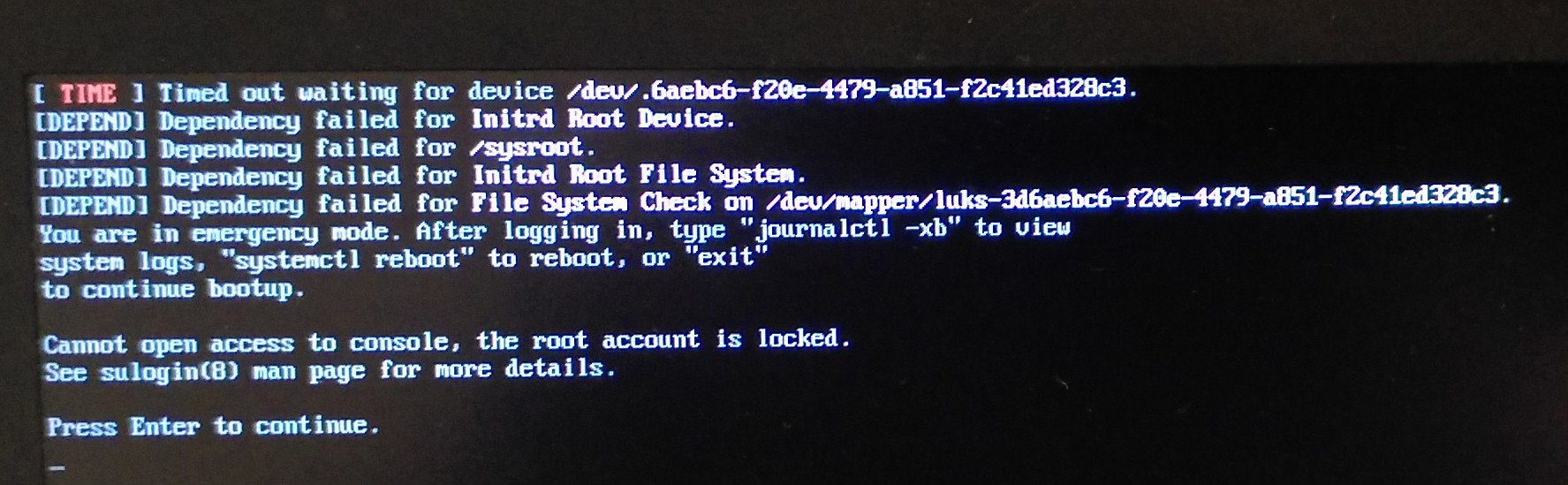
As an x11 user will I need to remember to check and reinstall ‘plasma-x11-session’ or is it for this update only?
I have issue with Wifi card.
System is using module MT7921e driver for a wifi pcie card.
The card works perfectly with 25.0.10, not at all with 25.1.0 (the card is even no more recognized at all)
I’m stuck on 25.0.10 for now, to have network working (could roll back thanks to timeshift).
I’m using LXDM as my login manager. Apparently the theme that LXDM was set to use was removed by the update. So when I restarted and LXDM could not find that theme, the only thing it displayed was my background image. There was no box to type in a username. No way to login or do anything. Just the background image and that’s it.
I had to switch to a different console and edit lxdm.conf so that it was set to a theme that was actually present on my system.
This was extremely non-obvious. I looked at the .pacnew file, as one is supposed to. The fact that it was set to some default theme and not the one originally present when I installed my system did not at all alert me to the fact that there would be a problem. This kind of difference in a .pacnew file is normal and does not usually require doing anything.
In the end, I just guessed that setting everything in lxdm.conf to the .pacnew defaults as much as possible might fix it and then narrowed down the problem once it started working. There really should have been a warning about this.
Hello. KDE Plasma on Wayland.
After turning on my laptop, I didn’t receive any notification about a possible update. After launching Pamac and refreshing, I first saw one available update → Floorp, and after refreshing again, 2.1 GB of the latest system appeared. Along with a message about a conflict between Protobuf 33 and libreprotobuf 32. The update went smoothly, after which I ran the recommended install/update Grub in Terminal. After restarting, I installed kernel 6.18 and restarted again. Everything is fine.
Thank you very much for your work. Best regards.
2 Likes
Once that a package is installed, it will continue that way and will get updates if that’s the case. Only if other package replaces that one or there is an incompatibility, your package can be deleted. But you will be warned first.
2 Likes
Using kernel 6.18 login screen does not appear.
$ journalctl --boot --priority=err --output=with-unit --no-pager
Tue 2025-12-09 10:04:41 CET statPC sddm.service[711]: Failed to read display number from pipe
Tue 2025-12-09 10:04:43 CET statPC sddm.service[711]: Failed to read display number from pipe
Tue 2025-12-09 10:04:45 CET statPC sddm.service[711]: Failed to read display number from pipe
Tue 2025-12-09 10:04:45 CET statPC sddm.service[711]: Could not start Display server on vt 2
My display says no signal, and I cannot open a tty with Ctrl+Alt+F3. I use Plasma on Wayland, and installing plasma-x11-session does not help.
Kernels 6.17 and 6.12 work perfectly.
Booting took forever because of a tpm timeout. I “fixed” it by masking the tpm service.
sudo systemctl mask tpm2.target
1 Like
Did the upgrade, installed plasma-x11-session and manually updated GRUB, restarted and all is fine. Even my AUR packages seem to be working. Needless to say I’m on Plasma X11. Thanx for the good work.
A post was split to a new topic: Every attempt to enter sleep results in a crash and freeze
I had read the fine known issues thead before updating: I am on x11 with an nvidia 470xx driver (old GPU, and this is the only driver that seems to work for me), so I installed plasma-x11-session and, just in case, reinstalled grub with install-grub and update-grub
unfortunately, upon rebooting, the default session was set to wayland anyway, which on my hardware causes immense lag because it defaults to CPU rendering and uses 100% of all cores and renders the system unusable.
fortunately enough, having a luks encryption on my home partition, i was able to bypass sddm on startup and edit the /etc/sddm.conf.d/kde_settings.conf and comment out the [Autologin] session ( # before every line under the section) and creating a new x11.conf file with a single lineDisplayServer=x11 before rebooting into an usable system.
For safety, i did also fo into the SDDM section of the settings to verify Plasma(x11) was set, as a general tooltip the correct configuration to do before rebooting on X11 should be to change the [Autologin] Session to plasmax11 , as it defaults to plasma , meaning wayland
Good Afternoon all,
Even at my PC the update went smoothly as it was expected, and the updating to new Kernel went fine too.
Tested most Programs and all start normal.
KDE-Plasma-Version: 6.5.3
Kernel-Version: 6.18.0-1-MANJARO (64-bit)
Grafik-Plattform: Wayland
i7-11700K @ 3.60GHz
NVIDIA GeForce RTX 4060
Thank you very so much for your hard work.
Best regards. to all
1 Like
hi, first of all, thank you for the update!
after the update, I had to run `sudo grub-install && sudo update-grub` otherwise the system would not start.
why isn’t this done automatically? I assume because running ‘grub-install’ during updates is risky. Manjaro cannot know which efi partition is the correct one, many systems use dual boot, and in some setups /boot/efi is not mounted.
So Manjaro leaves this step to the user, correct? a bold red warning would be helpful… or did I miss something?
3 Likes
A post was split to a new topic: Rnote no longer reacts to key presses
A post was split to a new topic: Spectacle causes my display to cut out