Tried looking through a few other posts first, but couldn’t find a solution.
Forum post 1: Obviously high SSD I/O usage from btrfs-cleaner after upgrading to Kernel 5.16
Forum post 2: High CPU Usage: Process with Changing PID
This started happening around after I was messing around with getting some exe’s to work in Wine via lutris, Wine CLI, Bottles. After that, I had cleared some logs using the tutorial titled “Cleaning Arch Linux“ from Chris Titus. Then, I enabled trimming on a schedule using fstrim. Tried disabling it but to no avail. Same usage spikes.
One thing I seem to notice is that a few processes pop into existence for a few seconds then disapear. Those processes are kdeworker, journald, and gvfsd metadata.
My question is, what could be causing these spikes from 0 to 100% disk usage on my system?
Logs of the event here:
Total DISK READ :       0.00 B/s | Total DISK WRITE :       0.00 B/s
Actual DISK READ:       0.00 B/s | Actual DISK WRITE:       0.00 B/s
    TID  PRIO  USER     DISK READ  DISK WRITE  SWAPIN      IO    COMMAND
Total DISK READ :       0.00 B/s | Total DISK WRITE :     252.65 K/s
Actual DISK READ:       0.00 B/s | Actual DISK WRITE:     364.32 K/s
    TID  PRIO  USER     DISK READ  DISK WRITE  SWAPIN      IO    COMMAND
    499 be/4 root        0.00 B/s   45.94 K/s  ?unavailable?  systemd-journald
   2573 be/4 user    0.00 B/s   22.18 K/s  ?unavailable?  auth?
   2594 be/4 user    0.00 B/s  811.01 B/s  ?unavailable?  auth? [HangWatcher]
   2623 be/4 user    0.00 B/s  811.01 B/s  ?unavailable?  auth? [CompositorTileW]
   2642 be/4 user    0.00 B/s  811.01 B/s  ?unavailable?  auth? [ThreadPoolSingl]
   2633 be/4 user    0.00 B/s   60.19 K/s  ?unavailable?  renderD128 --crashpad-handler-pid=2576
   3071 idle user    0.00 B/s   16.63 K/s  ?unavailable?  localsearch-3
   8194 be/4 root        0.00 B/s    3.17 K/s  ?unavailable?  [kworker/u64:38-gfx_0.0.0]
   8195 be/4 root        0.00 B/s    6.34 K/s  ?unavailable?  [kworker/u64:39-events_unbound]
   8439 be/4 root        0.00 B/s   34.85 K/s  ?unavailable?  [kworker/u64:5-events_unbound]
   8443 be/4 root        0.00 B/s    3.17 K/s  ?unavailable?  [kworker/u64:10-btrfs-endio-write]
   8447 be/4 root        0.00 B/s    3.17 K/s  ?unavailable?  [kworker/u64:15-btrfs-endio-write]
   8456 be/4 root        0.00 B/s   12.67 K/s  ?unavailable?  [kworker/u64:24-btrfs-endio-write]
   9852 be/4 root        0.00 B/s    9.50 K/s  ?unavailable?  [kworker/u64:1-btrfs-endio-write]
  10015 be/4 root        0.00 B/s   31.68 K/s  ?unavailable?  [kworker/u64:2-btrfs-endio-write]
  10652 be/4 root        0.00 B/s  811.01 B/s  ?unavailable?  python /usr/bin/iotop -b -o -d 5 -n 12
Total DISK READ :       3.59 M/s | Total DISK WRITE :       2.49 M/s
Actual DISK READ:       3.59 M/s | Actual DISK WRITE:       3.93 M/s
    TID  PRIO  USER     DISK READ  DISK WRITE  SWAPIN      IO    COMMAND
    438 be/4 root        3.17 K/s 1378.38 K/s  ?unavailable?  [btrfs-transaction]
    499 be/4 root        0.00 B/s   46.74 K/s  ?unavailable?  systemd-journald
   2138 be/4 user    0.00 B/s   26.93 K/s  ?unavailable?  gvfsd-metadata
   2282 be/1 user    0.00 B/s   38.02 K/s  ?unavailable?  wireplumber
   2573 be/4 user    0.00 B/s  212.30 K/s  ?unavailable?  auth?
   2597 be/4 user 1877.44 K/s   84.76 K/s  ?unavailable?  auth? [ThreadPoolForeg]
   2599 be/4 user  643.24 K/s  183.78 K/s  ?unavailable?  auth? [ThreadPoolForeg]
   2601 be/4 user    0.00 B/s    7.13 K/s  ?unavailable?  auth? [Chrome_IOThread]
   2617 be/4 user  770.78 K/s   23.77 K/s  ?unavailable?  auth? [ThreadPoolForeg]
   2618 be/4 user   16.64 K/s    0.00 B/s  ?unavailable?  auth? [ThreadPoolForeg]
   2619 be/4 user   54.66 K/s    5.55 K/s  ?unavailable?  auth? [ThreadPoolForeg]
   2620 be/4 user    3.17 K/s    0.00 B/s  ?unavailable?  auth? [ThreadPoolForeg]
   2621 be/4 user    0.00 B/s  811.18 B/s  ?unavailable?  auth? [ThreadPoolSingl]
   2622 be/4 user 1622.37 B/s   11.88 K/s  ?unavailable?  auth? [CacheThread_Blo]
   2642 be/4 user    0.00 B/s    3.17 K/s  ?unavailable?  auth? [ThreadPoolSingl]
   2633 be/4 user  106.15 K/s  148.14 K/s  ?unavailable?  renderD128 --crashpad-handler-pid=2576
   8194 be/4 root        0.00 B/s    9.51 K/s  ?unavailable?  [kworker/u64:38-kcryptd-254:0-1]
   8195 be/4 root        0.00 B/s   41.19 K/s  ?unavailable?  [kworker/u64:39-flush-btrfs-1]
   8439 be/4 root        0.00 B/s   66.54 K/s  ?unavailable?  [kworker/u64:5-gfx_0.0.0]
   8443 be/4 root        0.00 B/s   25.35 K/s  ?unavailable?  [kworker/u64:10-writeback]
   8447 be/4 root        0.00 B/s    6.34 K/s  ?unavailable?  [kworker/u64:15-kcryptd-254:0-1]
   8456 be/4 root        0.00 B/s   19.01 K/s  ?unavailable?  [kworker/u64:24-btrfs-endio-write]
   8474 be/4 root        0.00 B/s    3.17 K/s  ?unavailable?  [kworker/u64:46-kcryptd-254:0-1]
   9852 be/4 root        0.00 B/s   12.67 K/s  ?unavailable?  [kworker/u64:1-btrfs-endio]
  10015 be/4 root        0.00 B/s  107.74 K/s  ?unavailable?  [kworker/u64:2+events_unbound]
  10016 be/4 root        0.00 B/s   28.52 K/s  ?unavailable?  [kworker/u64:3-btrfs-endio]
  10436 be/4 user  123.58 K/s    0.00 B/s  ?unavailable?  chromium --type=renderer --crashpad-handler-pid=2576
  10652 be/4 root        0.00 B/s  811.18 B/s  ?unavailable?  python /usr/bin/iotop -b -o -d 5 -n 12
Total DISK READ :      79.52 K/s | Total DISK WRITE :     880.28 K/s
Actual DISK READ:      79.52 K/s | Actual DISK WRITE:     473.94 K/s
    TID  PRIO  USER     DISK READ  DISK WRITE  SWAPIN      IO    COMMAND
    499 be/4 root        0.00 B/s   73.95 K/s  ?unavailable?  systemd-journald
   2573 be/4 user    0.00 B/s   69.98 K/s  ?unavailable?  auth?
   2594 be/4 user    0.00 B/s  814.28 B/s  ?unavailable?  auth? [HangWatcher]
   2596 be/4 user    0.00 B/s  814.28 B/s  ?unavailable?  auth? [ThreadPoolServi]
   2597 be/4 user   38.17 K/s  253.67 K/s  ?unavailable?  auth? [ThreadPoolForeg]
   2599 be/4 user   23.86 K/s  814.28 B/s  ?unavailable?  auth? [ThreadPoolForeg]
   2601 be/4 user    0.00 B/s    3.98 K/s  ?unavailable?  auth? [Chrome_IOThread]
   2618 be/4 user 1628.56 B/s    0.00 B/s  ?unavailable?  auth? [ThreadPoolForeg]
   2622 be/4 user  814.28 B/s    9.54 K/s  ?unavailable?  auth? [CacheThread_Blo]
   2633 be/4 user   15.11 K/s  166.99 K/s  ?unavailable?  renderD128 --crashpad-handler-pid=2576 -
   8195 be/4 root        0.00 B/s    9.54 K/s  ?unavailable?  [kworker/u64:39-btrfs-endio-write]
   8439 be/4 root        0.00 B/s   38.17 K/s  ?unavailable?  [kworker/u64:5-btrfs-endio-write]
   8443 be/4 root        0.00 B/s   79.52 K/s  ?unavailable?  [kworker/u64:10-events_unbound]
   8461 be/4 root        0.00 B/s    6.36 K/s  ?unavailable?  [kworker/u64:29-btrfs-endio-write]
   8474 be/4 root        0.00 B/s   19.08 K/s  ?unavailable?  [kworker/u64:46-flush-btrfs-1]
   9817 be/4 root        0.00 B/s   44.53 K/s  ?unavailable?  [kworker/u64:0-events_unbound]
   9852 be/4 root        0.00 B/s    9.54 K/s  ?unavailable?  [kworker/u64:1-btrfs-endio-write]
  10646 be/4 user    0.00 B/s    2.39 K/s  ?unavailable?  nautilus --gapplication-service [pool-45]
  10015 be/4 root        0.00 B/s    9.54 K/s  ?unavailable?  [kworker/u64:2-btrfs-endio-write]
  10016 be/4 root        0.00 B/s   34.99 K/s  ?unavailable?  [kworker/u64:3-kcryptd-254:0-1]
  10652 be/4 root        0.00 B/s    3.98 K/s  ?unavailable?  python /usr/bin/iotop -b -o -d 5 -n 12
Total DISK READ :       0.00 B/s | Total DISK WRITE :     659.81 K/s
Actual DISK READ:       0.00 B/s | Actual DISK WRITE:    1376.66 K/s
    TID  PRIO  USER     DISK READ  DISK WRITE  SWAPIN      IO    COMMAND
    499 be/4 root        0.00 B/s   42.77 K/s  ?unavailable?  systemd-journald
   2573 be/4 user    0.00 B/s   30.10 K/s  ?unavailable?  auth?
   2597 be/4 user    0.00 B/s   80.00 K/s  ?unavailable?  auth? [ThreadPoolForeg]
   2599 be/4 user    0.00 B/s   45.94 K/s  ?unavailable?  auth? [ThreadPoolForeg]
   2601 be/4 user    0.00 B/s 1622.21 B/s  ?unavailable?  auth? [Chrome_IOThread]
   2617 be/4 user    0.00 B/s    2.38 K/s  ?unavailable?  auth? [ThreadPoolForeg]
   2618 be/4 user    0.00 B/s  811.10 B/s  ?unavailable?  auth? [ThreadPoolForeg]
   2619 be/4 user    0.00 B/s  811.10 B/s  ?unavailable?  auth? [ThreadPoolForeg]
   2622 be/4 user    0.00 B/s  301.00 K/s  ?unavailable?  auth? [CacheThread_Blo]
   2642 be/4 user    0.00 B/s    2.38 K/s  ?unavailable?  auth? [ThreadPoolSingl]
   2633 be/4 user    0.00 B/s    3.96 K/s  ?unavailable?  renderD128 --crashpad-handler-pid=2576
   8443 be/4 root        0.00 B/s    9.51 K/s  ?unavailable?  [kworker/u64:10-gfx_0.0.0]
   8454 be/4 root        0.00 B/s    9.51 K/s  ?unavailable?  [kworker/u64:22-btrfs-endio-write]
   8461 be/4 root        0.00 B/s    6.34 K/s  ?unavailable?  [kworker/u64:29-btrfs-endio-write]
   8474 be/4 root        0.00 B/s   38.02 K/s  ?unavailable?  [kworker/u64:46-btrfs-endio-write]
   9817 be/4 root        0.00 B/s   38.02 K/s  ?unavailable?  [kworker/u64:0-gfx_0.0.0]
   9852 be/4 root        0.00 B/s   22.18 K/s  ?unavailable?  [kworker/u64:1-btrfs-endio-write]
  10015 be/4 root        0.00 B/s    3.17 K/s  ?unavailable?  [kworker/u64:2-btrfs-endio-write]
  10016 be/4 root        0.00 B/s   19.01 K/s  ?unavailable?  [kworker/u64:3-comp_1.3.0]
  10652 be/4 root        0.00 B/s 1622.21 B/s  ?unavailable?  python /usr/bin/iotop -b -o -d 5 -n 12
Total DISK READ :       2.38 K/s | Total DISK WRITE :     265.35 K/s
Actual DISK READ:      34.06 K/s | Actual DISK WRITE:     792.10 K/s
    TID  PRIO  USER     DISK READ  DISK WRITE  SWAPIN      IO    COMMAND
    499 be/4 root        0.00 B/s   10.30 K/s  ?unavailable?  systemd-journald
   2282 be/1 user    0.00 B/s   20.59 K/s  ?unavailable?  wireplumber
   2573 be/4 user    0.00 B/s   41.98 K/s  ?unavailable?  auth?
   2594 be/4 user    0.00 B/s  811.11 B/s  ?unavailable?  auth? [HangWatcher]
   2597 be/4 user    0.00 B/s   64.95 K/s  ?unavailable?  auth? [ThreadPoolForeg]
   2601 be/4 user    0.00 B/s    2.38 K/s  ?unavailable?  auth? [Chrome_IOThread]
   2619 be/4 user    0.00 B/s  811.11 B/s  ?unavailable?  auth? [ThreadPoolForeg]
   2622 be/4 user    0.00 B/s    2.38 K/s  ?unavailable?  auth? [CacheThread_Blo]
   2642 be/4 user    0.00 B/s  811.11 B/s  ?unavailable?  auth? [ThreadPoolSingl]
   2633 be/4 user  811.11 B/s   34.85 K/s  ?unavailable?  renderD128 --crashpad-handler-pid=2576
   8194 be/4 root        0.00 B/s    3.17 K/s  ?unavailable?  [kworker/u64:38-mt76]
   8195 be/4 root        0.00 B/s    3.17 K/s  ?unavailable?  [kworker/u64:39-btrfs-endio-write]
   8474 be/4 root        0.00 B/s   15.84 K/s  ?unavailable?  [kworker/u64:46-btrfs-endio-write]
   9817 be/4 root        0.00 B/s    6.34 K/s  ?unavailable?  [kworker/u64:0-flush-btrfs-1]
  10016 be/4 root        0.00 B/s   53.86 K/s  ?unavailable?  [kworker/u64:3-kvfree_rcu_reclaim]
  10652 be/4 root        0.00 B/s    3.17 K/s  ?unavailable?  python /usr/bin/iotop -b -o -d 5 -n 12
Total DISK READ :       0.00 B/s | Total DISK WRITE :     177.42 K/s
Actual DISK READ:       0.00 B/s | Actual DISK WRITE:     286.72 K/s
    TID  PRIO  USER     DISK READ  DISK WRITE  SWAPIN      IO    COMMAND
    499 be/4 root        0.00 B/s   42.77 K/s  ?unavailable?  systemd-journald
   2573 be/4 user    0.00 B/s   41.19 K/s  ?unavailable?  auth?
   2597 be/4 user    0.00 B/s   13.46 K/s  ?unavailable?  auth? [ThreadPoolForeg]
   2599 be/4 user    0.00 B/s 1622.12 B/s  ?unavailable?  auth? [ThreadPoolForeg]
   2601 be/4 user    0.00 B/s    3.96 K/s  ?unavailable?  auth? [Chrome_IOThread]
   2642 be/4 user    0.00 B/s  811.06 B/s  ?unavailable?  auth? [ThreadPoolSingl]
   2633 be/4 user    0.00 B/s   26.93 K/s  ?unavailable?  renderD128 --crashpad-handler-pid=2576
   8454 be/4 root        0.00 B/s    3.17 K/s  ?unavailable?  [kworker/u64:22-kcryptd-254:0-1]
   8461 be/4 root        0.00 B/s    6.34 K/s  ?unavailable?  [kworker/u64:29-btrfs-endio-write]
   8474 be/4 root        0.00 B/s    6.34 K/s  ?unavailable?  [kworker/u64:46-btrfs-endio-write]
   9817 be/4 root        0.00 B/s   12.67 K/s  ?unavailable?  [kworker/u64:0-flush-btrfs-1]
  10015 be/4 root        0.00 B/s    6.34 K/s  ?unavailable?  [kworker/u64:2-comp_1.3.0]
  10016 be/4 root        0.00 B/s    9.50 K/s  ?unavailable?  [kworker/u64:3-gfx_0.0.0]
  10652 be/4 root        0.00 B/s    2.38 K/s  ?unavailable?  python /usr/bin/iotop -b -o -d 5 -n 12
type or paste code here
System information:
System:
  Kernel: 6.12.48-1-MANJARO arch: x86_64 bits: 64 compiler: gcc
    v: 15.2.1 clocksource: tsc
  Desktop: GNOME v: 48.5 tk: GTK v: 3.24.50 wm: gnome-shell
    tools: gsd-screensaver-proxy dm: GDM v: 48.0 Distro: Manjaro
    base: Arch Linux
Machine:
  Type: Laptop System: Framework product: Laptop 13 (AMD Ryzen
    7040Series) v: A7 serial: <superuser required>
  Mobo: Framework model: FRANMDCP07 v: A7 serial: <superuser required>
    part-nu: FRANDGCP07 uuid: <superuser required> UEFI: INSYDE v: 03.16
    date: 07/25/2025
Battery:
  ID-1: BAT1 charge: 27.2 Wh (56.9%) condition: 47.8/60.6 Wh (78.8%)
    volts: 15.12 min: 15.48 model: NVT FRANGWA type: Li-ion
    serial: <filter> charging: status: discharging cycles: 212
CPU:
  Info: 8-core model: AMD Ryzen 7 7840U w/ Radeon 780M Graphics bits: 64
    type: MT MCP smt: enabled arch: Zen 4 rev: 1 cache: L1: 512 KiB
    L2: 8 MiB L3: 16 MiB
  Speed (MHz): avg: 1397 min/max: 400/5132 boost: enabled cores:
    1: 1397 2: 1397 3: 1397 4: 1397 5: 1397 6: 1397 7: 1397 8: 1397
    9: 1397 10: 1397 11: 1397 12: 1397 13: 1397 14: 1397 15: 1397
    16: 1397 bogomips: 105437
  Flags-basic: avx avx2 ht lm nx pae sse sse2 sse3 sse4_1 sse4_2
    sse4a ssse3 svm
Graphics:
  Device-1: Advanced Micro Devices [AMD/ATI] Phoenix1 vendor: Framework
    driver: amdgpu v: kernel arch: RDNA-3 pcie: speed: 16 GT/s lanes: 16
    ports: active: eDP-1 empty: DP-1, DP-2, DP-3, DP-4, DP-5, DP-6,
    DP-7, DP-8, Writeback-1 bus-ID: c1:00.0 chip-ID: 1002:15bf
    class-ID: 0300 temp: 30.0 C
  Display: wayland server: X.org v: 1.21.1.18 with: Xwayland v: 24.1.8
    compositor: gnome-shell driver: gpu: amdgpu display-ID: 0
  Monitor-1: eDP-1 model: BOE Display 0x0bca res: 2256x1504 dpi: 201
    size: 285x190mm (11.22x7.48") diag: 343mm (13.5") modes:
    max: 2256x1504 min: 640x480
  API: EGL v: 1.5 hw: drv: amd radeonsi platforms: device: 0
    drv: radeonsi device: 1 drv: swrast gbm: drv: kms_swrast surfaceless:
    drv: radeonsi wayland: drv: radeonsi x11: drv: radeonsi
  API: OpenGL v: 4.6 compat-v: 4.5 vendor: amd mesa v: 25.2.3-arch1.2
    glx-v: 1.4 direct-render: yes renderer: AMD Radeon 780M Graphics
    (radeonsi phoenix LLVM 20.1.8 DRM 3.61 6.12.48-1-MANJARO)
    device-ID: 1002:15bf display-ID: :0.0
  API: Vulkan v: 1.4.321 layers: 5 surfaces: N/A device: 0
    type: integrated-gpu hw: amd driver: mesa radv device-ID: 1002:15bf
  Info: Tools: api: clinfo, eglinfo, glxinfo, vulkaninfo
    x11: xprop,xrandr
Audio:
  Device-1: Advanced Micro Devices [AMD/ATI] Radeon High Definition
    Audio [Rembrandt/Strix] vendor: Framework driver: snd_hda_intel
    v: kernel pcie: speed: 16 GT/s lanes: 16 bus-ID: c1:00.1
    chip-ID: 1002:1640 class-ID: 0403
  Device-2: Advanced Micro Devices [AMD] Audio Coprocessor
    vendor: Framework driver: snd_pci_ps v: kernel pcie: speed: 16 GT/s
    lanes: 16 bus-ID: c1:00.5 chip-ID: 1022:15e2 class-ID: 0480
  Device-3: Advanced Micro Devices [AMD] Family 17h/19h/1ah HD Audio
    vendor: Framework driver: snd_hda_intel v: kernel pcie: speed: 16 GT/s
    lanes: 16 bus-ID: c1:00.6 chip-ID: 1022:15e3 class-ID: 0403
  API: ALSA v: k6.12.48-1-MANJARO status: kernel-api with: aoss
    type: oss-emulator
  Server-1: JACK v: 1.9.22 status: off
  Server-2: PipeWire v: 1.4.8 status: active with: 1: pipewire-pulse
    status: active 2: wireplumber status: active 3: pipewire-alsa
    type: plugin
Network:
  Device-1: MEDIATEK MT7922 802.11ax PCI Express Wireless Network
    Adapter driver: mt7921e v: kernel pcie: speed: 5 GT/s lanes: 1
    bus-ID: 01:00.0 chip-ID: 14c3:0616 class-ID: 0280
  IF: wlp1s0 state: up mac: <filter>
Bluetooth:
  Device-1: MediaTek Wireless_Device driver: btusb v: 0.8 type: USB
    rev: 2.1 speed: 480 Mb/s lanes: 1 bus-ID: 1-5:3 chip-ID: 0e8d:e616
    class-ID: e001 serial: <filter>
  Report: rfkill ID: hci0 rfk-id: 0 state: up
    address: see --recommends
Drives:
  Local Storage: total: 232.89 GiB used: 117.25 GiB (50.3%)
  ID-1: /dev/nvme0n1 vendor: Kingston model: SNV2S250G
    size: 232.89 GiB speed: 63.2 Gb/s lanes: 4 tech: SSD serial: <filter>
    fw-rev: CRTP2324 temp: 30.9 C scheme: GPT
Partition:
  ID-1: / size: 232.59 GiB used: 117.25 GiB (50.4%) fs: btrfs
    dev: /dev/dm-0 mapped: luks-7d308940-7fab-4509-a8e1-c22e9f7f279d
  ID-2: /boot/efi size: 299.4 MiB used: 824 KiB (0.3%) fs: vfat
    dev: /dev/nvme0n1p1
  ID-3: /home size: 232.59 GiB used: 117.25 GiB (50.4%) fs: btrfs
    dev: /dev/dm-0 mapped: luks-7d308940-7fab-4509-a8e1-c22e9f7f279d
  ID-4: /var/log size: 232.59 GiB used: 117.25 GiB (50.4%) fs: btrfs
    dev: /dev/dm-0 mapped: luks-7d308940-7fab-4509-a8e1-c22e9f7f279d
Swap:
  Alert: No swap data was found.
Sensors:
  System Temperatures: cpu: 32.6 C mobo: 32.0 C gpu: amdgpu temp: 30.0 C
  Fan Speeds (rpm): N/A
Info:
  Memory: total: 32 GiB note: est. available: 30.66 GiB
    used: 5.02 GiB (16.4%)
  Processes: 429 Power: uptime: 5h 5m states: freeze,mem,disk
    suspend: s2idle wakeups: 3 hibernate: platform Init: systemd v: 257
    default: graphical
  Packages: 1521 pm: pacman pkgs: 1516 pm: flatpak pkgs: 5 Compilers:
    gcc: 15.2.1 Shell: Zsh v: 5.9 running-in: kgx inxi: 3.3.39


 at their disposal – instead, please help others to make informed suggestions based on information you provide.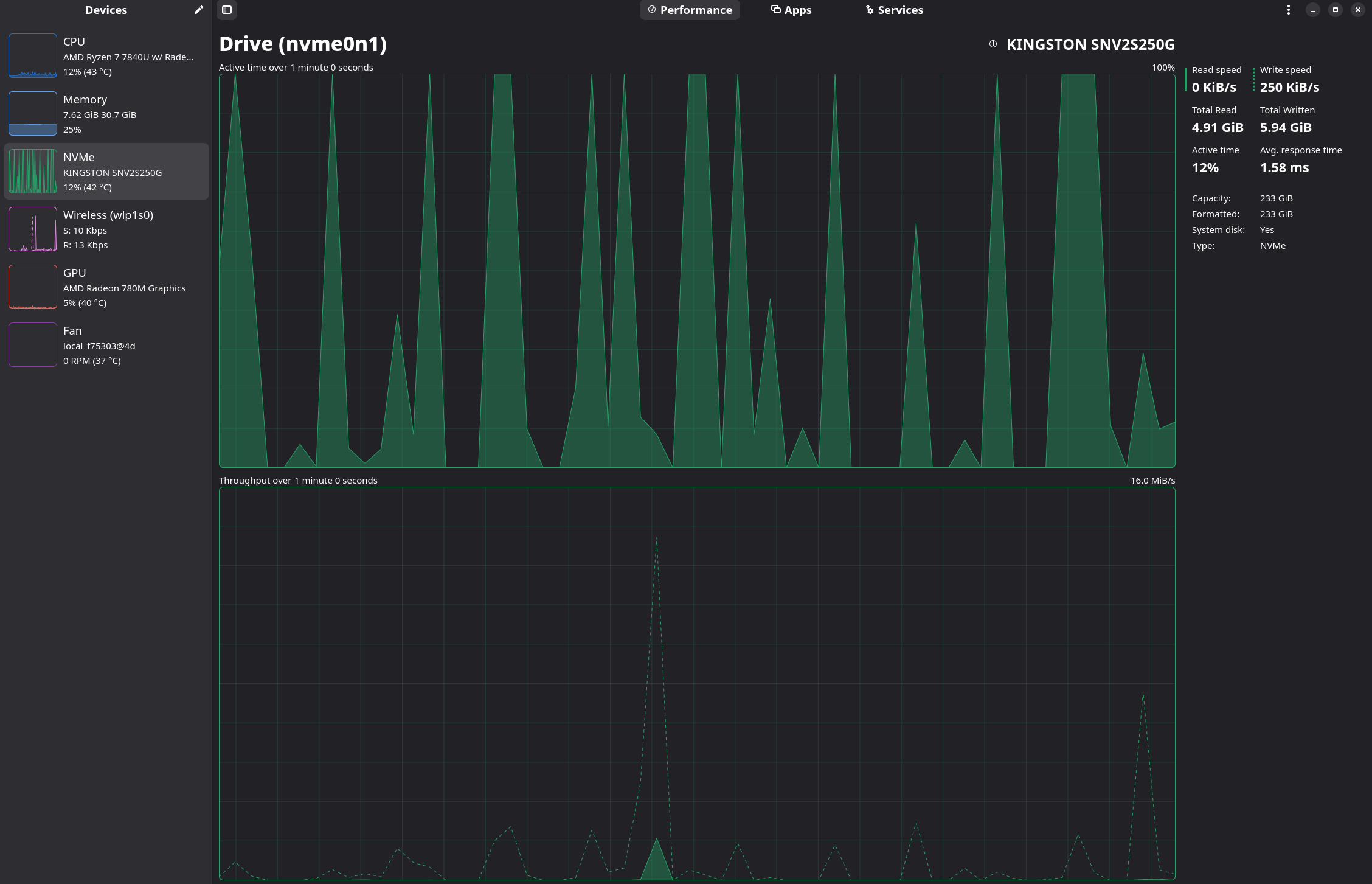
 )
)