Hi, everyone! I know that people ask questions like this here and there, but it’s happening to me as well and I’m not sure my problem is the same as theirs.
I’m not sure how/when it started, but it’s been a few weeks since my second monitor is not detected by Manjaro. If I reboot my laptop into Windows, my second monitor shows image and works as expected, so I know it’s not a fault on my monitor or the HDMI cable.
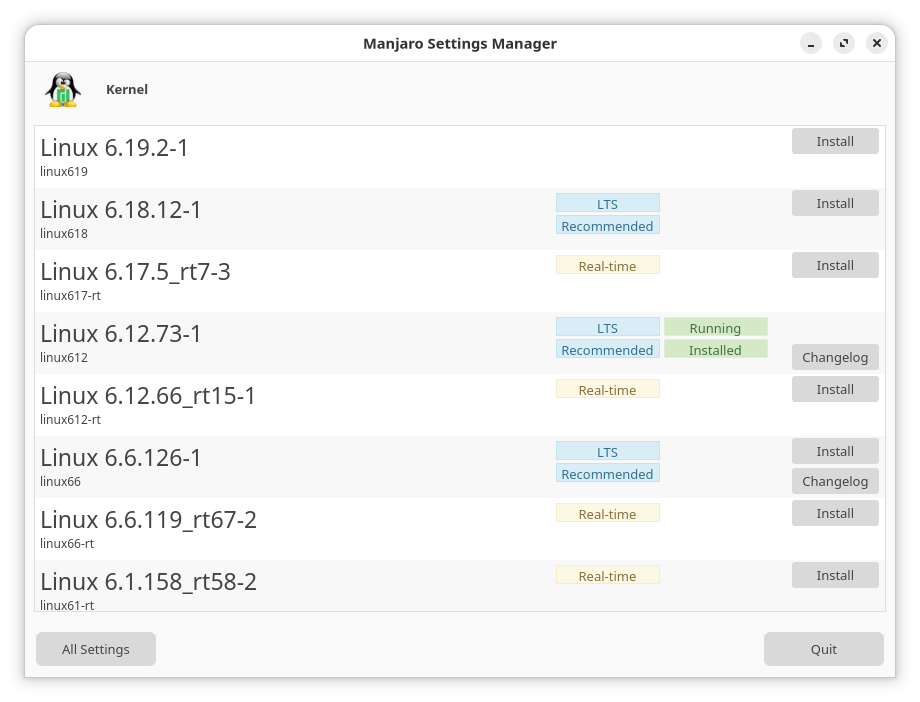
I’m using Manjaro with the GNOME 49 desktop, latest updates applied, 6.12 (LTS) kernel.
$ xrandr

Screen 0: minimum 16 x 16, current 1680 x 1050, maximum 32767 x 32767
eDP-1 connected primary 1680x1050+0+0 (normal left inverted right x axis y axis) 340mm x 220mm
   1680x1050    239.75*+
   1400x1050    239.75
   1280x1024    239.55
   1280x960     239.55
   1152x864     239.72
   1024x768     239.55
   800x600      239.48
   640x480      239.21
   320x240      238.24
   1440x900     239.56
   1280x800     239.55
   1152x720     239.72
   960x600      239.45
   928x580      239.49
   800x500      239.33
   768x480      239.29
   720x480      239.35
   640x400      238.88
   320x200      238.84
   1600x900     239.62
   1368x768     239.44
   1280x720     239.62
   1024x576     239.79
   864x486      239.23
   720x400      239.07
   640x350      239.59
$ mhwd

> 0000:01:00.0 (0300:10de:2860) Display controller nVidia Corporation:
--------------------------------------------------------------------------------
                  NAME               VERSION          FREEDRIVER           TYPE
--------------------------------------------------------------------------------
video-hybrid-intel-nvidia-prime            2025.12.29               false            PCI
video-hybrid-intel-nvidia-575xx-prime            2025.12.29               false            PCI
video-hybrid-intel-nvidia-570xx-prime            2025.12.29               false            PCI
          video-nvidia            2025.09.29               false            PCI
    video-nvidia-575xx            2025.09.29               false            PCI
    video-nvidia-570xx            2025.09.29               false            PCI
           video-linux            2024.05.06                true            PCI
     video-modesetting            2020.01.13                true            PCI
            video-vesa            2017.03.12                true            PCI


> 0000:00:02.0 (0300:8086:a788) Display controller Intel Corporation:
--------------------------------------------------------------------------------
                  NAME               VERSION          FREEDRIVER           TYPE
--------------------------------------------------------------------------------
video-hybrid-intel-nvidia-prime            2025.12.29               false            PCI
video-hybrid-intel-nvidia-575xx-prime            2025.12.29               false            PCI
video-hybrid-intel-nvidia-570xx-prime            2025.12.29               false            PCI
           video-linux            2024.05.06                true            PCI
     video-modesetting            2020.01.13                true            PCI
            video-vesa            2017.03.12                true            PCI
$ inxi -Fxxz

System:
  Kernel: 6.12.73-1-MANJARO arch: x86_64 bits: 64 compiler: gcc v: 15.2.1
  Desktop: GNOME v: 49.4 tk: GTK v: 3.24.51 wm: gnome-shell dm: GDM
    Distro: Manjaro base: Arch Linux
Machine:
  Type: Laptop System: Acer product: Predator PHN16-72 v: V1.14
    serial: <superuser required>
  Mobo: RPL model: EQE_RTX v: V1.14 serial: <superuser required>
    part-nu: 0000000000000000 Firmware: UEFI vendor: Insyde v: 1.14
    date: 09/19/2024
Battery:
  ID-1: BAT1 charge: 75.5 Wh (100%) condition: 75.6/90.1 Wh (83.9%)
    volts: 17.13 min: 15.4 model: PANASONIC AP21A5T serial: <filter> charging:
    status: not charging cycles: N/A
  Device-1: hidpp_battery_0 model: Logitech Wireless Keyboard
    serial: <filter> charge: 50% (should be ignored) status: N/A
CPU:
  Info: 24-core (8-mt/16-st) model: Intel Core i9-14900HX bits: 64
    type: MST AMCP arch: Raptor Lake rev: 1 cache: L1: 2.1 MiB L2: 32 MiB
    L3: 36 MiB
  Speed (MHz): avg: 729 min/max: 800/5600:5800:4100 cores: 1: 729 2: 729
    3: 729 4: 729 5: 729 6: 729 7: 729 8: 729 9: 729 10: 729 11: 729 12: 729
    13: 729 14: 729 15: 729 16: 729 17: 729 18: 729 19: 729 20: 729 21: 729
    22: 729 23: 729 24: 729 25: 729 26: 729 27: 729 28: 729 29: 729 30: 729
    31: 729 32: 729 bogomips: 154880
  Flags-basic: avx avx2 ht lm nx pae sse sse2 sse3 sse4_1 sse4_2 ssse3 vmx
Graphics:
  Device-1: Intel Raptor Lake-S UHD Graphics vendor: Acer Incorporated ALI
    driver: i915 v: kernel arch: Xe ports: active: eDP-1 empty: none
    bus-ID: 0000:00:02.0 chip-ID: 8086:a788
  Device-2: NVIDIA AD106M [GeForce RTX 4070 Max-Q / Mobile]
    vendor: Acer Incorporated ALI driver: nvidia v: 590.48.01 arch: Lovelace
    bus-ID: 0000:01:00.0 chip-ID: 10de:2860
  Device-3: Quanta ACER HD User Facing driver: uvcvideo type: USB rev: 2.0
    speed: 480 Mb/s lanes: 1 bus-ID: 1-6:3 chip-ID: 0408:4035
  Display: wayland server: X.org v: 1.21.1.21 with: Xwayland v: 24.1.9
    compositor: gnome-shell driver: X: loaded: modesetting,nvidia
    unloaded: nouveau alternate: fbdev,nv,vesa dri: iris gpu: i915
    display-ID: 0
  Monitor-1: eDP-1 model: BOE Display 0x0b17 res: 2560x1600 dpi: 188
    diag: 407mm (16")
  API: EGL v: 1.5 platforms: device: 0 drv: nvidia device: 1 drv: iris
    device: 2 drv: swrast gbm: drv: iris surfaceless: drv: nvidia wayland:
    drv: iris x11: drv: iris
  API: OpenGL v: 4.6.0 compat-v: 4.5 vendor: nvidia mesa v: 25.3.5-arch1.1
    glx-v: 1.4 direct-render: yes renderer: NVIDIA GeForce RTX 4070 Laptop
    GPU/PCIe/SSE2 display-ID: :0.0
  API: Vulkan v: 1.4.341 surfaces: N/A device: 0 type: integrated-gpu
    driver: mesa intel device-ID: 8086:a788 device: 1 type: discrete-gpu
    driver: nvidia device-ID: 10de:2860
  Info: Tools: api: eglinfo, glxinfo, vulkaninfo
    gpu: nvidia-settings,nvidia-smi x11: xprop,xrandr
Audio:
  Device-1: Intel Raptor Lake High Definition Audio
    vendor: Acer Incorporated ALI driver: sof-audio-pci-intel-tgl
    bus-ID: 0000:00:1f.3 chip-ID: 8086:7a50
  Device-2: NVIDIA AD106M High Definition Audio
    vendor: Acer Incorporated ALI driver: snd_hda_intel v: kernel
    bus-ID: 0000:01:00.1 chip-ID: 10de:22bd
  API: ALSA v: k6.12.73-1-MANJARO status: kernel-api with: aoss
    type: oss-emulator
  Server-1: sndiod v: N/A status: off
  Server-2: JACK v: 1.9.22 status: off
  Server-3: PipeWire v: 1.4.10 status: active with: 1: pipewire-pulse
    status: active 2: wireplumber status: active 3: pipewire-alsa type: plugin
Network:
  Device-1: Intel 700 Series CNVi WiFi vendor: Rivet Networks driver: iwlwifi
    v: kernel bus-ID: 0000:00:14.3 chip-ID: 8086:7a70
  IF: wlp0s20f3 state: up mac: <filter>
  Device-2: Realtek Killer E3000 2.5GbE vendor: Acer Incorporated ALI
    driver: r8169 v: kernel port: 3000 bus-ID: 0000:43:00.0 chip-ID: 10ec:3000
  IF: enp67s0 state: down mac: <filter>
  IF-ID-1: br-4b959408776b state: down mac: <filter>
  IF-ID-2: br-4e0292e2eec5 state: down mac: <filter>
  IF-ID-3: br-7c0460970d1a state: down mac: <filter>
  IF-ID-4: br-83d0044ec9ec state: down mac: <filter>
  IF-ID-5: br-93dad6c76837 state: down mac: <filter>
  IF-ID-6: docker0 state: down mac: <filter>
Bluetooth:
  Device-1: Intel AX211 Bluetooth driver: btusb v: 0.8 type: USB rev: 2.0
    speed: 12 Mb/s lanes: 1 bus-ID: 1-14:5 chip-ID: 8087:0033
  Report: rfkill ID: hci0 rfk-id: 0 state: up address: see --recommends
RAID:
  Hardware-1: Intel RST Volume Management Device Controller driver: vmd v: 0.6
    bus-ID: 0000:00:0e.0 chip-ID: 8086:a77f
Drives:
  Local Storage: total: 953.87 GiB used: 544.54 GiB (57.1%)
  ID-1: /dev/nvme0n1 vendor: Samsung model: MZVL21T0HCLR-00B07
    size: 953.87 GiB speed: 63.2 Gb/s lanes: 4 serial: <filter> temp: 43.9 C
Partition:
  ID-1: / size: 200 GiB used: 126.1 GiB (63.1%) fs: btrfs dev: /dev/nvme0n1p5
  ID-2: /boot/efi size: 256 MiB used: 62.6 MiB (24.4%) fs: vfat
    dev: /dev/nvme0n1p1
  ID-3: /home size: 459.58 GiB used: 418.37 GiB (91.0%) fs: ext4
    dev: /dev/dm-0 mapped: luks-d7fb0903-be5e-4dd0-b1d6-75d53561208f
  ID-4: /var/log size: 200 GiB used: 126.1 GiB (63.1%) fs: btrfs
    dev: /dev/nvme0n1p5
Swap:
  ID-1: swap-1 type: partition size: 34.6 GiB used: 0 KiB (0.0%) priority: -2
    dev: /dev/nvme0n1p7
Sensors:
  System Temperatures: cpu: 44.5 C mobo: N/A
  Fan Speeds (rpm): N/A
Info:
  Memory: total: 32 GiB note: est. available: 31.05 GiB used: 6.97 GiB (22.5%)
  Processes: 575 Power: uptime: 32m wakeups: 0 Init: systemd v: 259
    default: graphical
  Packages: 2159 pm: pacman pkgs: 2127 pm: flatpak pkgs: 32 Compilers:
    clang: 21.1.8 gcc: 15.2.1 Shell: Zsh v: 5.9 running-in: kgx inxi: 3.3.40