Xfce Desktop language / Manjaro settings manager - unable to switch (back) to en_US.UTF-8

Hello!
Although I tried to read all about Manjaro-setting-manger, Xfce language setting an Local trouble shooting in this forum (among many others this and this and of course this and others) - I am still stuck with my profane problem of not being able to switch my Xfce desktop language back to US-English (en_US.UTF-8).

For years now I use Manjaro with the system language set to en_US.UTF-8 and all other settings - such as for number-format, address, date, etc., I set to de_DE.UTF-8 and it worked like a charm.
I am not aware what I did (or that I changed anything) but a couple of days ago I noticed that although my settings manager local settings still were the same - the Xfce desktop language was in German which I don’t understand and I don’t want - I want it to be in US-English.

I don’t know if it is relevant but currently I am using the following kernel:
6.18.33-1-MANJARO #1 SMP PREEMPT_DYNAMIC

  • locale -v gives the follwing output:
LANG=en_US.UTF-8
LC_CTYPE="en_US.UTF-8"
LC_NUMERIC="en_US.UTF-8"
LC_TIME="en_US.UTF-8"
LC_COLLATE="en_US.UTF-8"
LC_MONETARY="en_US.UTF-8"
LC_MESSAGES="en_US.UTF-8"
LC_PAPER="en_US.UTF-8"
LC_NAME="en_US.UTF-8"
LC_ADDRESS="en_US.UTF-8"
LC_TELEPHONE="en_US.UTF-8"
LC_MEASUREMENT="en_US.UTF-8"
LC_IDENTIFICATION="en_US.UTF-8"
LC_ALL=
  • the /etc/locale.conf file ONLY contains LANG=en_US.UTF-8
  • in the /etc/locale.gen` file ONLY the line with en_US.UTF-8 is not commented:
#...en_SG.UTF-8 UTF-8  
#en_SG ISO-8859-1  
en_US.UTF-8 UTF-8
#en_US ISO-8859-1  
#en_ZA.UTF-8 UTF-8 ...
  • my /etc/default/locale file ONLY contains LANG=en_US.UTF-8
  • locale -a gives all possible locales I can wish including the one I would want to see as my desktop language - so the command locale -a | grep -i "en_US" returns en_US and en_US.utf8 which is no surprise.
  • In my settings manager I completely removed German language support.

This had no effect so I tried the manual approach to trouble shoot that issue - by follwing the suggestions of this post but unfortunately setting the files by hand and calling locale-gen and setting the language manually by calling sudo localectl set-locale LANGUAGE=en_US.UTF-8 didn’t help either and after rebooting the state remained the same - an Xfce desktop in German language. I don’t know how.

Any hints what I did wrong or oversaw are truly appreciated - it is not a showstopper but very annoying. Currently it looks as if I cannot change any locale settings at all.

The irony is the following screenshot (after changing everything to en-US.UTF-8 and reboot) - everything looks as set to US-English but the system language is German…
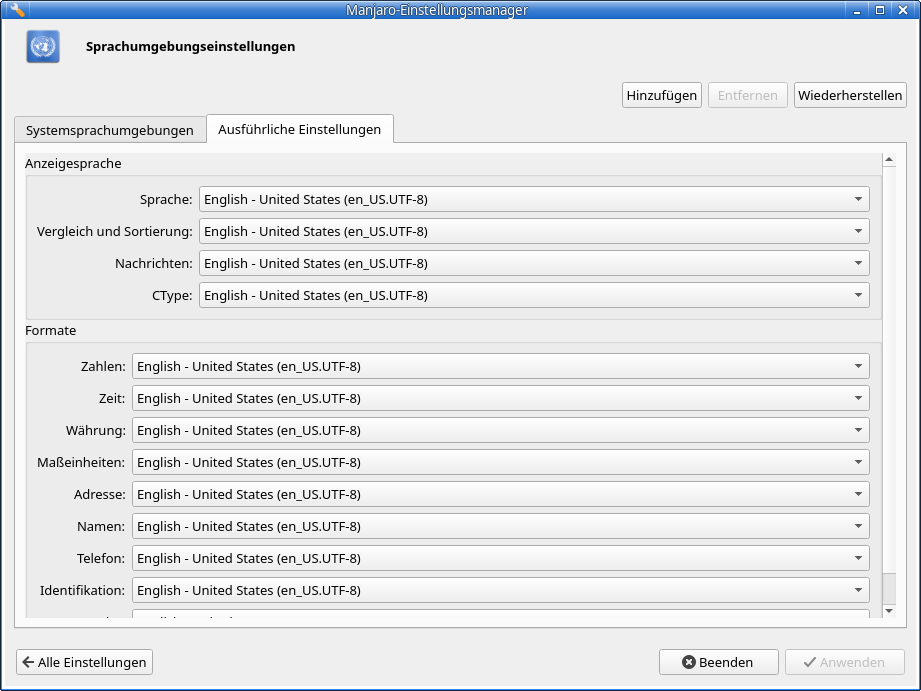
That look strange - I give you that.

I am thinking that despite your efforts to weed out the German language - I don’t see any mention of using the Xfce settings manager.

I think that if you use the Xfce settings applet - you will find it is set to German.

If you now say - that is confusing, perhaps even inconsistent - and you are absolute right.

The desktop editions has their own configuration files - which will override what the system has defined.

Because Manjaro Settings Manager is a very old application - it only work with the basic system configuration - it does not change Xfce, Gnome and Plasma specific settings.

EDIT:

Just a thought - after editing /etc/locale.gen did you rebuild the languages using sudo locale-gen?

This is required to ensure that system messages is generated for the selected locales.

The GUI language is initially controlled by the system locale but may be overridden by the desktop or by single applications e.g.

LANG=da_DK pacman-mirrors --help

Also - in Manjaro Settings Manager - you can right click the langauge entry and select what it is used for.

The options are

  • default display language and format
  • default display language
  • default format

EDIT: this is strange - I have to retest - I am not sure this is correct

Another thing I just tested (credit @nikgnomic) - the language choice in lightdm does affect the language used in xfce - even if it has not been selected inside the desktop.

The file /etc/locale.gen will be adapted and the locale will be build automagically - I have never experienced this before.

I have checked - the files /etc/locale.conf and /etc/locale.gen is not changed as this is on system level BUT the interface language will reflect what has been chosen in the display manager.

The value is stored - as @nikgnomic points out in ~/.dmrc.

This value behaves much like the ~/.config/plasma-localerc does for Plasma.

It will override the system configured locale and it has been cause of confusion for many users.

My test environment (Manjaro Xfce virtual machine)

 $ grep -e DK /etc/locale.gen
#da_DK.UTF-8 UTF-8
#da_DK ISO-8859-1
#en_DK.UTF-8 UTF-8
#en_DK ISO-8859-1
en_DK.UTF-8 UTF-8
 $ grep -e DK /etc/locale.conf
LANG=en_DK.UTF-8
 $ cat  ~/.dmrc
[Desktop]
Language=da_DK.utf8
Session=xfce

This will display the Xfce desktop in Danish language despite a different locale is defined for the system messages.

It is possible because the applications installed will pull their interface text from the applications corresponding file e.g. pacman-mirrors and Danish locale

/usr/share/locale/da/LC_MESSAGES/pacman_mirrors.mo

I have marked @nikgnomic comment below as the answer as my comments above is a result of the hint, I suspected something similar to Plasma but I didn’t know for sure until now.

You can consider my comments as background information, the explanation why below comment is the real answer.

1 Like

My system is still using wrong language - Locale - ArchWiki

LightDM will automatically use accountsservice to set a user’s locale if it is installed. Otherwise, LightDM stores the user session configuration in ~/.dmrc. It is possible that an unwanted locale setting is retrieved from there as well.

[nik@gnomic ~]$ cat ~/.dmrc
[Desktop]
Language=en_GB.utf8
Session=xfce

Wow, thanks for this quick ad detailed reply - although at the moment I am still stuck - I learned a view new things here.

Right - well, to my knowledge - xfce4-settings-manager just brings up the settings window where I can start all kinds of setting applets in four categories (‘Personal’, ‘Hardware’, ‘System’ and ‘Other’) which are from About me to Session Startup and finally Settings Editor . From here I usually run the manjaro-settings-manager.

When you mention ‘another’ Xfce settings applet I am totally agnostic to that an probably never used it consciously, sorry.

Yes, I run the locale sudo locale-gen command which gave the following output (sorry for omitting this in my previous post):

Generating locales...
  en_US.UTF-8... done
Generation complete.

Ah, ok you mean the different apps are started with an overriden language setting - not to my knowledge. I don´t use that consciously. The interesting thing is that Thunar, the Whisker-menu entries and the Settings-Manager dialog the whole xfce messages popping up are in German - of course I have singel apps which are still in US-English, such as firefox but the majority is in German.

Thanks, that was new to me - since I know the detail tab to choose that which currently is fully populated with en_US.UTF-8 as can bee seen in previous screen shot. BUT of course I set it now (default display language and format) - although having only a single Language I assumed these settings were chosen by default. Unfortunately no effect.

Hm, although I did set and apply them I don’t have this file and never - had - I checked an older backup of mine. Delivering cat .dmrc in my home leads to cat: .dmrc: No such file or directory.

Once again - thanks for your help, but the sate did no change so far.

Thanks for the quote, nikgnomic - I have read that article too but did not find how this could affect me since I do not have a ~/.dmrc file.

BUT it is true I changed something with my greeter settings, although nothing which had to do with locale - but the position of the login window.

I just reopened the LightDM GTK Greeter setting and had a look - I cannot see any locale value which could be set, neither in tab Appearance, Panel, Window Position or Misc.

… But wait … I just notice a thing. Whenever I start the settings manager from my console it is in English (likely en_US.UTF-8) language. But starting from the Whisker-menu → settings → Manjaro Settings Manager it is in German (likely de_DE.UTF-8).

But I have not seen any change after reboot. Still stuck to German.

I am trying to create another user and have a look if the German settings are system wide or default - then I have to search in other places not my home.


Mod edit:- Please avoid consecutive posts. Remedied, no charge.

I didn’t mean that you would be running any apps with a different locale - it was merely an example that it is possible for applications - the whole desktop display in a language different from the system configuration.

For a moment - ignore what you have configured in /etc and concentrate on your desktop.

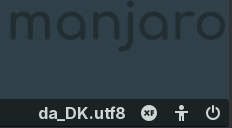
I suggest you sign-off - check in lower right corner of the login screen (default) you should see a locale - what does it say?

If it says anything but en_US.UTF-8 then the answer is to change the locale by clicking on the label.

Example

Also worth mentioning - for reason unknown - you will need to sign-off/sign-on one more time for the change to take effect (no need to reboot) - just sign-off and sign-on.

Hmmm, i am on the move now but if i remember correctly this only changes the keyboard layout to type the password.

language changing in xfce / Desktop / Xfce Forums

locale is one component of localization/internationalization. Here is an Arch Wiki page on it.

Upstream Xfce (or the Xfce project) has the option to change fonts (Settings Manager > Appearance) and keyboard layout (xfce4-xkb-plugin) but the rest needs to be done at the distro level (like changing locale). Note that some distros do offer tools to make these changes but again that is at the distro level and not an upstream Xfce capability.

Stack Exchange - setting-the-lang-environment-variable-for-xfce

Setting ~/.dmrc works on Arch/Manjaro

$ cat ~/.dmrc 
[Desktop]
Session=xfce4
Language=en_US.utf8

This is mentioned in the Arch Wiki

Ask Ubuntu - How do I fix my locale issue?

Nothing suggested above worked in my case (Ubuntu Server 12.04LTS). What finally helped was putting to the file /etc/environment:

LC_ALL=en_US.UTF-8
LANG=en_US.UTF-8

I think the OP can mark what @linux-aarhus wrote as a solution. I was wrong, because the locale drop down menu is right next to the keyboard layout menu (so in my case it is en_US.utf8 en and it is hard to notice those are 2 menus). Changing the locale form this menu in the login screen, and logging on-off-on changes the locale.
I also have the .dmrc file as posted above. And judging by it’s change date it is auto-generated when the user fiddles with that menu on the lightdm login screen.

Note: if you are on a laptop, by default on the login screen the touchpad works with pressing, and not tapping. Can be changed in one config file. Me personally, at the beginning didn’t even realize those are menus…as i tapped and nothing happened.