Hello, I have an Inspiron 15 3535 Laptop that came with Windows 11 preinstalled. It only has one drive. Over the past year, I created a partition for Manjaro and found that I’ve started using it the majority of the time. I would like to reset Windows 11 using either the Reset PC > Keep My Files, or the Reset PC > Remove everything, options. Ideally, I would prefer removing everything so I have a clean start.
The question I have is, will pressing either option kill my Manjaro partition? I tried looking online, and some places say it’s fine, some say to remake the partition after, and others say I have to reinstall the GRUB. I don’t fully remember how to do that after a year. Not to mention all the questions I’ve found online are asking about Ubuntu or Windows 10, and are massively out of date.
I really don’t want to lose anything in the Linux partition, so if it’s all fine, I’ll go do it, but otherwise, some steps to follow would be great. Not sure if this is the right category, but it seemed the best I could figure out.
The process should only operate on the Windows partition - not on the whole drive.
There must be explanations about what happens when you do that reset.
It will for sure wipe out your Grub boot loader and you’ll need to reinstall it.
The safest option is to have a backup on an external drive from which you can easily restore your Linux installation.
You should have that backup in any case.
As Nachlese said. Backup, try to find what it does and prepare live usb.
I would not risk it if it was my machine (unless someone explains what those opinions really do).
I don’t know about 11, but 10 modified the boot operation on my HP laptop, (not Grub) by deleting Linux. I couldn’t figure out how to add it back in. It took a full reinstall of Linux. The second time it happened I just deleted Windows all together.
However, with your obvious lack of experience, it might be better to copy your /home directory (or partition) somewhere safe - an ext4 formatted USB disk (for example) - while you sort it out.
With the content of /home safe and sound, you can then go ahead and start from scratch - /home can be copied back later.
If you follow this route, I’d recommend:
1. Download the latest Manjaro Installer ISO;
2. Createa new Installer USB; Ventoy USB recommended:
It’s not.
The Manjaro forum has no category for Windows questions, and your questions have nothing to do with Manjaro system updates.
Your topic has been moved elsewhere, and might be moved again before the day is done.
In the meantime, in case others might have further suggestions, please provide (Manjaro) system information as decribed (below) and the output of:
This is definitely worth pointing out, as I myself have read various reports of Windows seeing the ext4 (or whatever non-Windows) partitions as “free space”; this was a good while back and I don’t know if Win11 is any better in that respect — but certainly not worth the risk of doing it without backing-up (and verifying it) first.
That is the million dollar question here - will it only reset the boot entries, or will it delete/recreate the partition table too. Somebody has to sacrifice himself to test and tell the others, but it won’t be me
Not quite the same thing, but both Windows and MacOS at one time had a somewhat annoying warning at startup, asking to format a partition if the file system was unrecognised by the OS; so, basically, any file system that was not native to the OS concerned.
Of course the real danger with that was that Johnny DF would boot their machine, see the message, and think “Hm, OK, I’ll click that…Yes”.
The only way to avoid the message was to remove the disk, format the partition with a known file system, or prevent it from mounting - the latter was my personal workaround, gleaned from years of mult-booting experience.
As far as I’m aware, the issue hasn’t existed on Windows since XP, or possibly 7; and early-mid versions of MacOS (X).
If an “in-place upgrade” is performed (from within Windows) it should upgrade the existing system, with the pre-existing layout. If the Windows Installer DVD/USB is booted, then Windows is replaced in its entirety.
In that case the user should carefully plan their strategy, as Windows has never supported the concept of multi-booting with Windows and some other OS on the very same disk.
With inexperienced hands there is always scope for things to go awry. For this reason, I always recommend (wherever possible) to install each OS on a separate disk;
That would be me then. Both upgrading an existing installation and new installation from a USB flashed ISO does NOT alter partition layout UNLESS you choose to. The new installation media allows choosing which partition to install Windows into like this:
The easy answer always was, “depends on the manufacturer”.
They used to have to build the tool to do it themselves with Windows XP and before. Commonly, just having the recovery partition at the end, then their tool would almost dd the image over top at the start of the drive.
That even continued well into Windows 7 days, even with major manufactures. But to do it the official Microsoft way, was using WinPE and WIM. A little bit messy. And my many experiences, this almost always blasted over the partition table. (I’m guessing the best practice was starting with diskpart clean? I do not know, I try to avoid M$! )
Now currently the MS SDK for OEMs (for Windows 10 and 11 onward), the official MS way now uses WinRE. This is the way you see in @leledumbo’s screenshots, and is non-destructive to other partitions.
For all the big OEM partners (Lenovo/Dell/HP/and on), just to sell OEM Windows, their agreements are very specific, and have to do it this way.


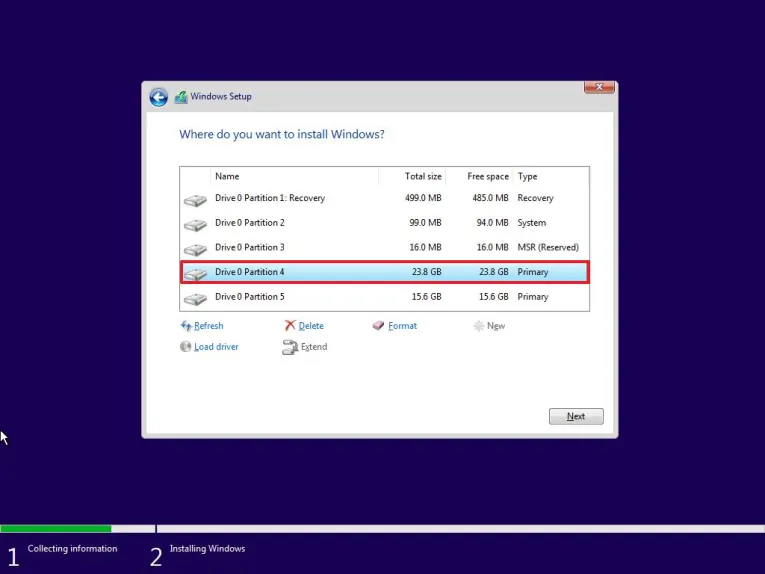

 )
)