System:
  Kernel: 6.15.11-2-MANJARO arch: x86_64 bits: 64 compiler: gcc v: 15.2.1
    clocksource: tsc avail: hpet,acpi_pm
    parameters: BOOT_IMAGE=/@/boot/vmlinuz-6.15-x86_64
    root=UUID=efcf7327-b70a-4194-8cd4-6d749e10920e rw rootflags=subvol=@
    quiet splash apparmor=1 security=apparmor udev.log_priority=3
  Desktop: GNOME v: 48.4 tk: GTK v: 3.24.50 wm: gnome-shell
    tools: gsd-screensaver-proxy dm: GDM v: 48.0 Distro: Manjaro
    base: Arch Linux
Machine:
  Type: Desktop System: ASUS product: N/A v: N/A serial: <superuser required>
  Mobo: ASUSTeK model: ROG STRIX B550-F GAMING (WI-FI) v: Rev X.0x
    serial: <superuser required> part-nu: SKU uuid: <superuser required>
    UEFI: American Megatrends v: 2803 date: 04/27/2022
Battery:
  Device-1: hidpp_battery_0 model: Logitech MX Keys Wireless Keyboard
    serial: <filter> charge: 50% (should be ignored) rechargeable: yes
    status: discharging
Memory:
  System RAM: total: 32 GiB available: 31.25 GiB used: 8.39 GiB (26.8%)
  Message: For most reliable report, use superuser + dmidecode.
  Array-1: capacity: 128 GiB slots: 4 modules: 4 EC: None
    max-module-size: 32 GiB note: est.
  Device-1: DIMM_A1 type: DDR4 detail: synchronous unbuffered (unregistered)
    size: 8 GiB speed: 3733 MT/s volts: note: check curr: 1 min: 1 max: 1
    width (bits): data: 64 total: 64 manufacturer: Patriot
    part-no: 3733 C17 Series serial: <filter>
  Device-2: DIMM_A2 type: DDR4 detail: synchronous unbuffered (unregistered)
    size: 8 GiB speed: 3733 MT/s volts: note: check curr: 1 min: 1 max: 1
    width (bits): data: 64 total: 64 manufacturer: Patriot
    part-no: 3733 C17 Series serial: N/A
  Device-3: DIMM_B1 type: DDR4 detail: synchronous unbuffered (unregistered)
    size: 8 GiB speed: 3733 MT/s volts: note: check curr: 1 min: 1 max: 1
    width (bits): data: 64 total: 64 manufacturer: Patriot
    part-no: 3733 C17 Series serial: <filter>
  Device-4: DIMM_B2 type: DDR4 detail: synchronous unbuffered (unregistered)
    size: 8 GiB speed: 3733 MT/s volts: note: check curr: 1 min: 1 max: 1
    width (bits): data: 64 total: 64 manufacturer: Patriot
    part-no: 3733 C17 Series serial: N/A
PCI Slots:
  Permissions: Unable to run dmidecode. Root privileges required.
CPU:
  Info: model: AMD Ryzen 7 5700X bits: 64 type: MT MCP arch: Zen 3+ gen: 3
    level: v3 note: check built: 2022 process: TSMC n6 (7nm) family: 0x19 (25)
    model-id: 0x21 (33) stepping: 2 microcode: 0xA201211
  Topology: cpus: 1x dies: 1 clusters: 1 cores: 8 threads: 16 tpc: 2
    smt: enabled cache: L1: 512 KiB desc: d-8x32 KiB; i-8x32 KiB L2: 4 MiB
    desc: 8x512 KiB L3: 32 MiB desc: 1x32 MiB
  Speed (MHz): avg: 1759 min/max: 557/4867 boost: enabled scaling:
    driver: amd-pstate-epp governor: powersave cores: 1: 1759 2: 1759 3: 1759
    4: 1759 5: 1759 6: 1759 7: 1759 8: 1759 9: 1759 10: 1759 11: 1759 12: 1759
    13: 1759 14: 1759 15: 1759 16: 1759 bogomips: 108803
  Flags: 3dnowprefetch abm adx aes aperfmperf apic arat avic avx avx2 bmi1
    bmi2 bpext cat_l3 cdp_l3 clflush clflushopt clwb clzero cmov cmp_legacy
    constant_tsc cpb cpuid cqm cqm_llc cqm_mbm_local cqm_mbm_total
    cqm_occup_llc cr8_legacy cx16 cx8 de debug_swap decodeassists erms
    extapic extd_apicid f16c flushbyasid fma fpu fsgsbase fsrm fxsr fxsr_opt
    ht hw_pstate ibpb ibrs ibs invpcid irperf lahf_lm lbrv lm mba mca mce
    misalignsse mmx mmxext monitor movbe msr mtrr mwaitx nonstop_tsc nopl npt
    nrip_save nx ospke osvw overflow_recov pae pat pausefilter pclmulqdq
    pdpe1gb perfctr_core perfctr_llc perfctr_nb pfthreshold pge pku pni
    popcnt pse pse36 rapl rdpid rdpru rdrand rdseed rdt_a rdtscp rep_good sep
    sha_ni skinit smap smca smep ssbd sse sse2 sse4_1 sse4_2 sse4a ssse3
    stibp succor svm svm_lock syscall tce topoext tsc tsc_scale umip
    user_shstk v_spec_ctrl v_vmsave_vmload vaes vgif vmcb_clean vme vmmcall
    vpclmulqdq wbnoinvd wdt x2apic xgetbv1 xsave xsavec xsaveerptr xsaveopt
    xsaves xtopology
  Vulnerabilities:
  Type: gather_data_sampling status: Not affected
  Type: ghostwrite status: Not affected
  Type: indirect_target_selection status: Not affected
  Type: itlb_multihit status: Not affected
  Type: l1tf status: Not affected
  Type: mds status: Not affected
  Type: meltdown status: Not affected
  Type: mmio_stale_data status: Not affected
  Type: reg_file_data_sampling status: Not affected
  Type: retbleed status: Not affected
  Type: spec_rstack_overflow mitigation: Safe RET
  Type: spec_store_bypass mitigation: Speculative Store Bypass disabled via
    prctl
  Type: spectre_v1 mitigation: usercopy/swapgs barriers and __user pointer
    sanitization
  Type: spectre_v2 mitigation: Retpolines; IBPB: conditional; IBRS_FW;
    STIBP: always-on; RSB filling; PBRSB-eIBRS: Not affected; BHI: Not
    affected
  Type: srbds status: Not affected
  Type: tsa mitigation: Clear CPU buffers
  Type: tsx_async_abort status: Not affected
Graphics:
  Device-1: NVIDIA GA104 [GeForce RTX 3070] vendor: ZOTAC driver: nvidia
    v: 575.64.05 alternate: nouveau,nova_core,nvidia_drm non-free: 550-580.xx+
    status: current (as of 2025-08; EOL~2026-12-xx) arch: Ampere code: GAxxx
    process: TSMC n7 (7nm) built: 2020-2023 pcie: gen: 1 speed: 2.5 GT/s
    lanes: 16 link-max: gen: 4 speed: 16 GT/s ports: active: none
    off: DP-1,DP-2 empty: DP-3,HDMI-A-1 bus-ID: 0b:00.0 chip-ID: 10de:2484
    class-ID: 0300
  Display: wayland server: X.org v: 1.21.1.18 with: Xwayland v: 24.1.8
    compositor: gnome-shell driver: X: loaded: N/A failed: nvidia
    gpu: nvidia,nvidia-nvswitch display-ID: 0
  Monitor-1: DP-1 model: Dell U2412M serial: <filter> built: 2011
    res: 1920x1200 dpi: 94 gamma: 1.2 chroma: red: x: 0.639 y: 0.329 green:
    x: 0.298 y: 0.600 blue: x: 0.149 y: 0.059 white: x: 0.314 y: 0.329
    size: 518x324mm (20.39x12.76") diag: 611mm (24.1") ratio: 16:10
    modes: 1920x1200, 1920x1080, 1600x1200, 1680x1050, 1280x1024, 1280x960,
    1024x768, 800x600, 640x480
  Monitor-2: DP-2 model: Lenovo LEN G34w-10 serial: <filter> built: 2020
    res: 3440x1440 dpi: 110 gamma: 1.2 chroma: red: x: 0.678 y: 0.310 green:
    x: 0.200 y: 0.690 blue: x: 0.149 y: 0.051 white: x: 0.314 y: 0.329
    size: 797x334mm (31.38x13.15") diag: 864mm (34") modes: 3440x1440,
    2560x1440, 2560x1080, 1920x1200, 1920x1080, 1600x1200, 1680x1050,
    1600x900, 1280x1024, 1440x900, 1366x768, 1280x800, 1152x864, 1280x720,
    1024x768, 800x600, 720x576, 720x480, 640x480
  EDID-Warnings: 1: parse_edid: unhandled CEA mode 90 2: parse_edid:
    unknown tag 112
  API: EGL v: 1.5 hw: drv: nvidia platforms: device: 0 drv: nvidia device: 2
    drv: swrast gbm: drv: nvidia surfaceless: drv: nvidia wayland: drv: nvidia
    x11: drv: nvidia inactive: device-1
  API: OpenGL v: 4.6.0 compat-v: 4.5 vendor: nvidia mesa v: 575.64.05
    glx-v: 1.4 direct-render: yes renderer: NVIDIA GeForce RTX 3070/PCIe/SSE2
    memory: 7.81 GiB display-ID: :0.0
  Info: Tools: api: eglinfo,glxinfo gpu: nvidia-settings,nvidia-smi
    x11: xprop,xrandr
Audio:
  Device-1: NVIDIA GA104 High Definition Audio vendor: ZOTAC
    driver: snd_hda_intel v: kernel alternate: nova_core pcie: gen: 4
    speed: 16 GT/s lanes: 16 bus-ID: 0b:00.1 chip-ID: 10de:228b class-ID: 0403
  Device-2: Advanced Micro Devices [AMD] Starship/Matisse HD Audio
    vendor: ASUSTeK driver: snd_hda_intel v: kernel pcie: gen: 4 speed: 16 GT/s
    lanes: 16 bus-ID: 0d:00.4 chip-ID: 1022:1487 class-ID: 0403
  Device-3: Creative Pebble V3 driver: hid-generic,snd-usb-audio,usbhid
    type: USB rev: 1.1 speed: 12 Mb/s lanes: 1 mode: 1.1 bus-ID: 1-2:5
    chip-ID: 041e:3272 class-ID: 0300 serial: <filter>
  API: ALSA v: k6.15.11-2-MANJARO status: kernel-api with: aoss
    type: oss-emulator tools: alsactl,alsamixer,amixer
  Server-1: sndiod v: N/A status: off tools: aucat,midicat,sndioctl
  Server-2: JACK v: 1.9.22 status: off tools: N/A
  Server-3: PipeWire v: 1.4.7 status: active with: 1: pipewire-pulse
    status: active 2: wireplumber status: active 3: pipewire-alsa type: plugin
    tools: pactl,pw-cat,pw-cli,wpctl
Network:
  Device-1: Intel Wi-Fi 6 AX200 driver: iwlwifi v: kernel pcie: gen: 2
    speed: 5 GT/s lanes: 1 bus-ID: 09:00.0 chip-ID: 8086:2723 class-ID: 0280
  IF: wlp9s0 state: up mac: <filter>
  IP v4: <filter> type: dynamic noprefixroute scope: global
    broadcast: <filter>
  IP v6: <filter> type: noprefixroute scope: link
  Device-2: Intel Ethernet I225-V vendor: ASUSTeK driver: igc v: kernel
    pcie: gen: 2 speed: 5 GT/s lanes: 1 port: N/A bus-ID: 0a:00.0
    chip-ID: 8086:15f3 class-ID: 0200
  IF: enp10s0 state: down mac: <filter>
  Info: services: NetworkManager, systemd-timesyncd, wpa_supplicant
  WAN IP: <filter>
Bluetooth:
  Message: No bluetooth data found.
Logical:
  Message: No logical block device data found.
RAID:
  Message: No RAID data found.
Drives:
  Local Storage: total: 5.24 TiB used: 178.56 GiB (3.3%)
  SMART Message: Required tool smartctl not installed. Check --recommends
  ID-1: /dev/nvme0n1 maj-min: 259:3 vendor: Western Digital
    model: WD BLACK SN850X 2000GB size: 1.82 TiB block-size: physical: 512 B
    logical: 512 B speed: 63.2 Gb/s lanes: 4 tech: SSD serial: <filter>
    fw-rev: 620311WD temp: 50.9 C scheme: GPT
  ID-2: /dev/nvme1n1 maj-min: 259:0 vendor: KIOXIA model: EXCERIA G2 SSD
    size: 931.51 GiB block-size: physical: 512 B logical: 512 B speed: 31.6 Gb/s
    lanes: 4 tech: SSD serial: <filter> fw-rev: ECFA17.1 temp: 46.9 C
    scheme: GPT
  ID-3: /dev/sda maj-min: 8:0 vendor: SanDisk model: SDSSDH3500G
    size: 465.76 GiB block-size: physical: 512 B logical: 512 B speed: 6.0 Gb/s
    tech: SSD serial: <filter> fw-rev: 70RL scheme: MBR
  ID-4: /dev/sdb maj-min: 8:16 vendor: OCZ model: VERTEX4 size: 238.47 GiB
    block-size: physical: 512 B logical: 512 B speed: 6.0 Gb/s tech: SSD
    serial: <filter> fw-rev: 1.5 scheme: MBR
  ID-5: /dev/sdc maj-min: 8:32 vendor: Seagate model: ST2000DL003-9VT166
    size: 1.82 TiB block-size: physical: 512 B logical: 512 B speed: 6.0 Gb/s
    tech: HDD rpm: 5900 serial: <filter> fw-rev: CC32 scheme: MBR
  Message: No optical or floppy data found.
Partition:
  ID-1: / raw-size: 397.67 GiB size: 397.67 GiB (100.00%)
    used: 178.56 GiB (44.9%) fs: btrfs dev: /dev/nvme0n1p5 maj-min: 259:8
    label: N/A uuid: efcf7327-b70a-4194-8cd4-6d749e10920e
  ID-2: /boot/efi raw-size: 512 MiB size: 511 MiB (99.80%)
    used: 348 KiB (0.1%) fs: vfat dev: /dev/nvme0n1p6 maj-min: 259:9 label: N/A
    uuid: 24EB-20C0
  ID-3: /home raw-size: 397.67 GiB size: 397.67 GiB (100.00%)
    used: 178.56 GiB (44.9%) fs: btrfs dev: /dev/nvme0n1p5 maj-min: 259:8
    label: N/A uuid: efcf7327-b70a-4194-8cd4-6d749e10920e
  ID-4: /var/cache raw-size: 397.67 GiB size: 397.67 GiB (100.00%)
    used: 178.56 GiB (44.9%) fs: btrfs dev: /dev/nvme0n1p5 maj-min: 259:8
    label: N/A uuid: efcf7327-b70a-4194-8cd4-6d749e10920e
  ID-5: /var/log raw-size: 397.67 GiB size: 397.67 GiB (100.00%)
    used: 178.56 GiB (44.9%) fs: btrfs dev: /dev/nvme0n1p5 maj-min: 259:8
    label: N/A uuid: efcf7327-b70a-4194-8cd4-6d749e10920e
Swap:
  Alert: No swap data was found.
Unmounted:
  ID-1: /dev/nvme0n1p1 maj-min: 259:4 size: 16 MiB fs: <superuser required>
    label: N/A uuid: N/A
  ID-2: /dev/nvme0n1p2 maj-min: 259:5 size: 100 MiB fs: vfat label: N/A
    uuid: ECCC-7828
  ID-3: /dev/nvme0n1p3 maj-min: 259:6 size: 1.43 TiB fs: ntfs label: N/A
    uuid: 9428DBD628DBB588
  ID-4: /dev/nvme0n1p4 maj-min: 259:7 size: 758 MiB fs: ntfs label: N/A
    uuid: DA342A0D3429ECE7
  ID-5: /dev/nvme1n1p1 maj-min: 259:1 size: 16 MiB fs: <superuser required>
    label: N/A uuid: N/A
  ID-6: /dev/nvme1n1p2 maj-min: 259:2 size: 931.5 GiB fs: ntfs
    label: NVMe 1TB uuid: 3E0E309D0E304FDF
  ID-7: /dev/sda1 maj-min: 8:1 size: 465.76 GiB fs: ntfs label: SDD 500GB
    uuid: 5CD028FCD028DDD0
  ID-8: /dev/sdb1 maj-min: 8:17 size: 238.47 GiB fs: ntfs label: SSD 240GB
    uuid: 3816F45B16F41C16
  ID-9: /dev/sdc1 maj-min: 8:33 size: 1.82 TiB fs: ntfs label: Arxius 2TB
    uuid: 60A6CCB155D250D7
USB:
  Hub-1: 1-0:1 info: hi-speed hub with single TT ports: 10 rev: 2.0
    speed: 480 Mb/s (57.2 MiB/s) lanes: 1 mode: 2.0 chip-ID: 1d6b:0002
    class-ID: 0900
  Device-1: 1-2:5 info: Creative Pebble V3 type: audio,HID
    driver: hid-generic,snd-usb-audio,usbhid interfaces: 3 rev: 1.1
    speed: 12 Mb/s (1.4 MiB/s) lanes: 1 mode: 1.1 power: 300mA
    chip-ID: 041e:3272 class-ID: 0300 serial: <filter>
  Device-2: 1-6:2 info: ASUSTek AURA LED Controller type: HID
    driver: hid-generic,usbhid interfaces: 2 rev: 2.0 speed: 12 Mb/s (1.4 MiB/s)
    lanes: 1 mode: 1.1 power: 16mA chip-ID: 0b05:1939 class-ID: 0300
    serial: <filter>
  Hub-2: 1-7:3 info: Genesys Logic Hub ports: 4 rev: 2.0
    speed: 480 Mb/s (57.2 MiB/s) lanes: 1 mode: 2.0 power: 100mA
    chip-ID: 05e3:0610 class-ID: 0900
  Device-1: 1-7.1:4 info: Logitech Unifying Receiver
    type: keyboard,mouse,HID driver: logitech-djreceiver,usbhid interfaces: 3
    rev: 2.0 speed: 12 Mb/s (1.4 MiB/s) lanes: 1 mode: 1.1 power: 98mA
    chip-ID: 046d:c52b class-ID: 0300
  Hub-3: 2-0:1 info: super-speed hub ports: 4 rev: 3.1
    speed: 10 Gb/s (1.16 GiB/s) lanes: 1 mode: 3.2 gen-2x1 chip-ID: 1d6b:0003
    class-ID: 0900
  Hub-4: 3-0:1 info: hi-speed hub with single TT ports: 4 rev: 2.0
    speed: 480 Mb/s (57.2 MiB/s) lanes: 1 mode: 2.0 chip-ID: 1d6b:0002
    class-ID: 0900
  Device-1: 3-3:2 info: ROCCAT Kave Headset type: HID
    driver: hid-generic,usbhid interfaces: 1 rev: 1.1
    speed: 1.5 Mb/s (183 KiB/s) lanes: 1 mode: 1.0 power: 100mA
    chip-ID: 1e7d:38a4 class-ID: 0301
  Hub-5: 3-4:3 info: Microchip (formerly SMSC) USB 2.0 Hub ports: 4 rev: 2.0
    speed: 480 Mb/s (57.2 MiB/s) lanes: 1 mode: 2.0 power: 2mA
    chip-ID: 0424:2514 class-ID: 0900
  Hub-6: 4-0:1 info: super-speed hub ports: 4 rev: 3.1
    speed: 10 Gb/s (1.16 GiB/s) lanes: 1 mode: 3.2 gen-2x1 chip-ID: 1d6b:0003
    class-ID: 0900
Sensors:
  System Temperatures: cpu: 41.5 C mobo: 40.0 C
  Fan Speeds (rpm): fan-1: 560 fan-2: 505 fan-3: 0 fan-4: 598 fan-5: 0
    fan-6: 0 fan-7: 487
Repos:
  Packages: 1643 pm: pacman pkgs: 1621 libs: 508 tools: gnome-software,pamac
    pm: flatpak pkgs: 22
  Active pacman repo servers in: /etc/pacman.d/mirrorlist
    1: https://manjaro.ynh.ovh/stable/$repo/$arch
    2: https://coresite.mm.fcix.net/manjaro/stable/$repo/$arch
    3: https://forksystems.mm.fcix.net/manjaro/stable/$repo/$arch
    4: https://cofractal-ewr.mm.fcix.net/manjaro/stable/$repo/$arch
    5: https://muug.ca/mirror/manjaro/stable/$repo/$arch
    6: https://codingflyboy.mm.fcix.net/manjaro/stable/$repo/$arch
    7: https://mirror.ufro.cl/manjaro/stable/$repo/$arch
    8: https://mirrors.up.pt/pub/manjaro/stable/$repo/$arch
Processes:
  CPU top: 5 of 443
  1: cpu: 20.1% command: chromium pid: 28078 mem: 395.9 MiB (1.2%)
  2: cpu: 7.6% command: gnome-shell pid: 1722 mem: 789.3 MiB (2.4%)
  3: cpu: 5.7% command: chromium pid: 27461 mem: 338.5 MiB (1.0%)
  4: cpu: 4.1% command: chromium pid: 2866 mem: 562.0 MiB (1.7%)
  5: cpu: 3.7% command: spotify pid: 4693 mem: 428.3 MiB (1.3%)
  Memory top: 5 of 443
  1: mem: 789.3 MiB (2.4%) command: gnome-shell pid: 1722 cpu: 7.6%
  2: mem: 709.3 MiB (2.2%) command: Telegram pid: 13610 cpu: 0.1%
  3: mem: 577.9 MiB (1.8%) command: chromium pid: 2483 cpu: 2.4%
  4: mem: 562.0 MiB (1.7%) command: chromium pid: 2866 cpu: 4.1%
  5: mem: 556.9 MiB (1.7%) command: nautilus pid: 7636 cpu: 0.2%
Info:
  Processes: 443 Power: uptime: 3h 20m states: freeze,mem,disk suspend: deep
    avail: s2idle wakeups: 0 hibernate: platform avail: shutdown, reboot,
    suspend, test_resume image: 12.47 GiB services: gsd-power,
    power-profiles-daemon, upowerd Init: systemd v: 257 default: graphical
    tool: systemctl
  Compilers: gcc: 15.2.1 Shell: fish v: 4.0.2 running-in: gnome-terminal
    inxi: 3.3.39
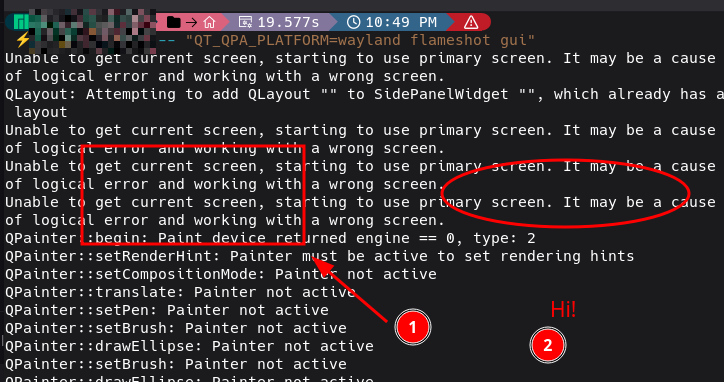
Yes, I’m using Wayland…
Do you remember the patch you had installed?
 https://flameshot.org/docs/guide/key-bindings/#on-ubuntu-and-other-gnome-based-distros