This should be something else. X, being the traditional or the new one, is not responsible for user creation (because that’s what we have here, the login fails because there is no such user, yet, it is created too slowly).
Those isos with xlibre are nice but they have other changes too so i don’t know if it is that easy to compare.
1 Like
Thank you for answering!
No Sihr!
Xlibre has now a dedicated manjaro stable (i mean built on manjaro stable) repo and an arch Repo.
Plus has a keyring
@Teo Yes! I remember now, deepseek analized full bootlog says same.
I waited 4-5 minutes then let me in with pw keyboard layout fails back to English.
Mod edit: Consecutive posts merged.
For manjaro-xfce-26.1-testing-minimal-linux71 ISOs on AMD desktop system:
- 202607191707 - Boots to desktop but does not change locale from en_US
- 202607191757 - Unable to contact settings server
- 202607200632 - Unable to contact settings server
For manjaro-xfce-26.1-testing-minimal-linux618 ISOs:
- 202607191757 - Unable to contact settings server
- 202607200632 - Unable to contact settings server
1 Like
This was caused by a bug in plymouth and was allegedly fixed with an update to a later plymouth version. Perhaps the ISOs still have the older plymouth.
One way to make sure whether this is the case would be to compile an ISO without plymouth — or perhaps boot with the nosplash kernel parameter.
1 Like
First of all, all XFCE ISOs don’t ship with plymouth, as this was reported to be kinda problematic. Then we have now tested 3 things:
- the regular approach with having
manjaro-livescript started within the boot-up manjaro-livecalled on build-time and disabling the service- the split version of
manjaro-livewhich does the user setup on build-time and keyboard configuration on boot-up
Some report it working, others not.
Sure, systemd can be an issue. When I look at archiso the user and display manager, if any, are configured during build-time.
Since we already have some archiso profiles done for the Arkdep versions of Manjaro, maybe someone might adopt a given profile to one of the normal desktop editions to see if that boots up, kinda. manjaro-tools are in maintenance for many years and no development was done.
Testing with an older systemd I already suggested …
Thanks for the update.
I’d like to investigate this issue myself. Are the source repositories and PKGBUILDs for the live packages public?
I noticed that these packages have been updated recently, but I wasn’t able to locate their source repositories or PKGBUILDs:
manjaro-live-base(20241119-1→20260720-1)manjaro-live-skel(20241119-1→20260720-1)manjaro-live-systemd(20241119-1→20260720-1)
Are these indeed the components responsible for the live session user setup and autologin, or should I be looking somewhere else?
If the repositories are public, could you point me to their GitLab location? I’d like to inspect the code, compare the changes and, if appropriate, fork them for testing.
Thanks!
PKGBUILD (Phil didn’t update it yet):
https://gitlab.manjaro.org/packages/extra/manjaro-live
Source:
https://gitlab.manjaro.org/tools/development-tools/manjaro-tools-livecd
2 Likes
First of all, the things I try might not work. I can push the local changes as I go for sure. However, I don’t see any regression reports on the older Preview ISOs: Manjaro 26.1 Bian-May - Preview released. So I like them to be retested similar as it was done here. I still think there are some systemd issues …
Most likely this is one of the first ISOs breaking things:
Bian-May 26.1.0-rc1 (2026-07-10)
Download XFCE
Full
https://download.manjaro.org/xfce/26.1.0-rc1/manjaro-xfce-26.1.0-rc1-260710-linux71.iso
https://download.manjaro.org/xfce/26.1.0-rc1/manjaro-xfce-26.1.0-rc1-260710-linux71.iso.sig
https://download.manjaro.org/xfce/26.1.0-rc1/manjaro-xfce-26.1.0-rc1-260710-linux71.iso.sha1
https://download.manjaro.org/xfce/26.1.0-rc1/manjaro-xfce-26.1.0-rc1-260710-linux71.iso.sha256
https://download.manjaro.org/xfce/26.1.0-rc1/manjaro-xfce-26.1.0-rc1-260710-linux71.iso.torrent
https://download.manjaro.org/xfce/26.1.0-rc1/manjaro-xfce-26.1.0-rc1-260710-linux71.iso.pkgs
Minimal
https://download.manjaro.org/xfce/26.1.0-rc1/manjaro-xfce-26.1.0-rc1-minimal-260710-linux71.iso
https://download.manjaro.org/xfce/26.1.0-rc1/manjaro-xfce-26.1.0-rc1-minimal-260710-linux71.iso.sig
https://download.manjaro.org/xfce/26.1.0-rc1/manjaro-xfce-26.1.0-rc1-minimal-260710-linux71.iso.sha1
https://download.manjaro.org/xfce/26.1.0-rc1/manjaro-xfce-26.1.0-rc1-minimal-260710-linux71.iso.sha256
https://download.manjaro.org/xfce/26.1.0-rc1/manjaro-xfce-26.1.0-rc1-minimal-260710-linux71.iso.torrent
https://download.manjaro.org/xfce/26.1.0-rc1/manjaro-xfce-26.1.0-rc1-minimal-260710-linux71.iso.pkgs
Minimal (linux618)
https://download.manjaro.org/xfce/26.1.0-rc1/manjaro-xfce-26.1.0-rc1-minimal-260710-linux618.iso
https://download.manjaro.org/xfce/26.1.0-rc1/manjaro-xfce-26.1.0-rc1-minimal-260710-linux618.iso.sig
https://download.manjaro.org/xfce/26.1.0-rc1/manjaro-xfce-26.1.0-rc1-minimal-260710-linux618.iso.sha1
https://download.manjaro.org/xfce/26.1.0-rc1/manjaro-xfce-26.1.0-rc1-minimal-260710-linux618.iso.sha256
https://download.manjaro.org/xfce/26.1.0-rc1/manjaro-xfce-26.1.0-rc1-minimal-260710-linux618.iso.torrent
https://download.manjaro.org/xfce/26.1.0-rc1/manjaro-xfce-26.1.0-rc1-minimal-260710-linux618.iso.pkgs
Minimal (linux612)
https://download.manjaro.org/xfce/26.1.0-rc1/manjaro-xfce-26.1.0-rc1-minimal-260710-linux612.iso
https://download.manjaro.org/xfce/26.1.0-rc1/manjaro-xfce-26.1.0-rc1-minimal-260710-linux612.iso.sig
https://download.manjaro.org/xfce/26.1.0-rc1/manjaro-xfce-26.1.0-rc1-minimal-260710-linux612.iso.sha1
https://download.manjaro.org/xfce/26.1.0-rc1/manjaro-xfce-26.1.0-rc1-minimal-260710-linux612.iso.sha256
https://download.manjaro.org/xfce/26.1.0-rc1/manjaro-xfce-26.1.0-rc1-minimal-260710-linux612.iso.torrent
https://download.manjaro.org/xfce/26.1.0-rc1/manjaro-xfce-26.1.0-rc1-minimal-260710-linux612.iso.pkgs
Download GNOME
Full
https://download.manjaro.org/gnome/26.1.0-rc1/manjaro-gnome-26.1.0-rc1-260710-linux71.iso
https://download.manjaro.org/gnome/26.1.0-rc1/manjaro-gnome-26.1.0-rc1-260710-linux71.iso.sig
https://download.manjaro.org/gnome/26.1.0-rc1/manjaro-gnome-26.1.0-rc1-260710-linux71.iso.sha1
https://download.manjaro.org/gnome/26.1.0-rc1/manjaro-gnome-26.1.0-rc1-260710-linux71.iso.sha256
https://download.manjaro.org/gnome/26.1.0-rc1/manjaro-gnome-26.1.0-rc1-260710-linux71.iso.torrent
https://download.manjaro.org/gnome/26.1.0-rc1/manjaro-gnome-26.1.0-rc1-260710-linux71.iso.pkgs
Minimal
https://download.manjaro.org/gnome/26.1.0-rc1/manjaro-gnome-26.1.0-rc1-minimal-260710-linux71.iso
https://download.manjaro.org/gnome/26.1.0-rc1/manjaro-gnome-26.1.0-rc1-minimal-260710-linux71.iso.sig
https://download.manjaro.org/gnome/26.1.0-rc1/manjaro-gnome-26.1.0-rc1-minimal-260710-linux71.iso.sha1
https://download.manjaro.org/gnome/26.1.0-rc1/manjaro-gnome-26.1.0-rc1-minimal-260710-linux71.iso.sha256
https://download.manjaro.org/gnome/26.1.0-rc1/manjaro-gnome-26.1.0-rc1-minimal-260710-linux71.iso.torrent
https://download.manjaro.org/gnome/26.1.0-rc1/manjaro-gnome-26.1.0-rc1-minimal-260710-linux71.iso.pkgs
Minimal (linux618)
https://download.manjaro.org/gnome/26.1.0-rc1/manjaro-gnome-26.1.0-rc1-minimal-260710-linux618.iso
https://download.manjaro.org/gnome/26.1.0-rc1/manjaro-gnome-26.1.0-rc1-minimal-260710-linux618.iso.sig
https://download.manjaro.org/gnome/26.1.0-rc1/manjaro-gnome-26.1.0-rc1-minimal-260710-linux618.iso.sha1
https://download.manjaro.org/gnome/26.1.0-rc1/manjaro-gnome-26.1.0-rc1-minimal-260710-linux618.iso.sha256
https://download.manjaro.org/gnome/26.1.0-rc1/manjaro-gnome-26.1.0-rc1-minimal-260710-linux618.iso.torrent
https://download.manjaro.org/gnome/26.1.0-rc1/manjaro-gnome-26.1.0-rc1-minimal-260710-linux618.iso.pkgs
Minimal (linux612)
https://download.manjaro.org/gnome/26.1.0-rc1/manjaro-gnome-26.1.0-rc1-minimal-260710-linux612.iso
https://download.manjaro.org/gnome/26.1.0-rc1/manjaro-gnome-26.1.0-rc1-minimal-260710-linux612.iso.sig
https://download.manjaro.org/gnome/26.1.0-rc1/manjaro-gnome-26.1.0-rc1-minimal-260710-linux612.iso.sha1
https://download.manjaro.org/gnome/26.1.0-rc1/manjaro-gnome-26.1.0-rc1-minimal-260710-linux612.iso.sha256
https://download.manjaro.org/gnome/26.1.0-rc1/manjaro-gnome-26.1.0-rc1-minimal-260710-linux612.iso.torrent
https://download.manjaro.org/gnome/26.1.0-rc1/manjaro-gnome-26.1.0-rc1-minimal-260710-linux612.iso.pkgs
Download KDE
Full
https://download.manjaro.org/kde/26.1.0-rc1/manjaro-kde-26.1.0-rc1-260710-linux71.iso
https://download.manjaro.org/kde/26.1.0-rc1/manjaro-kde-26.1.0-rc1-260710-linux71.iso.sig
https://download.manjaro.org/kde/26.1.0-rc1/manjaro-kde-26.1.0-rc1-260710-linux71.iso.sha1
https://download.manjaro.org/kde/26.1.0-rc1/manjaro-kde-26.1.0-rc1-260710-linux71.iso.sha256
https://download.manjaro.org/kde/26.1.0-rc1/manjaro-kde-26.1.0-rc1-260710-linux71.iso.torrent
https://download.manjaro.org/kde/26.1.0-rc1/manjaro-kde-26.1.0-rc1-260710-linux71.iso.pkgs
Minimal
https://download.manjaro.org/kde/26.1.0-rc1/manjaro-kde-26.1.0-rc1-minimal-260710-linux71.iso
https://download.manjaro.org/kde/26.1.0-rc1/manjaro-kde-26.1.0-rc1-minimal-260710-linux71.iso.sig
https://download.manjaro.org/kde/26.1.0-rc1/manjaro-kde-26.1.0-rc1-minimal-260710-linux71.iso.sha1
https://download.manjaro.org/kde/26.1.0-rc1/manjaro-kde-26.1.0-rc1-minimal-260710-linux71.iso.sha256
https://download.manjaro.org/kde/26.1.0-rc1/manjaro-kde-26.1.0-rc1-minimal-260710-linux71.iso.torrent
https://download.manjaro.org/kde/26.1.0-rc1/manjaro-kde-26.1.0-rc1-minimal-260710-linux71.iso.pkgs
Minimal (linux618)
https://download.manjaro.org/kde/26.1.0-rc1/manjaro-kde-26.1.0-rc1-minimal-260710-linux618.iso
https://download.manjaro.org/kde/26.1.0-rc1/manjaro-kde-26.1.0-rc1-minimal-260710-linux618.iso.sig
https://download.manjaro.org/kde/26.1.0-rc1/manjaro-kde-26.1.0-rc1-minimal-260710-linux618.iso.sha1
https://download.manjaro.org/kde/26.1.0-rc1/manjaro-kde-26.1.0-rc1-minimal-260710-linux618.iso.sha256
https://download.manjaro.org/kde/26.1.0-rc1/manjaro-kde-26.1.0-rc1-minimal-260710-linux618.iso.torrent
https://download.manjaro.org/kde/26.1.0-rc1/manjaro-kde-26.1.0-rc1-minimal-260710-linux618.iso.pkgs
Minimal (linux612)
https://download.manjaro.org/kde/26.1.0-rc1/manjaro-kde-26.1.0-rc1-minimal-260710-linux612.iso
https://download.manjaro.org/kde/26.1.0-rc1/manjaro-kde-26.1.0-rc1-minimal-260710-linux612.iso.sig
https://download.manjaro.org/kde/26.1.0-rc1/manjaro-kde-26.1.0-rc1-minimal-260710-linux612.iso.sha1
https://download.manjaro.org/kde/26.1.0-rc1/manjaro-kde-26.1.0-rc1-minimal-260710-linux612.iso.sha256
https://download.manjaro.org/kde/26.1.0-rc1/manjaro-kde-26.1.0-rc1-minimal-260710-linux612.iso.torrent
https://download.manjaro.org/kde/26.1.0-rc1/manjaro-kde-26.1.0-rc1-minimal-260710-linux612.iso.pkgs
Here are ISOs with systemd v260.3: Release 202607201859 · manjaro/release-review · GitHub
ISOs built with v261.1 didn’t boot on my AMD Ryzen Gaming MiniPC. It also uses the split manjaro-live packages. However I still think that we have some systemd regression I mentioned much earlier …
And those who are fancy can try with their own custom builds:
[systemd-v260]
SigLevel = PackageRequired
Server = https://download.manjaro.org/repo/$repo/$arch
Seems I had spoken too fast. The ISO booted just by luck. When I restarted I hit a black screen. TTY4 will show me SDDM but when trying to login I get a black screen again and HDMI tells me no signal. This was with linux71.
So this issue might lay much deeper as I think.
So I looked to other distros similar to Manjaro. Seems Garuda also released some new ISOs: Index of /iso/garuda/dr460nized-gaming/260720/. This one booted on my MiniPC just fine. Tools are similar to ours: Garuda Linux 🦅 / Tools / garuda-tools · GitLab. Also the livecd part: Garuda Linux 🦅 / Tools / garuda-tools-livecd · GitLab and profiles: Garuda Linux 🦅 / Tools / iso-profiles · GitLab.
What I noticed is that booting their ISOs take way longer, and that might be one reason why it works. On our end booting is really fast and therefore we might run into some timing issue, whatever.
Another option would be to chat with Bruno from BigLinux: BigLinux · GitHub After all they are Manjaro-based. Their Plasma 6.6.6 ISOs were done recently: https://www.biglinux.com.br/download
2 Likes
Precisely, and what I have been working to eliminate - the timing issue.
That the underlying cause is a timing issue is very clear - if you wait for some time - the dbus session becomes available - and when it is available - you can login.
With the testing I did - adding the extra line to the lightdm* files in /etc/pam.d - you can login by just pressing Enter.
The original manjaro-live.service is set to be Before=systemd-user-sessions.service.
This work as expected - the user part is configured as expected.
Just examining the log will be evidence to that.
The problem lies when the greeter tries to auto login and for some reason the display-manager.service cannot trigger the dbus.socket which is crucial, because that is where the dbus session is created.
When examining the underlying file system when one cannot login, $XDG_RUNTIME_DIR /run/user/1000 is missing - thus the dbus session socket /run/user/1000/bus is unavailable.
I have tried to force this by adding Requires=dbus.socket to the manjaro-live.service - but it does not change anything.
I have experimented by adding - to the end of the manjaro-live script a command sleep 30 - but it is just a gaffa-tape solution - it is just a workaround.
The real is issue is that the generic display-manager.service is always a symlink to the actual service - in case of xfce it is lightdm.service.
The Manjaro Linux system uses systemd-logind and I am speculating if there - somewhere in the chain - is a missing Requires= or Before= or After= dependency - the problem is the where, what and why.
1 Like
Not true. Many people pointed in iso preview Topic there is this blackscreen issue and people couldn’t boot in live boot
without getting no signal from Monitor.
No Monitor Signal on Radeon 9070
Yes, Plasma is busted too. Black screen and no signal. TTY4 has SDDM but you can not log in.
Regardless of which dbus units used.
The split on manjaro-live creates the user and display server configuration during build time and the script does only the language configuration. However that didn’t help either.
ISOs boot fine in VirtualBox…
https://bbs.archlinux.org/viewtopic.php?id=302872
We could try with:
until [ -S /run/dbus/system_bus_socket ];
 do sleep 1;
done;
systemctl restart user@1000;
It was true at the time I wrote it - the local builds I did worked as I expected - it has since become an issue with all editions - so I may have just been lucky?
As it has become an issue with everything - I am suspecting the issue is buried somewhere in the systemd event chain.
But that is just me - knowing very little about the systemd dependency chain…
If this makes no difference perhaps one also has to add After, that is, Requires=dbus.socket and After=dbus.socket together?
I am not sure - what I understood from the documentation - the After= is a more loosely coupling while Requires= makes the requirement explicit, that is like a cannot function without.
My understanding would also be that Requires somehow implies After but that may be wrong. After defines ordering, Requires doesn’t seem to do this, and if Requires didn’t make a difference (unexpectedly) then please try to combine the two to ensure that dbus.socket is started (Requires) and fully available (After).
I think there is a little misconception with the current timing issue. The user is now created during build-time of the ISO. Hence the things are given and user 1000 exists. The manjaro-live script only configures language and locales and can fail even. The issue is more or less the dbus.socket not available in time when the display manager tries to autologin. Recently Arch switched over to dbus-broker-units which uses dbus-broker. The standard way is dbus-daemon-units. However both have similar issues with the socket creation for some odd reason.
Now we have simply add some sort of delay to wait for the socket creation before we can continue.
On XFCE edition you may get the error message and land on LightDM. After trying to login several times by entering the password you will end up in XFCE at some point.
Plasma seems to be more harsh recently as it needs a working dbus session to function with Wayland. GNOME on the other hand seems to be more relaxed on that matter.
All ISOs somehow boot fine on a virtual machine using VirtualBox, but real hardware has some issues …
Here is another set of ISOs for testing: Release 202607210633 · manjaro/release-review · GitHub
This time I changed this:
- switched back to
systemdv261.1: Revert "[tmp] use systemd-v260" (4d83ec2c) · Commits · Tools / development-tools / manjaro-tools · GitLab - added some fancy to delay the startup: [tmp] try to fix dbus issue (67537a01) · Commits · Tools / development-tools / manjaro-tools-livecd · GitLab
A successful release is when all ISO variants, as in GNOME, Plasma and XFCE boot on several machines. That is why doing a Manjaro Release needs a lot of testing, if multiple ISOs are available. And doing my fast-track: Does it boot on VirtualBox? seems not to cut it anymore …
I know that we already had some complaints that the ISOs on the download page are kinda outdated, however adding broken ones makes no sense …
Edit: Seems these ISOs will wait too long for something to happen which doesn’t happen:
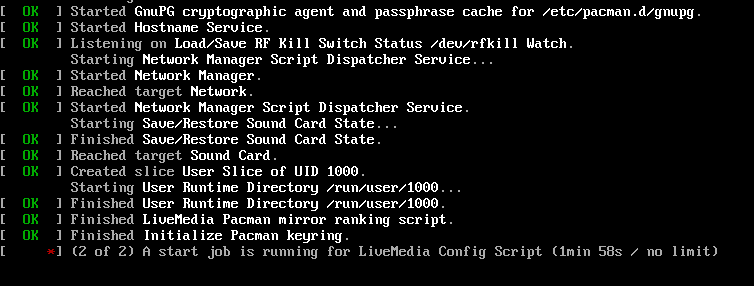
MHWD script and LiveMedia Configuration. Based on the screenshot we see that the runtime directory was created. I will try to simplify this now.
Hmmm okay then you must have created your local builds in a different way, because people reported this problem since early May in Preview Iso Topic, but nobody was helping them:
With your latest FULL KDE ISO. After logging inside TTY3 TTY4 TTY5 TTY6 (with manjaro/manjaro) i relentless switched to TTY2 and login (login/pw) to experience blackscreens. But after another time TTY6 (where i was already logged in) i swapped to TTY2 (login screen) and gave in PW… i probably repeated it at least 2-3 times.
You have to do this logins relentless, but i could repeat this logins for 5 times now… but it took me around 3-4min for a finally desktop login.
Since im a gamer, i created a little high score… i could manage to loggin one time in just 2min, there might be a hidden combo required 
Here is another set of ISOs: Release 202607210749 · manjaro/release-review · GitHub
I will try to test them when I’m back home. Let’s see if this one will stick on the wall…
Did some testing now with the new ISOs. I see now errors like this when the service user@1000.service gets restarted:
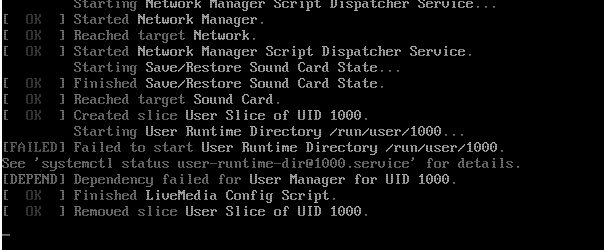
If it doesn’t fail the system won’t boot:
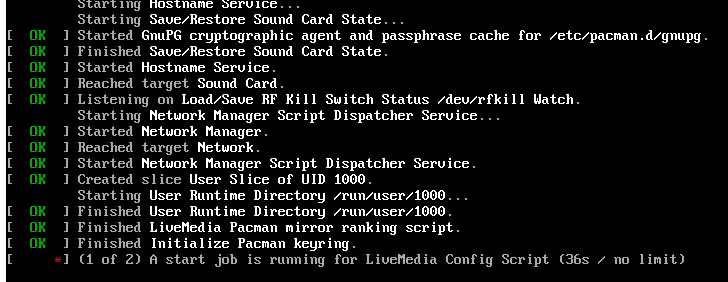
So we have to look at user-runtime-dir@1000.service to see when and what might create this timing issue. Maybe changing stuff on locales might create issues somehow.
1 Like