This looks like one big scary update. The “Preview” in the title worries me. I think I’ll give it a few days for things to settle before I update. I’m in no hurry anyway.
It seems the biggest problem being reported is the switch to Wayland. Luckily my laptop and desktop already run Wayland by default, so I don’t foresee an issue.
Upon reviewing my pacnew files using pacdiff, it seems like mkinitcpio.conf.pacnew would mess with my system’s ability to decrypt the root partition though.
I’m not well versed in the Desktop Environments discussion. I believe I was running KDE Plasma and now after my standard Update notification in the GUI and subsequent installation of 800+ packages, I appear to be running something more like Gnome… All of my DE customizations are gone, Tray is not even present any longer and my virtual desktops are gone. I cannot open the ‘Settings’ when right clicking on the desktop - nothing happens. I need to configure my Displays. I cannot open any applications like ‘Spectacle to capture a screenshot to show you. When I go to ‘KDE System Settings’, and About this system I see the following:
KDE Plasma version: 6.5.3
KDE Frameworks Version: 6.20.0
Qt Version: 6.10.1
Kernel Version: 6.12.61-1-MANJARO (64-Bit)
Graphics Platform: Wayland
When I go to ‘Display & Monitor’ I see:
‘KScreen backend found. Please check KScreen installation.’
Can someone please let me know what my nest steps might be in getting back to my normal Desktop Environment without breaking things further? I’m needing to get a lot of work done on this system over the next few days and I can deal with big changes at a later time. Let me know what else I can provide to help.
EDIT: I was able to get back to my Plasma DE by restarting and selecting the Proper Environment before logging in! I’ve never done/had to do this in the past, but it appears that I’m back in action. I apparently have GNOME installed as wel and not sure how that happened. Question remains: Will I eventually have to leave the KDE behind and move to GNOME?
You are not supposed to copy the .pacnew over the existing configuration file, but to merge the new file in, i.e. to wisely adapt your existing file with the changes proposed in the .pacnew.
In the case of encryption, you need to include the sd-encrypt hook. Also, the keymap and consolefont hooks are no longer needed when sd-vconsole is used.
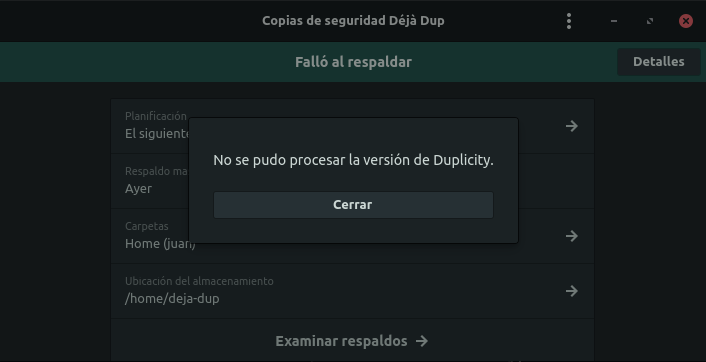
dic 10 10:55:23 onecto org.gnome.DejaDup[12628]: DuplicityPlugin.vala:70: Traceback (most recent call last):
                                                   File "/usr/bin/duplicity", line 5, in <module>
                                                     from duplicity.__main__ import dup_run
                                                   File "/usr/lib/python3.13/site-packages/duplicity/__main__.py", line 32, in <module>
                                                     from duplicity import (
                                                     ...<4 lines>...
                                                     )
                                                   File "/usr/lib/python3.13/site-packages/duplicity/tempdir.py", line 35, in <module>
                                                     from duplicity import config
                                                   File "/usr/lib/python3.13/site-packages/duplicity/config.py", line 30, in <module>
                                                     from duplicity import gpg
                                                   File "/usr/lib/python3.13/site-packages/duplicity/gpg.py", line 39, in <module>
                                                     from duplicity import util
                                                   File "/usr/lib/python3.13/site-packages/duplicity/util.py", line 38, in <module>
                                                     import pexpect
                                                 ModuleNotFoundError: No module named 'pexpect'
My version of Deja Dup is 49.2-1 and my version of Duplicity is 3.0.6.3-1
Thanks @Phemisters and @Aragorn for the clarification!
Following your suggestions I installed the wrapper script.
After doing some digging I found that the distinction is:
install-grub - Manjaro-specific wrapper script that synchronizes the EFI stubs and also runs update-grub, making the process easier and safer for most users.
grub-install - upstream GRUB binary, lower-level tool used by distributions and scripts.
So for regular usage and after GRUB updates, it seems that install-grub is the preferred command, since it handles everything in one step.
The only slightly confusing part is that the update message recommends install-grub, but since it’s not installed by default, it might not be obvious that it comes from a separate package (and I not a fan of such naming for this script). Maybe worth mentioning in the announcement or notes.
I wanted to report a display issue I encountered when upgrading from 25.01 to 25.1, as well as during a fresh 25.01 to 25.1 installation. The same issue also occurred with a fresh 25.1-pre1 install. The updates and installations completed successfully, but upon reboot, I was greeted with the splash screen followed by a black screen (which appeared to transition from completely dark to slightly illuminated).
After troubleshooting, testing NVIDIA drivers (RTX 3080 FE), adjusting settings, and switching between X11 and Wayland, I discovered the root cause: the physical port my monitor was connected to. My monitor had been plugged into DisplayPort 2 for years, but the desktop environment was now expecting it on DisplayPort 1 or HDMI 1. I suspect the DE changes in this release altered the default display port detection, now prioritizing DP1 unless manually configured otherwise?
Yesterday I re-installed my Manjaro system after almost 5 years of using it… just to reorganize a little bit some disk partitions and clean up old stuff. My /etc/mkinitcpio.conf looks like this:
I removed openswap (because of an issue found during the boot process with the encrypted swap partition) and resume (not needed). Now I see your post which has a few additional options: systemd sd-vconsole sd-encrypt. Do I need to add these options to my file? Just in case, I’m using encrypted disk with XFCE. Thanks!
It’s not a matter of adding the new hooks, but about replacing the old ones.
The systemd hook replaces the udev, usr (if present) and resume (if present) hooks.
The sd-vconsole hook replaces the keymap and consolefont hooks.
The sd-encrypt hook replaces the encrypt hook.
Also, if you’re not using a US keyboard while you do use encryption, then it is best to put the keyboard hook right before the autodetect hook.
Also note that the base hook doesn’t do much anymore “as is”, because all it still offers is a rescue shell within the initramfs, but this rescue shell is either way disabled by default for security reasons unless you boot with “SYSTEMD_SULOGIN_FORCE=1” as a kernel parameter.
EDIT: Finished my update and ran into 3 very minor problems involving my KDE performance that I was able to fix.
#1: My cursor was smaller but this was fixed by swapping the global size on another cursor before swapping back to the cursor I use.
#2: My task bar had the ability to scroll through my active tasks disabled. This was easy to just re-enable in the configuration under “Behaviour”.
#3: Mouse acceleration was turned on. Easy to turn off.
Will edit again if I run into anything else.
EDIT2: There appears to be a graphical bug when closing windows, the window will flicker for around half a second when it’s closing. I can’t find a setting to fix this but it’s not a real awful issue.
EDIT3: Kdenlive is now quite laggy. There appears to be a few issues with KDE in the new update, hopefully these can be fixed in a future one.
EDIT4 (Hopefully the final one): It appears my session was started in Wayland instead of X11 after my update and reboot for some reason. I checked SDDM and saw “Wayland” set as my “auto log-in with session”, so I swapped it back to X11 and my issues appear to all be gone.
And after applying the “grub fix“ scripts ……….. no change.
sudo install-grub

Grub will be installed on: EFI
Installing for x86_64-efi platform.
Installation finished. No error reported.
Generating grub configuration file …
Found theme: /usr/share/grub/themes/manjaro/theme.txt
Found linux image: /boot/vmlinuz-6.17-x86_64
Found initrd image: /boot/intel-ucode.img /boot/initramfs-6.17-x86_64.img
Found linux image: /boot/vmlinuz-6.12-x86_64
Found initrd image: /boot/intel-ucode.img /boot/initramfs-6.12-x86_64.img
Adding boot menu entry for UEFI Firmware Settings …
Detecting snapshots …
Found snapshot: 2025-12-10 19:55:12 | timeshift-btrfs/snapshots/2025-12-10_19-55-12/@ | ondemand | {timeshift-autosnap} {created before upgrade} |
Found snapshot: 2025-12-08 21:24:29 | timeshift-btrfs/snapshots/2025-12-08_21-24-29/@ | ondemand | plus REMOVED most gnome ■■■■                  |
Found snapshot: 2025-12-08 17:44:23 | timeshift-btrfs/snapshots/2025-12-08_17-44-23/@ | ondemand | PRE BIG LTS update 2.2Gb                      |
Found snapshot: 2025-11-07 14:36:10 | timeshift-btrfs/snapshots/2025-11-07_14-36-10/@ | ondemand | WHY NOT pre 6.17 Kernel UPDATE TO             |
Found 4 snapshot(s)
Unmount /tmp/grub-btrfs.2UB7zUNxbR .. Success
sudo update-grub
Generating grub configuration file …
Found theme: /usr/share/grub/themes/manjaro/theme.txt
Found linux image: /boot/vmlinuz-6.17-x86_64
Found initrd image: /boot/intel-ucode.img /boot/initramfs-6.17-x86_64.img
Found linux image: /boot/vmlinuz-6.12-x86_64
Found initrd image: /boot/intel-ucode.img /boot/initramfs-6.12-x86_64.img
Adding boot menu entry for UEFI Firmware Settings …
Detecting snapshots …
Found snapshot: 2025-12-10 19:55:12 | timeshift-btrfs/snapshots/2025-12-10_19-55-12/@ | ondemand | {timeshift-autosnap} {created before upgrade} |
Found snapshot: 2025-12-08 21:24:29 | timeshift-btrfs/snapshots/2025-12-08_21-24-29/@ | ondemand | plus REMOVED most gnome ■■■■                  |
Found snapshot: 2025-12-08 17:44:23 | timeshift-btrfs/snapshots/2025-12-08_17-44-23/@ | ondemand | PRE BIG LTS update 2.2Gb                      |
Found snapshot: 2025-11-07 14:36:10 | timeshift-btrfs/snapshots/2025-11-07_14-36-10/@ | ondemand | WHY NOT pre 6.17 Kernel UPDATE TO             |
Found 4 snapshot(s)
Unmount /tmp/grub-btrfs.KIrLfrIpkf .. Success
done
The only other problem I see is adwaita theme not respected in leafpad. The other dark themes are fine in leafpad.