Specifically, with the 580xx driver, I recall seeing mentioned.
Installing either 570xx or 575xx seems to work around the problem for some. There are a few topics to be found in recent weeks that go into some detail.
Specifically, with the 580xx driver, I recall seeing mentioned.
Installing either 570xx or 575xx seems to work around the problem for some. There are a few topics to be found in recent weeks that go into some detail.
It is a known issue for some older NVIDIA cards. You may want to install nvidia-575xx drivers via mhwd instead …
Thanks for those hints. I don’t find in the documentation the need for this rd.luks.key in the Grub configuration, is it something mandatory, where does it come from? As far as I understand, this path is defined in the mkinitcpio file - I have “FILES=(/crypto_keyfile.bin)” in it, but maybe that’s something different?
Edit, sorry found dm-crypt/System configuration - ArchWiki and trying to understand it…
I updated two systems (my daily driver is on unstable now) and it worked fairly well (i opted for the “either ignore the grub update completely”-part because i see no benefit of reinstalling grub for my use cases) - although i had some work on the one machine running as a home server. This is because many things changed at once - was a rather large diff. Anyway great thanks 
In case anyone else runs into problems with pen input:
The versions of gtk4 and libadwaita shipped in this update break pen input for gtk4 apps (given your DE is not gnome).
For reference (and a workaround or two):
After updating the system, the startup autologin stopped working.
SOLUTION: change Session:
plasmawayland to plasma in
/etc/sddm.conf.d/kde_settings.conf
(It seems, the update change the session name.)
running
install-grubfollowed byupdate-grubafter the system update
Is this a typo? I normally use grub-install (install-grub isnt valid on my system.)
This is what I actually did:
sudo su -
grub-install --recheck --no-rs-codes
update-grub
sync && exit
I updated yesterday and upon arriving at desktop I was met with no icons or menu bar ! Thankfully after reading through some of these posts I was able to install plasma-x11-session and switched off of 6.17 kernel to 6.12 LTS kernel.
Thanks and I love Manjaro.
No
$ pamac info install-grub
Name                  : install-grub
Version               : 2:2.14rc1-3
Description           : GNU Grub (2) Install Script on Updates
URL                   : https://www.gnu.org/software/grub/

Optional For          : grub
I had the same problem, but I solved it by editing: /etc/sddm.conf adding:
[Autologin]
User=username
Session=plasma.desktop
Update went fine on my main and media machine.
Noticed one issue with my RAM spd5118-i2c temp sensors. They were detected & properly read out under 6.16.48.
But after updating to 6.18.0 and currently testing 6.17.11, spd5118-i2c reads 0.0 degrees on both banks.
Does anyone know if there were changes made in 6.17 and up?
sudo dmesg | grep spd5118
[    7.656996] spd5118 11-0051: DDR5 temperature sensor: vendor 0x06:0x32 revision 1.6
[    7.663995] spd5118 11-0053: DDR5 temperature sensor: vendor 0x06:0x32 revision 1.6
spd5118-i2c-11-51
Adapter: SMBus PIIX4 adapter port 0 at 0b00
temp1:         +0.0°C  (low  =  +0.0°C, high = +55.0°C)
                       (crit low =  +0.0°C, crit = +85.0°C)
spd5118-i2c-11-53
Adapter: SMBus PIIX4 adapter port 0 at 0b00
temp1:         +0.0°C  (low  =  +0.0°C, high = +55.0°C)
                       (crit low =  +0.0°C, crit = +85.0°C)
Upgrade worked well for XFCE & Plasma, no major problems. Thank you!
There is only a display problem with the taskbars …
I’m using a floating task bar above the regular taskbar. After the update, it’s still there, but it now overlaps the bottom taskbar. To reproduce this… add a second new taskbar > position at the bottom… in edit mode it displays correctly (on top of each other). When exit edit mode, the upper taskbar shifts into the bottom bar.
Is there any solution regarding this issue?

Hey,
upgraded my workstation with plasma and 6.18 without issues.
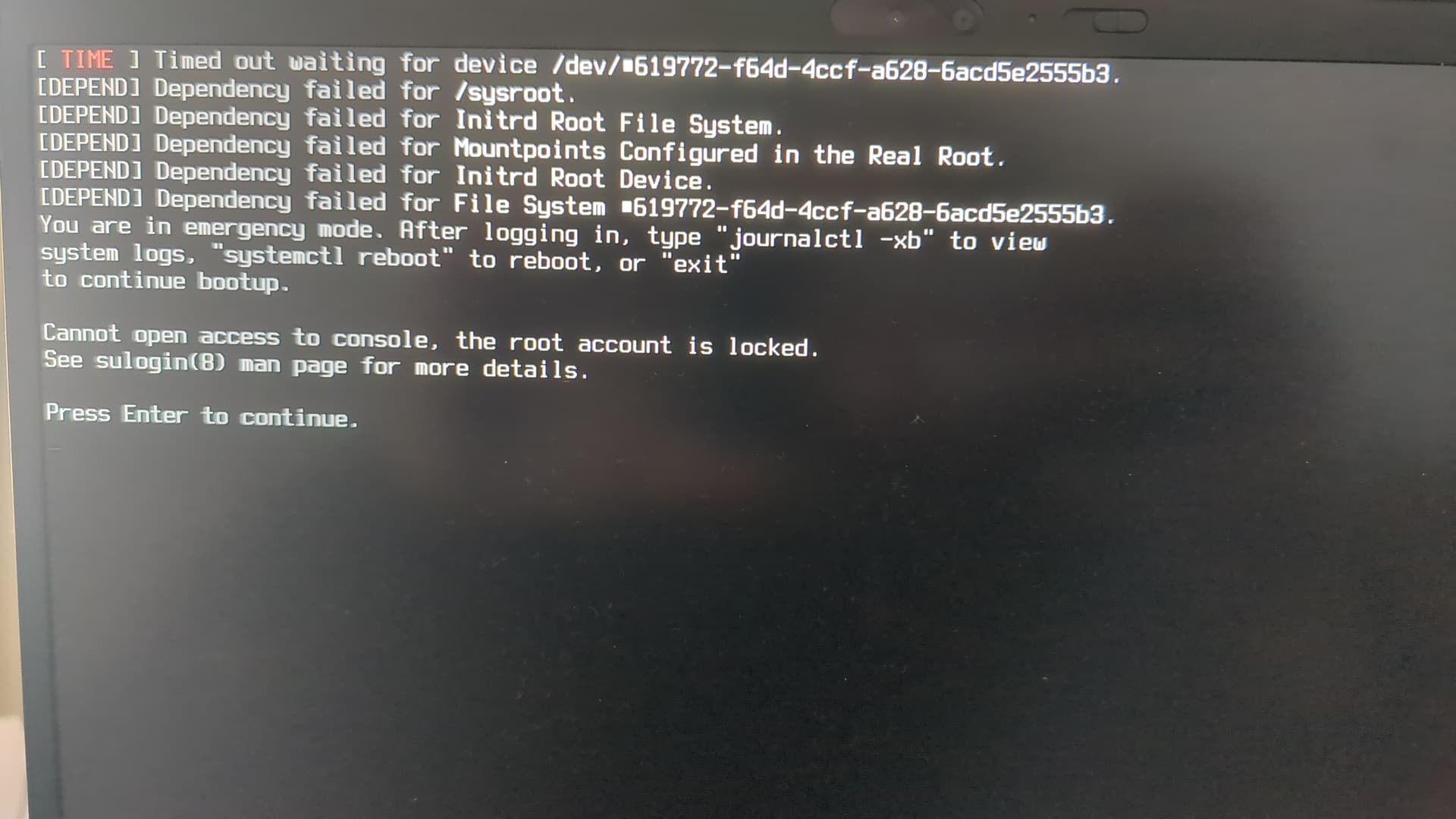
Unfortunately my thinkpad nano gen 2 does not boot. With 6.18 and 6.12. I did “install-grub” and “update-grub”
I get the following message after successfully unlocking my luks encrypted drive after a minute or so:
Welp, there goes my day. Whoops!
As noted earlier:
…the new Nvidia drivers gave me issues. (I still dind it strange to think of my GPU as “older” but that’s what it is apparently.) As per @philm’s suggestion, I installed a different driver, using mhwd.
sudo mhwd -i pci video-nvidia-575xx
And rebooted.
To be met with a black screen. So I grabbed my trusty Live Environment USB disk, booted into it and entered a chroot environment the first time.
Remembering that mhwd edoesn’t work correctly in a cxhroot environment, I tried using pacman to get rid of all the nvidia-related things.
Eventually, after many driver reinstallations, timeshift rollbacks and trying a even version 470xx, as originally suggested, only the nouvaeu driver seems to be the only working at the moment and although it’s not really an issue since I don’t play a lot of games, getting the proprietary one working again woulld be nice. But as they say: all in due time.
At the moment I’m not in the mood or motivated enough to try again, so It’ll have to wait since everything I need is working.
Just reporting that the 25.1 Anh-Linh Preview update went smoothly on my XFCE system.
I reviewed and merged my .pacnew files without issues (mkinitcpio.conf.pacnew: udev Replaced by systemd, consolefont Replaced by sd-vconsole). System feels stable so far.
One thing that might confuse people during the update is the message about:
install-grub
update-grub
On my system there is no install-grub command, so I ran the usual ones:
sudo grub-install
sudo update-grub
Both finished successfully and the system booted normally afterwards.
Maybe someone from the Manjaro team could clarify if install-grub is just a typo in the message, or if it refers to a wrapper that isn’t present on all setups.
Other than that — great work and thanks!
I got this same screen on my thinkpad E595 after following the steps for this update.
See this thread, I made some modifications on my mkinitcpio and Grub config, but I’m a bit afraid to restart at this point ^^
The install-grub command is in a separate package, and might be worth installing: sudo pacman -Syu install-grub
install-grub is a script — it’s not installed by default, but it’s in the repository — which synchronizes the EFI stubs, so that /boot/efi/EFI/boot/bootx64.efi and /boot/efi/EFI/Manjaro/grubx64.efi would be identical. As part of this operation, it also updates the grub configuration. 
OK, got it working, weird about me. I just couldn’t let it go!
Turn out it was the driver, man!