Setting up a NAT virtual network in KVM

I know this should be relatively easy after putting up with the whole set up of a VM but it seems it is not in my case.
So I have my running Win 11 in KVM but I am cut out of the world.
The place I am now in the only source of network I have is mobile hotspot access via wifi.

This is an overview of my current interfaces

ip link                                                                                                                                                 
1: lo: <LOOPBACK,UP,LOWER_UP> mtu 65536 qdisc noqueue state UNKNOWN mode DEFAULT group default qlen 1000
    link/loopback 00:00:00:00:00:00 brd 00:00:00:00:00:00
2: enp7s0: <NO-CARRIER,BROADCAST,MULTICAST,UP> mtu 1500 qdisc mq state DOWN mode DEFAULT group default qlen 1000
    link/ether 50:eb:f6:79:c3:98 brd ff:ff:ff:ff:ff:ff
    altname enx50ebf679c398
3: wlp5s0: <BROADCAST,MULTICAST,UP,LOWER_UP> mtu 1500 qdisc noqueue state UP mode DORMANT group default qlen 1000
    link/ether 96:2f:c3:ea:a8:11 brd ff:ff:ff:ff:ff:ff 
    altname wlx44e51706dd5d
4: kvmbr: <NO-CARRIER,BROADCAST,MULTICAST,UP> mtu 1500 qdisc noqueue state DOWN mode DEFAULT group default qlen 1000
    link/ether de:ee:fd:f3:7d:98 brd ff:ff:ff:ff:ff:ff
5: virbr0: <NO-CARRIER,BROADCAST,MULTICAST,UP> mtu 1500 qdisc noqueue state DOWN mode DEFAULT group default qlen 1000
    link/ether 66:3a:7d:ee:7d:d9 brd ff:ff:ff:ff:ff:ff
6: macvtap0@wlp5s0: <BROADCAST,MULTICAST,UP,LOWER_UP> mtu 1500 qdisc fq_codel state UP mode DEFAULT group default qlen 500
    link/ether be:28:e8:54:72:b1 brd ff:ff:ff:ff:ff:ff

As you can see I am also trying to get a bridge and a macvtap working. I’ve been told bridges don’t work well over wifi. I’m still working on macvtap.

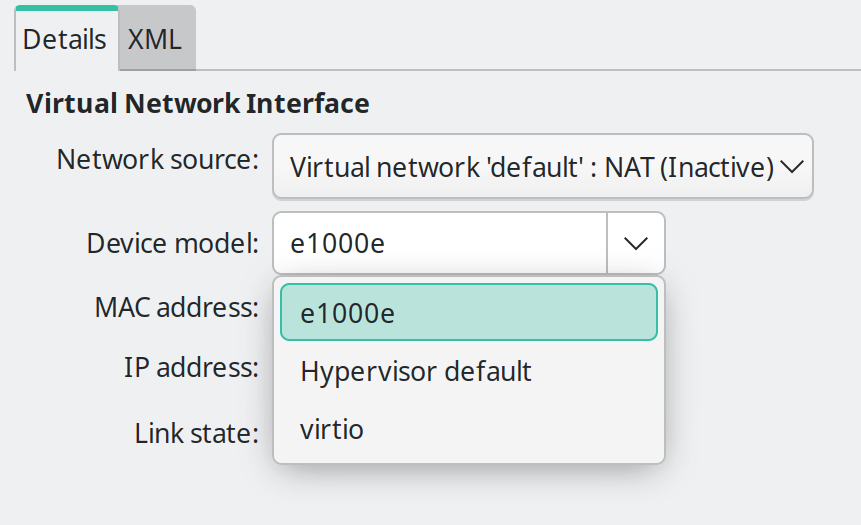
The point I am in is here

choosing which is the right device model.
I made several attempt without being able to connect. Right now I get an error on VM startup I didn’t get it before, probably due to having changed/added more interfaces.

Error starting domain: Requested operation is not valid: network 'default' is not active

https://wiki.archlinux.org/title/Libvirt#Error_starting_domain:_Requested_operation_is_not_valid:network’default’_is_not_active

The most common problem I think I have seen in these forums is to make qemu use nftables (over iptables).

Which is just uncommenting this line:

/etc/libvirt/network.conf


#firewall_backend = "nftables"

And restarting libvirtd.


If not, then we need much more information. Starting with..

What is the output of:

sudo virsh net-info default

Is it set to auto-start?

While were here, is it bridged to virbr0?

The next steps I would probably take is, in a separate terminal type:

journalctl -f

Then try to start it by:

sudo virsh net-start default

What are the logs from journalctl -f?

It says

Your first attempt can be simply trying to start the network with virsh.
virsh net-start default

I tried and

virsh net-start default                                                                                                                                  ✔ 
error: failed to get network 'default'
error: Network not found: no network with matching name 'default'


Done sudo systemctl restart libvirtd and

Unable to connect to libvirt qemu:///system.

Cannot recv data: Connection reset by peer

I tried also with sudo systemctl start libvirtd.service, which is what I use when I first set up KVM, nothing…

systemctl status libvirtd                                                                                                                                ✔ 
× libvirtd.service - libvirt legacy monolithic daemon
     Loaded: loaded (/usr/lib/systemd/system/libvirtd.service; enabled; preset: disabled)
     Active: failed (Result: start-limit-hit) since Tue 2026-03-31 22:28:50 CEST; 6min ago
   Duration: 430us
 Invocation: 960c5a484e20465aa9cfde84ea485f3e
TriggeredBy: × libvirtd.socket
             × libvirtd-admin.socket
             × libvirtd-ro.socket
       Docs: man:libvirtd(8)
             https://libvirt.org/
    Process: 81039 ExecStart=/usr/bin/libvirtd $LIBVIRTD_ARGS (code=exited, status=0/SUCCESS)
   Main PID: 81039 (code=exited, status=0/SUCCESS)
   Mem peak: 13.1M
        CPU: 39ms

mar 31 22:28:50 user libvirtd[81039]: hostname: usu
mar 31 22:28:50 user libvirtd[81039]: Libvirt doesn't support VirtualBox API version 7002006
mar 31 22:28:50 user systemd[1]: Started libvirt legacy monolithic daemon.
mar 31 22:28:50 user libvirtd[81039]: configuration file syntax error: /etc/libvirt/network.conf:13: expecting an assignment
mar 31 22:28:50 user libvirtd[81039]: Initialisation of bridge state driver failed: configuration file syntax error: /etc/libvirt/network.conf:13: expecting an assignme>
mar 31 22:28:50 user libvirtd[81039]: Driver state initialisation failed
mar 31 22:28:50 user systemd[1]: libvirtd.service: Deactivated successfully.
mar 31 22:28:50 user systemd[1]: libvirtd.service: Start request repeated too quickly.
mar 31 22:28:50 user systemd[1]: libvirtd.service: Failed with result 'start-limit-hit'.
mar 31 22:28:50 user systemd[1]: Failed to start libvirt legacy monolithic daemon.

It seems it didn’t digest well the uncommenting

These are not “logs”, the actual output from journalctl when you try to start it.

But something changed, had not active before, it wasn’t: not found.

Does it exist anymore?

sudo virsh net-list --all

Oh, the logs automagically appeared! :smile: (Use --no-pager when copy/pasting.)

What is the contents of your: /etc/libvirt/network.conf

sudo virsh net-list --all                                                                                                                 INT 
error: failed to connect to the hypervisor
error: Operation not supported: No URI is provided and cannot identify any listening daemon socket path to attempt to connect to. Please ensure the expected daemon sockets are active and/or provide an explicit URI. For more information see https://libvirt.org/kbase/failed_connection_after_install.html

Those commands need to have libvirtd running to work. (It was working fine before!)

So back up and figure out what stopped it from starting.

So just making this change..

/etc/libvirt/network.conf


#firewall_backend = "nftables"

to

firewall_backend = "nftables"

And that broke it?

Undo that change if so. You probably don’t have nftables..

How did you install all this? (What pacman or other command?)

Do you have all the proper dependencies installed for qemu-desktop?

Such as..

pacman -Q nftables dnsmasq
nftables 1:1.1.6-3
dnsmasq 2.92-1

We need extra packages outside qemu-full, found in qemu-desktop which is qemu-full plus 50 or so other packages.

Correct. I reverted the changes, rebooted and it is back to normal.

Back to

Name      State      Autostart   Persistent
----------------------------------------------
 default   inactive   no          yes

Yes, I did install it (qemu-desktop).

mine

nftables 1:1.1.6-2
dnsmasq 2.92-1

Name:           default
UUID:           73e39f31-c427-42c0-af76-83672b888b16
Active:         no
Persistent:     yes
Autostart:      no
Bridge:         virbr0
sudo virsh net-start default                                                                                                                            
error: Failed to start network default
error: error creating bridge interface virbr0: File exists

A possible cause for virbr0 failing could be that at a point I did delete it sudo ip link delete virbr0 type bridge and recreate it with nmcli con add type bridge ifname virbr0 .

That is why

nmcli con show  
NAME                 UUID                                  TYPE      DEVICE 
Gs2u                 b4cef3e4-5b6f-4976-8b1d-f5718e023db3  wifi      wlp5s0 
bridge-kvmbr         5ece3556-4590-46ee-988a-c4f5c204c170  bridge    kvmbr  
bridge-virbr0        8e372d58-ba08-4716-bc24-447efaa10a32  bridge    virbr0 
lo                   6fa3bd79-7be8-4924-9bd8-b3ec329d01e3  loopback  lo 

initially it was different, something like

virbr0        8e372d58-ba08-4716-bc24-447efaa10a32  bridge    virbr0 

That wouldn’t do it (through reboots anyway).

Okay, that would most likely brake it.

I have pretty much the same NAT setup, it just worked for me. So I didn’t have to tinker with anything that I remember.

Since you have already have written over this connection.

I think we just have to delete it.

sudo nmcli connection delete bridge-virbr0

On mine, everything needed to create it is in:

sudo virsh net-dumpxml default
<network>
 <name>default</name>
 <uuid>a27ac96b-4598-4eee-9537-443d3005ecc2</uuid>
 <forward mode='nat'>
   <nat>
     <port start='1024' end='65535'/>
   </nat>
 </forward>
 <bridge name='virbr0' stp='on' delay='0'/>
 <mac address='52:54:00:93:41:bf'/>
 <ip address='192.168.122.1' netmask='255.255.255.0'>
   <dhcp>
     <range start='192.168.122.2' end='192.168.122.254'/>
   </dhcp>
 </ip>
</network>

Then try the net-start default command. Libvirt should manage all this itself.


And what is bridge-kvmbr again, a failed bridge attempt? Get rid of that too if you’re not using it.

Yes, I was following a guide on how to add a bridge via nmcli. bridge-kvmbr bridge-slave-wlp5s0 were supposed to be the bridge and the slave interface. That before you let me in on that wouldn’t work with wifi :sweat_smile:

Is there any parameter I have to change according to my network (like the ip address)? Sorry, I need to ask, I am not at a level to consider that obvious or not.

I cleared all of them and went again with sudo virsh net-start default. This time it went through.
So we have

sudo virsh net-info default                                                                                  1 ✘ 
Name:           default
UUID:           73e39f31-c427-42c0-af76-83672b888b16
Active:         yes
Persistent:     yes
Autostart:      yes
Bridge:         virbr0

sudo virsh net-list --all                                                                                      ✔ 

 Name      State    Autostart   Persistent
--------------------------------------------
 default   active   yes         yes

Is the NAT supposed to be fully operational now?

I ask because I still have no connection - same behaviour.

That part at least looks fine now.

Run that same command I did to dump your default network config:

sudo virsh net-dumpxml default

This is where all of my NAT settings are, and where it binds to virbr0.

Do you also have dnsmasq running? Check to see if it’s running and listening on the DNS port with:

sudo ss -tlnp  | grep dnsmasq

You should see something like:

LISTEN 0      32     192.168.122.1:53         0.0.0.0:*    users:(("dnsmasq",pid=1375,fd=6))          

If it’s not in one of those, I’m a little puzzled why it’s not working.


I just created a new VM to boot the Manjaro live image, and NAT works fine. (I left my NAT settings and networks all untouched, all defaults.)

Even if to just help troubleshoot. Did you ever test it with statically assigning an IP in your guest? (Or use other OSs than Windows?)

Have you been watching logs while you are trying to make this work? (journalctl -f) Sometimes problems blatantly show themselves. I was asking for them earlier.

Pasting them may also help.

I was looking for something like this earlier. For example, here are my logs, when I power on a VM on the NAT network:

Apr 01 10:09:50 mbox kernel: virbr0: port 1(vnet3) entered blocking state
Apr 01 10:09:50 mbox kernel: virbr0: port 1(vnet3) entered disabled state
Apr 01 10:09:50 mbox kernel: vnet3: entered allmulticast mode
Apr 01 10:09:50 mbox kernel: vnet3: entered promiscuous mode
Apr 01 10:09:50 mbox kernel: virbr0: port 1(vnet3) entered blocking state
Apr 01 10:09:50 mbox kernel: virbr0: port 1(vnet3) entered listening state
Apr 01 10:09:50 mbox NetworkManager[1083]: <info>  [1775059790.6964] manager: (vnet3): new Tun device (/org/freedesktop/NetworkManager/Devices/11)
Apr 01 10:09:50 mbox NetworkManager[1083]: <info>  [1775059790.7074] device (vnet3): state change: unmanaged -> unavailable (reason 'connection-assumed', managed-type: 'external')
Apr 01 10:09:50 mbox NetworkManager[1083]: <info>  [1775059790.7077] device (vnet3): state change: unavailable -> disconnected (reason 'connection-assumed', managed-type: 'external')
Apr 01 10:09:50 mbox NetworkManager[1083]: <info>  [1775059790.7080] device (vnet3): Activation: starting connection 'vnet3' (752fc157-3934-4977-88d9-0129ce9d9dad)
Apr 01 10:09:50 mbox NetworkManager[1083]: <info>  [1775059790.7081] device (vnet3): state change: disconnected -> prepare (reason 'none', managed-type: 'external')
Apr 01 10:09:50 mbox NetworkManager[1083]: <info>  [1775059790.7082] device (vnet3): state change: prepare -> config (reason 'none', managed-type: 'external')
Apr 01 10:09:50 mbox NetworkManager[1083]: <info>  [1775059790.7083] device (vnet3): state change: config -> ip-config (reason 'none', managed-type: 'external')
Apr 01 10:09:50 mbox NetworkManager[1083]: <info>  [1775059790.7084] device (virbr0): bridge port vnet3 was attached
Apr 01 10:09:50 mbox NetworkManager[1083]: <info>  [1775059790.7084] device (vnet3): Activation: connection 'vnet3' attached as port, continuing activation
Apr 01 10:09:50 mbox systemd-machined[1074]: New machine qemu-5-diskless.
Apr 01 10:09:50 mbox NetworkManager[1083]: <info>  [1775059790.7119] device (vnet3): state change: ip-config -> ip-check (reason 'none', managed-type: 'external')
Apr 01 10:09:50 mbox dbus-daemon[1070]: [system] Activating via systemd: service name='org.freedesktop.nm_dispatcher' unit='dbus-org.freedesktop.nm-dispatcher.service' requested by ':1.6' (uid=0 pid=1083 comm="/usr/bin/NetworkManager --no-daemon" label="unconfined")
Apr 01 10:09:50 mbox systemd[1]: Started Virtual Machine qemu-5-diskless.
Apr 01 10:09:50 mbox systemd[1]: Starting Network Manager Script Dispatcher Service...
Apr 01 10:09:50 mbox dbus-daemon[1070]: [system] Successfully activated service 'org.freedesktop.nm_dispatcher'
Apr 01 10:09:50 mbox systemd[1]: Started Network Manager Script Dispatcher Service.
Apr 01 10:09:50 mbox NetworkManager[1083]: <info>  [1775059790.7327] device (vnet3): state change: ip-check -> secondaries (reason 'none', managed-type: 'external')
Apr 01 10:09:50 mbox NetworkManager[1083]: <info>  [1775059790.7328] device (vnet3): state change: secondaries -> activated (reason 'none', managed-type: 'external')
Apr 01 10:09:50 mbox NetworkManager[1083]: <info>  [1775059790.7330] device (vnet3): Activation: successful, device activated.
Apr 01 10:09:52 mbox kernel: virbr0: port 1(vnet3) entered learning state
Apr 01 10:09:54 mbox kernel: virbr0: port 1(vnet3) entered forwarding state
Apr 01 10:09:54 mbox kernel: virbr0: topology change detected, propagating
Apr 01 10:09:54 mbox NetworkManager[1083]: <info>  [1775059794.7697] device (virbr0): carrier: link connected
Apr 01 10:10:00 mbox systemd[1]: NetworkManager-dispatcher.service: Deactivated successfully.

I was looking for yours, so we could compare.
oh, I thought those were info I had to compile.. :sweat_smile: shameless
Here

sudo virsh net-dumpxml default                                                                                 ✔ 
<network>
  <name>default</name>
  <uuid>73e39f31-c427-42c0-af76-83672b888b16</uuid>
  <forward mode='nat'>
    <nat>
      <port start='1024' end='65535'/>
    </nat>
  </forward>
  <bridge name='virbr0' stp='on' delay='0'/>
  <mac address='52:54:00:4d:3d:07'/>
  <ip address='192.168.122.1' netmask='255.255.255.0'>
    <dhcp>
      <range start='192.168.122.2' end='192.168.122.254'/>
    </dhcp>
  </ip>
</network>

sudo ss -tlnp  | grep dnsmasq                                                                                  ✔ 
LISTEN 0      32     192.168.122.1:53        0.0.0.0:*    users:(("dnsmasq",pid=18525,fd=6))    

Right, sorry I thought I had published it but no I didn’t, here

journalctl -f      
apr 01 21:12:41 user avahi-daemon[1086]: Registering new address record for fe80::fc54:ff:fe44:3436 on vnet2.*. 
apr 01 21:12:42 user kernel: virbr0: port 1(vnet2) entered learning state 
apr 01 21:12:44 user NetworkManager[1173]: <info>  [1775070764.4287] device (virbr0): carrier: link connected 
apr 01 21:12:44 user kernel: virbr0: port 1(vnet2) entered forwarding state 
apr 01 21:12:44 user kernel: virbr0: topology change detected, propagating 
apr 01 21:12:50 user systemd[1]: NetworkManager-dispatcher.service: Deactivated successfully. 

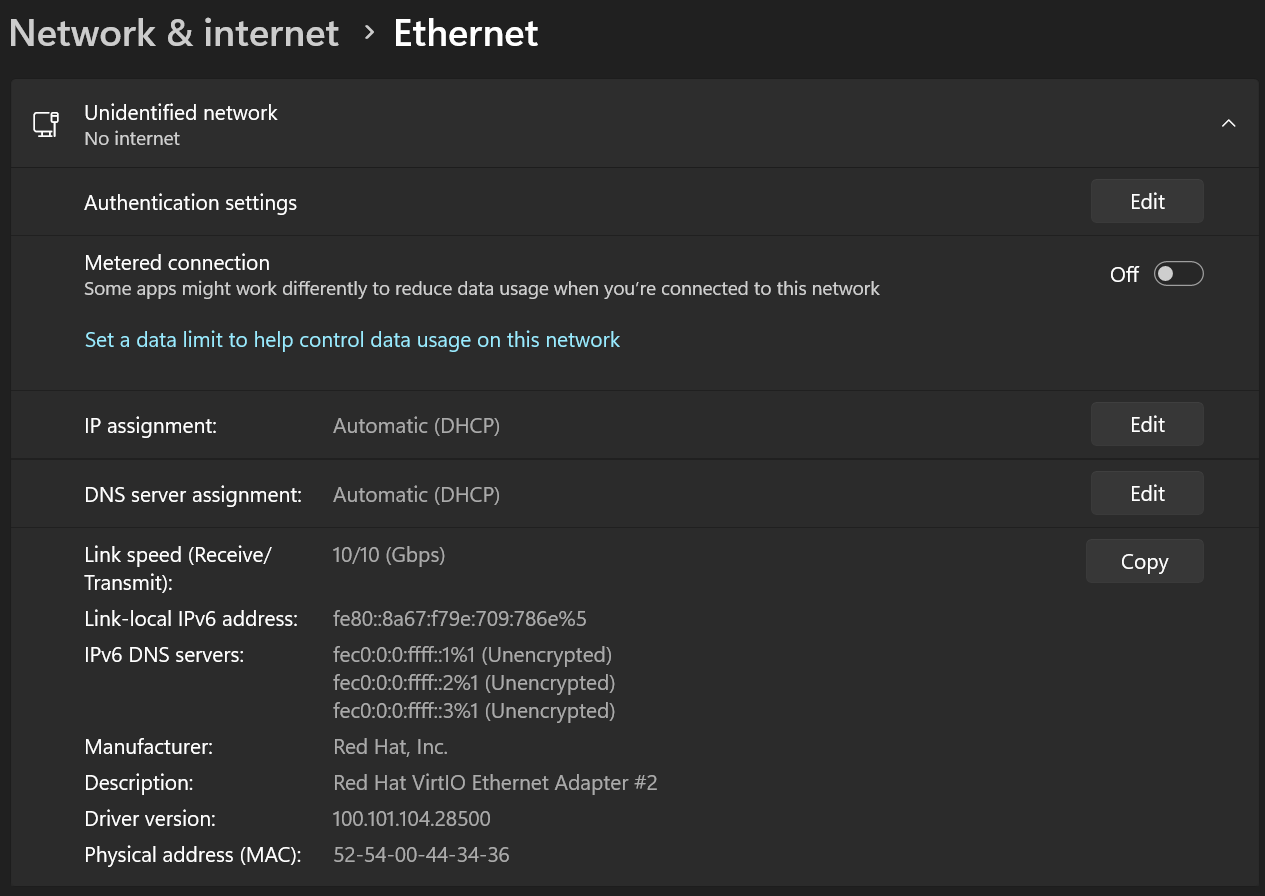
Here what I see inside my guest.

I begin suspecting the problem is on the guest side

This is to only follow or watch the logs live. Otherwise you only see the last few lines. I was hoping for all of the logs, starting from when you hit power on the guest. In my example, I just grabbed 10 seconds from that point. I saw NetworkManager deactivates, and nothing useful was past that.

So you have to find this portion in the logs yourself. There are tons of ways to find and filter journalctl logs. You do not have to watch them live. (journalctl -r -b will go in reverse until you started your host).

So I suggested, father than find them. You can do this. Before you start the guest, you run journalctl -f in a different terminal. Ignore the 10 lines it spits out right after running it, we are looking for new log entries. Then power up the guest. Those new lines onwards are the ones I was hoping you could paste.

I do see the last 6 lines of all that though! So close..


Just boot a Manjaro live image on your NAT network. Use any VM, or make a new diskless one.

But to statically assign the IP on that screen you would have to put in this infomation, I don’t have Windows 11, but this should be enough:

IP:        192.168.122.10
Gateway:   192.168.122.1
Netmask:   255.255.255.0 | if requires CIDR notation then it's | 192.168.122.0/24
Broadcast: 192.168.122.255
DNS:       8.8.8.8
           8.8.4.4

I don’t know your DNS server(s), usually ISP provided. So those are Google’s public DNS servers if you don’t know yours. (Good for testing, bad for privacy.)

Definitely much more going on now, hopefully there will be some relevant info

journalctl -f                                                                                                                                            ✔  
apr 02 01:11:59 user polkit-kde-authentication-agent-1[1919]: Listener adapter polkit_qt_listener_initiate_authentication_finish 
apr 02 01:11:59 user polkit-kde-authentication-agent-1[1919]: polkit_qt_listener_initiate_authentication_finish callback for  0x560725fb4360 
apr 02 01:11:59 user polkit-kde-authentication-agent-1[1919]: Finish obtain authorization: true 
apr 02 01:11:59 user polkit-kde-authentication-agent-1[1919]: Dialog cancelled 
apr 02 01:11:59 user polkit-kde-authentication-agent-1[1919]: Finishing obtaining privileges 
apr 02 01:11:59 user polkit-kde-authentication-agent-1[1919]: Finish obtain authorization: true 
apr 02 01:11:59 user kernel: ntfs3: Enabled Linux POSIX ACLs support 
apr 02 01:11:59 user kernel: ntfs3: Read-only LZX/Xpress compression included 
apr 02 01:11:59 user systemd[1]: polkit-agent-helper@0-1-1919-1000.service: Deactivated successfully. 
apr 02 01:11:59 user systemd[1]: Finished Authorization Manager Agent Helper (PID 1919/UID 1000). 
apr 02 01:12:32 user kwin_wayland[1649]: The theme "Gently" uses the legacy metadata.desktop. Consider contacting the author and asking them update it to use the newer J
SON format. 
apr 02 01:12:32 user kwin_wayland[1649]: Failed to register with host portal QDBusError("org.freedesktop.portal.Error.Failed", "Could not register app ID: Unable to open
 /proc/1649/root") 
apr 02 01:13:43 user plasmashell[1874]: PipeWire remote error:  -2 unknown resource 3 op:4 
apr 02 01:13:43 user plasmashell[1874]: PipeWire remote error:  -2 unknown resource 3 op:7 
apr 02 01:13:44 user plasmashell[1874]: PipeWire remote error:  -2 unknown resource 3 op:4 
apr 02 01:13:44 user plasmashell[1874]: PipeWire remote error:  -2 unknown resource 3 op:7 
apr 02 01:14:28 user sudo[3644]:      user : TTY=pts/3 ; PWD=/home/user ; USER=root ; COMMAND=/usr/bin/virt-manager 
apr 02 01:14:28 user sudo[3644]: pam_unix(sudo:session): session opened for user root(uid=0) by user(uid=1000) 
apr 02 01:14:54 user systemd[1]: Starting libvirt logging daemon... 
apr 02 01:14:54 user systemd[1]: Started libvirt logging daemon. 
apr 02 01:14:54 user kernel: tun: Universal TUN/TAP device driver, 1.6 
apr 02 01:14:54 user kernel: virbr0: port 1(vnet0) entered blocking state 
apr 02 01:14:54 user kernel: virbr0: port 1(vnet0) entered disabled state 
apr 02 01:14:54 user kernel: vnet0: entered allmulticast mode 
apr 02 01:14:54 user kernel: vnet0: entered promiscuous mode 
apr 02 01:14:54 user NetworkManager[1154]: <info>  [1775085294.9065] manager: (vnet0): new Tun device (/org/freedesktop/NetworkManager/Devices/6) 
apr 02 01:14:54 user kernel: virbr0: port 1(vnet0) entered blocking state 
apr 02 01:14:54 user kernel: virbr0: port 1(vnet0) entered listening state 
apr 02 01:14:54 user NetworkManager[1154]: <info>  [1775085294.9182] device (vnet0): state change: unmanaged -> unavailable (reason 'connection-assumed', managed-type: '
external') 
apr 02 01:14:54 user NetworkManager[1154]: <info>  [1775085294.9183] device (vnet0): state change: unavailable -> disconnected (reason 'connection-assumed', managed-type
: 'external') 
apr 02 01:14:54 user NetworkManager[1154]: <info>  [1775085294.9184] device (vnet0): Activation: starting connection 'vnet0' (402bf6ad-34af-4716-9ad0-eb78016a6ab7) 
apr 02 01:14:54 user NetworkManager[1154]: <info>  [1775085294.9185] device (vnet0): state change: disconnected -> prepare (reason 'none', managed-type: 'external') 
apr 02 01:14:54 user NetworkManager[1154]: <info>  [1775085294.9185] device (vnet0): state change: prepare -> config (reason 'none', managed-type: 'external') 
apr 02 01:14:54 user NetworkManager[1154]: <info>  [1775085294.9185] device (vnet0): state change: config -> ip-config (reason 'none', managed-type: 'external') 
apr 02 01:14:54 user NetworkManager[1154]: <info>  [1775085294.9186] device (virbr0): bridge port vnet0 was attached 
apr 02 01:14:54 user NetworkManager[1154]: <info>  [1775085294.9186] device (vnet0): Activation: connection 'vnet0' attached as port, continuing activation 
apr 02 01:14:54 user NetworkManager[1154]: <info>  [1775085294.9186] device (vnet0): state change: ip-config -> ip-check (reason 'none', managed-type: 'external') 
apr 02 01:14:54 user systemd[1]: Starting Network Manager Script Dispatcher Service... 
apr 02 01:14:54 user systemd-machined[1093]: New machine qemu-1-win11. 
apr 02 01:14:54 user systemd[1]: Started Virtual Machine qemu-1-win11. 
apr 02 01:14:54 user systemd[1]: Started Network Manager Script Dispatcher Service. 
apr 02 01:14:54 user NetworkManager[1154]: <info>  [1775085294.9860] device (vnet0): state change: ip-check -> secondaries (reason 'none', managed-type: 'external') 
apr 02 01:14:54 user NetworkManager[1154]: <info>  [1775085294.9860] device (vnet0): state change: secondaries -> activated (reason 'none', managed-type: 'external') 
apr 02 01:14:54 user NetworkManager[1154]: <info>  [1775085294.9861] device (vnet0): Activation: successful, device activated. 
apr 02 01:14:56 user avahi-daemon[1088]: Joining mDNS multicast group on interface vnet0.IPv6 with address fe80::fc54:ff:fe44:3436. 
apr 02 01:14:56 user avahi-daemon[1088]: New relevant interface vnet0.IPv6 for mDNS. 
apr 02 01:14:56 user avahi-daemon[1088]: Registering new address record for fe80::fc54:ff:fe44:3436 on vnet0.*. 
apr 02 01:14:56 user kernel: virbr0: port 1(vnet0) entered learning state 
apr 02 01:14:59 user NetworkManager[1154]: <info>  [1775085299.0629] device (virbr0): carrier: link connected 
apr 02 01:14:59 user kernel: virbr0: port 1(vnet0) entered forwarding state 
apr 02 01:14:59 user kernel: virbr0: topology change detected, propagating 
apr 02 01:15:04 user systemd[1]: NetworkManager-dispatcher.service: Deactivated successfully. 
apr 02 01:15:08 user avahi-daemon[1088]: Withdrawing address record for fe80::fc54:ff:fe44:3436 on vnet0. 
apr 02 01:15:08 user avahi-daemon[1088]: Withdrawing address record for 192.168.122.1 on virbr0. 
apr 02 01:15:08 user avahi-daemon[1088]: Withdrawing address record for fe80::ba08:a3dc:b235:e09b on wlp5s0. 
apr 02 01:15:08 user avahi-daemon[1088]: Withdrawing address record for ::1 on lo. 
apr 02 01:15:08 user avahi-daemon[1088]: Withdrawing address record for 127.0.0.1 on lo. 
apr 02 01:15:08 user avahi-daemon[1088]: Host name conflict, retrying with user-2 
apr 02 01:15:08 user avahi-daemon[1088]: Registering new address record for fe80::fc54:ff:fe44:3436 on vnet0.*. 
apr 02 01:15:08 user avahi-daemon[1088]: Registering new address record for 192.168.122.1 on virbr0.IPv4. 
apr 02 01:15:08 user avahi-daemon[1088]: Registering new address record for fe80::ba08:a3dc:b235:e09b on wlp5s0.*. 
apr 02 01:15:08 user avahi-daemon[1088]: Registering new address record for 192.168.106.30 on wlp5s0.IPv4. 
apr 02 01:15:08 user avahi-daemon[1088]: Registering new address record for ::1 on lo.*. 
apr 02 01:15:08 user avahi-daemon[1088]: Registering new address record for 127.0.0.1 on lo.IPv4. 
apr 02 01:15:09 user avahi-daemon[1088]: Server startup complete. Host name is user-2.local. Local service cookie is 2510165280.

In your logs, every line says it came up right, and is almost identical to mine in the right places.

I should have asked for this before.. (I think it’s in every related Arch wiki for setting stuff like this up, and I set mine up 5 years ago.)

Make sure forwarding is even enabled. Type:

sysctl net.ipv4.ip_forward

It should return:

net.ipv4.ip_forward = 1

Now at this point..

Did you boot a Manjaro live image on the default network? This is kind of important in troubleshooting, as if this doesn’t work then we’re checking less likely things.

You said setting it to nftables, will make libvirtd not even start. I remember posts where that fixes it for some people, so that is ironic.

So we can try to get nftables to work, or find out why iptables is broke.

Let’s see where were at with the above first.

Yes, correct.

Yes. I just confirmed it one more time.
Just to be sure, I uncomment the following # nftables - use nft commands to construct the firewall which now that I notice it is a bit different from

# Master configuration file for the network driver.
# All settings described here are optional - if omitted, sensible
# defaults are used.

# firewall_backend:
#
#   determines which subsystem to use to setup firewall packet
#   filtering rules for virtual networks.
#
#   Supported settings:
#
#     iptables - use iptables commands to construct the firewall
#     nftables - use nft commands to construct the firewall
#
#   If firewall_backend isn't configured, libvirt will choose the
#   first available backend from the following list:
#
#     [nftables, iptables]
#
#   If no backend is available on the host, then the network driver
#   will fail to start, and an error will be logged.
#

Not yet. When you say live image you mean an .ISO to loaded as a guest on KVM?

One more thing, I realized I have had ufw active and running all this time. Could it be a problem?

sudo ufw status                                                                                                                                          ✔ 
Status: active

To                         Action      From
--                         ------      ----
22/tcp                     ALLOW OUT   Anywhere                  
443/tcp                    ALLOW OUT   Anywhere                  
192.168.1.1 123/udp        ALLOW OUT   Anywhere                  
192.168.1.1 53/udp         ALLOW OUT   Anywhere                  
22/tcp (v6)                ALLOW OUT   Anywhere (v6)             
443/tcp (v6)               ALLOW OUT   Anywhere (v6)   

When you’re using virt-manager you have to start the default network using the play button whilst it is not set to auto-start:

I don’t have it that way. Could it be a different version.
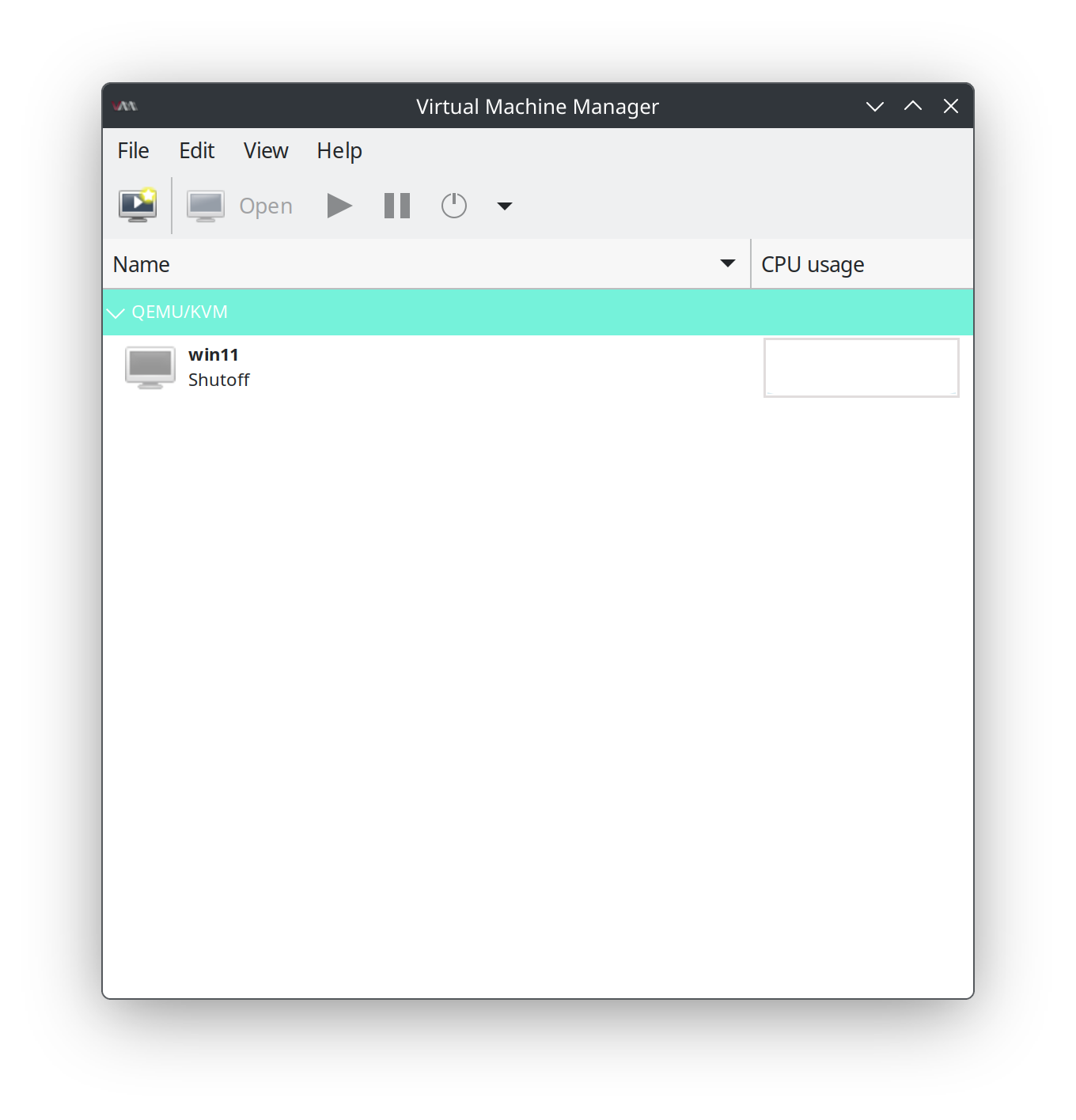
My GUI is like this

The manager is in another window

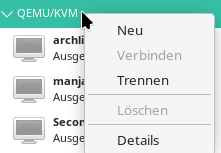
You have to right-click the host line, not the indiviudal vm:

Then select ‘Details’ (sorry, switch to english frontend doesn’t work)