Hello everybody,
I’ve got a old Dell Inspiron 1545 to restore a not bootable Manjaro installation. I installed the system a few years ago, with everything working incl. Wifi.
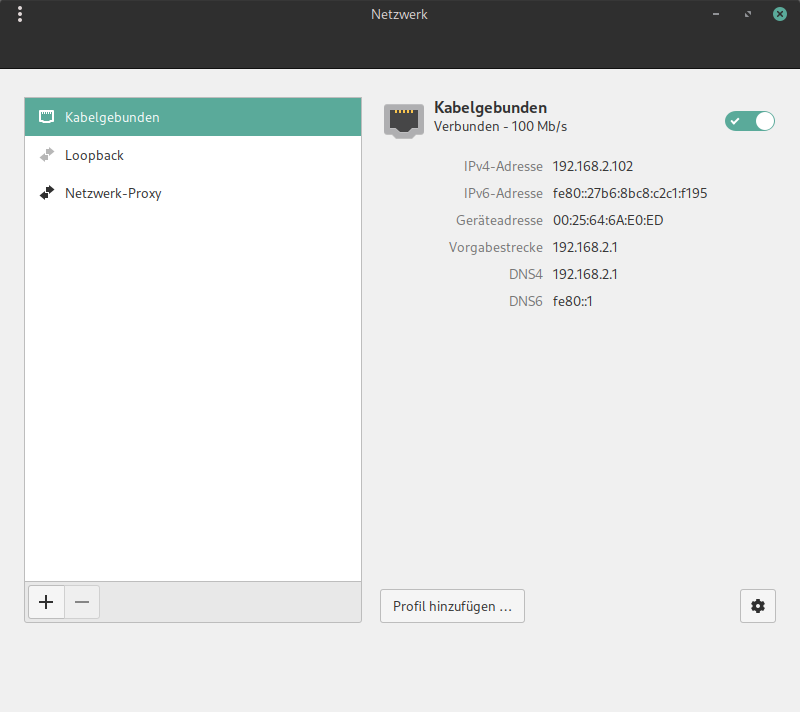
I guess, cause it’s not my own PC and i don’t know what exactly leeds to the problem, it could be a broken (by user…) update. I could solve the booting problem so, manjaro is running again and the latest update is installed. But the old Broadcom BCM4312 does not find any Wifi-Connections. At this moment i am posting this via LAN.
Here is my:
inxi -Fz
System:
  Kernel: 6.12.48-1-MANJARO arch: x86_64 bits: 64
  Desktop: Cinnamon v: 6.4.12 Distro: Manjaro Linux
Machine:
  Type: Portable System: Dell product: Inspiron 1545 v: N/A
    serial: <superuser required>
  Mobo: Dell model: 0G848F serial: <superuser required> BIOS: Dell v: A10
    date: 07/17/2009
Battery:
  ID-1: BAT0 charge: 48.8 Wh (100%) condition: 48.8/48.8 Wh (100%)
CPU:
  Info: dual core model: Celeron T3000 bits: 64 type: MCP cache: L2: 1024 KiB
  Speed (MHz): avg: 1796 min/max: N/A cores: 1: 1796 2: 1796
Graphics:
  Device-1: Intel Mobile 4 Series Integrated Graphics driver: i915 v: kernel
  Display: x11 server: X.Org v: 21.1.18 with: Xwayland v: 24.1.8 driver: X:
    loaded: modesetting dri: crocus gpu: i915 resolution: 1366x768~60Hz
  API: OpenGL Message: Unable to show GL data. glxinfo is missing.
  Info: Tools: x11: xdpyinfo, xprop, xrandr
Audio:
  Device-1: Intel 82801I HD Audio driver: snd_hda_intel
  API: ALSA v: k6.12.48-1-MANJARO status: kernel-api
  Server-1: PulseAudio v: 17.0-43-g3e2bb status: active
Network:
  Device-1: Marvell 88E8040 PCI-E Fast Ethernet driver: sky2
  IF: enp9s0 state: up speed: 100 Mbps duplex: full mac: <filter>
  Device-2: Broadcom BCM4312 802.11b/g LP-PHY driver: b43-pci-bridge
Drives:
  Local Storage: total: 476.94 GiB used: 154.17 GiB (32.3%)
  ID-1: /dev/sda vendor: Netac model: SSD 512GB size: 476.94 GiB
Partition:
  ID-1: / size: 32.12 GiB used: 15.5 GiB (48.3%) fs: ext4 dev: /dev/sda2
  ID-2: /home size: 432.02 GiB used: 138.67 GiB (32.1%) fs: ext4
    dev: /dev/sda1
Swap:
  ID-1: swap-1 type: partition size: 4 GiB used: 256 KiB (0.0%) dev: /dev/sda3
Sensors:
  System Temperatures: cpu: 56.0 C mobo: N/A
  Fan Speeds (rpm): cpu: 0
Info:
  Memory: total: 4 GiB available: 3.79 GiB used: 1.77 GiB (46.8%)
  Processes: 190 Uptime: 3h 56m Shell: Bash inxi: 3.3.39
Here the status of networkmanager:
NetworkManager.service - Network Manager
     Loaded: loaded (/usr/lib/systemd/system/NetworkManager.service; enabled; preset: disabled)
     Active: active (running) since Mon 2025-10-27 11:26:51 CET; 4h 4min ago
 Invocation: 01dfba9351eb42429e35dd68fd8304c1
       Docs: man:NetworkManager(8)
   Main PID: 929 (NetworkManager)
      Tasks: 4 (limit: 4612)
     Memory: 18.8M (peak: 19.4M)
        CPU: 975ms
     CGroup: /system.slice/NetworkManager.service
             └─929 /usr/bin/NetworkManager --no-daemon

Okt 27 11:26:53 dell-inspiron1545 NetworkManager[929]: <info>  [1761560813.4683] device (enp9s0): state change: ip-config -> ip-check (reason 'none', managed-type: 'full')
Okt 27 11:26:53 dell-inspiron1545 NetworkManager[929]: <info>  [1761560813.4733] device (enp9s0): state change: ip-check -> secondaries (reason 'none', managed-type: 'full')
Okt 27 11:26:53 dell-inspiron1545 NetworkManager[929]: <info>  [1761560813.4738] device (enp9s0): state change: secondaries -> activated (reason 'none', managed-type: 'full')
Okt 27 11:26:53 dell-inspiron1545 NetworkManager[929]: <info>  [1761560813.4757] manager: NetworkManager state is now CONNECTED_SITE
Okt 27 11:26:53 dell-inspiron1545 NetworkManager[929]: <info>  [1761560813.4764] device (enp9s0): Activation: successful, device activated.
Okt 27 11:26:53 dell-inspiron1545 NetworkManager[929]: <info>  [1761560813.4798] manager: startup complete
Okt 27 11:26:53 dell-inspiron1545 NetworkManager[929]: <info>  [1761560813.5342] manager: NetworkManager state is now CONNECTED_GLOBAL
Okt 27 11:27:02 dell-inspiron1545 NetworkManager[929]: <info>  [1761560822.4744] agent-manager: agent[3c69b77fff9b21d3,:1.46/org.cinnamon.NetworkAgent/1000]: agent registered
Okt 27 11:27:11 dell-inspiron1545 NetworkManager[929]: <info>  [1761560831.4691] dhcp6 (enp9s0): activation: beginning transaction (timeout in 45 seconds)
Okt 27 11:27:11 dell-inspiron1545 NetworkManager[929]: <info>  [1761560831.4706] dhcp6 (enp9s0): state changed new lease
I got the advice to install broadcom-wl-dkms - but this leeds to deinstallation of broadcom-wl on all kernels (5.15 - 6.1 - 6.12).
lspci -k says before:
09:00.0 Ethernet controller: Marvell Technology Group Ltd. 88E8040 PCI-E Fast Ethernet Controller (rev 13)
	Subsystem: Dell Device 02aa
	Kernel driver in use: sky2
	Kernel modules: sky2
0c:00.0 Network controller: Broadcom Inc. and subsidiaries BCM4312 802.11b/g LP-PHY (rev 01)
	Subsystem: Dell Wireless 1397 WLAN Mini-Card
	Kernel driver in use: wl
	Kernel modules: ssb, wl
though many Wifi networks in the building, none is shown:

I tried to install broadcom-wl again but i was asked:
sudo pacman -S broadcom-wl
[sudo] Passwort für delli:
:: Es stehen 13 Anbieter für broadcom-wl zur Verfügung:
:: Repositorium extra
   1) linux510-broadcom-wl  2) linux515-broadcom-wl  3) linux54-broadcom-wl
   4) linux61-broadcom-wl  5) linux61-rt-broadcom-wl  6) linux612-broadcom-wl
   7) linux612-rt-broadcom-wl  8) linux615-rt-broadcom-wl
   9) linux616-broadcom-wl  10) linux616-rt-broadcom-wl
   11) linux617-broadcom-wl  12) linux66-broadcom-wl
   13) linux66-rt-broadcom-wl

Geben Sie eine Zahl ein (Voreinstellung=1):
Is it possible to choose more than one package? I just want to have it on each kernel.
But even then there is no Wifi listed - did i forget something?