Yes, shows (SW) rather than (HW). CPU usage is close to 90% on all 4 CPUs as it struggles to play.
Are you sure the video is h265 and not h264. It will not be HW on any other format.
I am not sure of that… in fact, no clue.
jellyfish-110-mbps-hd-hevc.mkv
file says it is: Matroska data
I am going to try running it all from the command line and see what it does…
My file is jellyfish-100-mbps-hd-hevc.mkv and it did ok from the comand line. I have noticed people sometimes package the wrong format as opposed to the file name.
Try the jellyfish-100-mbps-hd-hevc.mkv file
Downloading the file now, it is going to take a about 30 min.
Here is a pic while it’s playing. The video will not show up because it is playing in a terminal. Everything but the video it’s self will show.
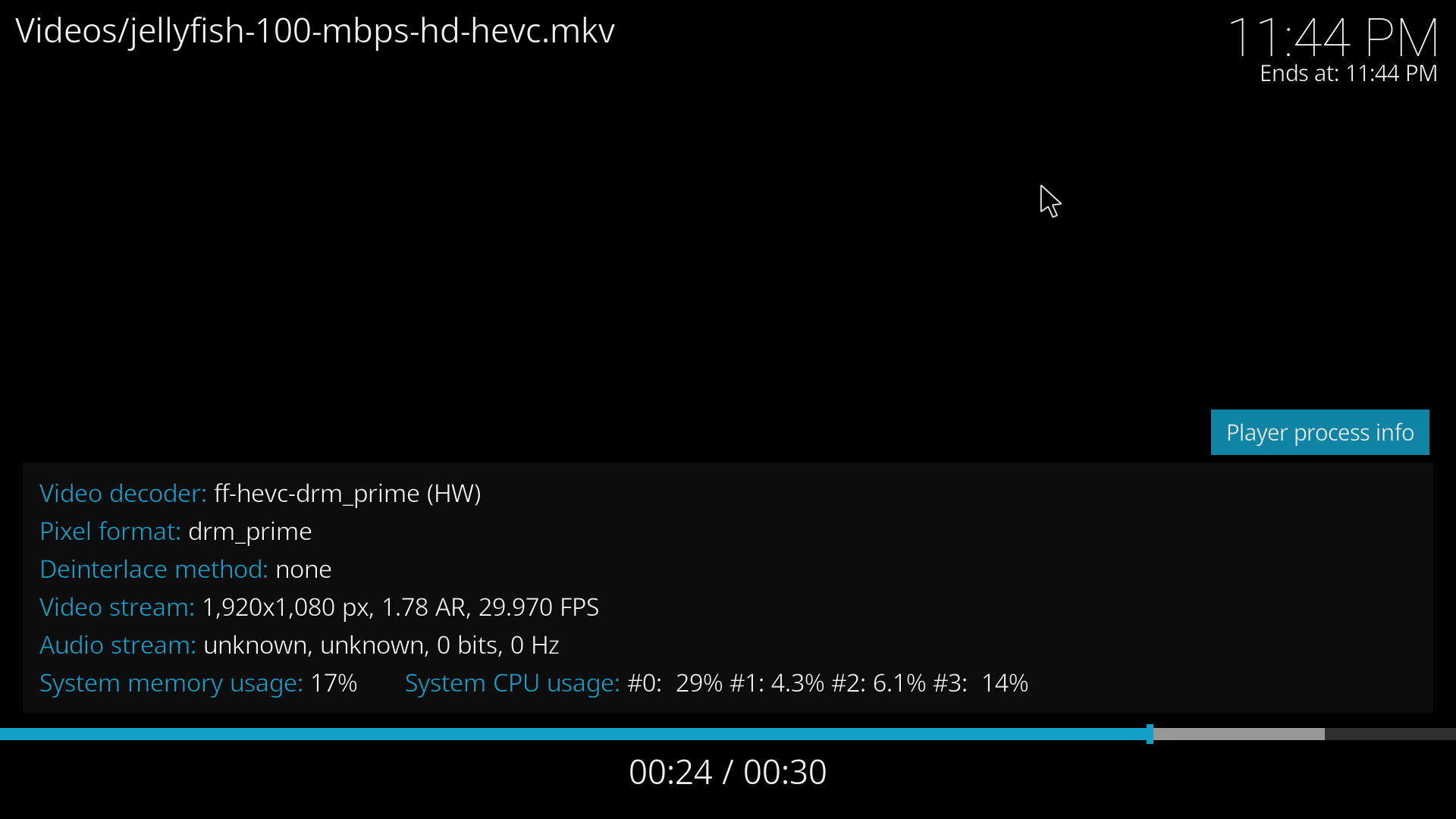
How did you capture that screen?
PrtScr button
It may be sluggish with the processors maxed. A window should pop up asking where to save.
[ray@pi4 ~]$ glxinfo | grep “OpenGL renderer string”
OpenGL renderer string: llvmpipe (LLVM 11.0.0, 128 bits)
over_voltage=5
arm_freq=2000

gpu_mem=384
initramfs initramfs-linux.img followkernel
kernel=kernel8.img
arm_64bit=1
enable_gic=1
disable_overscan=1

#enable sound
dtparam=audio=on
#hdmi_drive=2

#enable vc4
dtoverlay=vc4-fkms-v3d,cma-384
max_framebuffers=2
dtoverlay=rpivid-v4l2

hdmi_force_edid_3d:0=1
#hdmi_mode:0=16
hdmi_mode:0=39
hdmi_drive:0=2
hdmi_group:0=2
hdmi_force_mode:0=1
hdmi_ignore_edid:0=0xa5000080
xf86-video-fbturbo-git installed
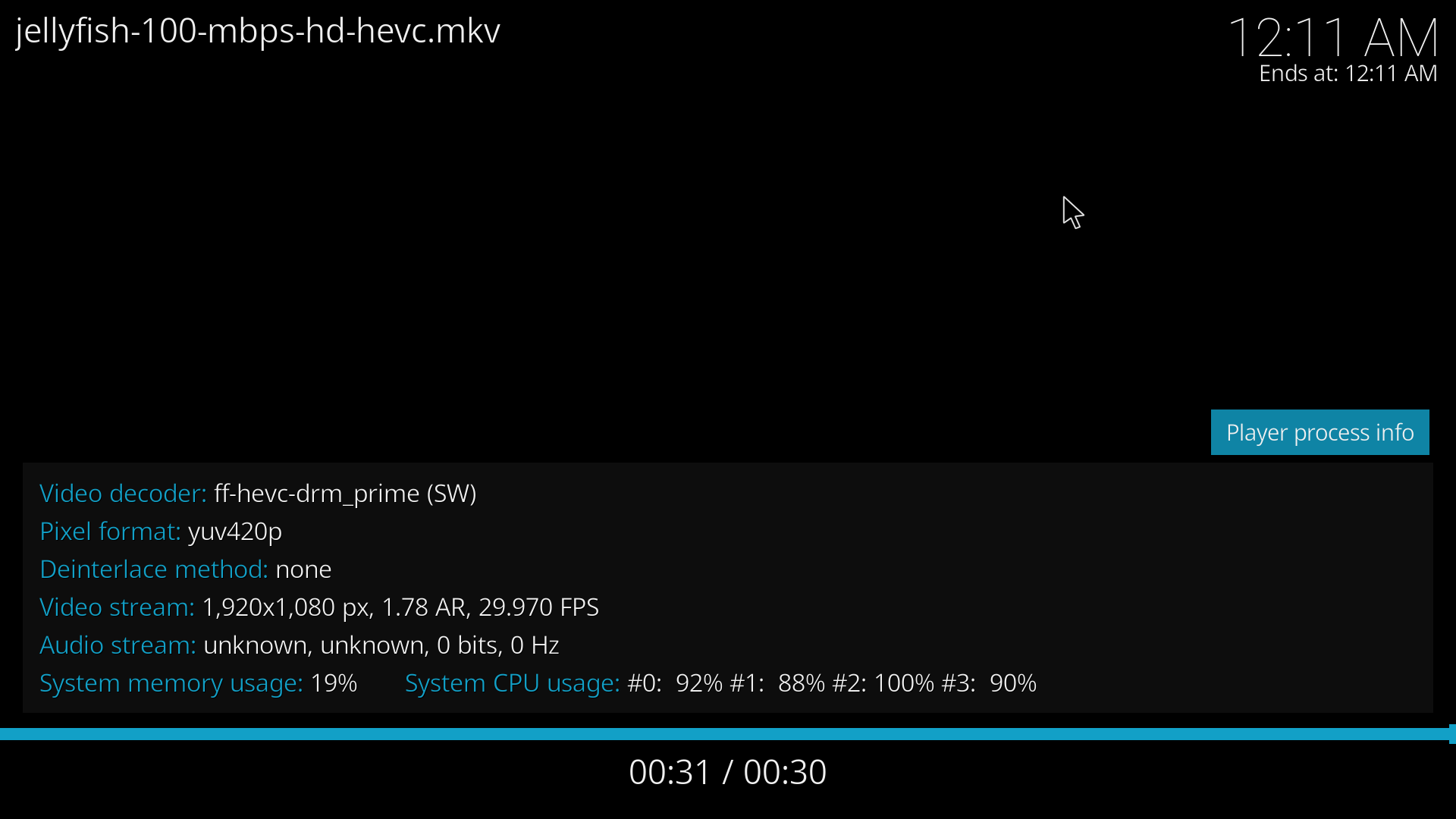
Last thing I can think of is maybe try another monitor. I see you have the new file.
Only other thought is there is some config some where on your system you have changed.
That is the newly downloaded file.
I will now reinstall fbturbo and adjust my config and give it another try.
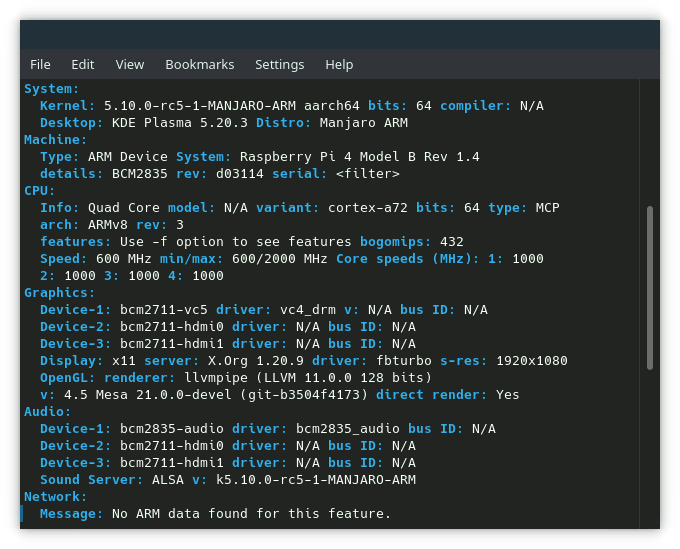
My Graphics section is different than yours.
That was when I first booted into the new mate image and I first got vulkan going.
I uploaded the new kodi with the changes so it would not have the same provides. I do not know if it will make a diff but uninstall the old ones first. The will have the -2 extension in the file names. The new folder in this tarball is kodi.
md5sum:
94e780195eff646b97662d47ae5db479 kodi.tar
https://drive.google.com/file/d/1an57rAdAB6syg9SI7B-3Oc12IGYs2z6g/view?usp=sharing
I double checked after my changes and noticed there was a diff with theyour and my mesa-git versions. Strit must have built a new one after I made the mate image. I installed the new mesa-git and tested kodi and it is still good. The new mesa-git did screw up my ability to resize my windows. I can only can do it from the top of the windows now. Trying on the bottom is useless. I ran in to this before and there is a fix for mate but I will have to look it up.
Current:
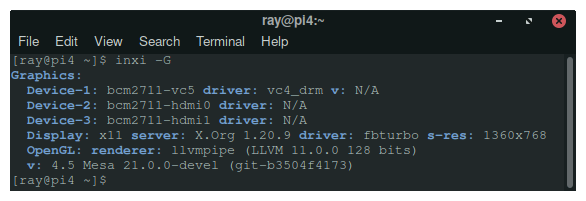
Still no dice. Sorry, it does not look like I will be able to do the 4k test tomorrow. I am pretty much out of ideas.
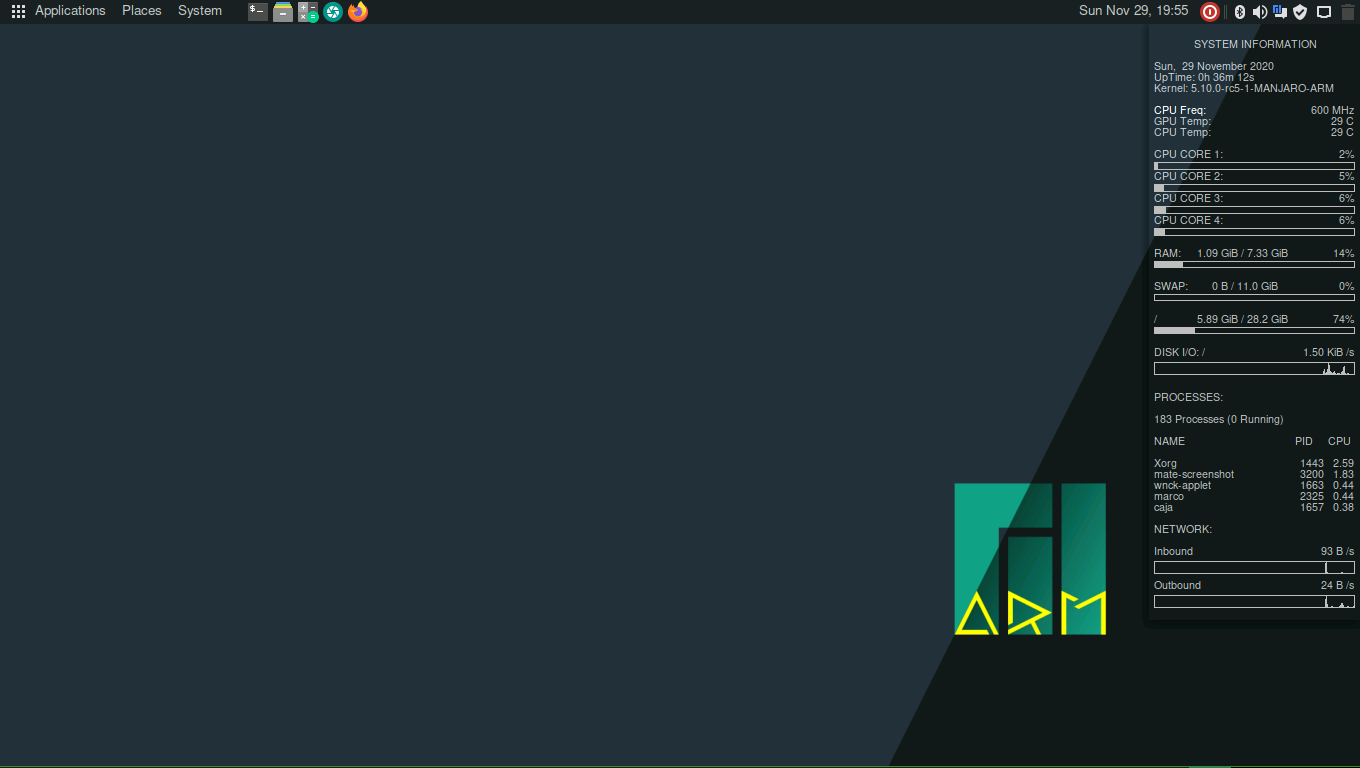
That looks really nice, well done. I like the conky too, here is mine… which is fairly similar to yours.
conky.config = {
-- --------------------------------------------------------------------------------------------- #

-- .conkyrc - derived from various examples across the 'net

-- --------------------------------------------------------------------------------------------- #

-- -------------------- Conky's Run Time Parameters -------------------- #

	update_interval = 3.0,-- Conky update interval in seconds
	total_run_times = 0,-- Number of updates before quitting.  Set to zero to run forever.
	no_buffers = true,-- Subtract file system buffers from used memory?
	cpu_avg_samples = 1,-- Number of cpu samples to average. Set to 1 to disable averaging
	net_avg_samples = 1,-- Number of net samples to average. Set to 1 to disable averaging
	top_name_width = 12,-- Limit process name length
	short_units = true,-- Helps with alignment
	double_buffer = true,-- Use double buffering (reduces flicker)
	use_spacer = 'right',-- Adds spaces to stop object from moving
	maximum_width = 242,-- Maximum width of window in pixels

-- -------------------- Conky's General Look and Feel -------------------- #

-- --- default values --- #
	default_color = '#33bb55',-- Default color and border color
	default_bar_width = 0, default_bar_height = 4,-- Specify a default width and height for bars.
	default_gauge_width = 25, default_gauge_height = 25,-- Specify a default width and height for gauges.
	default_graph_width = 0, default_graph_height = 20,-- Specify a default width and height for graphs.
-- 	default_outline_color = 'white',-- Default border and text outline color
	default_shade_color = 'grey',-- Default border and text shading color

-- --- predefined colors - http://www.kgym.jp/freesoft/xrgb.html --- #
	color0 = '#00ffaa',
	color1 = '#ffff22',

-- --- window layout and options --- #
	own_window = true,-- Conky creates its own window instead of using desktop
	own_window_class = 'Conky',
	own_window_type = 'normal',-- If own_window is yes, use type normal, desktop, or override
	own_window_transparent = true,
	own_window_hints = 'undecorated,below,sticky,skip_taskbar,skip_pager',
	own_window_argb_visual = true,
	own_window_argb_value = 0,
	own_window_colour = 'black',-- If own_window_transparent is no, set the background colour

-- --- window placment --- #
	alignment = 'middle_right',

-- --- borders, margins, and outlines --- #
	draw_graph_borders = true,-- Do you want to draw borders around graphs
	border_inner_margin = 5,-- Window's inner border margin (in pixels)
	border_outer_margin = 5,-- Window's outer border margin (in pixels)
	gap_x = 10,-- Gap between borders of screen and text (on x-axis)
	gap_y = 35,-- Gap between borders of screen and text (on y-axis)
	border_width = 5,-- Window's border width (in pixels)

-- --- Text --- #
	draw_outline = false,-- Do you want to draw outlines
	draw_shades = false,-- Do you want to draw shades
	draw_borders = false,-- Do you want to draw borders around text
	uppercase = false,-- set to yes if you want all text to be in uppercase
	use_xft = true,-- use the X FreeType interface library (anti-aliased font)
	font = 'NotoSansMono:size=8:weight=bold',-- Xft font to be used

-- -------------------- Conky's Displayed System Monitoring Parameters -------------------- #
};

conky.text = [[
${color1}SYSTEM INFORMATION ${hr 1}
${color0}System: ${color}${nodename} ${alignr}${color0}Uptime: ${color}${exec uptime -p | cut -b4- | sed 's/days/d/' | sed 's/hours/h/' | sed 's/minutes/m/'}
${color0}Kernel: ${color}${kernel} (${machine})
${color0}Driver:${color}${execi 99999 glxinfo | grep "OpenGL renderer" | cut -d":" -f2} ${alignr}${color0}Resolution: ${color}${execi 99999 xdpyinfo | awk '/^ +dimensions/ {print $2}'}

${color1}CLOCK SPEEDS (MHz) ${hr 1}
${color0}ARM: ${color}${execi 99999 /opt/vc/bin/vcgencmd measure_clock arm | awk -F'=' '{printf "%6.2f", $2 / 1000000}'}  ${color0}PWM:  ${color}${execi 99999 /opt/vc/bin/vcgencmd measure_clock pwm | awk -F'=' '{printf "%6.2f", $2 / 1000000}'}  ${color0}ISP:  ${color}${execi 99999 /opt/vc/bin/vcgencmd measure_clock isp | awk -F'=' '{printf "%6.2f", $2 / 1000000}'}
${color0}V3D:  ${color}${execi 99999 /opt/vc/bin/vcgencmd measure_clock v3d | awk -F'=' '{printf "%6.2f", $2 / 1000000}'}  ${color0}VEC:  ${color}${execi 99999 /opt/vc/bin/vcgencmd measure_clock vec | awk -F'=' '{printf "%6.2f", $2 / 1000000}'}  ${color0}DPI:  ${color}${execi 99999 /opt/vc/bin/vcgencmd measure_clock dpi | awk -F'=' '{printf "%6.2f", $2 / 1000000}'}
${color0}CORE: ${color}${execi 99999 /opt/vc/bin/vcgencmd measure_clock core | awk -F'=' '{printf "%6.2f", $2 / 1000000}'}  ${color0}H264: ${color}${execi 99999 /opt/vc/bin/vcgencmd measure_clock h264 | awk -F'=' '{printf "%6.2f", $2 / 1000000}'}  ${color0}EMMC: ${color}${execi 99999 /opt/vc/bin/vcgencmd measure_clock emmc | awk -F'=' '{printf "%6.2f", $2 / 1000000}'}
${color0}UART: ${color}${execi 99999 /opt/vc/bin/vcgencmd measure_clock uart | awk -F'=' '{printf "%6.2f", $2 / 1000000}'}  ${color0}HDMI: ${color}${execi 99999 /opt/vc/bin/vcgencmd measure_clock hdmi | awk -F'=' '{printf "%6.2f", $2 / 1000000}'}  ${color0}PIXEL:${color}${execi 99999 /opt/vc/bin/vcgencmd measure_clock pixel | awk -F'=' '{printf "%6.2f", $2 / 1000000}'}

${color1}PROCESSORS ${hr 1}
${color0}Frequency: ${color}${freq}MHz ${alignr}${color0}Throttled: ${color}${exec /opt/vc/bin/vcgencmd get_throttled | awk -F'=' '{print $2}' }
${color0}CPU Temp:  ${color}${exec awk '{printf "%4.1f °C", $1 / 1000}' /sys/class/thermal/thermal_zone0/temp} ${alignr}${color0}Voltage: ${color}${exec /opt/vc/bin/vcgencmd measure_volts core | awk -F'=' '{printf "%6.4fV", $2}'}
#seems to cause random errors which causes the conky display to hang
#${color0}GPU Temp: ${color}${exec /opt/vc/bin/vcgencmd measure_temp | awk -F'=' '{printf "%4.1f °C", $2}'}
${color0}${alignc}Load Avg: ${color}$loadavg
${color}${cpu cpu1}% ${cpubar cpu1 2,32} ${cpu cpu2}% ${cpubar cpu2 2,32} ${cpu cpu3}% ${cpubar cpu3 2,32} ${cpu cpu4}% ${cpubar cpu4 2,32}
${color}${cpugraph cpu0 10,0}

${color1}MEMORY ${hr 1}
#conky's $mem is wonky, sometimes a negative value
#${color0}RAM:  ${color}$mem / $memmax $memperc% ${membar 2,0}
${color0}RAM:  ${color}${exec awk </proc/meminfo -F': *' ' { v[$1]=$2/1048576 } END{printf "%4.2fG", v["MemTotal"]-v["MemFree"]-(v["Cached"]-v["Shmem"]+v["Buffers"]+v["SReclaimable"])}'} / $memmax $memperc% ${membar 2,0}
${color0}SWAP: ${color}$swap / $swapmax $swapperc% ${swapbar 2,0}
${color0}CPU/GPU Allocation: ${color}${execi 99999 /opt/vc/bin/vcgencmd get_mem arm | awk -F'=' '{print $2}' } / ${color}${execi 99999 /opt/vc/bin/vcgencmd get_mem gpu | awk -F'=' '{print $2}'}
${color0}SDRAM C: ${color}${execi 99999 /opt/vc/bin/vcgencmd measure_volts sdram_c | awk -F'=' '{printf "%6.4fV", $2}'}  ${color0}I: ${color}${execi 99999 /opt/vc/bin/vcgencmd measure_volts sdram_i | awk -F'=' '{printf "%6.4fV", $2}'}  ${color0}P: ${color}${execi 99999 /opt/vc/bin/vcgencmd measure_volts sdram_p | awk -F'=' '{printf "%6.4fV", $2}'}

${color1}FILESYSTEMS ${hr 1}
${color0}/     ${color}${fs_used /} / ${fs_size /} ${fs_used_perc /}% ${color}${fs_bar 2,0 /}
${color0}/home ${color}${fs_used /home} / ${fs_size /home} ${fs_used_perc /home}% ${color}${fs_bar 2,0 /home}
${color0}/boot ${color}${fs_used /boot} / ${fs_size /boot} ${fs_used_perc /boot}% ${color}${fs_bar 2,0 /boot}
${color0}/tmp  ${color}${fs_used /tmp} / ${fs_size /tmp} ${fs_used_perc /tmp}% ${color}${fs_bar 2,0 /tmp}
${color0}/var/log ${color}${fs_used /var/log} / ${fs_size /var/log} ${fs_used_perc /var/log}% ${color}${fs_bar 2,0 /var/log}
${color0}READ: ${color}${diskio_read}/s ${alignr}${color0}WRITE: ${color}${diskio_write}/s

${color1}NETWORKS ${hr 1}
${if_existing /sys/class/net/eth0/operstate up}${color0}eth0 ${alignr}${color0}Link Speed: ${color}${exec cat /sys/class/net/eth0/speed} Mb/s
${color0}MAC: ${color}${exec cat /sys/class/net/eth0/address} ${color0}IP: ${color}${addr eth0}
${color0}Up:  ${color} ${upspeed eth0}/s (${totalup eth0})
${upspeedgraph eth0 10,0}
${color0}Down:${color} ${downspeed eth0}/s (${totaldown eth0})
${downspeedgraph eth0 10,0}

${endif}${if_existing /sys/class/net/wlan0/operstate up}${color0}wlan0      Quality:${color}${wireless_link_qual_perc wlan0}${alignr}${color0}Bit Rate: ${color}${wireless_bitrate wlan0}
${color0}MAC: ${color}${exec cat /sys/class/net/wlan0/address} ${color0}IP: ${color}${addr wlan0}
${color0}Up:  ${color} ${upspeed wlan0}/s (${totalup wlan0})
${upspeedgraph wlan0 10,0}
${color0}Down:${color} ${downspeed wlan0}/s (${totaldown wlan0})
${downspeedgraph wlan0 10,0}${endif}

${color1}TOP PROCESSES ${hr 1}
${color0}I/O ${color}${top_io name 1} ${top_io pid 1} ${alignr}${color0}R:${color}${top_io io_read 1} ${color0}W:${color}${top_io io_write 1}
${color0}MEM ${color}${top_mem name 1} ${top_mem pid 1} ${alignc}${top_mem mem 1}%  ${alignr}${top_mem mem_res 1}

${color0}NAME            PID    CPU    MEM    I/O
${color}${top name 1} ${top pid 1} ${top cpu 1} ${top mem 1} ${top io_perc 1}
${color}${top name 2} ${top pid 2} ${top cpu 2} ${top mem 2} ${top io_perc 2}
${color}${top name 3} ${top pid 3} ${top cpu 3} ${top mem 3} ${top io_perc 3}
${color}${top name 4} ${top pid 4} ${top cpu 4} ${top mem 4} ${top io_perc 4}
${color}${top name 5} ${top pid 5} ${top cpu 5} ${top mem 5} ${top io_perc 5}

${color1}LOG FILES ${hr 1}
${color0}Kernel Ring Buffer (excluding debug (7))
${color}${exec /bin/journalctl -k -q -x -p0..6 -n5 | cut -d' ' -f1,2,4,5 --complement | fold -w40}
]];