Hi, more than a problem something which I find annoying, and have looked extensively online but couldn’t find a solution.
Few days ago I put together the first pc for my young kid and wanted to do same set-up as mine, which is Manjaro XFCE. My installation is almost 10y old (and had basically zero issues top top OS btw) and I guess because of that few things looked different from my machine.
In particular, in the Settings panel, he has this XFCE screensaver option which is not present in mine; in first place I disabled both screensaver and the lock screen on the second tab. I think because of that, the lock screen button in Whisker menu no longer worked, so I re-enabled Lock screen in XFCE screensaver and button worked again.
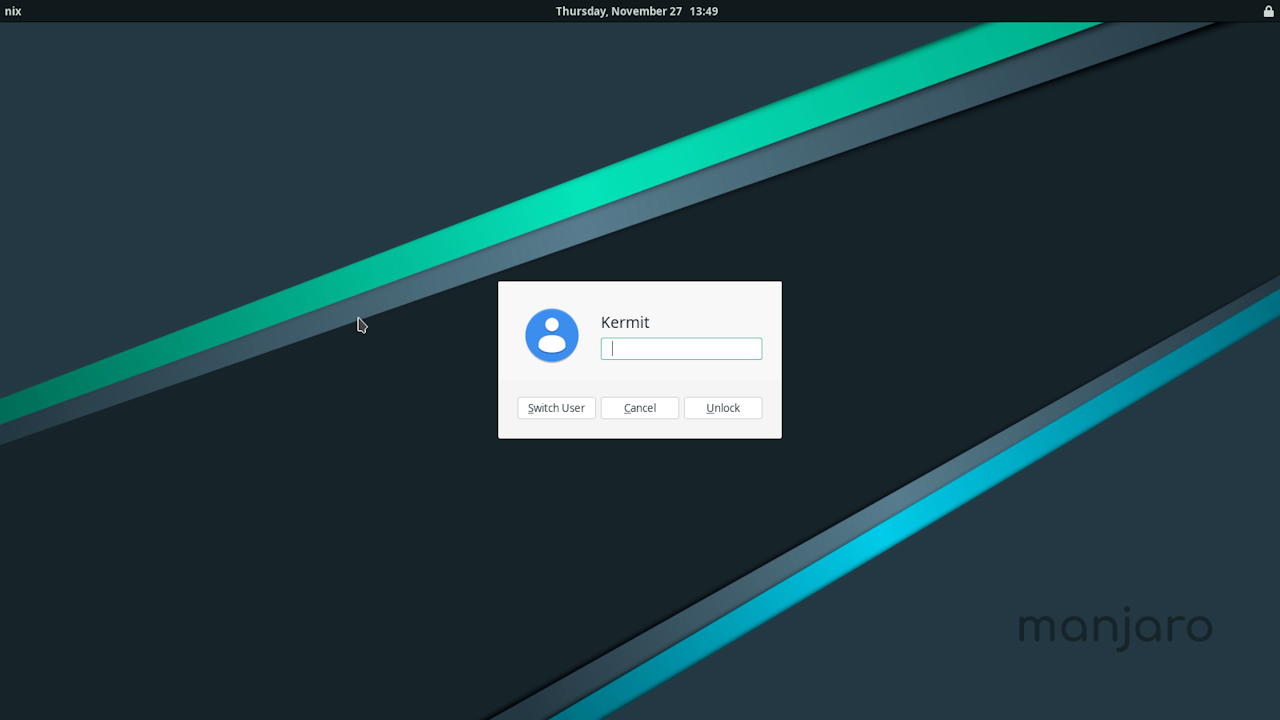
The issue is that the Lock screen pop up/dialog looks ugly and different from the log-in dialog pop up I set up with different theme, fonts, etc. using LightDM GTK. So, the questions:
Is it correct that log in and lock screen are now different???
If so, and I can’t get rid of the ‘new’ lock screen, is there a way to edit appearance of the pop up dialog?
Perhaps related to the point above, is there a way to also edit the awful window popping up when wanting to turn off/suspend/hibernate/log out from system?? It seems the same poor theme as this ‘new’ lock screen window…
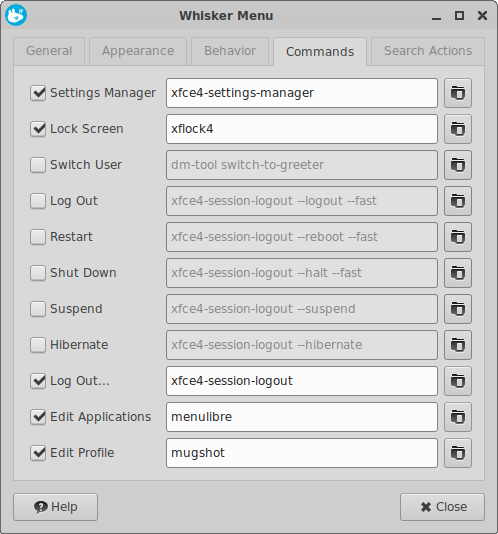
As temporary ‘solution’, I have again disabled Lock screen in XFCE screensaver and hid the lock screen button from Whisker menu; instead use Switch user to lock the screen as the pop up dialog is the same as the log in – BTW does Switch user basically achieve same result as lock screen??
Manjaro Xfce still uses Lightdm GTK greeter login screen, but lock screen settings have been moved from xfce4-power-manager to xfce4-screensaver and light-locker has been dropped
There is no dedicated “security” tab anymore. Lock screen management was massively simplified and “Light Locker” was dropped. “lock-on-sleep” is now synchronized with xfce4-session and xfce4-screensaver.
Screen locking settings are now only handled by xfce4-screensaver to avoid conflicts.
Manjaro updates do not automatically install xfce4-screensaver and remove light-locker
but packages can be installed and removed by user:
Right-click on the Log Out button in panel and select “Properties” xfce4-panel - Action Buttons
uncheck Log Out… option and check one or more options to Lock Screen, Switch User, Suspend, Hibernate, Hybrid Sleep, Shut Down, Restart or Log Out without prompt screen
I have already adjusted theme/icons/fonts/etc. using lightdm-gtk-greeter-settings-pkexec but these changes are only reflected in the pop up window I get when I log in, or when I press the button to switch user in the whisker menu. The window I get when pressing the lock screen button in whisker menu is different/ugly and I cannot find a way to change the appearance.
Do you think I have an issue as lightDM gtk should also update this lock screen dialog?
Re: action buttons; I didn’t explain myself properly - I am looking if there is a way to change appearance of the window which pop up when pressing the log out button in the whisker menu; similarly to the above lock screen window, I would like to edit appearance as I do when using lightDM gtk. Unfortunately the default view doesn’t look nice, and also different from rest of my OS.
This manual page documents briefly the xfce4-session-logout command.
The xfce4-session-logout command allows you to programmatically logout from your Xfce session. It requests the session manager to display the logout confirmation screen, or, if given one of the command-line options below, causes the session manager to take the requested action immediately.
OPTIONS
xfce4-session-logout takes the following command line options:
–logout
Log out without displaying the logout dialog. –halt
Halt without displaying the logout dialog. –reboot
Reboot without displaying the logout dialog. –suspend
Suspend without displaying the logout dialog. –hibernate
Hibernate without displaying the logout dialog. –hybrid-sleep
Hybrid Sleep without displaying the logout dialog. –fast
Do a fast shutdown. This instructs the session manager not to save the session, but instead to quit everything quickly.
Lock screen invoked with xflock4 has 3 buttons: Switch User, Cancel and Unlock
but the first option can be changed in xfce4-screensaverScreen Lock settings
Login screen invoked with xfce4-session-logout --logout has Login button only, but also has a dropdown menu to switch user account
xfce4-screenshooter does not work on an installed OS if screen is locked
Last time I checked Xfce Live ISO (25.0.8) it was using a different background image for desktop and lock screen: /usr/share/backgrounds/xfce/x-xfce.svg. youtube - Manjaro 25 Zetar is Here! - Xfce 4.20
Spot on, that’s the look of my son PC lock screen window and I would like to change the layout (theme/icons/font); I think the log in and switch user window pop up was same/similar style, but I was able to change appearance using LighDM gtk. But for the lock screen window I don’t seem to be able to do it
Not sure if intended behaviour but these type of pop up windows should have a consistent style in my opinion, and have the ability to amend them all accordingly. In my old XFCE installation these windows have all the same layout (which I was able to edit).
I don’t generally use XFCE, but as far as I’m aware a global theme of some kind can govern the appearance of most dialogs. A complete new theme could be applied using Kvantum.
If it’s the background you don’t like, there are tutorials showing how to change that.
Here’s one;
As you can see, the image can be changed via the LightDM Greeter settings – you can change the theme, the image itself, icons, font,user image – all from the Appearance tab.
Menu → Settings → LightDM GTK Greeter → Appearance (tab)
However, to maintain a constant look and feel, I’d guess the best option would be to make sure the Theme (“Matcha-sea” is the default) matches the theme selected globally.
Menu → Appearance → Style (tab)
It works just fine, when the screen is locked.
However, it does need a little logic applied to the task beforehand:
1. Set Delay before capturing to an arbitrary duration long enough to proceed to lock the screen – say, 15 seconds …
2. Click “OK” → Lock the screen and wait for the delay to timeout (plus a few more seconds for good measure) …
3. Unlock the screen …
When returning to the desktop, the Screenshot dialog is presented, pending save options to be selected. Try it.
Manjaro Xfce has xfce4-appearance-settings to configure Gtk2; Gtk3 and Xfwm4 themes
(matcha-gtk-theme) - xfce:xfce4-settings:appearance [Xfce Docs]
and kvantummanager to configure Qt themes (kvantum-theme-matcha)
Thanks all for the help, but unfortunately I have not been able to amend appearance of lock screen pop up window, one of the very few where eI cannot edit style in xfce.
Same as the log out window I was referring to
Feels weird given xfce customization possibilities, perhaps and oversight
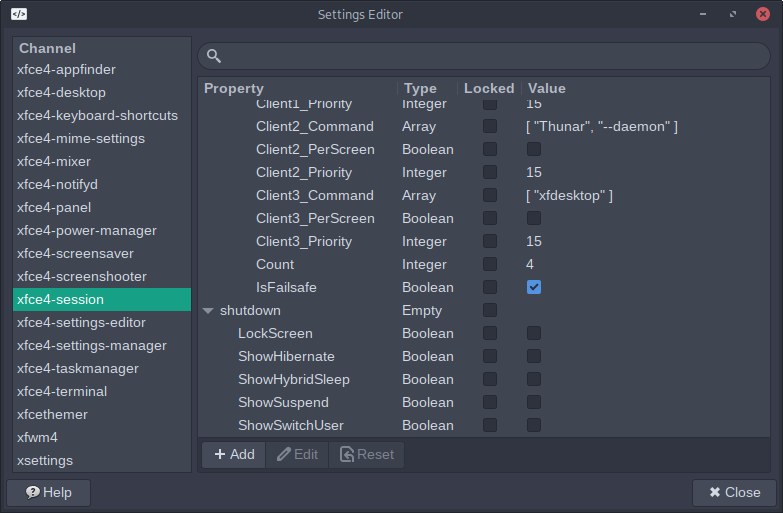
If all 4 of the buttons are hidden LogOut… prompt shows only Log Out, Restart and Shut Down
xfce4-settings:editor GUI could also be used to change Lock Screen settings in xfce4-screensaver, but as far as I know there are no hidden settings for the Lock Screen
If any hidden settings are found, it is likely that they will be posted on Xfce forums