GNOME Authenticator has been updated to version 4.0.3.r105.g9351815-1 (Build Date: Wed 30 Mar 2022 01:04:13 PM CEST) and is working. Why it is in the private repository, however, I have no idea. Maybe @philm ?
FYI, I’m just trying Gnome 42 on the PPP, and WOW!!! It feels a heck of a lot smoother in Manjaro.
Update
The power button doesn’t work (at least quick tapping it to go in to sleep mode), so your device has to be either completely powered off or on, there is no middle ground sleep state.
I was able to use the Gnome experimental hack to enable fractional scaling in Wayland and the UI scaling looks great (especially in GTK4 Gnome apps).
The on screen keyboard is not very good yet, so you will need a physical keyboard to input text.
Overall after a little more time playing with it, I am very pleased with the performance improvement on the PinePhonePro as it is actually fast enough for the animations to always feel smooth.
Do we know when Manjaro on the PPP will support the Keyboard case?
I see reports that it has been working on Arch with the PPP from 2 months ago, but still no reports of support on Manjaro for the PPP yet.
I’m able to use the KB case with Mobian on the original PP, but no luck on Manjaro with the newer PPP (tested with April 7th build, updated via unstable branch).
Unfortunately I’ve had no luck booting Arch from an SD card on my PPP to confirm if Arch is able to provide support for the KB case. I think my device was having issues with U-Boot/Towboot when I previously tried, so I may give it another try just to see if those reports are true that Arch supports it but Manjaro doesn’t.
Just got a Pine Phone Pro, man this thing is blistering fast in comparison to my old Pine Phone. I cant daily drive it unitll MMS is working and the settings are gray so I cant correct them. Even changing it via command line does not take. Anyone know how to fix this issue?
Side not when you install on internal storage wifi does not work. Is this a known issue?
Wifi works as expected here (PinePhonePro Explorer Edition), on both SD and MMC, with Phosh and Plasma. So no, its not a known issue.
@magdesign are these things working for you;
MMS settings in chatty can be corrected (not grayed out)
audio on phone calls does not work when waking from suspend
I know its not my hardware because on Arch linux for the pro I can get mms working. The audio problems seems to be across both distros, but again not hardware as phone audio works if you hang up and call back.
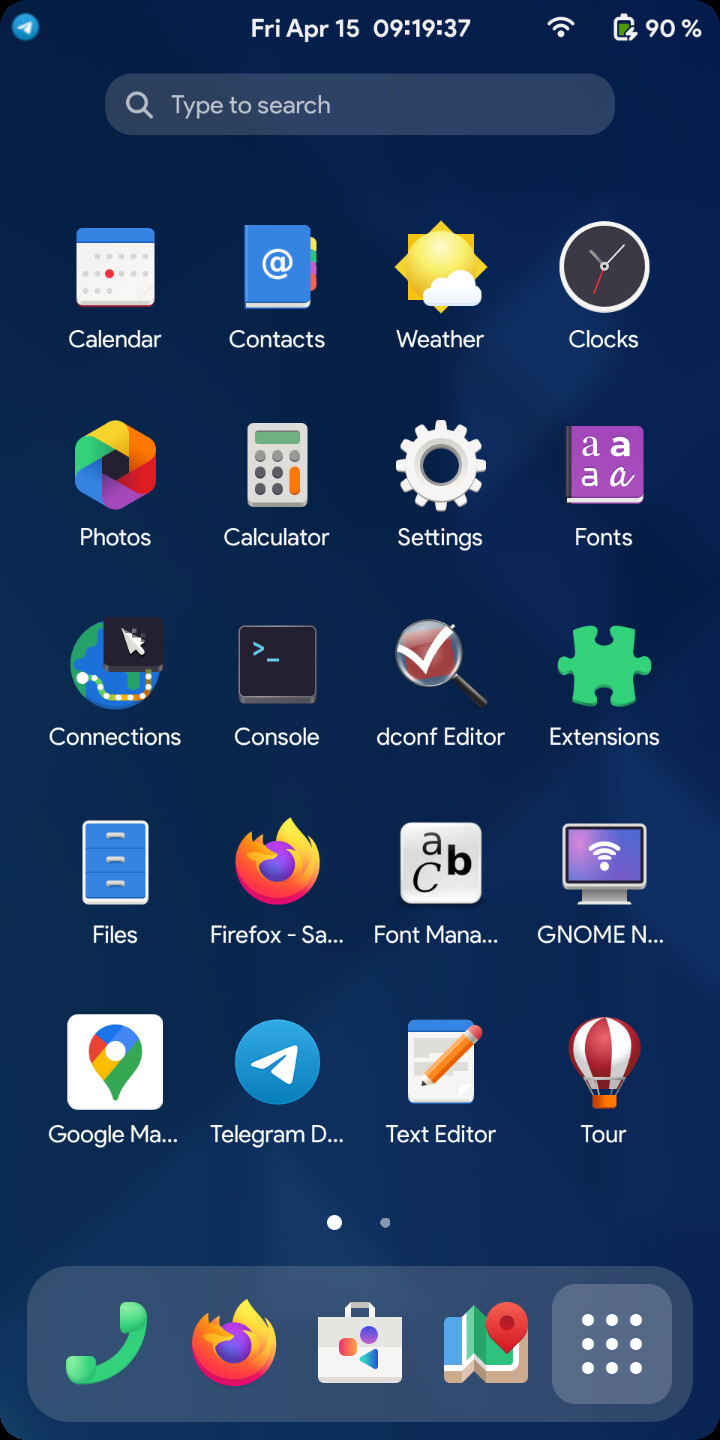
I’ve managed to get Gnome 42 fully working and scaled to a point that it’s pretty usable.
Though the version in the screenshot is running on PMOS due to an issue with Manjaro not working properly with the power button in Gnome 42 yet. If Manjaro is able to overcome this issue, then I think that the PinePhone Pro may have just reached a point that I can deem it usable enough to attempt to daily drive it.
Presently as it doesn’t have screen edge gestures, 3 finger swipes are required to show the app drawer and to switch apps (technically workspaces, but I’ve set it up so that each workspace is basically just a maximised app).
p.s. I left it running with the screen off for 7 hours last night and it only used 18% of the battery, though the screen on power usage is still fairly poor at 1% every couple of minutes or so. Though this was in PMOS not Manjaro do note.
4 Likes
A post was split to a new topic: Get help as a n00b to Gnome Extension development,
I don’t know if this is the appropriate place to ask such questions, but could I ask what in your experience are the biggest advantages/improvements of Gnome 42 over Phosh?
Convergence mode is the biggest advantage of course as when you connect to an external display, you’ll get the full Gnome desktop rather than Phosh on the large screen.
Also on the mobile display, the Gnome experience generally looks better imho once the few modifications to UI scaling are setup.
Gnome extensions are fully supported, so it’s easier to customise Gnome to your personal taste.
Long term, I expect that we are going to head this route anyway with Phosh being no longer relevant once Gnome has a few more touch ups done officially to support the phone more effectively (which I honestly believe to be rather minuscule given what I’ve achieved with Gnome on the PinePhone without too much effort).
The only adjustments that I think are required now along with the small tweaks I’ve made is for Gnome to have a way to enable a gesture bar at the bottom of the screen to swipe up to see the dock/apps list or to swipe horizontally to switch apps/workspaces and a notification panel that is designed for slim displays like the PinePhone.
The Phosh UI is functional, but I certainly wouldn’t imagine that many people would be rushing to switch away from their iPhones and Androids to use a Linux phone with Phosh as the UI. There are alternatives out there, but I quite like the GTK apps scalability as I think the Gnome app design language is pretty good and flexible enough to work on phones quite well. So overall, Gnome 42 provides a good system UI that can scale quite well with a few adjustments here and there, and the apps work well enough that the overall package actually feels good enough to use on a daily basis and to leave my non-Linux devices at home.
Also, this person on Reddit shared this concept of what Phosh could look like and it looks rather nice to be honest, although, it looks like it would be easier to achieve that on Gnome 42 than on Phosh as I’ve got something that looks fairly similar to that working now in Gnome 42, the only big differences being that the notification panel would likely need to be recreated through an extension, the status bar icons would possibly need reordering if we were to go for something identical to this, though I don’t think that is important and the Gnome dock in this example is missing as it shows the Phosh up/down arrow at the bottom instead.

1 Like
@Manjar0-Flow Do you have anyway to pack this up into an iso for others to test. As of now I am still using my OG pinephone as my daily because the Pro is not use-able due to phone mic and audio issues after suspend. So as of now my pro sits on my desk I would love to tinker with this.
Or would this be as simple as installing Arch with no GUI and installing gnome like you would on any other arch install?
I’ve attempted several ways to achieve this, though forgive me, I’m not sure how to pack it up into an ISO.
Distro choice and initial setup
If you’re interested in making a Manjaro install work with Gnome, you could open a terminal on the device and run the following command:
sudo systemctl enable gdm && sudo systemctl disable phosh && sudo reboot
This will initially get you into Gnome as a start point, though do note it will still need some tweaks to optimise it for the phone screen size.
As you mentioned, you could take the approach of installing Arch pure, update the system and install Gnome as you would on any Arch installation.
On PostMarketOS you could use pmbootstrap from a Linux computer (after installing pmbootstrap of course) and running the following command:
pmbootstrap init
Run through the steps that it shows to set it up for your device and select Gnome as the DE.
(the rest of the pmbootstrap steps I’d advise you to follow a guide that is up to date with the required steps to create a build to flash to your SD card).
Gnome setup
Once you’re in Gnome you’ll need to run through a few steps to optimise it for your handset including the following:
Setup fractional scaling so you can change the scaling settings in the display options (on Wayland):
gsettings set org.gnome.mutter experimental-features "['scale-monitor-framebuffer']"
(Our quality of vision may be different, so I’ll just state my settings for reference, but you may want to try other settings)
I set the display scaling to 150%
In Gnome tweaks, I set the font scaling to 1.15 for the status bar text to look a touch larger.
For the apps grid to display correctly on the PinePhone like you see in the images above, you’ll need to install a Gnome extension that is not yet updated for Gnome 42 so to enable that, run the following command:
gsettings set org.gnome.shell disable-extension-version-validation "true"
Install the ‘App Grid Tweaks’ extension, as it’s not yet optimised for Gnome 42, the settings app doesn’t open correctly and so you’ll need a little hackery here.
Go to ‘~/.local/share/gnome-shell/extensions/app-grid-tweaks@Selenium-H’
Modify the file ‘extension_40.js’
Look for the segment that shares much in common with the below code and replace the code that links to the settings with the fixed values listed below (bare in mind this is experimental stuff and some may need slight adjustments still to suit your ideal needs).
    [appGrid.style, appGrid._gridModes[0].rows, appGrid._gridModes[0].columns, this.iconSize, this.fRows, this.fColumns, this.sidePadding, OverviewControls.SIDE_CONTROLS_ANIMATION_TIME, IconGrid.PAGE_SWITCH_TIME] = ["font-size: "+16.00+"px;"+this.prefs.get_string("label-style"), 5, 4, 64, 4, this.prefs.get_int("folder-max-columns"), 0, this.prefs.get_int("open-animation-time"), this.prefs.get_int("page-switch-animation-time")];
    [IconGrid.IconSize.LARGE, IconGrid.IconSize.MEDIUM, IconGrid.IconSize.SMALL, IconGrid.IconSize.TINY] = [this.iconSize, this.iconSize, this.iconSize, this.iconSize];
Add these extensions too for additional optimisations (Note that the maximised to workspace extensions aren’t quite perfect and I still need to tinker with them when I get time to find something that works perfectly):
- Just Perfection (Multiple tweaks including hiding unnecessary items in top bar and hiding the workspace previews/thumbnails to add extra vertical space for the apps grid).
- Maximize To Workspace
- Maximized by default
‘Notification centre’ would be ideal although that extension is broken in Gnome 42, but when it’s fixed, it should separate the notifications center from the calendar/clock dropdown menu so not to cause the UI to get cut off of the screen.
I added ‘Blur My Shell’ to make it look a little nicer, though this is only for cosmetics.
If the distro you are building from is missing buttons like ‘close’ in the apps title bar and you want to re-enable them, try tweaking the command below to enable your choice of buttons:
gsettings set org.gnome.desktop.wm.preferences button-layout ":minimize,maximize,close"
As there is presently no edge gesture support, I’d suggest you remember that you can swipe up on the screen with 3 fingers to pull up the app grid and swipe left/right with three fingers to switch workspaces. I’m trying to see if I can learn to develop an on screen gesture bar to swipe up from with one finger to simulate iOS and Android to some degree with horizontal swipes to switch between workspaces/apps, though I’m new to this stuff, so just assume that I’m not going to be able to get anything done and if I do ever achieve it, that’s just a bonus.
And from there, I’d just suggest that you do a little more tinkering with gnome extensions and device settings to perfect it for yourself.
Good luck. 
5 Likes
Thanks for the write up it is much appreciated !
Very helpful indeed @Manjar0-Flow, thanks!
Maybe in due time, Manjaro could even ponder to support Gnome 42 instead of Phosh and roll out an iso for it that includes the changes you described above by default
So I tested gnome as is on postmarketOS on my pro, I am really impressed with it, if it had some tweaks, I agree with @p1x3l3d it would be great to see a manjaro edition.
Certainly more than a week ago, the top and bottom bars of the screen stopped responding to touch (e.g. you can’t switch between apps. If I want to use another I have to turn off the current one with Alt+F4 or control the phone via VNC). Is this somehow related to the experiments with Gnome 42 described above? (I use the continuously updated PP Phosh Nightly)
I made the update today and had same problem. Turns out you no longer tap to reveal but swipe. Weird to remove the tap function when the arrow is still there.
The arrow permanently taking up screen space was actually my biggest issue with the design of phosh coming from ubuntu touch, so hopefully now finally when phosh supports gestures the arrow can be removed.
1 Like
I’ve managed to create a working gesture bar, but at the moment it is only capable of working in x11 as I’m having issues getting it to respond to touch input on Wayland.
This change has enabled me to overcome the navigation issues in Gnome on the PinePhone, so I no longer need to use 3 finger gestures to access the overview/apps-grid and switching workspaces.

Yes, taps don’t work anymore with gestures. However now the arrow takes even more space than before. So you can comment on that one too. Also a Purism Dev still thinks that tabbing is still relevant.
1 Like
The UI should be converted to completely gesture based like lomiri was from the beginning. The whole bottom arrow bar that takes up screen space should be removed. This would be especially important when using the phone in landscape mode.
This would also fix the “arrow issues” whn the “app drawer” is open, since it just would not simply exist, and would also not take space in that drawer…