Hi everyone, I’m running Manjaro with Kernel 6.12.48-1-MANJARO x86_64 and wanted to install another Distro on a spare ssd. I wanted to give Pop_os / Mint / manaro with i3 a shot. I created the stick with the command sudo dd bs=4M if=<pathToFile> of=<usbStick> status=progress oflag=sync
this worked perfectly previously for installing manjaro on my laptop and my Desktop, though when I boot from the usbStick now (i tried multiple sticks with the Distros mentioned above), my screen either just displays GRUB_ in the top left corner and does nothing.
or it shows the following message:
`isolinux.bin missing or corrupt.
First things first. Whenever you download an ISO, always verify its checksum — usually SHA256 or SHA512 — against the one listed on the website. If they do not match, then your download has become corrupted — which does happen, due to network glitches, et al.
Secondly, the best way of putting an ISO on a disk is not in the traditional way — as you have done — but by way of ventoy, which is in the Manjaro repository.
With ventoy — which has a GUI but can also be used from the command line — you partition and format the USB stick, and it’ll create a Ventoy folder on it, in which you can simply drag & drop (multiple) ISOs without having to “burn” them. ventoy will then display them in a boot menu when booting up from the stick.
Thanks for the fast reply!
I did verify the checksums of all the ISOs I downloaded.
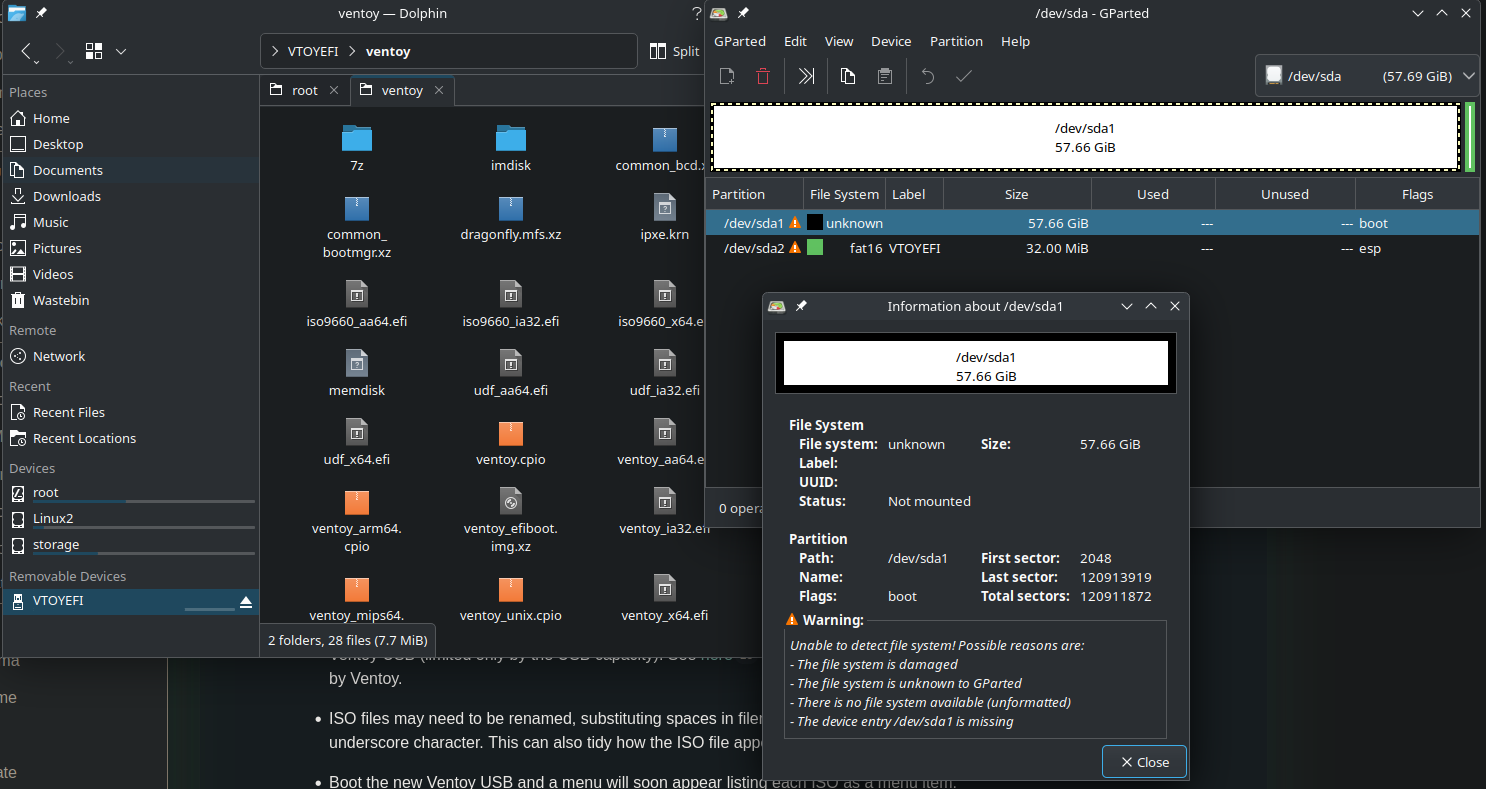
I followed the ventoy tutorial on 2 sticks; on both sticks the partition where I’m supposed to drop the ISO files isn’t able to be mounted. I can mount the EFI partition on one stick, but that doesn’t really help me.
When trying to mount the USB stick through CLI with sudo mount /dev/sda1 /run/media/usb
I get this Error: 32 ✘ mount: /run/media/usb: fsconfig() failed: /dev/sda1: Can't lookup blockdev. dmesg(1) may have more information after failed mount system call.
with lsblk it shows up like this: sda 8:0 1 57.7G 0 disk ├─sda1 8:1 1 57.7G 0 part └─sda2 8:2 1 32M 0 part
That might be wise, yes — they’re not exactly expensive, so it should be worth the try.
I was hesitant to suggest that the stick could be damaged because you mentioned that you had prepared two of them with ventoy, but I guess it’s not impossible for both of them to have become damaged. After all, they do have a limited lifetime, because unlike SSDs, USB sticks do not support TRIM, and they can only be rewritten a highly limited number of times.
When the sticks are bootable on another computer I doubt buying a new one will help.
You could try a smaller block size (e.g. 4K) and use the traditional method:
Make sure to boot the stick in UEFI mode from your firmware as it is only possible to install in the same mode as the stick is booted. If you would boot the stick in BIOS mode you only would be able to install in BIOS mode. Usually, there are two entries shown in the firmware, one with UEFI in front, this will lead to an UEFI boot.
How did you configure Ventoy before creating the two sticks – or, if you used the command-line – what was the exact command used to create the Ventoy USB?
This may suggest the file system is not recognised.
Did you configure Ventoy to use exfat (a good choice) for the storage partition? If so, is the exfat-utils package installed?
sudo pacman -S exfat-utils
Assuming the exfat-utils package is installed, the file system is exfat, and both the partition node/number and mount point are correct, try:
sudo mount -t exfat /dev/sda1 /run/media/usb
On the chance that you inadvertantly borked both USB sticks – perhaps by removing them too soon (example) from the USB port, you can check them for consistency;
sudo fsck.exfat /dev/sda1
Important: The file system must not be mounted prior to using fsck.
To address this…
The output you pasted shows that you are trying to boot an ISO from a network location, which you are not, so it’s telling you the attempt failed. This error would be expected.
You likely need to select the USB manually via F8 or whichever key on your mainboard is required to enter the boot selection menu (not the GRUB menu).
Either that, or temporarily promote the boot order of the USB to before the PXE boot – there will likely be a setting for that in the BIOS.
Please provide your system information as described (below) so that others wishing to help can more easily do so.
This may be a long post with the welcome template added, but it’s nonetheless important to read through all of it, and follow any links given.
Regards.
What follows is from a standard template.
Welcome to the Manjaro community
As a new or infrequent forum user, please take some time to familiarise yourself with Forum requirements, and the many ways to use the forum to your benefit.
To that end, links are provided (below) - Please use them.
Be prepared to provide outputs from various commands when asked. It’s equally important to provide as much actionable information as possible in your first post, rather than simply indicating there is a problem.
Waiting for others to blindly ask questions can be counter-productive – typically, nobody has a at their disposal – Instead, please help others to make informed suggestions, based on information you provide.
Update Announcements
The Update Announcements contain important information and a Known Issues and Solutions section that should generally be checked before posting a request for support.
System Information
While information from *-fetch type apps might be fine for someone wishing to buy your computer, for Support purposes it’s better to ask your system directly;
Output of the inxi command (with appropriate parameters, and formatted according to forum guidelines) will generate information useful for those wishing to help:
i dont… they just work when i use cat.. cat has a little known ability to work on binary files. dd rarely works correctly for me. coudl be the isos i try to use, but even burning pfsense or opnsense usb, i had no issues this way.
I think I found the error: the front USB ports on my PC are faulty. If I crawl under my desk and plug it into the back, everything works perfectly. I can run ventoy, drag the ISO files onto it and then boot from it. I guess the front ports aren’t always initialized properly.
exfat-utils was missing, the stick is recognized after installing this package.
I checked the checksum with the “collision” app.
I tried imagewriter too, had the same result as dd.
This could also be a mismatch of technologies – if the front ports are USB2.0 and the sticks USB3.x (for example).
My (front) ports are USB2.0, and populated by logitech receivers for mouse/keyboard. As a workaround around for the inconvenience I connect two USB extension cables to (rear) ports and drape them over the top of the case.
A few dollars vs. the hassle of crawling behind the machine every time a faster USB port is needed seems like a “no brainer”.
It’s customary to mark a post that helped the most as the solution (use the button below the respective post).
This helps others with similar issues to quickly find the marked “solution” post and evaluate whether or not it applies to them; and it also allows the topic to automatically close after a few days of inactivity.
In this instance it was logically my post, and I have marked it for you; try not to forget next time.




 at their disposal – Instead, please help others to make informed suggestions, based on information you provide.