To better understand the scope and complexity of this application, I suggest reading this post on a third party web site
Source
Overview
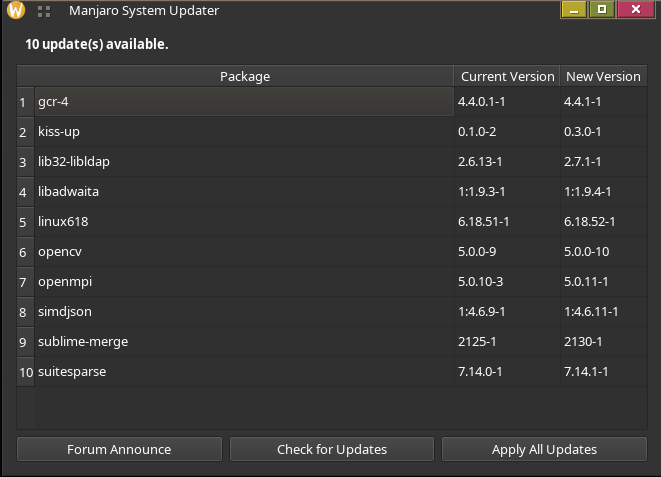
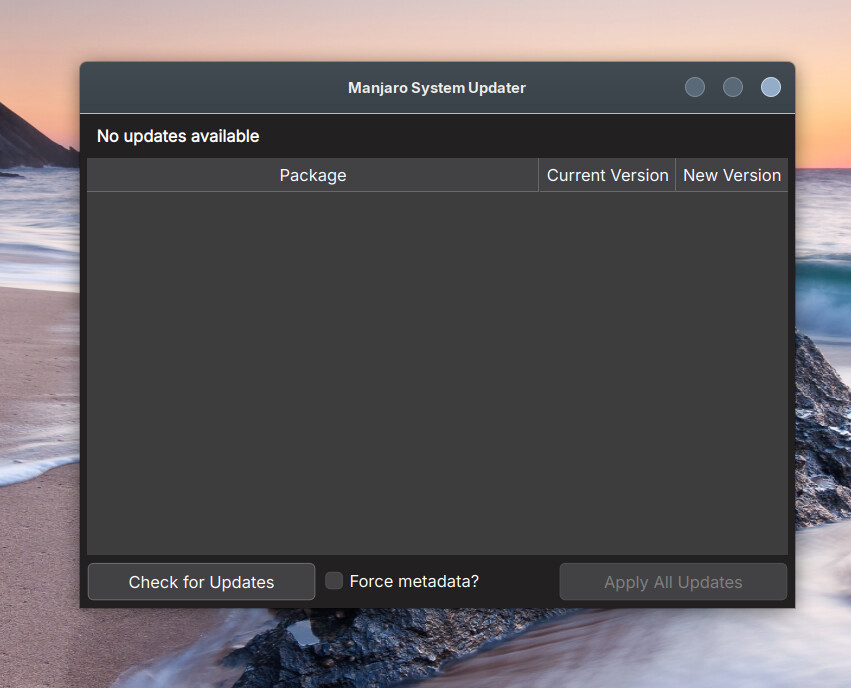
Pacman Repositories Only: Discovers updates from repositories (pacman.conf) using checkupdates. AUR buildscripts and Flatpaks are excluded.
Branch Update Announcements: A help button opens the latest update announcement thread on the Manjaro Linux forum for the configured branch (stable, testing, or unstable), dynamically retrieved from the forum’s RSS feed.
Full System Upgrades: Enforces full system upgrades to maintain package consistency and prevent dependency breakage.
BEWARE of ThirdParty repositories: When one or more repositories are added to pacman.conf it/they will be treated as being official. Third party repositories are unsupported, as they may cause issues.
Single Authentication: You are asked for your password exactly once, by pamac-installer itself.
Safe Execution Lifecycle:
Checks for updates safely in the background without root privileges (checkupdates).
Synchronizes repository metadata upon user confirmation by asking the pamac system daemon over D-Bus, reporting its progress inline.
Hands over installation to the graphical installer (pamac-installer).
Automatically refreshes the update list upon completion.
Installation
sudo pacman -Syu kiss-up
This installs the script as /usr/bin/kiss-up and creates a desktop launcher named K.I.S.S Up.
Usage
Run the Application
kiss-up &
License
This project is licensed under the 0BSD (Zero-Clause BSD) license. Dependencies carries their own licence.
I just installed it and I really like it. In fact, the more I thought about how or if I could integrate it into my work flow, the more it seems to me that the notification icon in the sys tray should launch kiss-up and not Pamac.
A button to launch Pamac GUI would be a “nice to have”.
On DeLinuxCo, it defaulted to dark theme automatically even though it is on Cinnamon.
Nice work! I think the Team should consider integrating this app.
Good point; though it might be an idea for it to check for the branch in use and link to the relevant one, in the (probably unlikely) case someone has switched to Testing or Unstable.
A thumbs up here I’ll keep an eye on this app via thread(s) and “listen” to the conversation(s) it generates first of all (coz I’m not being particularly plucky), then; I might actually dive in and give it a try.
Currently these changes is limited to unstable branch…
I assure you
it is intentional and it is a change with an opinion
the app not intended to replace proper system maintenance
the app is a helper for those consumer types
it is a probe into how to cater for the consumer approach without breaking the system
It is a consumer design, intended to eliminate issues where custom packages stops working due to system updates. The only exception is packages based on dkms or a custom printer/scanner driver - in which case the package is automagically rebuilt.
If you don’t like it - don’t use it.
If you don’t agree with the suggestion don’t click the update button.
That’s good; maybe I’ll try installing it on my parents’ laptops (they also use Manjaro, whether they realize it or not). However, I think a better option would be to add an “offline update” feature to Pamac, like in Fedora. That way, you wouldn’t have to update the system in a TTY. The downside of this solution is frequent system reboots, although you should do them anyway when updating the kernel, for example.
Like “German Bildzeitung” ==> not for experienced “customers”.
And: DAU (dümmster anzunehmender user) (dumbest user imaginable)
They have the most destructive ideas for driving an admin insane.
This app, I have decided not to have an opinion on it.
The application has been updated with functionality which makes the user aware when the kernel is unsupported and the application will install the next stable kernel including any extra modules e.g., kernel headers and other kernel specific modules present on the system.
I never thought I would do this - but it is an attempt to simplify maintenance for a select group of users by making decisions on their behalf related to the running system.
These decisions based on the intimate knowledge I have gained over the years while being a user myself, a developer and helping users in this very forum.
Because I have been a member of the Manjaro Linux Maintenance Team for many years, I also have privileged access to the Manjaro overlay package system, which in turn makes it possible to push updates and add signed packages to official repository.
I don’t think any user is dumb, instead a user has other priorities and is either not interested in the low level maintenance tasks or simply do not understand it.
This application’s purpose is to cater for those users with other priorities and no interest of opening the hood and look at the engine.
The purpose of it is to allow the system administrator to minimise and, in some instances, perhaps even remove issues caused by incompatible foreign packages.
When a system is used by such user, it is vary rare that a .pacnew file require any low level intervention and this is left to the system administrator.
Perhaps “kiss-up” is the software I’ve been waiting for. There is already an older person in my family whose computer I set up with Manjaro. So far, I usually handle updates via the GUI when I visit (whereas on my own Arch Linux and Manjaro laptops, I use only pacman in a virtual TTY, combined with screen and script to log the output). In the future, I might be able to recommend Manjaro to others for whom shell-level interventions are not an option. I am particularly interested in how .pacnew files and automatic transitions to the next LTS kernel generation are handled.
 I’ll keep an eye on this app via thread(s) and “listen” to the conversation(s) it generates first of all (coz I’m not being particularly plucky), then; I might actually dive in and give it a try.