How do I set up sound notifications in Xfce? Sound themes?

Hello everyone.

Could you please tell me how to set up sound notifications in XFCE4?
I’d like to hear a notification when I plug in or unplug a USB, Ethernet cable, power cable, etc.

I’ve read the Arch Linux wiki Xfce - ArchWiki
There’s very little information in it on how to configure this, but I can see that
there are a large number of sounds in the system:

$ ls  /usr/share/sounds/freedesktop/stereo/
alarm-clock-elapsed.oga         audio-test-signal.oga    dialog-warning.oga                    power-unplug.oga
audio-channel-front-center.oga  audio-volume-change.oga  message-new-instant.oga               screen-capture.oga
audio-channel-front-left.oga    bell.oga                 message.oga                           service-login.oga
audio-channel-front-right.oga   camera-shutter.oga       network-connectivity-established.oga  service-logout.oga
audio-channel-rear-center.oga   complete.oga             network-connectivity-lost.oga         suspend-error.oga
audio-channel-rear-left.oga     device-added.oga         phone-incoming-call.oga               trash-empty.oga
audio-channel-rear-right.oga    device-removed.oga       phone-outgoing-busy.oga               window-attention.oga
audio-channel-side-left.oga     dialog-error.oga         phone-outgoing-calling.oga            window-question.oga
audio-channel-side-right.oga    dialog-information.oga   power-plug.oga

Check the sound and sound theme settings:

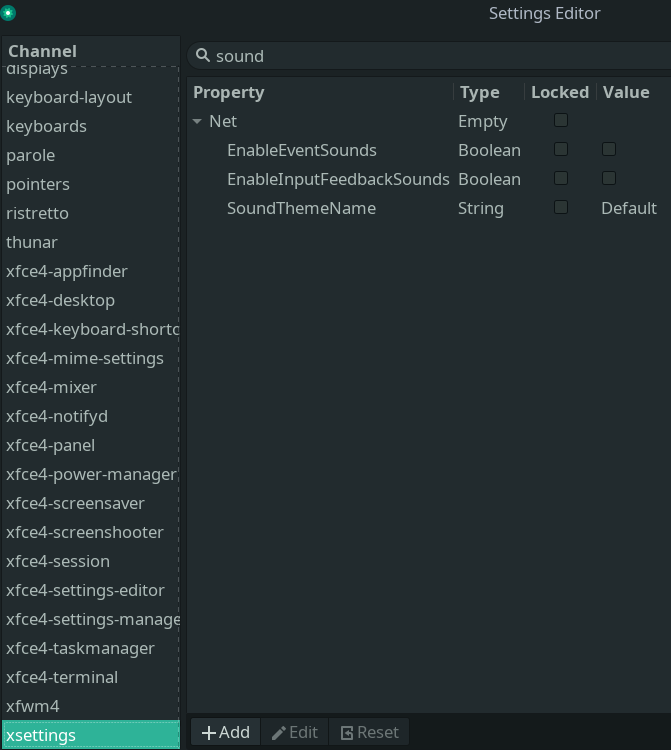
$ xfconf-query -c xsettings -lv | grep -i  sound
/Net/EnableEventSounds           true
/Net/EnableInputFeedbackSounds  true
/Net/SoundThemeName             ocean

By default, you will have false,false,default)

Download a sound theme from the repository:

$ sudo pacman -S ocean-sound-theme

Show available sound effects:

$ ls -l /usr/share/sounds/$(xfconf-query -c xsettings -p /Net/SoundThemeName)/stereo

Play a sound. We’ll use the paplay utility (included in the pulseaudio package)


$ cd /usr/share/sounds/ocean/stereo

$ ls

$ paplay device-added.oga   ## I can hear the sound

After installing the ocean-sound-theme sound theme, I don’t get any sound when I plug in a USB or Ethernet cable, etc.

  1. Check if sound notifications are turned on:

    xfconf-query -c xsettings -lv | grep -i sound; 
    

    or look in Appearance settings xfce4-appearance-settings GUI Settings tab

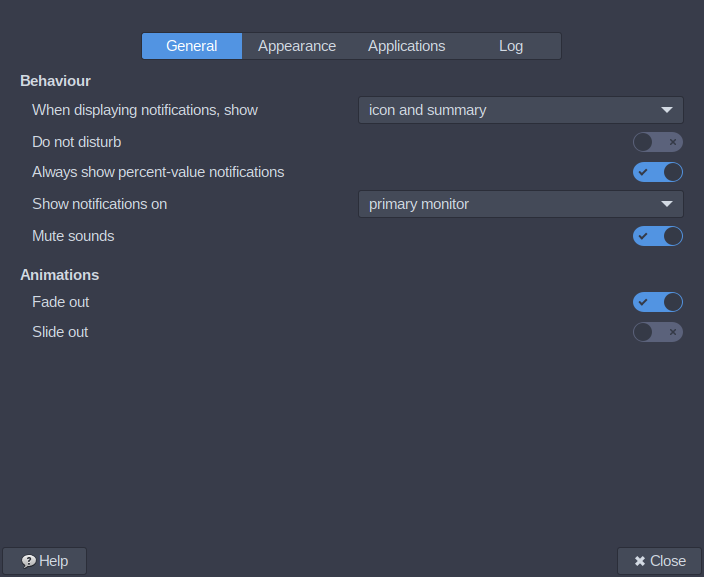
  2. Check sound notifications are not muted:

    xfconf-query -c xfce4-notifyd -lv | grep -i sound
    

    or look in Notifications settings xfce4-notifyd-config GUI General tab

  3. Check System Sounds level in Volume Control GUI Playback tab pavucontrol --tab=1

  4. Check the specific sound notification is working in Libcanberra:

    canberra-gtk-play -i device-added
    
1 Like

We also had a discussion and some findings here

1 Like

@nikgnomic @Teo Hello,

Thank you for your replies and for offering to help!

Could you please tell me where you found these packages?

xfce4-appearance-settings
xfce4-notifyd-config

I can’t see them in the repository:

Branch compare for Manjaro

Arch Linux - Package Search

libcanberra => is installed

I can hear the sound:

$ canberra-gtk-play -i device-added

The command works; I can see the graphical window opening

$ pavucontrol --tab=1

which is the same as simply:

$ pavucontrol

I have installed :

$ sudo pacman -Sy alsa-utils, pulseaudio, pavucontrol and pulseaudio-alsa

I can hear some sounds, for example when I empty the bin, but the USB isn’t working. Please tell me, does the sound work for you when you plug in or unplug a USB device?

In KDE Plasma, this is implemented brilliantly; everything is clear, you can preview tracks, etc. Here, I’m on a quest))

I guess Nik wanted just to speed you the launch of the applets - those are already installed, in the Settings, Appearance and Notifications.

And you nailed exactly the problem. Everything softwarewise is already there, it’s just a couple of settings to toggle (you have to install a sound theme, the default is pretty much empty)…and it still only works partly.
If you hear 1 event sound you are all set up. But the problem is, some work and some not, and even after collecting a lot more sound files from other sources and they appear to be named correcly some still do not play. At some point the naming convention was changed and nobody bothered to document i guess.
I could for example never make the trash make a sound.

Which sound theme do you test?

1 Like

Terminal command xfce4-appearance-settings is owned by xfce4-settings and can be used to launch Appearance settings GUI

the previously suggested xfconf-query command also shows which sound theme is in use that is not shown in Xfce GUI
xfconf-query -c xsettings -lv | grep -i soundtheme

xfce:xfce4-settings:appearance [Xfce Docs]
Enable event sounds - Event sounds include things like logging in/out, plugging/unplugging power, inserting/removing USB devices, etc. Requires “Canberra” support and may, in addition, require installing sound themes or other supporting applications, depending on your distribution.
Terminal command notifyd-config is owned by xfce4-notifyd and can be used to launch Appearance settings GUI


If some of the sound notifications are working it is unlikely to be an issue with libcanberra

Try this to check if Xfce Notifications are working

notify-send -i drive-removable-media -h "string:sound-name:device-added" Test:device-added-sound

That should show a desktop notification and play sound notification.

If the sound notification works, turn on Log notifications in Notifications settings GUI
apps:xfce4-notifyd:Logging settings [Xfce Docs]
and check if logs shows notifications when removable devices are mounted and unmounted


As far as I can recall from previous forum posts about this, Xfce sound notifications for removable devices was last confirmed to be working in 2023:
USB plug in and out notifications question

Manjaro Xfce ISO includes sound-theme-freedesktop that does not have notification sounds for device-added so most Xfce users would not know if this specific sound notification does not work unless they had installed another sound theme

2 Likes

@Teo Hi.

Thanks for your reply.

You’re absolutely right – that’s exactly the problem: some work, and some don’t.
I’m trying to figure out how to get the rest of the sounds in the directory to work

/usr/share/sounds/ocean/stereo

Here’s the thread: Branch compare for Manjaro

As for the bin, it works for me; I created an empty text file, put it in the bin and emptied it – I can hear the bin-emptying sound.
I can also hear a sound when I open the file manager on the panel, for example, but there’s no sound when I double-click with the mouse.

@nikgnomic Hi.

Thanks for your reply.

That’s a good test. Yes, everything’s working – I can see the notification and hear the sound.

notify-send -i drive-removable-media -h "string:sound-name:device-added" Test:device-added-sound

As for the logs, I’ve configured them as follows:

Notifications => log   => tick the box.
    
Log  Notifications  => always
    
Log application => all

And yes, I can see the notification in the log window

Hello everyone.

There are lots of other sounds that aren’t playing, including those from USB, and it’s not yet clear how to get them to work…

I have a theory the shorter sounds, around 1 seconds, are not playing, respectively there is, for some reason, a “silent” period at the beginning at sound triggering, and sounds under a second fall entirely in this frame in which the “player” is maybe not yet loaded.

But i have not had the time to test the theory with some custom sound files.

1 Like

I tend to add a second of silence to the start of audio files for e.g. KAlarm, for this very reason.

I also did this for ringtones for one of my old phones, because that, too, would cut off (or, fade-in) the audio clip and this isn’t what I wanted for the classic “annoying” monophonic Grande Valse ringtone (on a Siemens phone). :stuck_out_tongue:

1 Like

Hi.

There’s a package called mate-media, which you can run in the terminal using the command:

$ mate-volume-control

and you can select an audio theme ( ocean etc) without having to type any commands in the terminal, which is a bit more convenient)

1 Like

…or one can also use the Settings Editor because indeed there is no gui to choose sound theme name and the ticks to activate are in unlogical places in the settings gui.

2 Likes

Archwiki - PipeWire - Troubleshooting - Noticeable audio delay or audible pop/crack when starting playback

On Xfce it might also be possible to prevent node suspension in PipeWire by launching
Volume Control GUI pavucontrol

2 Likes

Helo @nikgnomic @Teo @BG405

Thank you for your replies.
Am I correct in understanding that the issue with sound themes has not yet been fully resolved?
As I mentioned earlier, I can only hear some of the sounds from the entire directory list
/usr/share/sounds/freedesktop/stereo/

$ ls   
alarm-clock-elapsed.oga         audio-test-signal.oga    dialog-warning.oga                    power-unplug.oga
audio-channel-front-center.oga  audio-volume-change.oga  message-new-instant.oga               screen-capture.oga
audio-channel-front-left.oga    bell.oga                 message.oga                           service-login.oga
audio-channel-front-right.oga   camera-shutter.oga       network-connectivity-established.oga  service-logout.oga
audio-channel-rear-center.oga   complete.oga             network-connectivity-lost.oga         suspend-error.oga
audio-channel-rear-left.oga     device-added.oga         phone-incoming-call.oga               trash-empty.oga
audio-channel-rear-right.oga    device-removed.oga       phone-outgoing-busy.oga               window-attention.oga
audio-channel-side-left.oga     dialog-error.oga         phone-outgoing-calling.oga            window-question.oga
audio-channel-side-right.oga    dialog-information.oga   power-plug.oga

Exactly, it is still a mystery. It doesn’t help that this is an unpopular feature and not many people use it. So unpopular actually, that even the xfce developers didn’t bother to finish it and give it a gui :facepalm:
I must admit i do not use it too. I only turned it on for this research. Well, we’ll keep debugging and if there is a guaranteed solution it will be a time for tutorial.

There might be something to it with what Nik says, but i do not hear noticeable delay, or pop, on my pipewire setup. Everything else works. Also, some sounds work without visible delay.

I suppose we have to standartize out test method so that we compare.
I now test with the Ocean theme. The theory of the silenced sound on pipewire did not confirm itself.

canberra-gtk-play -i trash-empty
canberra-gtk-play -i power-unplug

Those work from terminal, as well as double clicking them and playing from audio player (just do not use mpv, it has this part of the second silencing effect). However, the real actions do not sound.
But from real actions i get clicks on buttons in dialogs, or notifications

notify-send -i drive-removable-media -h "string:sound-name:device-added" Test:device-added-sound
1 Like

Hi @Teo
Thank you for your reply.
I completely agree with you. You know, I wondered if the problem might lie in the notification settings? If the command we tested for ejecting a USB drive from the terminal works, why doesn’t it work by default like other sounds, such as clicking on folders (that works for me too), or perhaps it’s udev.

Well the trash is not triggered by udev, so this theory fails too :man_shrugging:

As far as I know USB removable drives do not use a udev rule

It is possible to create a udev rule that is triggered by plugging in a USB drive
How to Use UDEV to Run a Script When Any USB Flash Drive is Inserted on Ubuntu (Including Serial Number & Devpath) — linuxvox.com
this script works to write message to journal but it does not work if the script is modified to play a sound notification

The sound notification commands might be failing because they are runnning as a root process and cannot access PipeWire service sandboxed in user-space

Sounds like a good theory at first glance, but then again, why are some sounds playing? :man_shrugging: