Firefox immediately crashes on Manjaro KDE (std::array<HeaderBarButtonType> assert, GCC 15.2.1)

I’m on Manjaro KDE fully up to date. I have just installed Firefox (142.0-1), it will not run at all. No matter what profile, theme, or environment I try, it dies instantly with this error:

/usr/bin/../lib64/gcc/x86_64-pc-linux-gnu/15.2.1/../../../../include/c++/15.2.1/array:210:
reference std::array<HeaderBarButtonType, 3>::operator[](size_type)
[_Tp = HeaderBarButtonType, _Nm = 3]: Assertion '__n < this->size()' failed.
Redirecting call to abort() to mozalloc_abort
*** stack smashing detected ***: terminated

Things I’ve already tried (none of which work):

  • Safe mode, new profiles, cleared ~/.cache and ~/.mozilla
  • Running Firefox tarball directly from mozilla.org (/tmp/firefox/firefox)
  • Disabling CSD, forcing Adwaita GTK theme, disabling acceleration (MOZ_WEBRENDER=0, LIBGL_ALWAYS_SOFTWARE=1, etc.)
  • Moving ~/.config/gtk-3.0, ~/.config/gtk-4.0, ~/.config/kde-gtk-config out of the way
  • Running with a completely clean $HOME
  • Confirmed gtk3-demo works fine, so GTK itself doesn’t crash
  • No gtk3-nocsd installed (pacman -Qs nocsd shows nothing)
  • No suspicious gtk-decoration-layout values anywhere in /etc

Even headless mode (--headless --screenshot) dies with a stack smashing error.

Has anyone else seen this? Is this a known issue with the current Firefox package in Manjaro/Arch, or is it likely my system libraries are out of sync?

1 Like

That is a very strange looking path.

Did you alter your $PATH environment variable?

1 Like
❱echo $PATH
/home/greg/.local/bin /home/greg/bash /home/greg/python /usr/local/sbin /usr/local/bin /usr/bin /usr/lib/jvm/default/bin /usr/bin/site_perl /usr/bin/vendor_perl /usr/bin/core_perl

I can’t reproduce in a KDE VM using the stable branch. Which branch are you using? Are you fully up to date?

Either way, I’ll do a rebuild for the stable branch today to be sure.

It looks strange, but apparently that’s normal.

Branch is stable.

❱yay
:: Synchronising package databases...
 core is up to date
 extra is up to date
 multilib is up to date
:: Searching AUR for updates...
 -> xerox-phaser-6000-6010: ignoring package upgrade (1.01-3 => 1.01_20110222-1)
:: Checking development packages...
:: Searching databases for updates...
 there is nothing to do

all up to date.

I would guess it has something to do with my GTK theming, but i have reset that back to default and cleared it all out, so I’m at a loss.

GPT is at a loss too.

Waterfox works fine, thats been my daily driver for the last year or so.

gcc 15.2.1 is in unstable and testing branch - not in stable.

It shouldn’t be there if you are on stable branch.

I cannot replicate the issue here as well - no problem whatsoever

1 Like

Alright. You are probably not the only one that is experiencing the problem. Like I mentioned, I’ll do a rebuild and let you know when it’s available.

1 Like

but i am on stable.

❱pacman-mirrors --status

Local mirror status for stable branch
Mirror #1   OK  00:40   United_Kingdom  https://www.mirrorservice.org/sites/repo.manjaro.org/repos/
Mirror #2   OK  00:11   United_Kingdom  https://ask4.mm.fcix.net/manjaro/
Mirror #3   OK  00:40   United_Kingdom  https://mirror.vinehost.net/manjaro/

Dont know how anything from outside of stable or upstream could have got installed.

But does not seem to be. :confounded:

❱gcc --version
gcc (GCC) 15.1.1 20250729
Copyright (C) 2025 Free Software Foundation, Inc.
This is free software; see the source for copying conditions.  There is NO
warranty; not even for MERCHANTABILITY or FITNESS FOR A PARTICULAR PURPOSE.


but that path in the error message points to a different one:
15.2.1

I just also tried what you did:
download Firefox from the official website - unpacked and ran it.
No problem either …

indeed it does, but i have no idea why or how to proceed from here?

❱firefox --ProfileManager
/usr/bin/../lib64/gcc/x86_64-pc-linux-gnu/15.2.1/../../../../include/c++/15.2.1/array:210: reference std::array<HeaderBarButtonType, 3>::operator[](size_type) [_Tp = HeaderBarButtonType, _Nm = 3]: Assertion '__n < this->size()' failed.
Redirecting call to abort() to mozalloc_abort

ExceptionHandler::GenerateDump attempting to generate:/tmp//7f28e51e-a4b5-2699-76ef-1e557ee6af58.dmp
ExceptionHandler::GenerateDump cloned child 101432
ExceptionHandler::SendContinueSignalToChild sent continue signal to child
ExceptionHandler::WaitForContinueSignal waiting for continue signal...
ExceptionHandler::GenerateDump minidump generation succeeded
11

Just tried flatpak and that fails too

❱flatpak run org.mozilla.firefox --ProfileManager

Note that the directories 

'/var/lib/flatpak/exports/share'
'/home/greg/.local/share/flatpak/exports/share'

are not in the search path set by the XDG_DATA_DIRS environment variable, so
applications installed by Flatpak may not appear on your desktop until the
session is restarted.

[2] Sandbox: CanCreateUserNamespace() clone() failure: EPERM
Gtk-Message: 17:40:43.600: Failed to load module "xapp-gtk3-module"
Gtk-Message: 17:40:43.600: Failed to load module "canberra-gtk-module"
*** stack smashing detected ***: terminated
ExceptionHandler::GenerateDump attempting to generate:/home/greg/.var/app/org.mozilla.firefox/cache/tmp//4224b749-be8f-05aa-d568-ab07d3c9432d.dmp
ExceptionHandler::GenerateDump cloned child 23
ExceptionHandler::SendContinueSignalToChild sent continue signal to child
ExceptionHandler::WaitForContinueSignal waiting for continue signal...
ExceptionHandler::GenerateDump minidump generation succeeded
6

⎼⎼⎼⎼⎼⎼⎼⎼⎼⎼ /tmp ⎼⎼⎼⎼⎼⎼⎼⎼⎼⎼
❱Gtk-Message: 17:40:43.779: Failed to load module "xapp-gtk3-module"
Gtk-Message: 17:40:43.779: Failed to load module "canberra-gtk-module"

stack smashing detected : terminated

Its that stack smashing (whatever that is) again.

me neither - perhaps @Yochanan’s intervention/action will change things for you

… I have never seen that stack smashing warning message ever
and a flatpak really should be self contained - the error you are getting makes no sense to me :man_shrugging:

… I have never in my life used a flatpak (or a snap) - just AppImage for select few applications.

Well GPT seems to be pretty sure that i should get these packages back in line with the stable branch

sudo DOWNGRADE_FROM_ALA=1 downgrade gcc gcc-libs lib32-gcc-libs

i would like some conformation that i should try this before i do as im way out of my depth since i have no idea how these got out of control in the first place.

I never switched branches, but if you don’t downgrade after a switch back from testing or unstable
back to stable
those things will (by my uninformed logic) just remain there
until they are eventually replaced when stable versions catch up …

So:
this time, GPT might be right for once :wink:

(this is not a confirmation!)

Hmm, odd thing is iv never switched branches ever.

Lets see what we can see with downgrading these anyhow.

but:
if you never switched branches

why would you even have to do downgrade?

downgrade from WHAT? - you say you never switched branch … :man_shrugging:

hmm, But it most definitely seems that this is the stable branch, but it still wants to update.

(1/3) downgrading gcc-libs                                                                             [#############################################################] 100%
(2/3) downgrading gcc                                                                                  [#############################################################] 100%
(3/3) downgrading lib32-gcc-libs                                                                       [#############################################################] 100%
:: Running post-transaction hooks...
(1/3) Arming ConditionNeedsUpdate...
(2/3) Refreshing PackageKit...
(3/3) Updating the info directory file...
add gcc to IgnorePkg? [y/N] N
add gcc-libs to IgnorePkg? [y/N] N
add lib32-gcc-libs to IgnorePkg? [y/N] N

...
❱sudo pacman -Syyuu
:: Synchronising package databases...
 core                                                                      147.8 KiB  1103 KiB/s 00:00 [#############################################################] 100%
 extra                                                                       8.5 MiB  7.70 MiB/s 00:01 [#############################################################] 100%
 multilib                                                                  147.3 KiB  1030 KiB/s 00:00 [#############################################################] 100%
:: Starting full system upgrade...
resolving dependencies...
looking for conflicting packages...

Packages (3) gcc-15.1.1+r500+gb1b8d8ce3eea-1  gcc-libs-15.1.1+r500+gb1b8d8ce3eea-1  lib32-gcc-libs-15.1.1+r500+gb1b8d8ce3eea-1

Total Installed Size:  475.27 MiB
Net Upgrade Size:       16.05 MiB

:: Proceed with installation? [Y/n] n
1
...

❱pacman -Si gcc gcc-libs lib32-gcc-libs | grep -E 'Name|Version|Repository'
Repository      : core
Name            : gcc
Version         : 15.1.1+r500+gb1b8d8ce3eea-1
Repository      : core
Name            : gcc-libs
Version         : 15.1.1+r500+gb1b8d8ce3eea-1
Repository      : core
Name            : lib32-gcc-libs
Version         : 15.1.1+r500+gb1b8d8ce3eea-1

Are you sure that 15.* are not on the stable?

There’s nothing to downgrade. 15.1.1 is the current version in the stable branch.

1 Like

ah, ok thx. i shall re-upgrade.

Puts me back to the firefox problem :frowning:

/usr/bin/../lib64/gcc/x86_64-pc-linux-gnu/15.2.1/../../../../include/c++/15.2.1/array:210: reference std::array<HeaderBarButtonType, 3>::operator[](size_type) [_Tp = HeaderBarButtonType, _Nm = 3]: Assertion '__n < this->size()' failed.

so i have 15.1.1 but this command that is trying to run FF has 15.2.1 , i dont know if its important.

… and why did you answer “No” to that question?

A “Yes” answer would have (probably) put you back on stable - which you never (consciously) left …

no, you apparently don’t have that - you have 15.2.1

… the flatpak still shouldn’t have failed …

Yes i do, i didnt update at that point because i wanted to double check something at the time, i did do the update just after after (i just didn’t feel the need to show it, i specified it instead).

Anyhow, i have figured what is causing the problem!

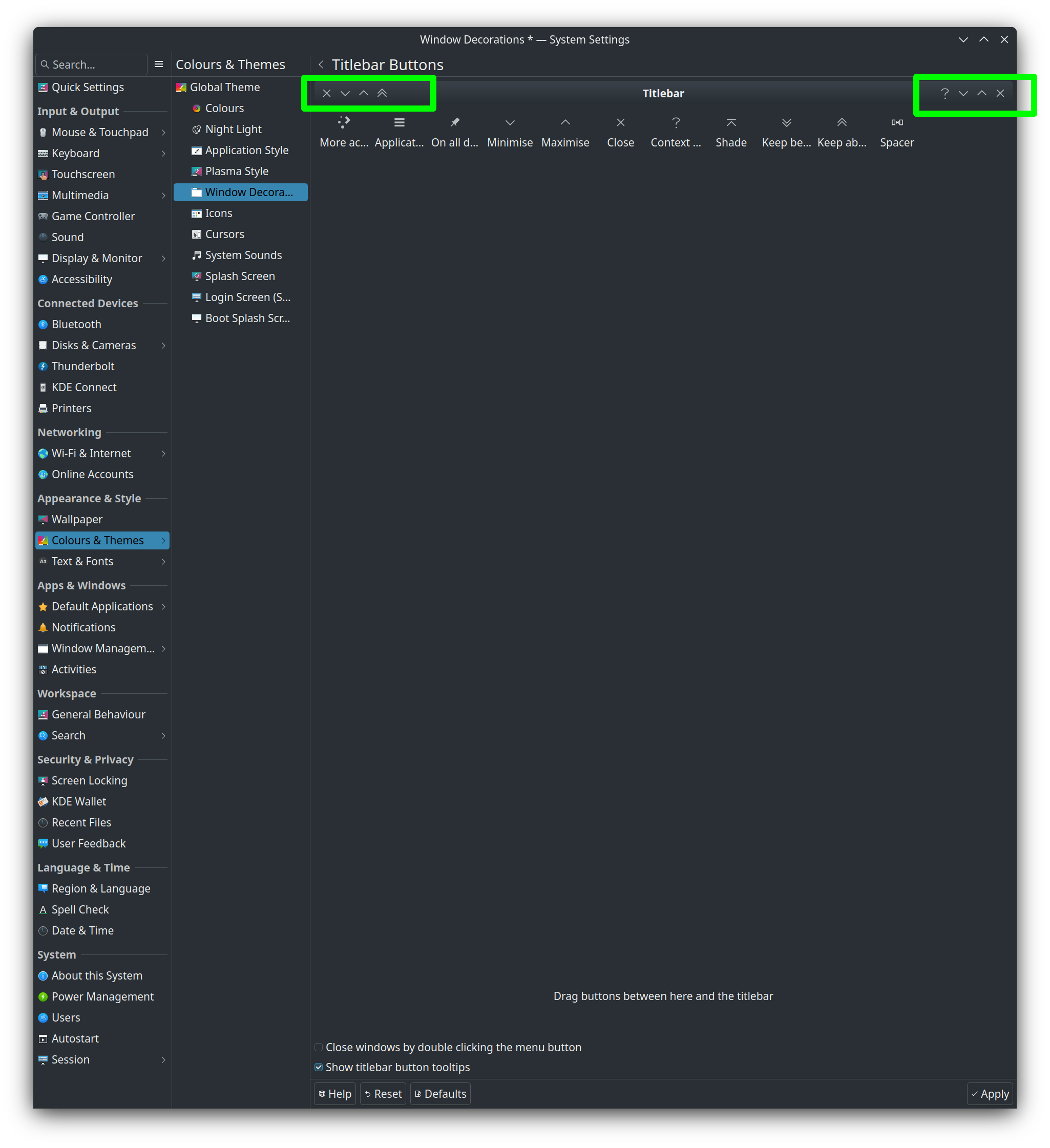
I have all my kde windows with button at both sides. This is destroying the loading of Firefox.

[_Tp = HeaderBarButtonType, _Nm = 3]: Assertion '__n < this->size()' failed.

I have tested by removing from the left side and FF works.

Thing is i want my window decorations the way i have had them for years. I don’t want all windows with just single sided buttons.