To clarify, he has GCC 15.1.1 but firefox 142.0-1 was built with 15.2.1. That’s why I’m doing a rebuild with 15.1.1 right now. 
3 Likes
this caused no issues here
I didn’t even have gcc installed.
Now I do have it.
Still no issue.
i have stated what the problem is/was just above
Can i get some help about fixing it though, thx.
I dont mind if just GTK has buttons on only 1 side, but not all windows
It’s what you think it is.
Is it, though?
… should be easy to confirm - by (temporarily) disabling that …
…
removing ~/.mozilla and starting from scratch should have worked around that, no?
I don’t use Plasma except with defaults in a VM …
yes, i tested it by removing one side of the button set (removed the left side) and its all working again. You try it, you can reproduce it easily.
No, already started with a completely new install including ~/.mozilla folder did not exist
It will be (re)created upon first start.
Don’t know about flatpak variant.
That folder … needs to be present - if it isn’t, it’s going to be created, along with it’s contents.
Unfortunately, my rebuild failed. I’m not sure why. 
EDIT: It turns out my build machine ran out of memory whilst compiling. Apparently 32 GB + 16 GB swap is not enough anymore.
I’ll try one more time.
EDIT: Nope. Failed again with various compiler warnings.
@anon33601770 Sorry im not sure what you are getting at. Iv tested it. If you add window decoration buttons in the kde setting to both sides of windows then Firefox will not load.
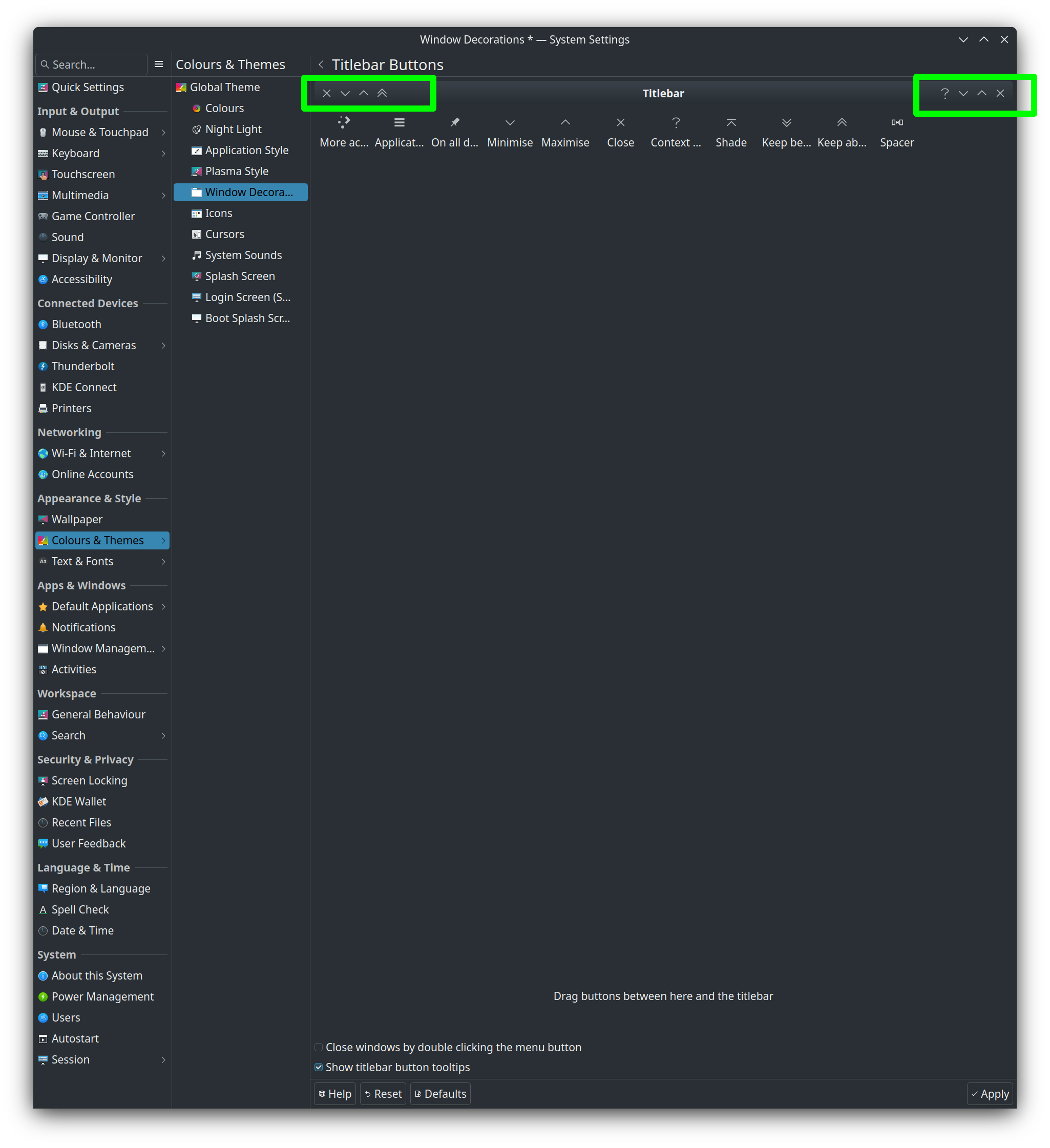
Thats it!
EDIT: it seems to be when you add all 3 of the buttons, or it might be just the maximize button.
So i think i will be able to at least have a close button on both sides.
I’m not usually using Plasma/KDE
I’m using … Xfce4
Can’t replicate your issue (in a Plasma VM)
or: I won’t, by trying to recreate your situation
I have no idea what that even might mean …
 , and i went to the trouble of drawing a nice screenshot and everything
You know the “close/minimize/maximize” buttons on all desktop windows? Well in KDE you can have them buttons on the left and the right side of all windows at the same time.
look

You adjust these buttons in the kde settings for the window decorations (as shown in my previous screenshot). If you add all 3 buttons (close/minimize/maximize) to both sides of all windows then Firefox does not load because the buttons being in them positions interfere with GTK and specifically Firefox.
and I told you that I don’t use plasma and that I do not (and cannot) recreate your issue
Plasma want`s to solve it?
Go ahead!
But:
it doesn’t
KDE / Plasma problem …
@jackdinn Sorry, the rebuild failed twice.
I haven’t seen anyone else report issues, so I’m at a loss here.
1 Like
No, i suspect that there are not to many other people who have the (close/minimise/maximise) window buttons on both sides of their windows so it will be a far and few between error.
Thx for talking the time to try and build it twice, thats a PITA to do.
But as i say it wasn’t the build or versions of anything that caused the problem in the end anyhow, it was, as i say, my window decoration buttons. I still would like an answer to how too fix it but for now i shall just remove some of my left-hand side window buttons and then Firefox works.
1 Like
I am just seeing this. After I updated to v 142 it froze immediately after launching. Was able to kill it in a tty via htop. Later, I thought I would just downgrade it to the previous version. Upon launching it wanted to create a new profile. No way I was doing that. So, I reverted back to 142. This time when it launched it worked. Ookaay. (I should mention, that some weeks ago I switched to Falkon because of other FF issues and I am very happy with it.)
Update: I’ve just ordered 64GB RAM to upgrade my desktop build machine from 32GB and will receive it tomorrow.
5 Likes

I can confirm the behaviour. If you remove the min, max and close buttons from the right hand side and add all of these to the left hand side, then Firefox still works. But trying to add a single one of them now to the right hand side again lets Firefox crash directly due to a questionable assertion. Seems like only the Mozilla devs can fix this. (Don’t think this is related to Manjaro in any way. Wherever you run Plasma and change the window title bar configuration this way it will trigger this seemingly internal Firefox assertion.)
1 Like
Yes i can give a highly detailed explanation for anyone who might want to look into this (maybe a FF dev may stumble across it).
Summary
Firefox crash on Manjaro KDE when KDE exports dual-sided GTK button layout via XSettings
Summary
On Manjaro KDE (Plasma 6), Firefox crashes on startup (GUI path only) with:
.../lib64/gcc/x86_64-pc-linux-gnu/15.2.1/.../array:210:
reference std::array<HeaderBarButtonType, 3>::operator[](size_type)
[_Tp = HeaderBarButtonType, _Nm = 3]: Assertion '__n < this->size()' failed.
Redirecting call to abort() to mozalloc_abort
*** stack smashing detected ***: terminated
Headless mode works (--headless --screenshot), so the crash is in the window/decorations path.
Root cause is KDE exporting a dual-sided button layout to GTK via XSettings, e.g.:
‘close,maximize,minimize:minimize,maximize,close’
Firefox’s GTK headerbar code appears to assume ≤3 buttons total on a single side and indexes a fixed std::array<…, 3> based on that. With GCC 15’s hardened libstdc++ (_GLIBCXX_ASSERTIONS), this becomes a hard abort.
Environment
- Distro: Manjaro, stable branch (mirrors currently ship GCC 15.x)
- Desktop: KDE Plasma 6 (Wayland and X11 tested; reproduced on X11 path too)
- GCC: gcc (GCC) 15.1.1 20250729 (also seen 15.2.1 in include path)
- Firefox: system package and Mozilla tarball both affected (so not a packaging-only issue)
- GTK: gtk3-demo runs fine; crash is Firefox-specific when reading headerbar layout
- Flatpak Firefox also crashed (same env → same XSettings → same path)
Repro steps
- In KDE, set window buttons on both left and right (KWin allows this).
- Plasma 6 removed the old “GTK Application Style” UI toggle; KDE still publishes the layout to GTK via XSettings.
- Launch Firefox normally:
firefox --ProfileManager - Observe immediate abort with the std::array<HeaderBarButtonType,3> assertion.
Control checks:
- –headless works:
/tmp/firefox/firefox --headless --screenshot /tmp/ok.png about:blankexit=0 and png created
- If KDE dual-sided layout is removed (right-only ‘:minimize,maximize,close’), Firefox starts.
- If CSD is disabled for Firefox:
MOZ_GTK_TITLEBAR_DECORATION=system GTK_CSD=0 firefox
→ Firefox starts (bypasses headerbar path).
What GTK/Firefox sees
- gsettings / dconf value (user):
‘close,maximize,minimize:minimize,maximize,close’ - KDE exports this via XSettings to GTK at runtime, so per-user ~/.config/gtk-*.0/settings.ini does not help. (Confirmed that overriding via a user xsettingsd with Gtk/DecorationLayout “menu:minimize,maximize,close” prevents the crash.)
Workarounds for users
- Keep KWin’s dual-sided layout, but override GTK via xsettingsd:
Gtk/DecorationLayout “menu:minimize,maximize,close”
(plus sensible Xft/* keys so fonts don’t look aliased) - Or disable Firefox CSD:
MOZ_GTK_TITLEBAR_DECORATION=system GTK_CSD=0 firefox - Or set GNOME/KDE layout to right-only for GTK apps (loses dual-side look).
Likely fix in Firefox
Harden the GTK headerbar layout parsing:
- Treat the XSettings/gnome key as two lists (left:right). Support duplicates gracefully.
- Map tokens {menu,minimize,maximize,close} into a bounded vector, truncate to 3, and dedupe.
- If both sides contain buttons, either choose the configured side for CSD or prioritize right side; never index a fixed 3-element array with an out-of-range position.
- On unexpected tokens or >3 items, fallback to ‘:minimize,maximize,close’ instead of asserting.
This avoids crashing when KDE (legitimately for KWin) publishes both-sided layouts that GTK headerbar apps don’t anticipate.
Why GCC 15 made it “suddenly crash”
With GCC 15’s libstdc++ hardening (_GLIBCXX_ASSERTIONS) the out-of-range std::array::operator becomes a hard abort. On older toolchains it likely “worked by accident” or exhibited UB without a clear failure. The underlying indexing assumption still needs fixing in Firefox.
3 Likes
That was just so thorough i couldn’t stop myself marking it as a solution (from users point of view, it contains workarounds, the devs still have to fix it).
4 Likes