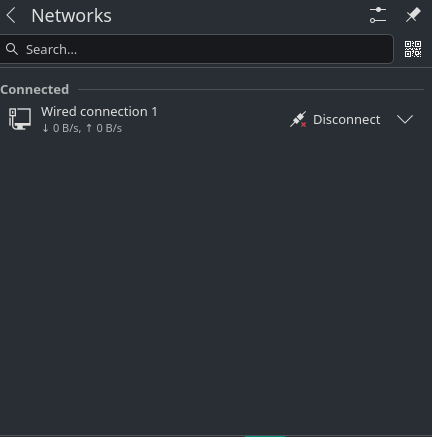
I am facing a weird issue now – my Wi-Fi and LAN were working fine till yesterday morning. Suddenly, in the morning, my screen went completely black and was not responding. I forced a shutdown of my laptop - Lenovo c340s. Still, this issue was there for some time. Later, the system started working, but my network is not connected, and the network widget in my plasma taskbar shows unknown. At that point, even wired was not detected. I could manage with mobile USB tethering and updated the system to the latest. Still my wifi is not getting detected. Earlier, I used to see a toggling option for flight mode and so on on Plasma network widget. Now it is not showing any such options except a search bar.
uname -r
6.18.49-1-MANJARO
❯ inxi -N
Network:
  Device-1: Intel Cannon Point-LP CNVi [Wireless-AC] driver: iwlwifi
  Device-2: Realtek RTL8152 Fast Ethernet Adapter driver: r8152 type: USB
❯ rfkill list
0: ideapad_wlan: Wireless LAN
        Soft blocked: no
        Hard blocked: no
1: ideapad_bluetooth: Bluetooth
        Soft blocked: no
        Hard blocked: no
2: hci0: Bluetooth
        Soft blocked: no
        Hard blocked: no
❯ lspci -nnk | grep -A3 Net
00:14.3 Network controller [0280]: Intel Corporation Cannon Point-LP CNVi [Wireless-AC] [8086:9df0] (rev 30)
        Subsystem: Intel Corporation Device [8086:0034]
        Kernel driver in use: iwlwifi
        Kernel modules: iwlwifi
❯ inxi -Fazy
System:
  Kernel: 6.18.49-1-MANJARO arch: x86_64 bits: 64 compiler: gcc v: 16.2.1
    clocksource: tsc avail: hpet,acpi_pm
    parameters: BOOT_IMAGE=/@/boot/vmlinuz-6.18-x86_64
    root=UUID=9046f096-701c-4c87-ac8f-07f095764c4c rw rootflags=subvol=@ quiet
    splash resume=UUID=40f2c8c5-bd0d-4e96-961a-526261b7d039
    udev.log_priority=3
  Desktop: KDE Plasma v: 6.7.4 tk: Qt v: N/A info: frameworks v: 6.29.0
    wm: kwin_wayland with: krunner vt: 2 dm: N/A Distro: Manjaro base: Arch Linux
Machine:
  Type: Convertible System: LENOVO product: 81N4 v: Lenovo IdeaPad C340-14IWL
    serial: <superuser required> Chassis: type: 31 v: Lenovo IdeaPad C340-14IWL
    serial: <superuser required>
  Mobo: LENOVO model: LNVNB161216 v: SDK0Q55722 WIN
    serial: <superuser required>
    part-nu: LENOVO_MT_81N4_BU_idea_FM_IdeaPad C340-14IWL
    uuid: <superuser required> Firmware: UEFI vendor: LENOVO v: AHCN34WW(V2.11)
    date: 06/18/2021
Battery:
  ID-1: BAT1 charge: 18.8 Wh (42.2%) condition: 44.4/45.5 Wh (97.5%)
    volts: 15.11 min: 15.36 model: 0x4C 0x47 0x43 0x00 PABAS0241231 type: Li-ion
    serial: <filter> charging: status: discharging type: standard
    avail: long_life,standard cycles: 306
CPU:
  Info: model: Intel Core i5-8265U bits: 64 type: MT MCP
    arch: Comet/Whiskey Lake note: check gen: core 8 level: v3 note: check
    built: 2018 process: Intel 14nm family: 6 model-id: 0x8E (142)
    stepping: 0xC (12) microcode: 0x100
  Topology: cpus: 1x dies: 1 clusters: 4 cores: 4 threads: 8 tpc: 2
    smt: enabled cache: L1: 256 KiB desc: d-4x32 KiB; i-4x32 KiB L2: 1024 KiB
    desc: 4x256 KiB L3: 6 MiB desc: 1x6 MiB
  Speed (MHz): avg: 400 min/max: 400/3900 scaling: driver: intel_pstate
    governor: powersave cores: 1: 400 2: 400 3: 400 4: 400 5: 400 6: 400 7: 400
    8: 400 bogomips: 28800
  Flags-basic: avx avx2 ht lm nx pae sse sse2 sse3 sse4_1 sse4_2 ssse3 vmx
  Vulnerabilities:
  Type: gather_data_sampling mitigation: Microcode
  Type: ghostwrite status: Not affected
  Type: indirect_target_selection mitigation: Aligned branch/return thunks
  Type: itlb_multihit status: KVM: Split huge pages
  Type: l1tf status: Not affected
  Type: mds status: Not affected
  Type: meltdown status: Not affected
  Type: mmio_stale_data mitigation: Clear CPU buffers; SMT vulnerable
  Type: old_microcode status: Not affected
  Type: reg_file_data_sampling status: Not affected
  Type: retbleed mitigation: Enhanced IBRS
  Type: spec_rstack_overflow status: Not affected
  Type: spec_store_bypass mitigation: Speculative Store Bypass disabled via
    prctl
  Type: spectre_v1 mitigation: usercopy/swapgs barriers and __user pointer
    sanitization
  Type: spectre_v2 mitigation: Enhanced / Automatic IBRS; IBPB: conditional;
    PBRSB-eIBRS: SW sequence; BHI: SW loop, KVM: SW loop
  Type: srbds mitigation: Microcode
  Type: tsa status: Not affected
  Type: tsx_async_abort status: Not affected
  Type: vmscape mitigation: IBPB before exit to userspace
Graphics:
  Device-1: Intel WhiskeyLake-U GT2 [UHD Graphics 620] vendor: Lenovo
    driver: i915 v: kernel arch: Gen-9.5 process: Intel 14nm built: 2016-20
    ports: active: eDP-1 empty: HDMI-A-1 bus-ID: 00:02.0 chip-ID: 8086:3ea0
    class-ID: 0300
  Device-2: NVIDIA GP108M [GeForce MX230] vendor: Lenovo driver: N/A
    alternate: nouveau, nova_core, nvidia_drm, nvidia non-free: 550-580.xx+
    status: legacy-active (EOL~2028-09-xx) arch: Pascal code: GP10x
    process: TSMC 16nm built: 2016-2021 pcie: gen: 3 speed: 8 GT/s lanes: 4
    bus-ID: 01:00.0 chip-ID: 10de:1d11 class-ID: 0302
  Device-3: IMC Networks Integrated Camera driver: uvcvideo type: USB
    rev: 2.0 speed: 12 Mb/s lanes: 1 mode: 1.1 bus-ID: 1-6:32 chip-ID: 13d3:56b2
    class-ID: 0e02
  Display: wayland server: X.org v: 1.21.1.24 with: Xwayland v: 24.1.13
    compositor: kwin_wayland driver: X: loaded: modesetting alternate: fbdev,vesa
    dri: iris gpu: i915 display-ID: 0
  Monitor-1: eDP-1 model: ChiMei InnoLux 0x14d4 built: 2016 res:
    mode: 1920x1080 hz: 60 scale: 100% (1) dpi: 158 gamma: 1.2
    size: 309x173mm (12.17x6.81") diag: 354mm (13.9") ratio: 16:9
    modes: 1920x1080
  API: EGL v: 1.5 hw: drv: intel iris platforms: device: 0 drv: iris
    device: 1 drv: swrast gbm: drv: iris surfaceless: drv: iris wayland:
    drv: iris x11: drv: iris
  API: OpenGL v: 4.6 vendor: intel mesa v: 26.2.2-arch1.1 glx-v: 1.4
    direct-render: yes renderer: Mesa Intel UHD Graphics 620 (WHL GT2)
    device-ID: 8086:3ea0 memory: 18.8 GiB unified: yes display-ID: :0.0
  API: Vulkan v: 1.4.357 layers: 4 device: 0 type: integrated-gpu name: Intel
    UHD Graphics 620 (WHL GT2) driver: mesa intel v: 26.2.2-arch1.1
    device-ID: 8086:3ea0 surfaces: N/A
  Info: Tools: api: clinfo, eglinfo, glxinfo, vulkaninfo
    de: kscreen-console,kscreen-doctor gpu: nvidia-settings,nvidia-smi
    wl: wayland-info x11: xdpyinfo, xprop, xrandr
Audio:
  Device-1: Intel Cannon Point-LP High Definition Audio vendor: Lenovo
    driver: snd_hda_intel v: kernel alternate: snd_soc_avs,snd_sof_pci_intel_cnl
    bus-ID: 00:1f.3 chip-ID: 8086:9dc8 class-ID: 0403
  API: ALSA v: k6.18.49-1-MANJARO status: kernel-api with: aoss
    type: oss-emulator tools: alsactl,alsamixer,amixer
  Server-1: sndiod v: N/A status: off tools: aucat,midicat,sndioctl
  Server-2: JACK v: 1.9.22 status: off tools: N/A
  Server-3: PipeWire v: 1.6.8 status: active with: 1: pipewire-pulse
    status: active 2: wireplumber status: active 3: pipewire-alsa type: plugin
    tools: pactl,pw-cat,pw-cli,wpctl
Network:
  Device-1: Intel Cannon Point-LP CNVi [Wireless-AC] driver: iwlwifi v: kernel
    bus-ID: 00:14.3 chip-ID: 8086:9df0 class-ID: 0280
  Device-2: Realtek RTL8152 Fast Ethernet Adapter driver: r8152 type: USB
    rev: 2.1 speed: 480 Mb/s lanes: 1 mode: 2.0 bus-ID: 1-3.2:40
    chip-ID: 0bda:8152 class-ID: 0000 serial: <filter>
  IF: enp0s20f0u3u2 state: up speed: 100 Mbps duplex: full mac: <filter>
  Info: services: NetworkManager,systemd-timesyncd
Bluetooth:
  Device-1: Intel Bluetooth 9460/9560 Jefferson Peak (JfP) driver: btusb v: 0.8
    type: USB rev: 2.0 speed: 12 Mb/s lanes: 1 mode: 1.1 bus-ID: 1-10:7
    chip-ID: 8087:0aaa class-ID: e001
  Report: rfkill ID: hci0 rfk-id: 2 state: up address: see --recommends
Drives:
  Local Storage: total: 953.87 GiB used: 129.03 GiB (13.5%)
  SMART Message: Unable to run smartctl. Root privileges required.
  ID-1: /dev/nvme0n1 maj-min: 259:0 vendor: Samsung model: MZVLB1T0HBLR-000L2
    size: 953.87 GiB block-size: physical: 512 B logical: 512 B speed: 31.6 Gb/s
    lanes: 4 tech: SSD serial: <filter> fw-rev: 3L1QEXF7 temp: 39.9 C
    scheme: GPT
Partition:
  ID-1: / raw-size: 463.59 GiB size: 463.59 GiB (100.00%)
    used: 78.67 GiB (17.0%) fs: btrfs dev: /dev/nvme0n1p2 maj-min: 259:2
  ID-2: /boot/efi raw-size: 2 GiB size: 2 GiB (99.80%) used: 664 KiB (0.0%)
    fs: vfat dev: /dev/nvme0n1p1 maj-min: 259:1
  ID-3: /home raw-size: 244.14 GiB size: 244.14 GiB (100.00%)
    used: 6.33 GiB (2.6%) fs: btrfs dev: /dev/nvme0n1p3 maj-min: 259:3
  ID-4: /var/log raw-size: 463.59 GiB size: 463.59 GiB (100.00%)
    used: 78.67 GiB (17.0%) fs: btrfs dev: /dev/nvme0n1p2 maj-min: 259:2
Swap:
  Kernel: swappiness: 60 (default) cache-pressure: 100 (default) zswap: yes
    compressor: zstd max-pool: 20%
  ID-1: swap-1 type: partition size: 9.77 GiB used: 0 KiB (0.0%) priority: -2
    dev: /dev/nvme0n1p5 maj-min: 259:5
Sensors:
  System Temperatures: cpu: 50.0 C pch: 51.0 C mobo: N/A
  Fan Speeds (rpm): N/A
Info:
  Memory: total: 20 GiB note: est. available: 19.25 GiB used: 4.25 GiB (22.1%)
  Processes: 295 Power: uptime: 15m states: freeze,mem,disk suspend: deep
    avail: s2idle wakeups: 0 hibernate: platform avail: shutdown, reboot,
    suspend, test_resume image: 7.61 GiB services: org_kde_powerdevil,
    power-profiles-daemon, upowerd Init: systemd v: 261 default: graphical
    tool: systemctl
  Packages: 2390 pm: dpkg pkgs: 0 pm: pacman pkgs: 2382 libs: 453
    tools: pamac pm: flatpak pkgs: 8 Compilers: clang: 22.1.8 gcc: 16.2.1 alt: 15
    Shell: Zsh v: 5.9.2 default: Bash v: 5.3.15 running-in: konsole
    inxi: 3.3.41
❯ nmcli g
STATE      CONNECTIVITY  WIFI-HW  WIFI     WWAN-HW  WWAN     METERED
connected  full          missing  enabled  missing  enabled  no (guessed)
I was using the 6.12 kernel and installed 6.18 to see if it solved the problem or not. It did not. I tried blacklisting, changing power options on modprobe, and so on. It also did not work.
sudo dmesg | grep iwlwifi | tail -n 20
[sudo] password for sreekanth:
[   18.245861] iwlwifi 0000:00:14.3: 0x01300202 | CNVR_AUX_MISC_CHIP
[   18.245872] iwlwifi 0000:00:14.3: 0x0000485B | CNVR_SCU_SD_REGS_SD_REG_DIG_DCDC_VTRIM
[   18.245913] iwlwifi 0000:00:14.3: 0xA5A5A5A2 | CNVR_SCU_SD_REGS_SD_REG_ACTIVE_VDIG_MIRROR
[   18.245933] iwlwifi 0000:00:14.3: 0x8877A4FB | FSEQ_PREV_CNVIO_INIT_VERSION
[   18.245941] iwlwifi 0000:00:14.3: 0x60C4E298 | FSEQ_WIFI_FSEQ_VERSION
[   18.245949] iwlwifi 0000:00:14.3: 0x2F38EF49 | FSEQ_BT_FSEQ_VERSION
[   18.245958] iwlwifi 0000:00:14.3: 0xF3AAAF77 | FSEQ_CLASS_TP_VERSION
[   18.245978] iwlwifi 0000:00:14.3: SecBoot CPU1 Status: 0x3, CPU2 Status: 0x2324
[   18.245997] iwlwifi 0000:00:14.3: WFPM_ARC1_PD_NOTIFICATION: 0x0
[   18.246016] iwlwifi 0000:00:14.3: HPM_SECONDARY_DEVICE_STATE: 0x42
[   18.246029] iwlwifi 0000:00:14.3: WFPM_MAC_OTP_CFG7_ADDR: 0x0
[   18.246042] iwlwifi 0000:00:14.3: WFPM_MAC_OTP_CFG7_DATA: 0x4
[   18.246054] iwlwifi 0000:00:14.3: UMAC PC: 0x804533c8
[   18.246067] iwlwifi 0000:00:14.3: LMAC PC: 0xe8
[   18.246068] iwlwifi 0000:00:14.3: Failed to start INIT ucode: -5
[   18.246070] iwlwifi 0000:00:14.3: WRT: Collecting data: ini trigger 13 fired (delay=0ms).
[   18.710978] iwlwifi 0000:00:14.3: WRT: Collecting data: ini trigger 4 fired (delay=0ms).
[   18.716123] iwlwifi 0000:00:14.3: WRT: Failed to dump region: id=4, type=5
[   18.716128] iwlwifi 0000:00:14.3: WRT: Failed to dump region: id=6, type=5
[   18.961423] iwlwifi 0000:00:14.3: Failed to run INIT ucode: -5
I searched the internet and tried resetting by holding the power button for 30 seconds after shutting down the system. I tried with a live usb Manjaro and it did not detect the wifi. I am not sure how to debug the problem now, so I will try to solve it. Any input will be greatly useful.
I’m not sure why dmesg gave Failed to run INIT ucode: -5 error, and nmcli says HW is missing. Not sure how to debug.
Thank you. Please let me know if you need any more details.

 - but as it is working with an external dongle, I’m afraid it points to a hardware problem
  Currently it works with an external dongle.