excuse my lack of consensus, but i get artifacts of the like on my secondary monitors all the time due to loose/dirty HDMI connectors. some wiggle on the connectors or the cable itself and everything is fine
Something else I had forgotten to show, this is just to show how the artifacting appears
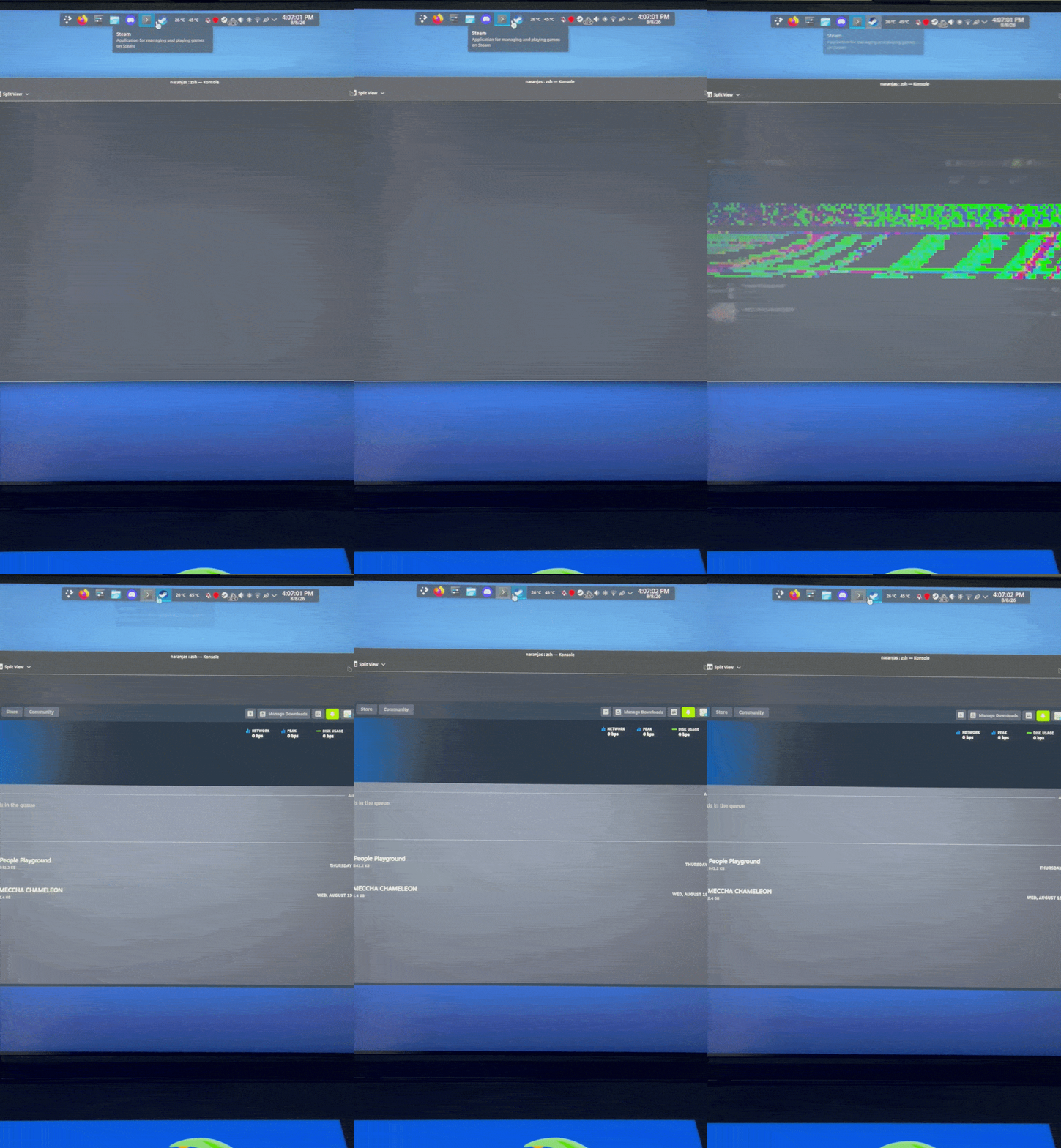
Yes, strangely enough the artifacting started affecting the terminal more for whatever reason? I think that can be overlooked though. Here are the results if its wanted
glmark2
=======================================================
    glmark2 2023.01
=======================================================
    OpenGL Information
    GL_VENDOR:      AMD
    GL_RENDERER:    AMD Radeon RX 7700 XT (radeonsi, navi32, ACO, DRM 3.64, 6.18.42-1-MANJARO)
    GL_VERSION:     4.6 (Compatibility Profile) Mesa 26.1.6-arch1.1
    Surface Config: buf=32 r=8 g=8 b=8 a=8 depth=24 stencil=0 samples=0
    Surface Size:   800x600 windowed
=======================================================
[build] use-vbo=false: FPS: 18803 FrameTime: 0.053 ms
[build] use-vbo=true: FPS: 30354 FrameTime: 0.033 ms
[texture] texture-filter=nearest: FPS: 30028 FrameTime: 0.033 ms
[texture] texture-filter=linear: FPS: 28701 FrameTime: 0.035 ms
[texture] texture-filter=mipmap: FPS: 27819 FrameTime: 0.036 ms
[shading] shading=gouraud: FPS: 29747 FrameTime: 0.034 ms
[shading] shading=blinn-phong-inf: FPS: 29599 FrameTime: 0.034 ms
[shading] shading=phong: FPS: 26716 FrameTime: 0.037 ms
[shading] shading=cel: FPS: 28178 FrameTime: 0.035 ms
[bump] bump-render=high-poly: FPS: 27147 FrameTime: 0.037 ms
[bump] bump-render=normals: FPS: 28711 FrameTime: 0.035 ms
[bump] bump-render=height: FPS: 28179 FrameTime: 0.035 ms
[effect2d] kernel=0,1,0;1,-4,1;0,1,0;: FPS: 32626 FrameTime: 0.031 ms
[effect2d] kernel=1,1,1,1,1;1,1,1,1,1;1,1,1,1,1;: FPS: 33160 FrameTime: 0.030 ms
[pulsar] light=false:quads=5:texture=false: FPS: 30465 FrameTime: 0.033 ms
[desktop] blur-radius=5:effect=blur:passes=1:separable=true:windows=4: FPS: 17402 FrameTime: 0.057 ms
[desktop] effect=shadow:windows=4: FPS: 19638 FrameTime: 0.051 ms
[buffer] columns=200:interleave=false:update-dispersion=0.9:update-fraction=0.5:update-method=map: FPS: 3208 FrameTime: 0.312 ms
[buffer] columns=200:interleave=false:update-dispersion=0.9:update-fraction=0.5:update-method=subdata: FPS: 3538 FrameTime: 0.283 ms
[buffer] columns=200:interleave=true:update-dispersion=0.9:update-fraction=0.5:update-method=map: FPS: 4823 FrameTime: 0.207 ms
[ideas] speed=duration: FPS: 15240 FrameTime: 0.066 ms
[jellyfish] <default>: FPS: 27355 FrameTime: 0.037 ms
[terrain] <default>: FPS: 5190 FrameTime: 0.193 ms
[shadow] <default>: FPS: 22304 FrameTime: 0.045 ms
[refract] <default>: FPS: 8460 FrameTime: 0.118 ms
[conditionals] fragment-steps=0:vertex-steps=0: FPS: 31416 FrameTime: 0.032 ms
[conditionals] fragment-steps=5:vertex-steps=0: FPS: 31871 FrameTime: 0.031 ms
[conditionals] fragment-steps=0:vertex-steps=5: FPS: 32125 FrameTime: 0.031 ms
[function] fragment-complexity=low:fragment-steps=5: FPS: 25552 FrameTime: 0.039 ms
[function] fragment-complexity=medium:fragment-steps=5: FPS: 22970 FrameTime: 0.044 ms
[loop] fragment-loop=false:fragment-steps=5:vertex-steps=5: FPS: 26296 FrameTime: 0.038 ms
[loop] fragment-steps=5:fragment-uniform=false:vertex-steps=5: FPS: 28737 FrameTime: 0.035 ms
[loop] fragment-steps=5:fragment-uniform=true:vertex-steps=5: FPS: 28712 FrameTime: 0.035 ms
=======================================================
                                  glmark2 Score: 23789
=======================================================
Yup, didn’t happen, I check both screens to be sure and no type of artifacting occurred.
And a bit on the talk about use of EXPO, it’s a tip that’s highly recommended towards people who are first building a PC, which I followed and I had experienced no issues then, the RAM I have has had no issues with EXPO before either, which is why I had said in a earlier reply that “I was confused”.

(Without having installed 7.1 kernel to see if the artifacting happens still,) This seems to be a fix to all of that, not the possible defective GPU, phew… but that does lead me to question about the sudden bugginess surrounding Vrr (Or Freesync, that’s what my monitor has). I’m still inclined to see 7.1 kernel perhaps fixes it as well? the issue also didn’t happen while being in the sign up screen, thought that’d be of interest maybe
So, it’s still happening, but it happens way, way less, it isn’t much of an annoyance compared to how it’d appeared every other moment, so it isn’t exactly a fix
Mod edit: Consecutive posts merged.
HI i been having the same artifacts but i don’t do ANY overclocking to the ram, CPU or GPU. for me it started after the vulkan driver actualization (i am using the 7.1.6-1)
the thermals and GPU usage for me haven’t really changed sense then
I confirm. After the update, graphical artifacts started appearing.
System
user@desktop
--------------
OS: Manjaro Linux x86_64
Kernel: Linux 7.1.6-1-MANJARO
Uptime: 12 hours, 41 mins
Packages: 1203 (pacman)[stable]
Shell: vim
Display (EI322QUR): 2560x1440 in 31", 60 Hz [External]
DE: KDE Plasma 6.7.4
WM: KWin (Wayland)
WM Theme: Breeze
Theme: Breeze (BreathLight) [Qt]
Icons: breeze [Qt]
Font: Noto Sans (10pt) [Qt]
Cursor: breeze (24px)
Terminal: tmux 3.7b
CPU: AMD FX(tm)-8350 (8) @ 4.00 GHz
GPU: AMD Radeon RX 9060 XT [Discrete]
Memory: 4.77 GiB / 31.30 GiB (15%)
Swap: 0 B / 8.00 GiB (0%)
Disk (/): 133.21 GiB / 1.11 TiB (12%) - xfs
Local IP (enp5s7): 192.168.1.13/24
Locale: en_US.UTF-8
The memory and processor are not overclocked. The graphics card is at stable undervolting level. Before the update, with the same settings, there were no artifacts.
I suspect it’s a KDE issue, as there are no artifacts in the kernel console, including when using mpv.
I run three systems on AMD with absolute no issues at all
- Thinkpad X13 AMD
- Thinkpad T495 AMD
workstation listed below
[fh@tiger ~]$ kinfo
Operating System: Manjaro Linux
KDE Plasma Version: 6.7.4
KDE Frameworks Version: 6.28.0
Qt Version: 6.11.1
Kernel Version: 7.2.0-rc6-1-fcs (64-bit)
Graphics Platform: Wayland
Processors: 24 × AMD Ryzen Threadripper PRO 5945WX 12-Cores
Memory: 128 GiB of RAM (125.6 GiB usable)
Graphics Processor: AMD Radeon AI PRO R9700
And yes - the -fcs in the kernel is because I have compiled a kernel without patches - like linux-next…
Known issues on a regression within amdgpu driver. Newer kernel may fix it: Making sure you're not a bot!
Just to get this topic out of the way. The link shows DDR5-6000 CL30. However the inxi output showed 4800Mhz. Perhaps sudo dmidecode -t 17 will show you what you actually have. Moreover, the CPU’s memory controller has limits, too. So, generally I think these tips are nonsense. If you don’t know what problem to solve there is no reason to turn expo on. If you really need it for something then I would try to stay at 5200Mhz first, and also have it only turned on for when it is relevant - perhaps when i play a particular game that needs it.
Anyway back to the issue
This could be a driver issue, then. But it isn’t clear what you did. Did you turn off VRR? Did you lower the refresh rate down from 200Hz? Did you disable MST (Multi-Stream Transport)?
I turned off VRR with my monitor settings, I had forgotten to say that, sorry
Lowering the refresh rate (VRR on) seemed to not really make much difference, as I still got the same weird artifacts. And about MST, I wasn’t even aware that was a setting, or thing 
Maybe this Reddit thread helps further. Someone fixed an issue with VRR by using lact (you can install the package from the Manjaro repo unless you already have it). Another one could solve his issue by switching from “Prefer color efficiency” to “Prefer color accuracy” in Plasma’s display configuration. Looks really like an AMD GPU driver issue, then.
For the record, does it happen on kernel 6.18?
Phil wrote above 7.1 has issue with amd.
I believe the OP has confirmed that
Trying this seems to work as a fix, tried to see if the artifacts would appear by doing by running little tests both with VRR on and off and (from what i’ve seen so far..) no artifacts appear, also, this could just be me being tired, but there is a tiny impact to performance games-wise, but that’s something I can overlook for the time being. Also, I still can’t confirm if the issue persists on a newer kernel, i hadn’t had much time to check it out
I’m seeing artifacts even with with Prefer color accuracy on 6.18
Please be reminded of the forum rules, specifically
- If a thread is marked as solved, do not reply stating the equivalent of “I am having a similar issue..”; start a new thread and link to the solved thread, if relevant.
If you followed the thread, there are lots of causes for seeing artifacts - hardware related like overclocking, degraded VRAM or even a bad hdmi cable, or also software related or a combination of these. The essential hint here was that the artifacts were (almost) gone when turning off VRR - but for a gaming setup you want to use VRR so i searched particularly for VRR related solutions and switching to “Prefer color accuracy” showed up as one of them. It’s rather unlikely that this solves all artifact issues for everyone.
And more specifically…
-
One problem per thread, and per user.
-
Don’t hijack somebody else’s thread.
-
The only exceptions are the Announcements threads, but those are for reporting problems, not for seeking solutions.