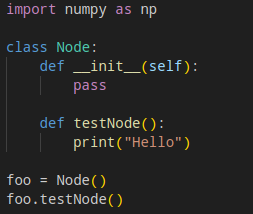
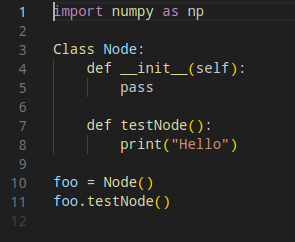
VS code and Vscodium on Manjaro, installed via pacman or from AUR, does not have proper intellisense or syntax highlighting behavior. Below is the issue:
Firstly, there is no highlighting of the imports, call to the Node() object, or method call on the Node() object. I would expect highlights for all of these.
Secondly, intellisense did not do any auto-completions when writing the initializer, which it always does when I’m working on my mac.
Things I’ve tried:
Installing/reinstalling python extension, which includes pylance
Installing magic python
Changing my python.languageserver to pylance. When I do this I get a popup upon opening vs code that says “The pylance extension is not installed but the python.languageServer value is set to “Pylance” Would you like to install the Pylance extension to use Pylance, or revert back to Jedi?”. When I click “Install Pylance”, nothing happens. But I know that it should already be installed via the python extension. I suspect this might have something to do with the buggy behavior described.
Well, I’m using Code from the official Manjaro repositories. This is the result without any extensions installed:
And, with the Prettier and Python Intelliense (Pylance) extensions installed, the highlighting is identical to that image. I’m not suggesting Prettier has any affect on highlighting; just that it’s installed.
The highlighting, again, remains the same with MagicPython installed.
In all cases the highlighting is consistent with the image I posted, with the obvious differences from the image you posted. Perhaps, try this version instead of the builds you tried.
I tried just reinstalling my OS, and that fixed the issue temporarily, but now the syntax highlighting is gone again… very strange. Would really like to fix this
 $ pamac search vs code --no-aur
vscode-markdown-languageserver  1.85.0-1                           extra
    Markdown language server
vscode-json-languageserver  1.85.0-1                               extra
    JSON language server
vscode-html-languageserver  1.85.0-1                               extra
    HTML language server
vscode-css-languageserver  1.85.0-1                                extra
    CSS/LESS/SCSS language server
texlive-mathscience  2023.66594-19                                 extra
    TeX Live - Mathematics, natural sciences, computer science
    packages
texlive-latexextra  2023.66594-19                                  extra
    TeX Live - LaTeX additional packages
code  1.84.2-1                                                     extra
    The Open Source build of Visual Studio Code (vscode) editor
Ultimately I think it was rainbow csv causing the issue. I reinstalled the OS, highlighting was working for a time, then randomly stopped (not so random in hindsight). I would usually click install rainbow csv when it recommends it. This time I reinstalled again and tried to keep it bare minimum, and it’s been working.
EDIT:
But deactivating and even uninstalling it, does not resolve the issue. I had to have never installed it in the first place.
I notice Rainbow CSV hasn’t seen any significant work in the past few years; some of the forks, up to five years. There’s been some activity within recent weeks, but still, no release since 2018.
If Rainbow CSV’s functionality is desired, the obvious choice now is to find a replacement. May I suggest creating a VM to test the new additions, just for the sake of caution.
Before you do so, it might be worth looking through cache/config folders (or node_modules, depending on how it was installed) and make sure there are no residual traces of Rainbow CSV.
This bug RBQL with Python error #148 could possibly be the root cause. If so, it seems like a comparitively easy fix for the dev(s) concerned; but I see no affirmative action.