Volume buttons on USB Soundbar do not work anymore

Since one of the updates from 2025-07-20, or 2025-07-18 the Volume Buttons on my ZETIY USB Soundbar do not work anymore. normally it regulates the master volume

pactl list cards

Karte #0
	Name: alsa_card.usb-Jieli_Technology_UACDemoV1.0_1120032508050019-00
	Treiber: module-alsa-card.c
	Owner-Modul: 6
	Eigenschaften:
		alsa.card = "0"
		alsa.card_name = "UACDemoV1.0"
		alsa.long_card_name = "Jieli Technology UACDemoV1.0 at usb-0000:2a:00.1-1, full speed"
		alsa.driver_name = "snd_usb_audio"
		device.bus_path = "pci-0000:2a:00.1-usb-0:1:1.0"
		sysfs.path = "/devices/pci0000:00/0000:00:01.2/0000:20:00.0/0000:21:08.0/0000:2a:00.1/usb1/1-1/1-1:1.0/sound/card0"
		udev.id = "usb-Jieli_Technology_UACDemoV1.0_1120032508050019-00"
		device.bus = "usb"
		device.vendor.id = "4c4a"
		device.vendor.name = "Jieli Technology"
		device.product.id = "4155"
		device.product.name = "UACDemoV1.0"
		device.serial = "Jieli_Technology_UACDemoV1.0_1120032508050019"
		device.string = "0"
		device.description = "UACDemoV1.0"
		module-udev-detect.discovered = "1"
		device.icon_name = "audio-card-usb"
	Profile:
		output:analog-stereo: Analog Stereo-Ausgabe (Ziele: 1, Quellen: 0, Priorität: 6500, verfügbar: ja)
		output:iec958-stereo: Digital Stereo (IEC958)-Ausgabe (Ziele: 1, Quellen: 0, Priorität: 5500, verfügbar: ja)
		output:iec958-ac3-surround-51: Digital Surround 5.1 (IEC958/AC3)-Ausgabe (Ziele: 1, Quellen: 0, Priorität: 300, verfügbar: ja)
		off: Aus (Ziele: 0, Quellen: 0, Priorität: 0, verfügbar: ja)
	Aktives Profil: output:analog-stereo
	Ports:
		analog-output: Analoge Ausgabe (Typ: Analog, Priorität: 9900, Latenzversatz: 0 usec, Verfügbarkeit unbekannt)
			Teil der/des Profil(s): output:analog-stereo
		iec958-stereo-output: Digitalausgang (S/PDIF) (Typ: SPDIF, Priorität: 0, Latenzversatz: 0 usec, Verfügbarkeit unbekannt)
			Teil der/des Profil(s): output:iec958-stereo

Karte #1
	Name: alsa_card.pci-0000_2f_00.1
	Treiber: module-alsa-card.c
	Owner-Modul: 7
	Eigenschaften:
		alsa.card = "1"
		alsa.card_name = "HDA ATI HDMI"
		alsa.long_card_name = "HDA ATI HDMI at 0xfcc20000 irq 96"
		alsa.driver_name = "snd_hda_intel"
		device.bus_path = "pci-0000:2f:00.1"
		sysfs.path = "/devices/pci0000:00/0000:00:03.1/0000:2d:00.0/0000:2e:00.0/0000:2f:00.1/sound/card1"
		device.bus = "pci"
		device.vendor.id = "1002"
		device.vendor.name = "Advanced Micro Devices, Inc. [AMD/ATI]"
		device.product.id = "ab30"
		device.product.name = "Navi 31 HDMI/DP Audio"
		device.string = "1"
		device.description = "Navi 31 HDMI/DP Audio"
		module-udev-detect.discovered = "1"
		device.icon_name = "audio-card-pci"
	Profile:
		output:hdmi-stereo: Digital Stereo (HDMI)-Ausgabe (Ziele: 1, Quellen: 0, Priorität: 38668, verfügbar: ja)
		output:hdmi-stereo-extra1: Digital Stereo (HDMI 2)-Ausgabe (Ziele: 1, Quellen: 0, Priorität: 5700, verfügbar: nein)
		output:hdmi-surround-extra1: Digital Surround 5.1 (HDMI 2)-Ausgabe (Ziele: 1, Quellen: 0, Priorität: 600, verfügbar: nein)
		output:hdmi-surround71-extra1: Digital Surround 7.1 (HDMI 2)-Ausgabe (Ziele: 1, Quellen: 0, Priorität: 600, verfügbar: nein)
		output:hdmi-stereo-extra2: Digital Stereo (HDMI 3)-Ausgabe (Ziele: 1, Quellen: 0, Priorität: 5700, verfügbar: nein)
		output:hdmi-surround-extra2: Digital Surround 5.1 (HDMI 3)-Ausgabe (Ziele: 1, Quellen: 0, Priorität: 600, verfügbar: nein)
		output:hdmi-surround71-extra2: Digital Surround 7.1 (HDMI 3)-Ausgabe (Ziele: 1, Quellen: 0, Priorität: 600, verfügbar: nein)
		output:hdmi-stereo-extra3: Digital Stereo (HDMI 4)-Ausgabe (Ziele: 1, Quellen: 0, Priorität: 5700, verfügbar: nein)
		output:hdmi-surround-extra3: Digital Surround 5.1 (HDMI 4)-Ausgabe (Ziele: 1, Quellen: 0, Priorität: 600, verfügbar: nein)
		output:hdmi-surround71-extra3: Digital Surround 7.1 (HDMI 4)-Ausgabe (Ziele: 1, Quellen: 0, Priorität: 600, verfügbar: nein)
		off: Aus (Ziele: 0, Quellen: 0, Priorität: 0, verfügbar: ja)
	Aktives Profil: output:hdmi-stereo
	Ports:
		hdmi-output-0: HDMI / DisplayPort (Typ: HDMI, Priorität: 5900, Latenzversatz: 0 usec, verfügbar)
			Eigenschaften:
				device.icon_name = "video-display"
				device.product.name = "LG ULTRAGEAR"
			Teil der/des Profil(s): output:hdmi-stereo
		hdmi-output-1: HDMI / DisplayPort 2 (Typ: HDMI, Priorität: 5800, Latenzversatz: 0 usec, nicht verfügbar)
			Eigenschaften:
				device.icon_name = "video-display"
			Teil der/des Profil(s): output:hdmi-stereo-extra1, output:hdmi-surround-extra1, output:hdmi-surround71-extra1
		hdmi-output-2: HDMI / DisplayPort 3 (Typ: HDMI, Priorität: 5700, Latenzversatz: 0 usec, nicht verfügbar)
			Eigenschaften:
				device.icon_name = "video-display"
			Teil der/des Profil(s): output:hdmi-stereo-extra2, output:hdmi-surround-extra2, output:hdmi-surround71-extra2
		hdmi-output-3: HDMI / DisplayPort 4 (Typ: HDMI, Priorität: 5600, Latenzversatz: 0 usec, nicht verfügbar)
			Eigenschaften:
				device.icon_name = "video-display"
			Teil der/des Profil(s): output:hdmi-stereo-extra3, output:hdmi-surround-extra3, output:hdmi-surround71-extra3

aplay

**** Liste der Hardware-Geräte (PLAYBACK) ****
Karte 0: UACDemoV10 [UACDemoV1.0], Gerät 0: USB Audio [USB Audio]
  Sub-Geräte: 1/1
  Sub-Gerät #0: subdevice #0
Karte 1: HDMI [HDA ATI HDMI], Gerät 3: HDMI 0 [LG ULTRAGEAR]
  Sub-Geräte: 1/1
  Sub-Gerät #0: subdevice #0
Karte 1: HDMI [HDA ATI HDMI], Gerät 7: HDMI 1 [HDMI 1]
  Sub-Geräte: 1/1
  Sub-Gerät #0: subdevice #0
Karte 1: HDMI [HDA ATI HDMI], Gerät 8: HDMI 2 [HDMI 2]
  Sub-Geräte: 1/1
  Sub-Gerät #0: subdevice #0
Karte 1: HDMI [HDA ATI HDMI], Gerät 9: HDMI 3 [HDMI 3]
  Sub-Geräte: 1/1
  Sub-Gerät #0: subdevice #0

inxi -SMAaz

System:
  Kernel: 6.16.0-rc6-1-MANJARO arch: x86_64 bits: 64 compiler: gcc v: 15.1.1
    clocksource: tsc avail: hpet,acpi_pm
    parameters: BOOT_IMAGE=/boot/vmlinuz-6.16-x86_64
    root=UUID=c0898dd5-da61-46bd-be5f-5850e528b463 rw udev.log_priority=3
  Desktop: KDE Plasma v: 6.3.6 tk: Qt v: N/A info: frameworks v: 6.16.0
    wm: kwin_x11 vt: 2 dm: SDDM Distro: Manjaro base: Arch Linux
Machine:
  Type: Desktop Mobo: Micro-Star model: X570-A PRO (MS-7C37) v: 3.0
    serial: <superuser required> uuid: <superuser required> UEFI: American
    Megatrends LLC. v: H.M0 date: 10/13/2023
Audio:
  Device-1: Advanced Micro Devices [AMD/ATI] Navi 31 HDMI/DP Audio
    driver: snd_hda_intel v: kernel pcie: gen: 4 speed: 16 GT/s lanes: 16
    bus-ID: 2f:00.1 chip-ID: 1002:ab30 class-ID: 0403
  Device-2: Jieli UACDemoV1.0 driver: snd-usb-audio type: USB rev: 1.1
    speed: 12 Mb/s lanes: 1 mode: 1.1 bus-ID: 1-1:2 chip-ID: 4c4a:4155
    class-ID: 0300 serial: <filter>
  API: ALSA v: k6.16.0-rc6-1-MANJARO status: kernel-api with: aoss
    type: oss-emulator tools: alsactl,alsamixer,amixer
  Server-1: sndiod v: N/A status: off tools: aucat,midicat,sndioctl
  Server-2: JACK v: 1.9.22 status: off tools: N/A
  Server-3: PipeWire v: 1.4.6 status: off with: pipewire-media-session
    status: active tools: pw-cli
  Server-4: PulseAudio v: 17.0-43-g3e2bb status: active
    with: pulseaudio-alsa type: plugin tools: pacat,pactl

tried the latest LTS Kernel too. Same problem.

1 Like

Have a look into /var/log/pacman.log and post all packages being updated which potentially could have caused this.

PipeWire is turned off but pipewire-media-session is active

I suspect that recent update restarted pipewire-media-session service that was previously disabled and inactive, which is most unusual considering that the pipewire-media-session package has not been updated since July 2024

I suggest you stop and disable the service

systemctl --user disable --now pipewire-media-session.service

Then restart system and check if audio controls are working again

If audio controls are not working, check the service is disabled and inactive

systemctl --user status pipewire-media-session.service

If the service has been restarted, use this command to mask it

systemctl --user mask pipewire-media-session.service
1 Like

i have no idea. i guess i got the same packages as you guys. i keep my system as vanilla as possible

nope did not solve it

systemctl --user status pipewire-media-session.service                                                           ✔ 
â—‹ pipewire-media-session.service
     Loaded: masked (Reason: Unit pipewire-media-session.service is masked.)
     Active: inactive (dead)

how do i reverse the mask command? just unmask?

i tried the speakers on my android phone with an usb-c adapter and it works as it should.

sudo systemctl unmask pipewire-media-session.service && sudo systemctl enable --now pipewire-media-session.service
1 Like
systemctl --user unmask pipewire-media-session.service

service runs in user-space and would not work with sudo


Try these commands to adjust master volume

amixer -D pulse sset Master 5%-
amixer -D pulse sset Master 5%+

If that does not work try these commands to adjust the USB speaker volume

pactl set-sink-volume alsa_output.Jieli_Technology_UACDemoV1.0_1120032508050019-00.analog-stereo +5%
pactl set-sink-volume alsa_output.Jieli_Technology_UACDemoV1.0_1120032508050019-00.analog-stereo -5%

NOTE: The following only applies if you are using the soundbar with a bluetooth connection. If with usb, then do not bother.

There is a main.conf file in here “/etc/bluetooth/”.

That is the main bluetooth configuration file. Open it, there are two lines that i need you to modify as follows (dont forget to remove the # signs):

[AVRCP]
# Allow SetAbsoluteVolume calls to a peer device that does not advertise the
# AVRCP remote control target profile.  If it does advertise this profile, the
# version is ignored.
VolumeWithoutTarget = true

# Validate that remote AVRCP profiles advertise the category-2 bit before
# allowing SetAbsoluteVolume calls or registering for EVENT_VOLUME_CHANGED
# notifications.
VolumeCategory = false

Then reboot and see if your volume buttons work.

it is an USB Soundbar

what do these commands do?
the master volume works fine. even with my old/cheap/IR/USB remote control. which i use now to regulate volume, when i am in a game and it is too loud

is there no way to see every input from USB devices? i want to know if manjaro evens knows, that i am pressing buttons

Try using VLC Hotkeys settings to check multimedia controls

you mean change some hotkeys with the soundbar imput. VLC does not see any imput from the soundbar.
also VLC sees just a few buttons of my remote control. buttons like the volume and play a kinda fixed for the OS. if i press PLAY, VLC hotkeys ignores them and a the open youtube videos starts playing

i tried it yesterday and today after the new stable update

If the multimedia controls were working before recent updates, I suggest boot system from a Live ISO, check if the controls are working and get more information about audio devices

inxi -Aaz

and detailed information about the USB speaker

lsusb -v -d 4c4a:4155

it does not work with the latest ISO from the website
but WORKS with manjaro-kde-25.0.5-250713-linux612.iso

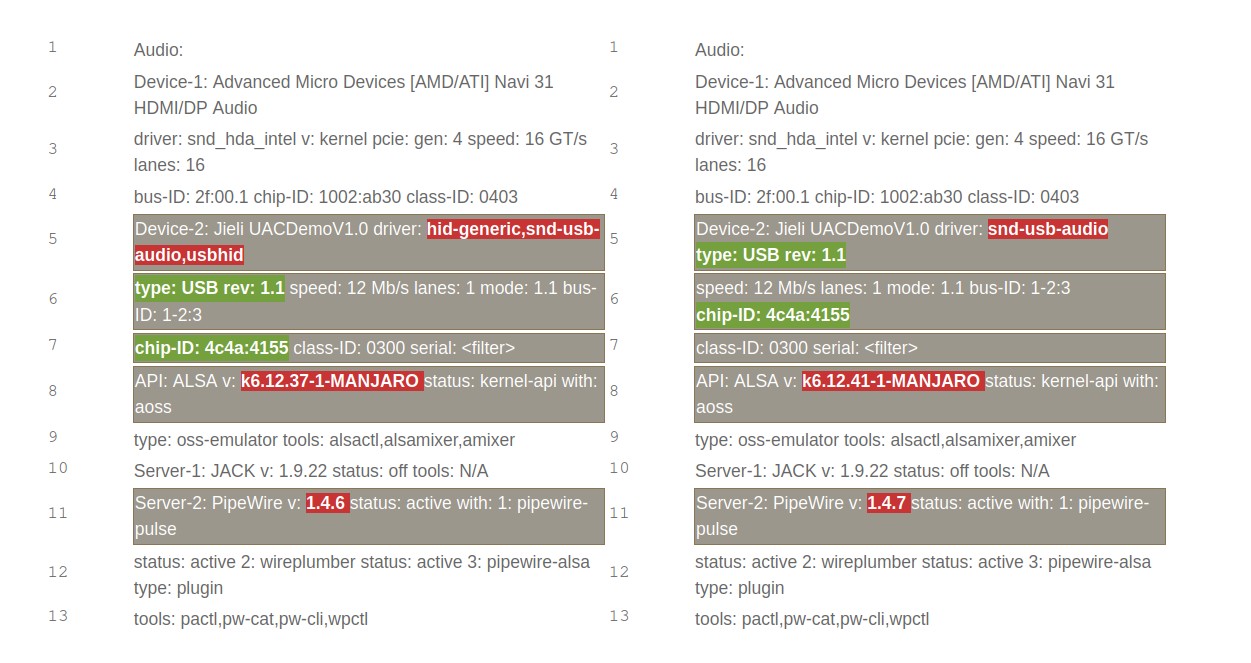
LSUSB is the same output on both. so here is just inxi, because there are differences at the USB device

the NEW iso

Audio:
  Device-1: Advanced Micro Devices [AMD/ATI] Navi 31 HDMI/DP Audio
    driver: snd_hda_intel v: kernel pcie: gen: 4 speed: 16 GT/s lanes: 16
    bus-ID: 2f:00.1 chip-ID: 1002:ab30 class-ID: 0403
  Device-2: Jieli UACDemoV1.0 driver: snd-usb-audio type: USB rev: 1.1
    speed: 12 Mb/s lanes: 1 mode: 1.1 bus-ID: 1-2:3 chip-ID: 4c4a:4155
    class-ID: 0300 serial: <filter>
  API: ALSA v: k6.12.41-1-MANJARO status: kernel-api with: aoss
    type: oss-emulator tools: alsactl,alsamixer,amixer
  Server-1: JACK v: 1.9.22 status: off tools: N/A
  Server-2: PipeWire v: 1.4.7 status: active with: 1: pipewire-pulse
    status: active 2: wireplumber status: active 3: pipewire-alsa type: plugin
    tools: pactl,pw-cat,pw-cli,wpctl

the OLD iso

Audio:
  Device-1: Advanced Micro Devices [AMD/ATI] Navi 31 HDMI/DP Audio
    driver: snd_hda_intel v: kernel pcie: gen: 4 speed: 16 GT/s lanes: 16
    bus-ID: 2f:00.1 chip-ID: 1002:ab30 class-ID: 0403
  Device-2: Jieli UACDemoV1.0 driver: hid-generic,snd-usb-audio,usbhid
    type: USB rev: 1.1 speed: 12 Mb/s lanes: 1 mode: 1.1 bus-ID: 1-2:3
    chip-ID: 4c4a:4155 class-ID: 0300 serial: <filter>
  API: ALSA v: k6.12.37-1-MANJARO status: kernel-api with: aoss
    type: oss-emulator tools: alsactl,alsamixer,amixer
  Server-1: JACK v: 1.9.22 status: off tools: N/A
  Server-2: PipeWire v: 1.4.6 status: active with: 1: pipewire-pulse
    status: active 2: wireplumber status: active 3: pipewire-alsa type: plugin
    tools: pactl,pw-cat,pw-cli,wpctl

edit. maybe that pics helps

Data for the older ISO shows HID drivers in addition to audio driver snd-usb-audio

Device-2: Jieli UACDemoV1.0 driver: hid-generic,snd-usb-audio,usbhid
type: USB rev: 1.1 speed: 12 Mb/s lanes: 1 mode: 1.1 bus-ID: 1-2:3
chip-ID: 4c4a:4155 class-ID: 0300

Try this to load usbhid driver

Unix & Linux Stack Exchange - Udev does not always automatically bind the usbhid driver to my device

Create a one-line file in /etc/modules-load.d`/00-my-usbhid.conf

usbhid
sudo tee /etc/modules-load.d/00-usbhid.conf <<< 'usbhid'

If all else fails, try adding kernel boot parameter

usbhid.quirks=0x4c4a:0x4155:0x08

to re-enable the NOGET quirk and see if that works.

did not help

i pressed SHIFT on boot. opened GRUB. made a new line with your command and booted with it.

inxi still shows

Device-2: Jieli UACDemoV1.0 driver: snd-usb-audio type: USB rev: 1.1
    speed: 12 Mb/s lanes: 1 mode: 1.1 bus-ID: 1-2:3 chip-ID: 4c4a:4155
    class-ID: 0300

Boot parameter should be added to same line as other parameters not as a new line
ArchWiki - Kernel parameters GRUB

Use inxi -Saz to check boot parameters

System:

    parameters: BOOT_IMAGE=/boot/vmlinuz-6.16-x86_64
    root=UUID=c0898dd5-da61-46bd-be5f-5850e528b463 rw udev.log_priority=3 usbhid.quirks=0x4c4a:0x4155:0x08
 parameters: BOOT_IMAGE=/boot/vmlinuz-6.17-x86_64
    root=UUID=LONGNUMBER rw udev.log_priority=3
    usbhid.quirks=0x4c4a:0x4155:0x08

 Device-2: Jieli UACDemoV1.0 driver: snd-usb-audio type: USB rev: 1.1
    speed: 12 Mb/s lanes: 1 mode: 1.1 bus-ID: 1-2:3 chip-ID: 4c4a:4155
    class-ID: 0300 serial: <filter>

does this USBHID even exist, or did manjaro throw it out with an update?

dont ask me why, but since the latest update it works again

1 Like

This topic was automatically closed 3 days after the last reply. New replies are no longer allowed.