I am completely new to Manjaro and Arch Linux. I have used Mint for a while, though I would consider myself an a fairly good noob. In other words, I get around and I can follow instructions.
Following the instructions on VMware’s site for installing the .bundle in Linux:
sudo sh ./VMware-Horizon-Client-5.4.1-15988340.x64.bundle
The graphical dialog comes forward, the options are selected and I select Next. There is nothing more than the words Installation was unsuccessful in the installation dialog. Noteworthy is that I also tried the --console option with the same outcome.
I explored the logs with KSystemLog viewer but probably I don’t know quite how to use it well enough, I could not find anything that showed an error, failure, that sort of thing.
Q: Has anyone in the community installed VMWare Horizon Client for connecting to a corporate environment in 20.1?
- If yes, I would sure appreciate your help.
Q: How can I better use the log viewer and/or other tools in Manjaro to find what I need in order to, hopefully, solve this installation question?
I appreciate your help.
2 Likes
That is fine. Hello and welcome.
You install this package from terminal or Pamac UI if you enabled AUR.
http://aur.archlinux.org/packages/vmware-horizon-client
pamac build vmware-horizon-client
I have no experience with it, but usually the comments in the AUR page can reveal a lot.
3 Likes
Thanks so much for the assistance. I was able to build and run the available version.
Unfortunately, this builld for some reason does not support USB redirection on my hardware under Manjaro/Arch. However, when I used the then current 5.4.x from VMWare in Mint the USB redirection picked up my USB tokens for MFA.
I think it may work properly in Manjaro on my hardware if the newer versions were available - just a guess on my part though.
All that being said, it is technically functional though somewhat limited.
Again, thanks for your assistance and advice.
I have to second this.
- USB redirection is not working, although I have installed it via pamac. In the “Connect USB Device” menu, it is stuck at “USB Initializing…”
Also, the complete image of the connection is distorted, looks a bit like interlaced like on an old TV. Doesn’t matter whether I choose BLAST or PCoIP as protocol.
I have all updates installed, KDE Plasma 5.21.3, Kernel 5.10.26-1-MANJARO, X11
Hardware: i7 4790, 32GB RAM, RX580 8GB (OSS driver)
Any ideas? Thanks!
systemctl start vmware-horizon-usb.service
this is what did the trick. a simply reboot would have helped as well, I assume.
regarding the distorted image, this was only with BLAST and I got rid of it by enabling “Allow High Color Accuracy” in File > Configure VMWare Blast.
I finally was able to get USB redirection to work for the USB security tokens (MFA). I believe that this was quite by accident. I purchased a USB Yubikey, after loading all of the requisite software needed to set up OTP authentication, magically USB redirection worked in VMWare Horizon. This is such a big deal, being able to do admin work and not be stuck with my non-privileged account (on the Windows domain). I have the following installed:
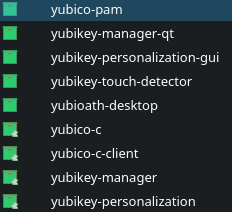
I cannot say with complete certainty that this is what solved the USB redirection problem, but it did work after but not before.
You are a savior. I was trying to download .bundle file and trying as usual i would do in ubuntu or mint. But it was failing continously.
Didnt know its that simple. Thank you