It seems to be solved by now, it is 6.6.5.
1 Like
I made some small changes to our Kernel support. With the ongoing DirtyFrag vulnerability and update to GCC 16 chasing 5.1x.y kernel series is too much of an effort from my end. Hence I’ll drop both series from our repos as of now.
Also I updated ZFS to the latest 2.4.2 release, which added 7.0 and early 7.1 support. Sadly 5.10 and 5.15 won’t compile due to different reasons.
In the end it will ease our kernel maintenance overall.
:: Different overlay package(s) in repository core x86_64

-------------------------------------------------------------------------------
                             PACKAGE              testing             unstable
-------------------------------------------------------------------------------
              linux-lts-headers-meta               5.10-1                6.1-1
                      linux-lts-meta               5.10-1                6.1-1
                            linux510           5.10.255-1                    -
                    linux510-headers           5.10.255-1                    -
                            linux515           5.15.206-1                    -
                    linux515-headers           5.15.206-1                    -


:: Different overlay package(s) in repository extra x86_64

-------------------------------------------------------------------------------
                             PACKAGE              testing             unstable
-------------------------------------------------------------------------------
            linux-lts-acpi_call-meta               5.10-2                6.1-1
             linux-lts-bbswitch-meta               5.10-2                6.1-1
          linux-lts-broadcom-wl-meta               5.10-2                6.1-1
         linux-lts-nvidia-390xx-meta               5.10-2                6.1-1
         linux-lts-nvidia-470xx-meta               5.10-2                6.1-1
         linux-lts-nvidia-570xx-meta               5.10-2                6.1-1
    linux-lts-nvidia-570xx-open-meta               5.10-2                6.1-1
         linux-lts-nvidia-575xx-meta               5.10-2                6.1-1
    linux-lts-nvidia-575xx-open-meta               5.10-2                6.1-1
         linux-lts-nvidia-580xx-meta               5.10-2                6.1-1
    linux-lts-nvidia-580xx-open-meta               5.10-2                6.1-1
               linux-lts-nvidia-meta               5.10-2                6.1-1
          linux-lts-nvidia-open-meta               5.10-2                6.1-1
                linux-lts-r8168-meta               5.10-2                6.1-1
            linux-lts-rtl8723bu-meta               5.10-2                6.1-1
             linux-lts-tp_smapi-meta               5.10-2                6.1-1
          linux-lts-vhba-module-meta               5.10-2                6.1-1
linux-lts-virtualbox-host-modules-meta             5.10-2                6.1-1
                  linux-lts-zfs-meta               5.10-2                6.1-1
                  linux510-acpi_call            1.2.2-211                    -
                   linux510-bbswitch              0.8-308                    -
                linux510-broadcom-wl     6.30.223.271-308                    -
               linux510-nvidia-390xx          390.157-129                    -
               linux510-nvidia-470xx        470.256.02-51                    -
               linux510-nvidia-570xx        570.211.01-10                    -
          linux510-nvidia-570xx-open        570.211.01-10                    -
               linux510-nvidia-575xx         575.64.05-15                    -
          linux510-nvidia-575xx-open         575.64.05-15                    -
               linux510-nvidia-580xx         580.159.03-4                    -
          linux510-nvidia-580xx-open         580.159.03-4                    -
                     linux510-nvidia          595.71.05-4                    -
                linux510-nvidia-open          595.71.05-4                    -
                      linux510-r8168           8.056.02-7                    -
                  linux510-rtl8723bu           20260507-2                    -
                   linux510-tp_smapi              0.45-24                    -
                linux510-vhba-module           20260313-5                    -
    linux510-virtualbox-host-modules              7.2.8-5                    -
                        linux510-zfs              2.4.1-6                    -
                  linux515-acpi_call            1.2.2-237                    -
                   linux515-bbswitch              0.8-247                    -
                linux515-broadcom-wl     6.30.223.271-247                    -
               linux515-nvidia-390xx          390.157-150                    -
               linux515-nvidia-470xx        470.256.02-58                    -
               linux515-nvidia-570xx         570.211.01-9                    -
          linux515-nvidia-570xx-open         570.211.01-9                    -
               linux515-nvidia-575xx         575.64.05-15                    -
          linux515-nvidia-575xx-open         575.64.05-15                    -
               linux515-nvidia-580xx         580.159.03-3                    -
          linux515-nvidia-580xx-open         580.159.03-3                    -
                     linux515-nvidia          595.71.05-3                    -
                linux515-nvidia-open          595.71.05-3                    -
                      linux515-r8168           8.056.02-6                    -
                  linux515-rtl8723bu           20260507-2                    -
                   linux515-tp_smapi              0.45-26                    -
                linux515-vhba-module           20260313-4                    -
    linux515-virtualbox-host-modules              7.2.8-4                    -
                        linux515-zfs              2.4.1-5                    -
                         linux61-zfs              2.4.1-8              2.4.2-1
                        linux612-zfs             2.4.1-13              2.4.2-1
                        linux618-zfs             2.4.1-19              2.4.2-1
                         linux66-zfs             2.4.1-11              2.4.2-1
                         linux70-zfs             2.4.1-10              2.4.2-1
                         linux71-zfs            2.4.1-0.2            2.4.2-0.1
                            zfs-dkms              2.4.1-2              2.4.2-1
                           zfs-utils              2.4.1-1              2.4.2-1
6 Likes
Anyone else experience something weird with pamac? Have AUR and Flatpak support enabled but it won’t let me search for AUR or Flatpak, those options are no longer visible on the left side menu.
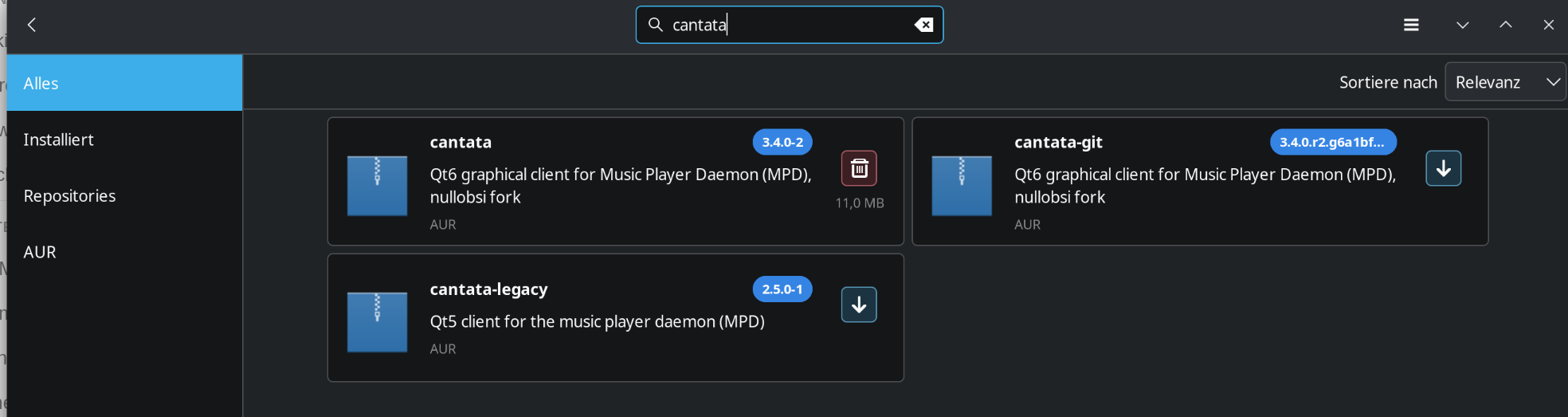
Mine only shows this:
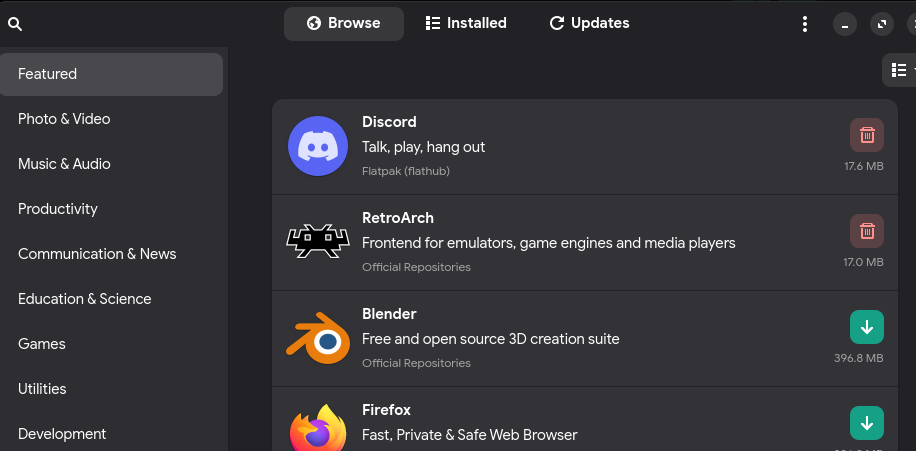
Not sure what changed or what could be wrong with it
Deleting my pamac config direction solved it.
manjaro-zsh-config was upgraded from 26.2 to 26.3.
26.3. changes the prompt symbol in konsole away from the used zsh symbol to an ordinary “>” after executing a command.
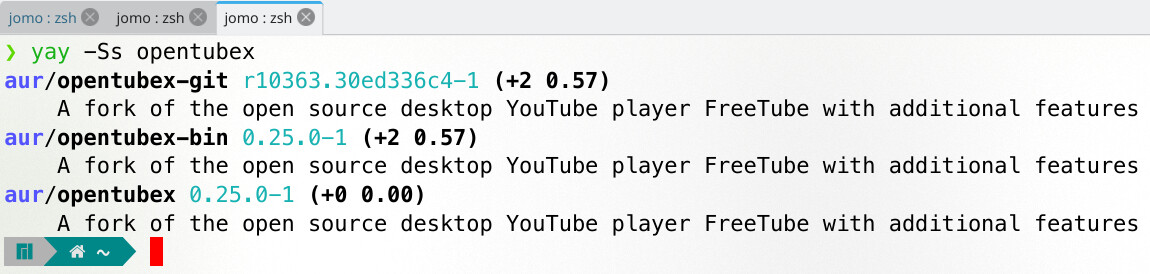
This is how it used to be up to 26.2 :
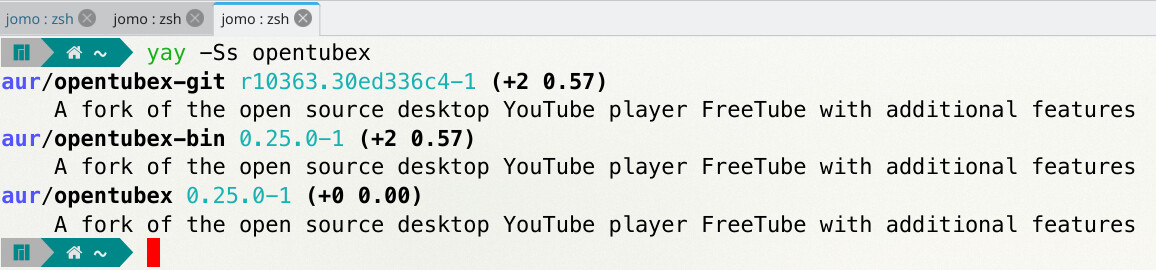
Any way to revert that back other than downgrading (which confirm this change when I did so)?
2 Likes
Oh. That’s pretty annoying for visibility. I hope that they revert that.
The transient prompt was enabled to make copied terminal output easier to read when pasted somewhere like the forum. It only trims down the prompt after a command completes.
Users can customize Powerlevel10k however they wish by running the configuration wizard.
Add the following to your ~/.zshrc to turn off the transient prompt:
typeset -g POWERLEVEL9K_TRANSIENT_PROMPT=off
For changes to take effect, either source it with source ~/.zshrc or restart your terminal.
7 Likes
Anybody else tested Kernel 7.1.rc3 ? Issue first occured in 7.1.rc2.
Shutdown isn’t working properly. System powers off, but usb devices (soundcard, midi keyboard) are still powered on. Laptop fans start spinning again after a while. Only pressing power button for 10 sec. powers off completely.
I didn’t noticed last night. Today my battery was completely empty.
Meanwhile I found out that shutdown is only working when I’m on battery mode. When I logout from the session first it’s working in AC Mode too.
Another issue is that I can’t set the cpu governor to performance mode anymore. Only powersave and balanced working.
(message in KDE: modus performance cannot be activated)
CPU: AMD Ryzen 9 7940HS
GPU: AMD Radeon 780M Graphics
Host: VivoBook_ASUSLaptop
1 Like
Doesn’t work for me. Haven’t run the config wizard, created a ~/.p10k.zsh file with touch and put the typeset -g POWERLEVEL9K_TRANSIENT_PROMPT=off there. Then sourced it and it was still in that bit annoying format. Tried also restarting the terminal and that did not work either.
Since Kernel 7.1.rc3 VirtualBox won’t start any VM. This is from corresponding log file:
Log created: 2026-05-18T10:02:38.560199000Z
Process ID:  3582 (0xdfe)
Parent PID:  2539 (0x9eb)
Executable:  /usr/lib/virtualbox/VirtualBoxVM
Arg[0]: /usr/lib/virtualbox/VirtualBoxVM
Arg[1]: --comment
Arg[2]: Ubuntu25.10
Arg[3]: --startvm
Arg[4]: df0dec54-ad57-4882-829e-b9d562b2faf4
Arg[5]: --no-startvm-errormsgbox
E1000 #0: port=c1a0 mmio=00000000f0600000 mac-cfg=08:00:27:ec:ac:dc 82540EM R0
General registers ------------------------------------------------------------------
   CTRL=00000249  STATUS=00000081    EECD=00000140    EERD=00000000  LEDCTL=07068302
    FLA=00000000    MDIC=18217949                                  CTRL_EXT=00000000
   FCAL=00000000    FCAH=00000000     FCT=00000000     VET=00008100   FCTTV=00000000
    PBA=00000000    TXCW=00000000    RXCW=00000000              EXTCNF_CTRL=00000000
Interrupt registers ----------------------------------------------------------------
    ICR=00000000     ITR=00000000     ICS=00000000     IMS=00000000     IMC=00000000
Receive registers ------------------------------------------------------------------
   RCTL=00000000  PSRCTL=00040402   FCRTL=00000000   FCRTH=00000000  RXDCTL=00000000
  RDBAL=00000000   RDBAH=00000000   RDLEN=00000000     RDH=00000000     RDT=00000000
   RDTR=00000000    RADV=00000000   RSRPD=00000000  RXCSUM=00000000   RFCTL=00000000
Transmit registers -----------------------------------------------------------------
   TCTL=00000000    TIPG=00000000    AIFS=00000000
  TDBAL=00000000   TDBAH=00000000   TDLEN=00000000     TDH=00000000     TDT=00000000
   TIDV=00000000  TXDMAC=00000000  TXDCTL=01010000    TADV=00000000   TSPMT=01000400
Management registers ---------------------------------------------------------------
    WUC=00000000    WUFC=00000000     WUS=00000000
   IPAV=00000000    MANC=00000000    WUPL=00000000
Statistics registers ---------------------------------------------------------------
CRCERRS=00000000                 ALGNERRC=00000000 SYMERRS=00000000  RXERRC=00000000
    MPC=00000000     SCC=00000000    ECOL=00000000
    MCC=00000000 LATECOL=00000000    COLC=00000000
     DC=00000000   TNCRS=00000000     SEC=00000000 CEXTERR=00000000    RLEC=00000000
 XONRXC=00000000  XONTXC=00000000 XOFFRXC=00000000 XOFFTXC=00000000   FCRUC=00000000
  PRC64=00000000  PRC127=00000000  PRC255=00000000
 PRC511=00000000 PRC1023=00000000 PRC1522=00000000
   GPRC=00000000    BPRC=00000000    MPRC=00000000    GPTC=00000000
  GORCL=00000000   GORCH=00000000   GOTCL=00000000   GOTCH=00000000    RNBC=00000000
    RUC=00000000     RFC=00000000     ROC=00000000     RJC=00000000
 MGTPRC=00000000  MGTPDC=00000000  MGTPTC=00000000     TPR=00000000     TPT=00000000
   TORL=00000000    TORH=00000000    TOTL=00000000    TOTH=00000000
  PTC64=00000000  PTC127=00000000  PTC255=00000000
 PTC511=00000000 PTC1023=00000000 PTC1522=00000000
   MPTC=00000000    BPTC=00000000   TSCTC=00000000  TSCTFC=00000000
Diagnostic registers ---------------------------------------------------------------
   RDFH=00000000    RDFT=00000000   RDFHS=00000000   RDFTS=00000000   RDFPC=00000000
   TDFH=00000000    TDFT=00000000   TDFHS=00000000   TDFTS=00000000   TDFPC=00000000

RA00: DST 08:00:27:ec:ac:dc

PHY registers ----------------------------------------------------------------------
    PCTRL=1340  PSTATUS=7949      PID=0141     EPID=0c24      ANA=0de1      LPA=01e0
      ANE=0000      NPT=2001      LPN=0000     GCON=1e00  GSTATUS=0000 EPSTATUS=3000
    PSCON=0868   PSSTAT=a000    PINTE=0000    PINTS=0000  EPSCON1=0d60     PREC=0000
  EPSCON2=000c    R30PS=0000    R30AW=0000

PHY MDIO: state=MDIO_IDLE acc=0 cnt=0 addr=
linux71-virtualbox-host-modules in the (unstable-extra) repository is still at 7.26-0.1
In Manjaro Gitlab the PKGBUILD is: 7.28-0.2
pkgname=("${_linuxprefix}-virtualbox-host-modules")
pkgver=7.2.8
_pkgver="${pkgver}_OSE"
pkgrel=0.2
Most likely it currently won’t build …
1 Like
Oh, whoops. I edited my reply to correct the instructions:
I quite like the transient prompt, as it makes it a lot easier for copying & pasting commands. So I won’t be disabling it.
The only issue is that having only the > symbol to indicate the original command can sometimes make it difficult to locate the actual line of the command, especially after several commands have been run.
So, I’ve added the following text to the start of my ~/.zshrc file:
precmd() {
    precmd() {
        echo
    }
}
(Don’t forget to source ~/.zshrc after making the change.)
This puts a blank line before every prompt except the first one: all the first precmd invocation does is replace precmd with a function that calls echo. Source: zsh zle - zsh new line prompt after each command - Stack Overflow
So my konsole output now looks like this:
❯ date +%FT%T
2026-05-19T09:24:07
❯ date +%FT%T
2026-05-19T09:24:31
~ (The normal Manjaro zsh command prompt)
1 Like
That’s a choice in the p10k configuration wizard called sparse prompt, actually. See Transient prompt and What is the best prompt style in the configuration wizard?.
1 Like
Wait a minute… 
Shouldn’t that be…
precmd() {
    echo
}
or for two lines:
precmd() {
    echo
    echo
}
Nesting a duplicate function within itself is a little odd to me… 
Thanks. I wasn’t sure about whether to run p10k configure, as I’m happy with the default settings (apart from the one manual edit I made to ~.zshrc).
I just did a brief run through p10k configure, but I quit without saving. I’ll have a proper look at it later today after I finish my morning errands.
I just used the text as-is from the Stack Overflow link. My assumption was that the extra precmd() { prevented a blank line from being inserted before the initial command prompt when the terminal is first opened.
1 Like
Oh, I see. It does indeed prevent a blank line.
1 Like