Under XFCE how to customize Dolphin(Qt6) highlighted selection or mouseover?

OS: Manjaro XFCE latest

installed: Dolphin(25.12 Qt6.10), qt6ct, kvantum, qt5ct, kvantum-qt5

kvantum apps theme: kvantum

I whish to change for Dolphin:

  1. the highlighted background-colour, when you select one or more files
  2. the mouseover background-colour

How I do that for Dolphin?

For Thunar, what I did is:

sudo mousepad ~/.config/gtk-3.0/gtk.css

and added:

.thunar .sidebar .view *:selected { background-color: @selected_bg_color; color: @theme_selected_fg_color; }
.thunar .sidebar .view *:hover { background-color: @GRAPE_300; color: @theme_selected_fg_color; }
.thunar .standard-view .view *:hover{ background-color: @GRAPE_300; color: @theme_selected_fg_color; }

and colours variable definitions are coming from the applied system theme, under usr/share/themes, in my case Matcha-dark-aliz.

Thanks

P.S. Quid solution in /usr/share/color-schemes/Kvantum.colors
but so far I failed to see what I want.

Look at the ~/.config/Kvantum folder for .kvconfig files.

sudo is not needed to edit files in $HOME directory

Latest Manjaro Xfce ISO includes matcha-gtk-theme for GTK packages
and kvantum-theme-matcha for QT packages

If Kvantum cannot configure theme for Dolphin, try using Qt 6 Configuration Utility qt6ct

>Look at the ~/.config/Kvantum folder for .kvconfig files.

Content is:
[General]
theme=KvDarkRed

if that’s the solution, any clue on what to add?

Do you see where in qt6ct, because I don’t see any field for Dolphin.

>Latest Manjaro Xfce ISO includes matcha-gtk-theme for GTK packages
and kvantum-theme-matcha for QT packages

For GTK3 apps, it’s simple, just put these lines and it will overwrite the theme, only for Thunar and specific its behaviours:

.thunar .sidebar .view *:selected { background-color: #F0544C; color: #ffffff; }
.thunar .sidebar .view *:hover { background-color: #B84ACB; color: #ffffff; }
.thunar .standard-view .view *:hover{ background-color: #B84ACB; color: #ffffff; }

I do not have Dolphin installed

As far as I can tell, it should be possible to add CSS snippets in qt6ct > Style Sheets

if that’s the solution, any clue on what to add?

It might be since my file is a lot fuller of settings including 3 highlight colours, but i forgot i have customized the theme a little with the GUI of Kvantum Manager so it seems it put copies of the customized files in the home config folder.
In your case the theme should then be

/usr/share/Kvantum/KvDark/KvDark.kvconfig
/usr/share/Kvantum/KvDarkRed/KvDarkRed.kvconfig

Under /.config/Kvantum, I only have kvantum.kvconfig

no sub-folder or other files

This is what I wish to see in Dolphin:

In order to use kvantum in a gtk-based environment like Xfce, you need to select kvantum as the qt theme in qt6ct. Only then can you specify which kvantum theme to use in the Kvantum Manager.

1 Like

Thanks.

I presume you mean:
1/ Apperance>style field.
2/ kvantum-dark can be acceptable
Would be worthwhile to mention, that in Kvantum manager itself.

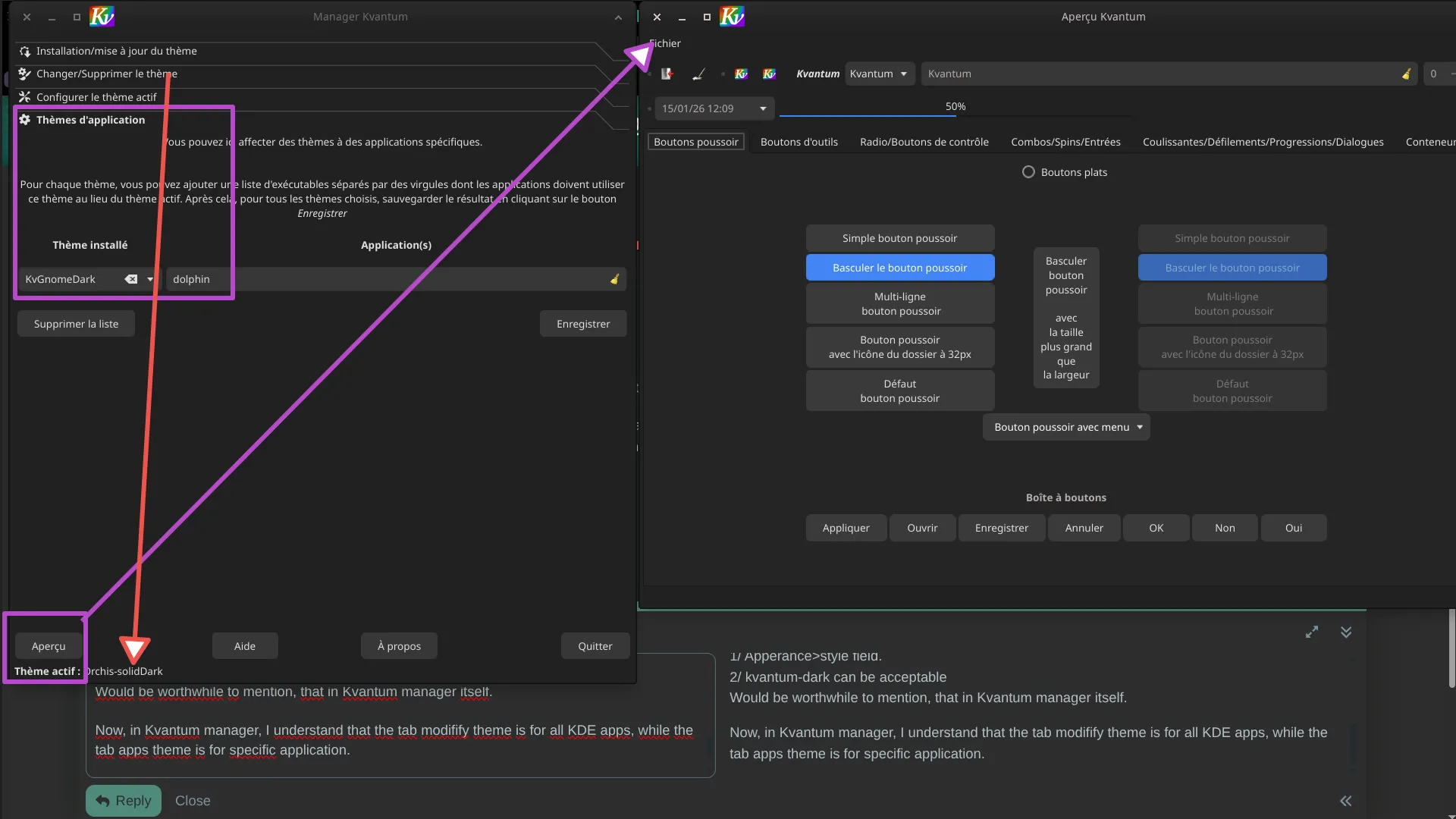
Now, in Kvantum manager, I understand that the tab modifify theme is for all KDE apps, while the tab apps theme is for specific application.
Now, if that’s correct, then whatever theme I chose, no change happens.

See:

Just one thought.
I never bothered (it never bothered me) with having consistent theming when using QT applications in GTK based environments.
I do use Xfce …

The thought:
There is a setting in
xfce4-settings-manager
in “Session and Startup” → the “Advanced” tab on the far right:
“Launch KDE services on startup”

I don’t know if it was disabled/not checked by default, but it is not checked here at the moment.

Perhaps checking that makes a difference?

@nikgnomic Probably closed by mistake? Looks legit to me. Recent topic, right section, no obvious solution.

in “Session and Startup” → the “Advanced” tab on the far right:
Never saw either. Tried, no change.
You’re not rebooting often either wink

I’m sure you know what you mean - but I don’t. :man_shrugging:

@artofit You could be forgetting this to get QT apps to theme nicely under GTK. In the terminal, run:

$ i=/etc/X11/xinit/xinitrc.d/99custom_xinitrc.sh && \
echo -e '#!/bin/sh\n\nexport QT_QPA_PLATFORMTHEME=qt5ct' | \
sudo tee $i && sudo chmod +x $i 

Log out then log back in. Now try changing the theme options under qt5ct or qt6ct. Note that QT_QPA_PLATFORMTHEME=qt5ct works for both QT5 and QT6.