Hello,
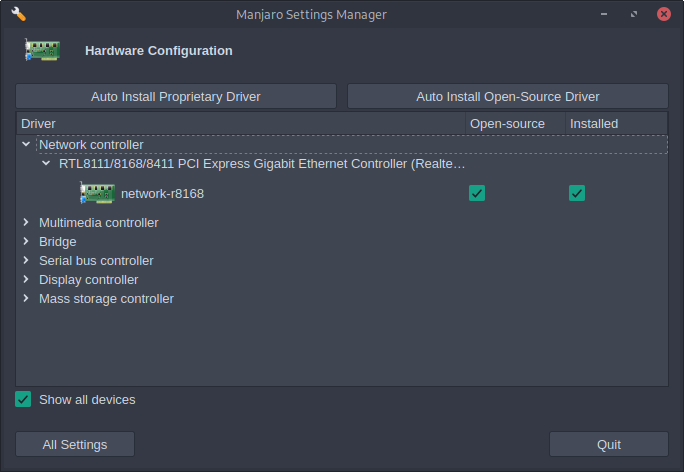
I am experiencing trouble switching to the r8168 driver for my network card. The system currently uses r8169 (kernel 6.12.28-1-Manjaro`).
Here are the steps I have taken so far:
Attempted to install the network-r8168 package, but received “target not found” errors.
Verified the kernel version with uname -r, which is 6.12.28-1-Manjaro.
Attempted to install the package corresponding to the current kernel, but this was not successful.
Blacklisted r8169 by creating a configuration file and regenerating kernel modules with sudo mkinitcpio -P.
Despite these steps, inxi -n still shows the driver status as NA, although r8168 is listed as installed by Pacman.
Here is the output of inxi:
System:
  Kernel: 6.12.28-1-MANJARO arch: x86_64 bits: 64 compiler: gcc v: 15.1.1
  Desktop: i3 v: 4.24 dm: LightDM Distro: Manjaro base: Arch Linux
Machine:
  Type: Desktop Mobo: Micro-Star model: B450M-A PRO MAX II (MS-7C52) v: 2.0
    serial: <superuser required> BIOS: American Megatrends LLC. v: A.30
    date: 07/13/2024
CPU:
  Info: 6-core model: AMD Ryzen 5 3600 bits: 64 type: MT MCP arch: Zen 2
    rev: 0 cache: L1: 384 KiB L2: 3 MiB L3: 32 MiB
  Speed (MHz): avg: 550 min/max: 550/4909 boost: enabled cores: 1: 550
    2: 550 3: 550 4: 550 5: 550 6: 550 7: 550 8: 550 9: 550 10: 550 11: 550
    12: 550 bogomips: 100825
  Flags: avx avx2 ht lm nx pae sse sse2 sse3 sse4_1 sse4_2 sse4a ssse3 svm
Graphics:
  Device-1: NVIDIA GP104 [GeForce GTX 1070] vendor: ASUSTeK driver: nvidia
    v: 570.144 arch: Pascal pcie: speed: 2.5 GT/s lanes: 16 ports: active: none
    off: HDMI-A-2 empty: DP-1, DP-2, DVI-D-1, HDMI-A-1 bus-ID: 29:00.0
    chip-ID: 10de:1b81
  Display: x11 server: X .org v: 1.21.1.16 compositor: Picom v: 12.5 driver:
    X: loaded: nvidia gpu: nvidia,nvidia-nvswitch display-ID: :0 screens: 1
  Screen-1: 0 s-res: 1920x1080
  Monitor-1: HDMI-A-2 mapped: HDMI-1 note: disabled model: VZ27EHF
    res: 1920x1080 hz: 60 dpi: 82 diag: 686mm (27")
  API: EGL v: 1.5 platforms: device: 0 drv: nvidia device: 1 drv: nouveau
    device: 2 drv: swrast gbm: drv: nvidia surfaceless: drv: nvidia x11:
    drv: nvidia inactive: wayland
  API: OpenGL v: 4.6.0 compat-v: 4.5 vendor: nvidia mesa v: 570.144
    glx-v: 1.4 direct-render: yes renderer: NVIDIA GeForce GTX 1070/PCIe/SSE2
  Info: Tools: api: eglinfo,glxinfo gpu: nvidia-settings,nvidia-smi
    x11: xprop,xrandr
Audio:
  Device-1: NVIDIA GP104 High Definition Audio vendor: ASUSTeK
    driver: snd_hda_intel v: kernel pcie: speed: 8 GT/s lanes: 16
    bus-ID: 29:00.1 chip-ID: 10de:10f0
  Device-2: Advanced Micro Devices [AMD] Starship/Matisse HD Audio
    vendor: Micro-Star MSI driver: snd_hda_intel v: kernel pcie: speed: 16 GT/s
    lanes: 16 bus-ID: 2b:00.4 chip-ID: 1022:1487
  API: ALSA v: k6.12.28-1-MANJARO status: kernel-api with: aoss
    type: oss-emulator
  Server-1: JACK v: 1.9.22 status: off
Network:
  Device-1: Realtek RTL8125 2.5GbE vendor: Micro-Star MSI driver: r8169
    v: kernel pcie: speed: 5 GT/s lanes: 1 port: f000 bus-ID: 25:00.0
    chip-ID: 10ec:8125
  IF: enp37s0 state: up speed: 100 Mbps duplex: full mac: <filter>
Drives:
  Local Storage: total: 953.87 GiB used: 7.06 GiB (0.7%)
  ID-1: /dev/sda vendor: MicroFrom model: 1TB SATA3 SSD size: 953.87 GiB
    speed: 6.0 Gb/s serial: <filter>
Partition:
  ID-1: / size: 953.87 GiB used: 7.06 GiB (0.7%) fs: btrfs dev: /dev/sda1
  ID-2: /home size: 953.87 GiB used: 7.06 GiB (0.7%) fs: btrfs
    dev: /dev/sda1
  ID-3: /var/log size: 953.87 GiB used: 7.06 GiB (0.7%) fs: btrfs
    dev: /dev/sda1
Swap:
  Alert: No swap data was found.
Sensors:
  System Temperatures: cpu: 38.2 C mobo: N/A gpu: nvidia temp: 42 C
  Fan Speeds (rpm): N/A gpu: nvidia fan: 0%
Info:
  Memory: total: 16 GiB available: 15.54 GiB used: 1.58 GiB (10.2%)
  Processes: 286 Power: uptime: 13m wakeups: 0 Init: systemd v: 257
    default: graphical
  Packages: pm: pacman pkgs: 1055 Compilers: gcc: 15.1.1 Shell: Bash
    v: 5.2.37 running-in: urxvtd inxi: 3.3.38
Any further guidance or suggestions would be greatly appreciated.