Unable to boot XFCE live USB

Provided that you reached the official Manjaro download page, the choices you suggest don’t exist are revealed by clicking the More button – right next to the Download button:


Yes, it likely should. Manjaro ISOs can be installed to either UEFI based or Legacy (BIOS/MBR) based computers.

Not according to your mainboard manual.

However, in that general timeframe (when UEFI was in it’s infancy) occasionally a manufacturer might offer a (highly experimental) UEFI BIOS which the user would need to apply. This was uncommon, but still a possibility. If you didn’t do this, or upon entering your BIOS you can find nothing indicating UEFI capability, then this is likely not the case.

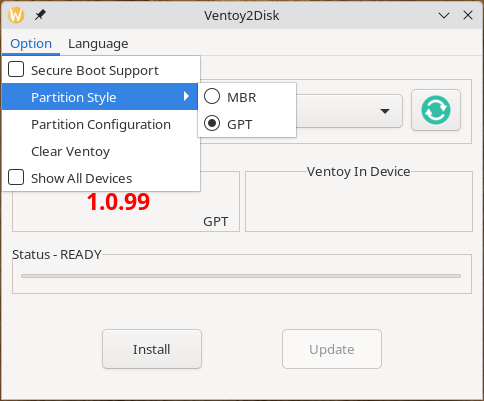
Creation of a UEFI compatible Ventoy USB is the focus of the guide – it states:

To create a Ventoy USB that works in a UEFI environment, a GPT partition scheme should be selected, as shown in the image above.

Ventoy actually defaults to creating a Master Boot Record (MBR) partition scheme, so that change was not needed for a computer that doesn’t support UEFI – in that case, the "Ventoy in Device and the Ventoy USB should both have shown “MBR” before creating the Ventoy USB.

That depends on the problem, which is unclear.

  • User error?
  • Something else?

Impossible to say without more information, and information that might be needed cannot be easily obtained until you can at least boot into the ISO’s live environment.

Naturally, questions about Arch (proper) should be directed to the Arch forums.

If you now have Arch installed, how did you install it – using Ventoy (if so, which Ventoy settings were successful for you?), or another method?

Let us know if you’d prefer to continue using Arch now that it’s installed, and we can simply close this topic without a solution.

Regards.


Edit:- An afterthought:

If you had a UEFI BIOS then that might also infer that Secure Boot would need to be disabled in the BIOS. Manjaro will not boot with it enabled.

However, this is an unlikely scenario for a mainboard of that vintage, but still worth mentioning on the chance that it does use an experimental UEFI BIOS..

I started the install using arch written with DD and then later with ventoy, both worked. Come to think of it, I used EFI for the arch image and that worked. I successfully installed the EFI extensions into grub as well. I will look at the other image options and see if one would be better. I did look at the more screen but I missed the switch widget for minimal or full. I expected a page with a file listing of different images. Thank you for your help.

Update: I tried installing Manjaro XFCE minimal using the same key and after setting the key to MBR.. both did the same thing with proprietary and open source drivers. I would say the Manjaro install just doesn’t work on some older machines for some reason.

It makes no sense to try booting with proprietary drivers in this case – the free drivers should be adequate – if it boots, concern yourself with proprietary drivers only then.


Another thought:-

When booting a Linux ISO with Ventoy, there are two boot modes you can choose from – “Normal” and “Grub” – you can also experiment with those (the common logic is: if one fails, use the other – presuming everything else is in place).


If you’re interested, one of our members creates his own Manjaro spins quite regularly. As you’ll see, @Jim.B has quite a few listed in the SbK Spins category. These are of course Community releases with only uunofficial support from Manjaro members, but may be worth looking at.

I understand his Cinnamon release is fairly popular, but the LXQt release would be a lot lighter.

Regards.

2 Likes

I looked at the hardware the OP has. Cinnamon would not be ideal because of its resource use. Either the LXQt or the Openbox spin would be best, IceWM will also work but it isnt as easy to use as the other two. Though it has the lowest resource use.
I just finished the latest releases and uploaded them. I will be posting the release announcements soon.

2 Likes

I would say, that differences between the Arch and Manjaro installation methods would certainly play a huge part:

Manjaro needs to boot and launch a live GUI environment from the ISO/USB and then launch a graphical installer (Calamares) in order to install the OS.

Arch simply boots and launches a console based installer script in order to install the OS and allow you configure settings according to preference – it’s very minimal.

In comparing these, the perceived result is that Arch boots and Manjaro doesn’t, but it’s more involved than that – the comparatively limited capabilities of a 16 y/o computer being the most obvious.

During my look into the hardware I found this, it might be helpful.

If you have trouble booting live USBs on older hardware with this GPU, try changing your BIOS/UEFI settings from UEFI to **CSM (Legacy) mode** and disable Secure Boot.

The comment from @Jim.B prompted me to look again at the mainboard userguide I linked (above). Well, it seems I was mistaken, as your mainboard does indeed support UEFI – a cursory search of the PDF for “UEFI” returned no obvious results, however, “EFI” did.

In that case, the usual caveats apply.

  • Disable Secure Boot in BIOS as Manjaro does not support it.
  • Disable the Fast Boot option in BIOS, if it exists.
  • Make sure the boot option priority1 is set for the USB.

  1. Pressing F8 when the ASUS logo appears will allow you to manually choose the boot device during system startup.

Otherwise, it still seems to fall back to differences between the install methods of each ISO (Arch/Manjaro). Perhaps you will indeed have better luck with LXQt (or Openbox) from @Jim.B – especially considering his Spins also come equipped with the Manjaro Architect script for a “lighter” custom install experience.

As a last resort, you still have Arch.

Hi everyone, I have the same problem with the Manjaro Xfce 26.0 version.
Updating from inside the system from version 25 to 26 works correctly, but when trying to perform a clean installation from the usb drive the same problem happens and I am not finding how to fix it, I tried it with different usb and with Ventoy and Balena Etcher to rule out errors and the problem persists, I clarify that it happens only with this version 26.0 of XFCE and not with 26.0 of KDE, thank you.
The motherboard is ASUS M5A88-M. The CPU is AMD FX4100 64Bit. The Video is AMD Radeon HD6670 1Gb. The system with 4Gb of RAM.


Mod edit:- Use only English in the main forum areas. The non-English content has been removed. Please only use the specific language categories to post in any other language:

In the context of the installer, when run on a system with no internet connection, there is no settings server to contact.

Yes the installer says it has no internet, but the network connection is only used to suggest the correct locale based on geo location from your public ip address.

The only thing that resembles a settings server, would be the xfce settings service but that would only be an issue if the ISO image was incomplete. From somewhere in the thread I saw a mention that the ISO was check-summed and found to be OK.

This leaves the USB media containing the ISO.

I believe I saw a guide on the forum to verify if the image written to ISO matches the checksum of the downloaded file - a doubled check.

A completely different option is to use the Manjaro get-iso script (is available from the repo with manjaro-get-iso package. Or you can run it on any other system with Python (Applications / Manjaro Get Iso · GitLab)

If I recall correct - the script will first verify the signature then copy the ISO to the destination e.g. a mounted USB and after the copy it will use sha256 to verify if the ISO was copied correct.

When run it produce an output similar to this
 $ get-iso xfce
==> Storage dir: /run/media/fh/Ventoy
==> Working dir: /tmp/tmpmkp4ebuf
   -> Processing xfce ISO
 --> Required space on tmpfs: 4223 MiB
 --> Required space on storage: 4223 MiB
 --> Download: manjaro-xfce-26.0-minimal-260104-linux618.iso.sha256
 --> Download: manjaro-xfce-26.0-minimal-260104-linux618.iso
 --> Download: manjaro-xfce-26.0-minimal-260104-linux618.iso.sig
   -> Wait for signature verification to complete...
 --> Signature verified. 
 --> Moved 'manjaro-xfce-26.0-minimal-260104-linux618.iso.sha256' to '/run/media/fh/Ventoy'      
 --> Moved 'manjaro-xfce-26.0-minimal-260104-linux618.iso.sig' to '/run/media/fh/Ventoy'      
 --> Moved 'manjaro-xfce-26.0-minimal-260104-linux618.iso' to '/run/media/fh/Ventoy'      
   -> Wait for checksum to complete...
 --> Checksum verified. manjaro-xfce-26.0-minimal-260104-linux618.iso: OK
   -> Cleaning up...
==> ISO file: manjaro-xfce-26.0-minimal-260104-linux618.iso
==> Storage : /run/media/fh/Ventoy

If a failure occur during download the download is discarded

 $ get-iso xfce -f
==> Storage dir: /run/media/fh/Ventoy
==> Working dir: /tmp/tmpw30iqntn
   -> Processing xfce ISO
 --> Required space on tmpfs: 5123 MiB
 --> Required space on storage: 5123 MiB
 --> Download: manjaro-xfce-26.0-260104-linux618.iso.sha256
 --> Download: manjaro-xfce-26.0-260104-linux618.iso
<###> Network Error: HTTPSConnectionPool(host='download.manjaro.org', port=443): Read timed out.
 --> Download: manjaro-xfce-26.0-260104-linux618.iso.sig
<###> Download failed... cleanup up and exit!

Retry the download

 $ get-iso xfce -f
==> Storage dir: /run/media/fh/Ventoy
==> Working dir: /tmp/tmpkvwf__hd
   -> Processing xfce ISO
 --> Required space on tmpfs: 5123 MiB
 --> Required space on storage: 5123 MiB
 --> Download: manjaro-xfce-26.0-260104-linux618.iso.sha256
 --> Download: manjaro-xfce-26.0-260104-linux618.iso
 --> Download: manjaro-xfce-26.0-260104-linux618.iso.sig
   -> Wait for signature verification to complete...
 --> Signature verified. 
 --> Moved 'manjaro-xfce-26.0-260104-linux618.iso.sha256' to '/run/media/fh/Ventoy'      
 --> Moved 'manjaro-xfce-26.0-260104-linux618.iso.sig' to '/run/media/fh/Ventoy'      
 --> Moved 'manjaro-xfce-26.0-260104-linux618.iso' to '/run/media/fh/Ventoy'      
   -> Wait for checksum to complete...
 --> Checksum verified. manjaro-xfce-26.0-260104-linux618.iso: OK
   -> Cleaning up...
==> ISO file: manjaro-xfce-26.0-260104-linux618.iso
==> Storage : /run/media/fh/Ventoy

This is strange, I just downloaded the official minimal xfce ISO, with no issues, and just a few days ago I tested another issue, claiming the same failure to boot the latest ISO.

I will download the full ISO as well and test it - I usually use an older Clevo N141WU to test - it is not as old as your systems - but it will tell me if it boots or not - and I will be using Ventoy as my boot medium.

ADDENDUM:

Depending on the system you are using - you may need to either use the eject button in the file manager or execute sync command to ensure all data is flushed to the device before removing it. In any case wait until the command completes before detaching the device.

Since some time all Manjaro systems comes with the package udev-usb-sync. The sole purpose of this package is to detect when removable device is attached and adjust cache and buffer to match the device expected write speed as close as possible. The presence of the script will ensure that data is flushed almost immediately to the device.

EDIT 2026-01-15T15:32:00Z

I have now tested both ISO on the mentioned Clevo N141WU. Both ISO start as expected from a Ventoy formatted removable device.

Test system short info/specification
System:
  Host: manjaro Kernel: 6.18.3-2-MANJARO arch: x86_64 bits: 64 compiler: gcc
    v: 15.2.1
  Desktop: Xfce v: 4.20.1 tk: Gtk v: 3.24.51 wm: xfwm4 dm: LightDM
    Distro: Manjaro base: Arch Linux
CPU:
  Info: quad core model: Intel Core i7-8550U bits: 64 type: MT MCP
    arch: Coffee Lake rev: A cache: L1: 256 KiB L2: 1024 KiB L3: 8 MiB
  Speed (MHz): avg: 400 min/max: 400/4000 cores: 1: 400 2: 400 3: 400 4: 400
    5: 400 6: 400 7: 400 8: 400 bogomips: 31999
  Flags-basic: avx avx2 ht lm nx pae sse sse2 sse3 sse4_1 sse4_2 ssse3 vmx
Graphics:
  Device-1: Intel UHD Graphics 620 vendor: CLEVO/KAPOK driver: i915 v: kernel
    arch: Gen-9.5 ports: active: eDP-1 empty: DP-1,HDMI-A-1,HDMI-A-2
    bus-ID: 00:02.0 chip-ID: 8086:5917
  Device-2: Chicony USB2.0 Camera driver: uvcvideo type: USB rev: 2.0
    speed: 480 Mb/s lanes: 1 bus-ID: 1-4:2 chip-ID: 04f2:b649
  Display: x11 server: X.org v: 1.21.1.21 compositor: xfwm4 v: 4.20.0
    driver: X: loaded: modesetting alternate: fbdev,vesa dri: iris gpu: i915
    display-ID: :0.0 screens: 1
  Screen-1: 0 s-res: 1920x1080
  Monitor-1: eDP-1 model: AU Optronics 0x403d res: 1920x1080 hz: 60 dpi: 158
    diag: 354mm (13.9")
  API: EGL v: 1.5 platforms: device: 0 drv: iris device: 1 drv: swrast gbm:
    drv: iris surfaceless: drv: iris x11: drv: iris inactive: wayland
  API: OpenGL v: 4.6 compat-v: 4.5 vendor: intel mesa v: 25.3.2-arch1.1
    glx-v: 1.4 direct-render: yes renderer: Mesa Intel UHD Graphics 620 (KBL
    GT2) device-ID: 8086:5917
  Info: Tools: api: eglinfo,glxinfo de: xfce4-display-settings
    x11: xprop,xrandr

This does not imply anything but the fact that I cannot reproduce the issue.

I realise the fact that you both have issues with the XFCE ISO on your systems, but I have no idea what may cause it - none, what-so-ever.
2 Likes

Adding this information in case it may be relevant:

Anecdotal:-

I recall difficulties with boards of that vintage supporting Socket AM3+ (and earlier) CPUs. Successful booting was sometimes hindered, dependent upon whether the Intel Memory Management Unit (IMMU) was enabled in BIOS.

IMMU (mis)configuration might lead to improper memory mapping, leaving the system susceptible to resource starvation, and a failure to initialise memory correctly during boot. Sometimes if virtualisation support was toggled off, it might have the same affect.

Switching between UEFI and Legacy could cause the boot loadr to not be found, in some cases.

Some peripherals depending on IMMU might malfunction and cause the boot sequence to hang or fail; but that was fairly uncommon.

I haven’t worn that hat in a very long while; that’s all I can think of that might potentially be of any consequence.

Hopefully it might trigger a few ideas.

2 Likes

I have tested latest minimal and full ISOs manjaro-xfce-26.0-260104-linux618 on Ventoy
and both can boot with open-source drivers and run calamares installer no problem

System:
  Host: manjaro Kernel: 6.18.3-2-MANJARO arch: x86_64 bits: 64
  Desktop: Xfce v: 4.20.1 Distro: Manjaro Linux
Machine:
  Type: Desktop Mobo: ASUSTeK model: M5A78L-M LX3 

CPU:
  Info: 6-core model: AMD FX-6300 

Graphics:
  Device-1: NVIDIA GK208B [GeForce GT 730] driver: nouveau 

For users having problems booting the Live ISO I suggest edit the GRUB boot parameters and remove quiet and splash to show more information

2 Likes

Hello, I understand that the Minimal and Full ISO images do not have any problems, it is simply that my laboratory computer is only quite old and I had problems starting with the Full ISO of Manjaro Xfce 26 when previously with the Full Xfce 25 version I had not had any problems.

I commented that my SOLUTION to ‘Unable to contact settings server’ was: Install the Minimal ISO of Manjaro Xfce 26 (Verified by SHA256) it booted perfectly and I was able to install the system without any problem and without the need for extra parameters in GRUB.

Conclusion: I think that due to my old hardware it simply collapses under the weight of the additional services of the Full version.

Apologies for my English, I am using a translator.
Thank you all. Greetings.

1 Like

Yet I tried the minimal ISO and it did exactly the same thing.

Please note:

  • I always unmounted the ventoy filesystem before removing the usb drive.
  • I had checked all ISOs, including the one written to ventoy.
1 Like

Did you try one of the SbK spins as suggested?

You haven’t responded to that at all, and I’m afraid I don’t have my :crystal_ball: with me today. :wink:

Sorry, what is a “SbK spin” ?

I’ll take that as a “no”.

Scroll up… Even better, here’s a link back to my post.

I didn’t do that because I’m not really comfortable getting something that isn’t from the official source. Also I had to get it going asap and it was just quicker for me to reinstall native arch.

Fair enough, but if you don’t respond to an idea presented, even to say you won’t take that direction, nobody is the wiser. :slight_smile:

As you really don’t need much of a GUI (or none at all), I wonder if you might be able to install the Sway edition from the main download page. Yes, it’s a Community edition too, but the Manjaro updates are still the same. Being a lighter edition, it might be easier to install on your old hardware.

That said, Sway is an acquired taste.

Sorry.. I was a bit frantic. My life was halted without this system.

2 Likes