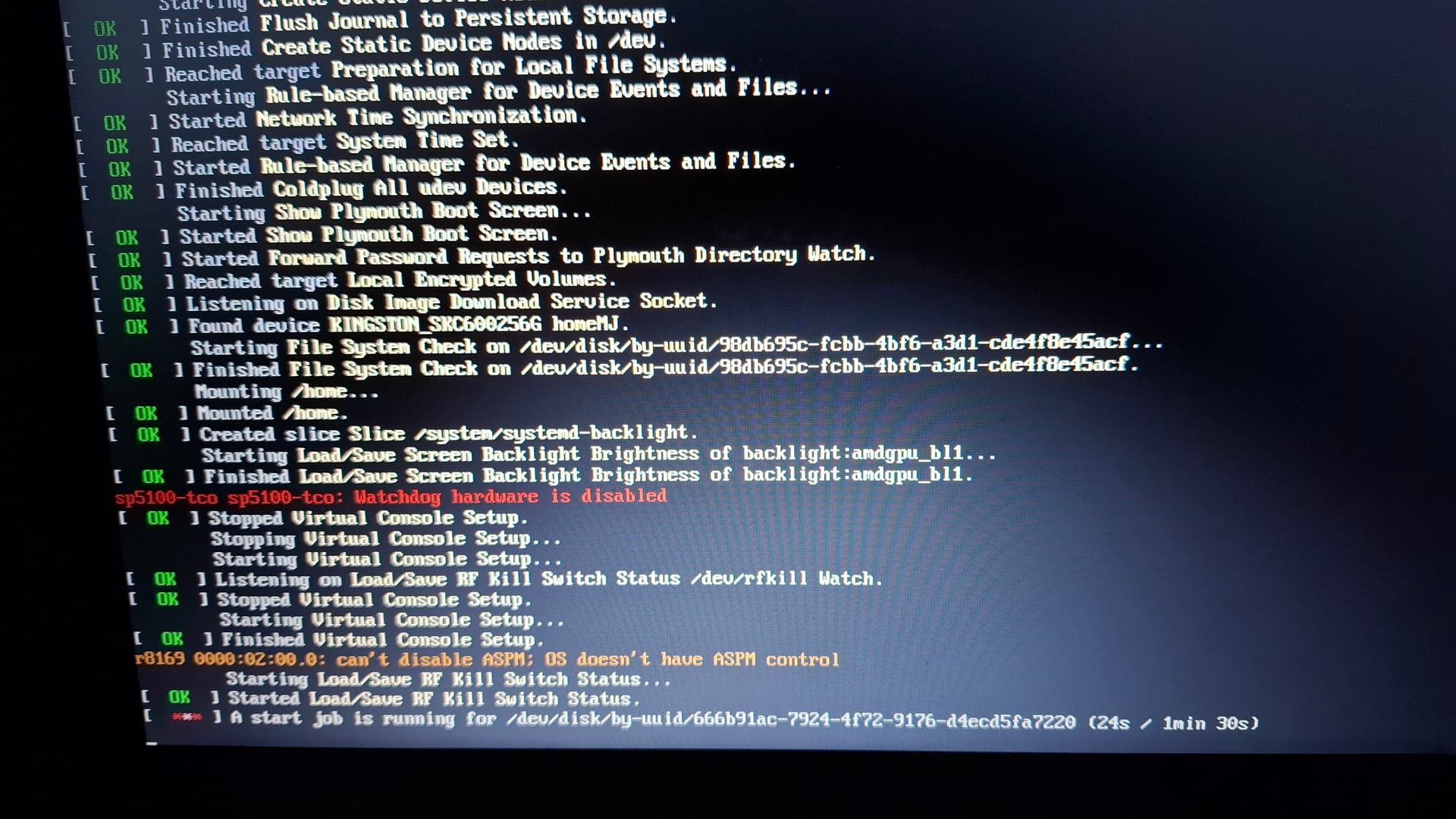
Hello,It’s taking a long time to boot into the DE XFCE.How can I fix this?
~ journalctl -b ✔
jan 02 15:07:12 A4910MJ kernel: Linux version 6.12.63-1-MANJARO (linux612@manja>
jan 02 15:07:12 A4910MJ kernel: Command line: BOOT_IMAGE=/boot/vmlinuz-6.12-x86>
jan 02 15:07:12 A4910MJ kernel: BIOS-provided physical RAM map:
jan 02 15:07:12 A4910MJ kernel: BIOS-e820: [mem 0x0000000000000000-0x0000000000>
jan 02 15:07:12 A4910MJ kernel: BIOS-e820: [mem 0x0000000000100000-0x00000000dd>
jan 02 15:07:12 A4910MJ kernel: BIOS-e820: [mem 0x00000000dd62c000-0x00000000dd>
jan 02 15:07:12 A4910MJ kernel: BIOS-e820: [mem 0x00000000dd74e000-0x00000000dd>
jan 02 15:07:12 A4910MJ kernel: BIOS-e820: [mem 0x00000000dd791000-0x00000000dd>
jan 02 15:07:12 A4910MJ kernel: BIOS-e820: [mem 0x00000000ddc37000-0x00000000dd>
jan 02 15:07:12 A4910MJ kernel: BIOS-e820: [mem 0x00000000ddf51000-0x00000000de>
jan 02 15:07:12 A4910MJ kernel: BIOS-e820: [mem 0x00000000de0ea000-0x00000000de>
jan 02 15:07:12 A4910MJ kernel: BIOS-e820: [mem 0x00000000de625000-0x00000000de>
jan 02 15:07:12 A4910MJ kernel: BIOS-e820: [mem 0x00000000dec3f000-0x00000000de>
jan 02 15:07:12 A4910MJ kernel: BIOS-e820: [mem 0x00000000deff8000-0x00000000de>
jan 02 15:07:12 A4910MJ kernel: BIOS-e820: [mem 0x00000000f8000000-0x00000000fb>
jan 02 15:07:12 A4910MJ kernel: BIOS-e820: [mem 0x00000000fe600000-0x00000000fe>
jan 02 15:07:12 A4910MJ kernel: BIOS-e820: [mem 0x00000000feb80000-0x00000000fe>
jan 02 15:07:12 A4910MJ kernel: BIOS-e820: [mem 0x00000000fec10000-0x00000000fe>
jan 02 15:07:12 A4910MJ kernel: BIOS-e820: [mem 0x00000000fed00000-0x00000000fe>
jan 02 15:07:12 A4910MJ kernel: BIOS-e820: [mem 0x00000000fed40000-0x00000000fe>
jan 02 15:07:12 A4910MJ kernel: BIOS-e820: [mem 0x00000000fed80000-0x00000000fe>
jan 02 15:07:12 A4910MJ kernel: BIOS-e820: [mem 0x00000000fedc0000-0x00000000fe>
jan 02 15:07:12 A4910MJ kernel: BIOS-e820: [mem 0x00000000fedc2000-0x00000000fe>
lines 1-23...skipping...
jan 02 15:07:12 A4910MJ kernel: Linux version 6.12.63-1-MANJARO (linux612@manjaro) (gcc (GCC) 15.2.1 20251112, GNU ld (GNU Binutils) 2>
jan 02 15:07:12 A4910MJ kernel: Command line: BOOT_IMAGE=/boot/vmlinuz-6.12-x86_64 root=/dev/sda4
jan 02 15:07:12 A4910MJ kernel: BIOS-provided physical RAM map:
jan 02 15:07:12 A4910MJ kernel: BIOS-e820: [mem 0x0000000000000000-0x000000000009ffff] usable
jan 02 15:07:12 A4910MJ kernel: BIOS-e820: [mem 0x0000000000100000-0x00000000dd62bfff] usable
jan 02 15:07:12 A4910MJ kernel: BIOS-e820: [mem 0x00000000dd62c000-0x00000000dd74dfff] reserved
jan 02 15:07:12 A4910MJ kernel: BIOS-e820: [mem 0x00000000dd74e000-0x00000000dd790fff] ACPI data
jan 02 15:07:12 A4910MJ kernel: BIOS-e820: [mem 0x00000000dd791000-0x00000000ddc36fff] ACPI NVS
jan 02 15:07:12 A4910MJ kernel: BIOS-e820: [mem 0x00000000ddc37000-0x00000000ddf50fff] reserved
jan 02 15:07:12 A4910MJ kernel: BIOS-e820: [mem 0x00000000ddf51000-0x00000000de0e9fff] usable
jan 02 15:07:12 A4910MJ kernel: BIOS-e820: [mem 0x00000000de0ea000-0x00000000de624fff] reserved
jan 02 15:07:12 A4910MJ kernel: BIOS-e820: [mem 0x00000000de625000-0x00000000dec3efff] usable
jan 02 15:07:12 A4910MJ kernel: BIOS-e820: [mem 0x00000000dec3f000-0x00000000deff7fff] reserved
jan 02 15:07:12 A4910MJ kernel: BIOS-e820: [mem 0x00000000deff8000-0x00000000deffffff] usable
jan 02 15:07:12 A4910MJ kernel: BIOS-e820: [mem 0x00000000f8000000-0x00000000fbffffff] reserved
jan 02 15:07:12 A4910MJ kernel: BIOS-e820: [mem 0x00000000fe600000-0x00000000fe6fffff] reserved
jan 02 15:07:12 A4910MJ kernel: BIOS-e820: [mem 0x00000000feb80000-0x00000000fec01fff] reserved
jan 02 15:07:12 A4910MJ kernel: BIOS-e820: [mem 0x00000000fec10000-0x00000000fec10fff] reserved
jan 02 15:07:12 A4910MJ kernel: BIOS-e820: [mem 0x00000000fed00000-0x00000000fed00fff] reserved
jan 02 15:07:12 A4910MJ kernel: BIOS-e820: [mem 0x00000000fed40000-0x00000000fed44fff] reserved
jan 02 15:07:12 A4910MJ kernel: BIOS-e820: [mem 0x00000000fed80000-0x00000000fed8ffff] reserved
jan 02 15:07:12 A4910MJ kernel: BIOS-e820: [mem 0x00000000fedc0000-0x00000000fedc0fff] reserved
jan 02 15:07:12 A4910MJ kernel: BIOS-e820: [mem 0x00000000fedc2000-0x00000000fedc8fff] reserved
jan 02 15:07:12 A4910MJ kernel: BIOS-e820: [mem 0x00000000ff000000-0x00000000ffffffff] reserved
jan 02 15:07:12 A4910MJ kernel: BIOS-e820: [mem 0x0000000100000000-0x00000001feffffff] usable
jan 02 15:07:12 A4910MJ kernel: NX (Execute Disable) protection: active
jan 02 15:07:12 A4910MJ kernel: APIC: Static calls initialized
jan 02 15:07:12 A4910MJ kernel: e820: update [mem 0xce959018-0xce968c57] usable ==> usable
Your inxi -zv8 is “missing”.
The output of journalctl -b can be scrolled down to the end - which is not included.
The photo shows what that would probably also show:
what is that last line referring to?
Do you have a disk in your /etc/fstab which is not connected when you are trying to boot?
Hi @JesusLinux ,
This whole log is from the 1 timestamp, less than a second. so there isn’t much to go on here. And neither is there in your description, to be honest.
Please elaborate. Also please provide the output of:
systemd-analyze
and
systemd-analyze blame
Mirdarthos:
systemd-analyze blame
Hello.
[jesuslinux@A4910MJ ~]$ systemd-analyze
Startup finished in 5.594s (firmware) + 3.471s (loader) + 14.096s (kernel) + 1min 33.334s (userspace) = 1min 56.497s
graphical.target reached after 1min 33.333s in userspace.
[jesuslinux@A4910MJ ~]$ systemd-analyze blame
1.823s NetworkManager.service
1.269s dev-sda4.device
 634ms systemd-udev-trigger.service
 571ms snapd.service
 558ms upower.service
 335ms user@1000.service
 266ms systemd-tmpfiles-setup-dev-early.service
 263ms polkit.service
 242ms systemd-journald.service
 229ms systemd-hostnamed.service
 224ms systemd-logind.service
 216ms ModemManager.service
 202ms ldconfig.service
 165ms sys-kernel-debug.mount
 160ms sys-kernel-tracing.mount
 159ms dev-mqueue.mount
 153ms systemd-tmpfiles-setup.service
 151ms kmod-static-nodes.service
 150ms dev-hugepages.mount
 143ms bluetooth.service
 135ms lvm2-monitor.service
 131ms sys-kernel-config.mount
 130ms udisks2.service
 126ms modprobe@dm_mod.service
 111ms systemd-udevd.service
 111ms sys-fs-fuse-connections.mount
 111ms modprobe@loop.service
 110ms avahi-daemon.service
 109ms systemd-fsck-root.service
 108ms systemd-journal-flush.service
 103ms systemd-remount-fs.service
 103ms alsa-restore.service
  99ms systemd-tmpfiles-setup-dev.service
  94ms accounts-daemon.service
  88ms cups.service
  88ms colord.service
  88ms systemd-rfkill.service
  83ms systemd-sysctl.service
  77ms user-runtime-dir@1000.service
  73ms systemd-timesyncd.service
  69ms systemd-modules-load.service
  69ms systemd-udev-load-credentials.service
  67ms systemd-userdbd.service
  66ms home.mount
  63ms proc-sys-fs-binfmt_misc.mount
  62ms plymouth-start.service
  61ms systemd-fsck@dev-disk-by\x2duuid-98db695c\x2dfcbb\x2d4bf6\x2da3d1\x2dcde4f8e45acf.service
  60ms ufw.service
  59ms systemd-journal-catalog-update.service
  58ms plymouth-quit-wait.service
  54ms systemd-vconsole-setup.service
  51ms plymouth-quit.service
  49ms systemd-backlight@backlight:amdgpu_bl1.service
  47ms wpa_supplicant.service
  43ms systemd-sysusers.service
  42ms dbus-broker.service
  40ms plymouth-read-write.service
  36ms lightdm.service
  33ms systemd-random-seed.service
  32ms systemd-userdb-load-credentials.service
  30ms rtkit-daemon.service
  27ms tmp.mount
  27ms systemd-update-utmp.service
  26ms systemd-user-sessions.service
  19ms systemd-update-done.service
  15ms snapd.socket
   2ms sshd-unix-local.socket
   2ms systemd-bootctl.socket
   1ms systemd-ask-password.socket
   1ms systemd-coredump.socket
   1ms systemd-sysext.socket
   1ms systemd-factory-reset.socket
 912us systemd-creds.socket
 763us dirmngr@etc-pacman.d-gnupg.socket
 603us systemd-importd.socket
 253us gpg-agent-extra@etc-pacman.d-gnupg.socket
 225us gpg-agent-ssh@etc-pacman.d-gnupg.socket
 214us gpg-agent@etc-pacman.d-gnupg.socket
 201us keyboxd@etc-pacman.d-gnupg.socket
 168us cups.socket
 162us systemd-machined.socket
 142us avahi-daemon.socket
 136us dbus.socket
 129us gpg-agent-browser@etc-pacman.d-gnupg.socket
 119us systemd-logind-varlink.socket
  67us systemd-journald-dev-log.socket
  59us systemd-hostnamed.socket
  58us lvm2-lvmpolld.socket
  52us dm-event.socket
  50us systemd-journald.socket
  48us systemd-userdbd.socket
  39us systemd-udevd-control.socket
  31us systemd-udevd-varlink.socket
  25us systemd-rfkill.socket
  20us systemd-udevd-kernel.socket
Have you tested if it takes a long time if you disable the network first? Because that and a partition, sda4, takes the longest.
Please also post the output of:
sudo smartctl --all /dev/sda
Just this one more time - then I’ll leave it be:
because:
… I’m referring to the picture above in your second post
[jesuslinux@A4910MJ ~]$ sudo smartctl --all /dev/sda
smartctl 7.5 2025-04-30 r5714 [x86_64-linux-6.12.63-1-MANJARO] (local build)
Copyright (C) 2002-25, Bruce Allen, Christian Franke, www.smartmontools.org

=== START OF INFORMATION SECTION ===
Model Family:     Silicon Motion based SSDs
Device Model:     KINGSTON SKC600256G
Serial Number:    50026B76837AE637
LU WWN Device Id: 5 0026b7 6837ae637
Firmware Version: S4500107
User Capacity:    256,060,514,304 bytes [256 GB]
Sector Sizes:     512 bytes logical, 4096 bytes physical
Rotation Rate:    Solid State Device
Form Factor:      2.5 inches
TRIM Command:     Available, deterministic, zeroed
Device is:        In smartctl database 7.5/5706
ATA Version is:   ACS-3 T13/2161-D revision 5
SATA Version is:  SATA 3.3, 6.0 Gb/s (current: 6.0 Gb/s)
Local Time is:    Fri Jan  2 16:49:38 2026 WET
SMART support is: Available - device has SMART capability.
SMART support is: Enabled

=== START OF READ SMART DATA SECTION ===
SMART overall-health self-assessment test result: PASSED

General SMART Values:
Offline data collection status:  (0x82)	Offline data collection activity
					was completed without error.
					Auto Offline Data Collection: Enabled.
Self-test execution status:      (   0)	The previous self-test routine completed
					without error or no self-test has ever
					been run.
Total time to complete Offline
data collection: 		(    0) seconds.
Offline data collection
capabilities: 			 (0x7b) SMART execute Offline immediate.
					Auto Offline data collection on/off support.
					Suspend Offline collection upon new
					command.
					Offline surface scan supported.
					Self-test supported.
					Conveyance Self-test supported.
					Selective Self-test supported.
SMART capabilities:            (0x0002)	Does not save SMART data before
					entering power-saving mode.
					Supports SMART auto save timer.
Error logging capability:        (0x01)	Error logging supported.
					General Purpose Logging supported.
Short self-test routine
recommended polling time: 	 (   2) minutes.
Extended self-test routine
recommended polling time: 	 (  30) minutes.
Conveyance self-test routine
recommended polling time: 	 (   2) minutes.
SCT capabilities: 	       (0x0031)	SCT Status supported.
					SCT Feature Control supported.
					SCT Data Table supported.

SMART Attributes Data Structure revision number: 16
Vendor Specific SMART Attributes with Thresholds:
ID# ATTRIBUTE_NAME          FLAG     VALUE WORST THRESH TYPE      UPDATED  WHEN_FAILED RAW_VALUE
  1 Raw_Read_Error_Rate     0x0000   100   100   000    Old_age   Offline      -       0
  5 Reallocated_Sector_Ct   0x0000   100   100   000    Old_age   Offline      -       0
  9 Power_On_Hours          0x0000   100   100   000    Old_age   Offline      -       996
 12 Power_Cycle_Count       0x0000   100   100   000    Old_age   Offline      -       386
148 Total_SLC_Erase_Ct      0x0000   100   100   000    Old_age   Offline      -       3353
149 Max_SLC_Erase_Ct        0x0000   100   100   000    Old_age   Offline      -       500
150 Min_SLC_Erase_Ct        0x0000   100   100   000    Old_age   Offline      -       291
151 Average_SLC_Erase_Ct    0x0000   100   100   000    Old_age   Offline      -       372
159 DRAM_1_Bit_Error_Count  0x0000   100   100   000    Old_age   Offline      -       0
160 Uncorrectable_Error_Cnt 0x0000   100   100   000    Old_age   Offline      -       0
161 Valid_Spare_Block_Cnt   0x0000   100   100   000    Old_age   Offline      -       16
164 Total_Erase_Count       0x0000   100   100   000    Old_age   Offline      -       23820
165 Max_Erase_Count         0x0000   100   100   000    Old_age   Offline      -       133
166 Min_Erase_Count         0x0000   100   100   000    Old_age   Offline      -       40
167 Average_Erase_Count     0x0000   100   100   000    Old_age   Offline      -       108
169 Remaining_Lifetime_Perc 0x0000   095   095   000    Old_age   Offline      -       95
177 Wear_Leveling_Count     0x0000   100   100   050    Old_age   Offline      -       1
181 Program_Fail_Cnt_Total  0x0000   100   100   000    Old_age   Offline      -       0
182 Erase_Fail_Count_Total  0x0000   100   100   000    Old_age   Offline      -       0
192 Power-Off_Retract_Count 0x0000   100   100   000    Old_age   Offline      -       23
194 Temperature_Celsius     0x0000   021   051   000    Old_age   Offline      -       21
195 Hardware_ECC_Recovered  0x0000   100   100   000    Old_age   Offline      -       0
196 Reallocated_Event_Count 0x0000   100   100   016    Old_age   Offline      -       0
199 UDMA_CRC_Error_Count    0x0000   100   100   050    Old_age   Offline      -       0
231 SSD_Life_Left           0x0000   095   095   000    Old_age   Offline      -       95
232 Available_Reservd_Space 0x0000   100   100   000    Old_age   Offline      -       100
241 Host_Writes_32MiB       0x0000   100   100   000    Old_age   Offline      -       199197
242 Host_Reads_32MiB        0x0000   100   100   000    Old_age   Offline      -       186862
245 TLC_Writes_32MiB        0x0000   100   100   000    Old_age   Offline      -       964710

SMART Error Log Version: 1
Warning: ATA error count 0 inconsistent with error log index 4
No Errors Logged

SMART Self-test log structure revision number 1
Num  Test_Description    Status                  Remaining  LifeTime(hours)  LBA_of_first_error
# 1  Short offline       Completed without error       00%       952         -
# 2  Short offline       Completed without error       00%       582         -
# 3  Short offline       Completed without error       00%       538         -
# 4  Short offline       Completed without error       00%       516         -
# 5  Short offline       Completed without error       00%       482         -
# 6  Short offline       Completed without error       00%       468         -
# 7  Short offline       Completed without error       00%       437         -
# 8  Short offline       Completed without error       00%       425         -
# 9  Short offline       Completed without error       00%       382         -
#10  Short offline       Completed without error       00%       370         -
#11  Short offline       Completed without error       00%       370         -
#12  Short offline       Completed without error       00%       354         -
#13  Short offline       Completed without error       00%       331         -
#14  Short offline       Completed without error       00%       297         -
#15  Short offline       Completed without error       00%       274         -
#16  Short offline       Completed without error       00%       256         -
#17  Short offline       Completed without error       00%       246         -
#18  Short offline       Completed without error       00%       231         -
#19  Short offline       Completed without error       00%       127         -
#20  Short offline       Completed without error       00%       119         -
#21  Short offline       Completed without error       00%       111         -

SMART Selective self-test log data structure revision number 1
 SPAN  MIN_LBA  MAX_LBA  CURRENT_TEST_STATUS
    1        0        0  Not_testing
    2        0        0  Not_testing
    3        0        0  Not_testing
    4        0        0  Not_testing
    5        0        0  Not_testing
Selective self-test flags (0x0):
  After scanning selected spans, do NOT read-scan remainder of disk.
If Selective self-test is pending on power-up, resume after 0 minute delay.

The above only provides legacy SMART information - try 'smartctl -x' for more
# /etc/fstab: static file system information.
#
# Use 'blkid' to print the universally unique identifier for a device; this may
# be used with UUID= as a more robust way to name devices that works even if
# disks are added and removed. See fstab(5).
#
# <file system>             <mount point>  <type>  <options>  <dump>  <pass>
UUID=e307e095-eddd-46c3-804a-1e134fa4aadc /              ext4    defaults   0 1
UUID=98db695c-fcbb-4bf6-a3d1-cde4f8e45acf /home          ext4    defaults   0 2
tmpfs                                     /tmp           tmpfs   defaults,noatime,mode=1777 0 0
UUID=666b91ac-7924-4f72-9176-d4ecd5fa7220 none swap defaults 0 0
UUID=b15ef201-57b8-4bb5-b0ce-f39718becd6a none swap defaults 0 0
comment out that line (for now at least)
put a # in front of that line
# UUID=666b91ac-7924-4f72-9176-d4ecd5fa7220 none swap defaults 0 0
What device is that?
lsblk -f
should show you the name of the device where this swap partition is (supposed to be)
lsblk
on it’s own - without a flag like -f will not show you much
I’m dual booting with other linux OS on partitions sda2 /root and sda3 /home.Manjaro is on sda4 /root and sda5 /home:
[jesuslinux@A4910MJ ~]$ lsblk
NAME   MAJ:MIN RM   SIZE RO TYPE MOUNTPOINTS
sda      8:0    0 238,5G  0 disk
├─sda1   8:1    0   584M  0 part
├─sda2   8:2    0    40G  0 part
├─sda3   8:3    0    75G  0 part
├─sda4   8:4    0    40G  0 part /
├─sda5   8:5    0    75G  0 part /home
└─sda6   8:6    0     8G  0 part [SWAP]
sr0     11:0    1  1024M  0 rom
I have other linux OS using the same swap partition. sda6 This linux OS is on sda2 and sda3 with sda1 being boot/UEFI
your output of lsblk above only shows one (1) swap partitiontwo (2) listed in /etc/fstab
One of them is apparently not present - which would explain the delay when booting.
The one with UUID ending in 7220 is the one that delayed the boot process - according to your picture.
1 Like
I removed the UUID ending in 7220 and apparently is much faster.
You are welcome.
How (and why) did that line get in there?
Cheers!
1 Like
system
5 January 2026 17:55
16
This topic was automatically closed 3 days after the last reply. New replies are no longer allowed.