Systemd-boot Bootmenü hat viele Einträge

Hallo an alle,

Ich hatte vor längerer Zeit meinen USB Stick auf systemd-boot umgestellt.
Mit Hilfe des Guides von @linux-aarhus
Aber irgendwo bin ich falsch abgebogen.
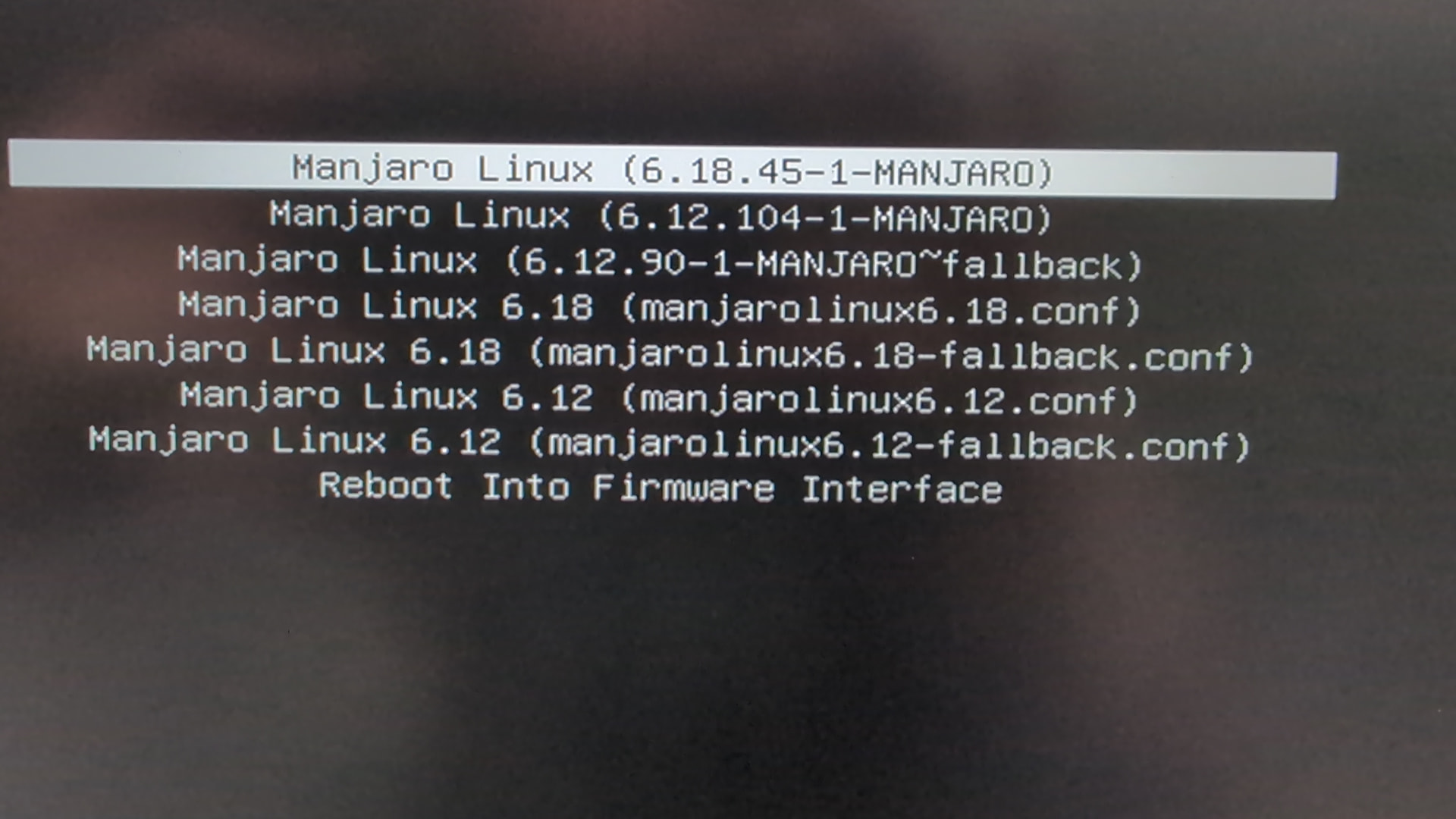
Im Bootmenü befinden sich die normalen Einträge und zusätzlich werden cfg Dateien erzeugt.
Mit den normalen Einträgen bootet er, mit den cfg Dateien bootet er nicht.
Wer erzeugt die cfg Dateien ? Da ist auch noch failsafe dabei. Wurde doch abgeschafft.

Translate:
Hi everyone,

Some time ago, I switched my USB stick to systemd-boot, following the guide by @linux-aarhus.
But somewhere along the way, I took a wrong turn.
The boot menu shows the standard entries, but additional .cfg files are being generated as well.
It boots using the standard entries, but fails to boot with the .cfg files.
What is generating these .cfg files? There is a “failsafe” option included, too—but I thought that had been discontinued.

bootctl
[sudo] Passwort für weingeist: 
System:
      Firmware: UEFI 2.80 (American Megatrends 5.27)
 Firmware Arch: x64
   Secure Boot: disabled
  TPM2 Support: yes
  Measured UKI: yes
   Measured OS: yes
  Boot into FW: supported
 Platform Lang: en_US.UTF-8

Current Boot Loader:
        Product: systemd-boot 261.2-1-manjaro
       Features: ✓ Boot counting
                 ✓ Menu timeout control
                 ✓ One-shot menu timeout control
                 ✓ Default entry control
                 ✓ One-shot entry control
                 ✓ Support for XBOOTLDR partition
                 ✓ Support for passing random seed to OS
                 ✓ Load drop-in drivers
                 ✓ Support Type #1 sort-key field
                 ✓ Support @saved pseudo-entry
                 ✓ Support Type #1 devicetree field
                 ✓ Enroll SecureBoot keys
                 ✓ Retain SHIM protocols
                 ✓ Menu can be disabled
                 ✓ Multi-Profile UKIs are supported
                 ✓ Loader reports network boot URL
                 ✓ Support Type #1 uki field
                 ✓ Support Type #1 uki-url field
                 ✓ Loader reports active TPM2 PCR banks
                 ✓ Loader reports firmware keyboard layout
                 ✓ Loader measures SMBIOS information
      Partition: /dev/disk/by-partuuid/fd478422-3161-4bec-a6d7-e79e87896096
         Loader: └─/efi//EFI/BOOT/grubx64.efi
Keyboard Layout: n/a (not reported by firmware)
  Current Entry: manjaro-6.18-x86_64.efi

Current Stub:
        Product: systemd-stub 261.2-1-manjaro
       Features: ✓ Stub reports loader partition information
                 ✓ Stub reports stub partition information
                 ✓ Stub reports network boot URL
                 ✓ Picks up credentials from boot partition
                 ✓ Picks up system extension images from boot partition
                 ✓ Picks up configuration extension images from boot partition
                 ✓ Measures kernel+command line+sysexts
                 ✓ Support for passing random seed to OS
                 ✓ Pick up .cmdline from addons
                 ✓ Pick up .cmdline from SMBIOS Type 11
                 ✓ Pick up .dtb from addons
                 ✓ Stub understands profile selector
                 ✓ Stub measures SMBIOS information
      Partition: /dev/disk/by-partuuid/fd478422-3161-4bec-a6d7-e79e87896096
           Stub: └─/EFI/Linux/manjaro-6.18-x86_64.efi

Random Seed:
 System Token: set
       Exists: yes

Available Boot Loaders on ESP:
          ESP: /efi (/dev/disk/by-partuuid/fd478422-3161-4bec-a6d7-e79e87896096)
         File: ├─/efi//EFI/systemd/systemd-boot-fallbackx64.efi (systemd-boot 261.1-1-manjaro)
               ├─/efi//EFI/systemd/systemd-bootx64.efi (systemd-boot 261.2-1-manjaro)
               ├─/efi//EFI/BOOT/bootx64.EFI
               ├─/efi//EFI/BOOT/grubx64.efi (systemd-boot 261.2-1-manjaro)
               └─/efi//EFI/BOOT/mmx64.efi

Boot Loaders Listed in EFI Variables:
        Title: Manjaro
           ID: 0x0000
       Status: active, boot-order
    Partition: /dev/disk/by-partuuid/947b69ef-842f-4340-8271-de385e273d45
         File: └─/efi//EFI/Manjaro/grubx64.efi

        Title: UEFI OS
           ID: 0x0002
       Status: active, boot-order
    Partition: /dev/disk/by-partuuid/947b69ef-842f-4340-8271-de385e273d45
         File: └─/efi//EFI/BOOT/BOOTX64.EFI

        Title: UEFI OS
           ID: 0x0003
       Status: active, boot-order
    Partition: /dev/disk/by-partuuid/fd478422-3161-4bec-a6d7-e79e87896096
         File: └─/efi//EFI/BOOT/BOOTX64.EFI

Boot Loader Entry Locations:
          ESP: /efi (/dev/disk/by-partuuid/fd478422-3161-4bec-a6d7-e79e87896096, $BOOT)
       config: /efi//loader/loader.conf
        token: manjaro

Default Boot Loader Entry:
         type: Boot Loader Specification Type #1 (.conf)
        title: Manjaro Linux 6.18 (manjarolinux6.18.conf)
           id: manjarolinux6.18.conf
       source: /efi//loader/entries/manjarolinux6.18.conf (on the EFI System Partition)
        linux: /efi//vmlinuz-6.18-x86_64
       initrd: /efi//amd-ucode.img
               /efi//intel-ucode.img
               /efi//initramfs-6.18-x86_64.img
      options: root=UUID=5b1bef2d-9530-4bf8-afcf-0a959482d9dd rw
        extra: /efi//loader/credentials/nvpcr-anchor.7f96d6cb26c649309a310a0275046706.cred
lsblk -f
NAME        FSTYPE FSVER LABEL UUID                                 FSAVAIL FSUSE% MOUNTPOINTS
sda                                                                                
├─sda1      vfat   FAT32       56ED-F25B                             576,3M    44% /efi
└─sda2      ext4   1.0         5b1bef2d-9530-4bf8-afcf-0a959482d9dd  147,1G    63% /
I have not been able to fully understand your issue - while German should be my second language - I was not able to learn it.

I use a translation service but I don’t understand your issue.

I got to the part where you ask about the configuration files and ask:

Q: Who create them (the loader configuration files)?
A: The answer is - you do.

Ich konnte Ihr Problem nicht vollständig verstehen - obwohl Deutsch meine Zweitsprache sein sollte -, konnte ich es nicht lernen.

Ich nutze einen Übersetzungsdienst, aber ich verstehe Ihr Problem nicht.

Ich bin zu dem Teil gekommen, in dem Sie nach den Konfigurationsdateien fragen und fragen:

F: Wer erstellt sie (die Loader-Konfigurationsdateien)?
A: Die Antwort ist: Das tun Sie.

Manuell von Hand

[How To] Convert to systemd-boot

cat /efi/EFI/loader/entries/manjaro-618.conf
title   Manjaro 6.18
linux   /vmlinuz-6.18-x86_64
initrd  /initramfs-6.18-x86_64.img 
options root=UUID=5aa3e4e1-7e37-4bd6-95ce-7324a040785b rw loglevel=3 nowatchdog 

Kernel-Installationshilfsskript

[How To] Convert to systemd-boot

What I mean is: the first 2 entries work, but the rest don’t. I only need the first 2 entries anyway.
kernel-install-mkinitcpio is not installed
systemd-boot-manager is installed

Is that the problem?

# mkinitcpio preset file for the '6.18-x86_64' package

#ALL_config="/etc/mkinitcpio.conf"
ALL_kver="/efi/vmlinuz-6.18-x86_64"
#ALL_kerneldest="/boot/vmlinuz-6.18-x86_64"

PRESETS=('default')
#PRESETS=('default' 'fallback')

#default_config="/etc/mkinitcpio.conf"
#default_image="/boot/initramfs-6.18-x86_64.img"
default_uki="/efi/EFI/Linux/manjaro-6.18-x86_64.efi"
default_options="--splash /usr/share/systemd/bootctl/splash-manjaro.bmp"

#fallback_config="/etc/mkinitcpio.conf"
#fallback_image="/boot/initramfs-6.18-x86_64-fallback.img"
#fallback_uki="/efi/EFI/Linux/manjaro-6.18-x86_64-fallback.efi"
#fallback_options="-S autodetect"

PS: Must i edit the hook.preset file in /usr/share/mkinitcpio ?

Hallo @weingeist, bitte entscheide Dich, ob Du deutschsprachig oder englisch unterstützt werden möchtest. Wenn Du auf englisch weitermachen möchtest, ist das fein, dann bitte den ersten Post ins Englische übersetzen (ergänzend!) und wir verschieben den ganzen Thread in den englischsprachigen Bereich. Ansonsten bitte deutschsprachig bleiben. Danke.

@Wollie

I just wanted to meet you halfway.

@linux-aarhus

Die cfg Dateien stammen von systemd-boot-manager. Denn habe ich jetzt deinstalliert. Die cfg Dateien in /efi/loader/entries gelöscht. Da waren nur die nicht funktionierenden. Dann habe ich hook.preset angepasst damit neue Kernel in efi geschrieben werden. Zum Test habe ich Kernel 7.2 installiert und es funktioniert. Der entries Ordner ist leer.

Brauche ich den systemd-boot-pacman-hook jetzt trotzdem ?

Translate

The .cfg files came from systemd-boot-manager, which I have now uninstalled. I deleted the .cfg files in /efi/loader/entries—only the non-functional ones were there. Then I adjusted hook.preset so that new kernels are written to EFI. I installed kernel 7.2 as a test, and it works. The entries folder is empty.

Do I still need the systemd-boot-pacman-hook?

By changing to boot a unified kernel you have moved away from your original topic and the solution is now different.

The original guide implies the use of the kernel and initrd image.

A correct configured system would have structure similar to this (Tuxedo laptop) which has been converted from grub using the original guide.

The sdboot-manage gen script will generate a structure where the entries are prefixed with the machine-id from /etc/machine-id. The reason for doing so is the ability to boot different systems - the machine-id is random UUID generated by systemd when first launched.

Durch die Änderung zum Booten eines einheitlichen Kernels haben Sie sich von Ihrem ursprünglichen Thema entfernt und die Lösung ist jetzt anders.

Die ursprüngliche Anleitung impliziert die Verwendung des Kernels und des Initrd-Images.

Ein korrekt konfiguriertes System hätte eine ähnliche Struktur wie dieses (Tuxedo-Laptop), das mithilfe der Originalanleitung von Grub konvertiert wurde.

Das Skript „sdboot-manage gen“ generiert eine Struktur, in der den Einträgen die „Maschinen-ID“ aus „/etc/machine-id“ vorangestellt wird. Der Grund hierfür ist die Möglichkeit, verschiedene Systeme zu booten – die „Maschinen-ID“ ist eine zufällige UUID, die von systemd beim ersten Start generiert wurde.

[nix-tuxedo efi]# tree .
.
├── 92ac224d1580446da8b522667a57bea1
│   └── 6.18.46-1-MANJARO
│       ├── initrd
│       ├── initrd-fallback
│       └── linux
├── amd-ucode.img
├── EFI
│   ├── boot
│   │   └── bootx64.efi
│   ├── Linux
│   ├── Manjaro
│   │   └── grubx64.efi
│   └── systemd
│       └── systemd-bootx64.efi
├── initramfs-6.18-x86_64.img
├── intel-ucode.img
├── loader
│   ├── entries
│   │   ├── 92ac224d1580446da8b522667a57bea1-6.18.46-1-MANJARO.conf
│   │   └── 92ac224d1580446da8b522667a57bea1-6.18.46-1-MANJARO-fallback.conf
│   ├── entries.srel
│   ├── keys
│   ├── loader.conf
│   └── random-seed
└── vmlinuz-6.18-x86_64

I have noted that your target device is a portable USB device. To boot a portable device using systemd-boot you only need a single entry

On the $esp partition - create the file

Ich habe festgestellt, dass Ihr Zielgerät ein tragbares USB-Gerät ist.

Um ein tragbares Gerät mit systemd-boot zu booten, benötigen Sie nur einen einzigen Eintrag

Auf der $esp-Partition - erstellen Sie die Datei
/EFI/loader/entries/manjaro.conf

title Manjaro
efi   /EFI/Linux/manjaro-6.18-x86_64.efi

Aber es sieht so aus, als hätten Sie Konfigurationsdateien, die auf nicht vorhandene Kernel verweisen. Das „manjarolinux“ sieht aus, als käme es aus der Konfigurationsdatei „/etc/sdboot-manage.conf“ (Teil des systemd-boot-manager-Pakets).

Bitte sehen Sie systemd-boot - ArchWiki

EDIT:
Nur so ein Gedanke…

Verweisen die nicht funktionsfähigen Einträge auf nicht vorhandene Ordner