I am looking at this here: Steam (runtime) boot issue “You are missing the following 32-bit libraries, and Steam may not run: libc.so.6”
and since yesterday (2022-05-30T07:00:00Z) I am having the exact same issue after a system update. Not much was updated, mostly monguhud if I recall correctly. I went through whatver was said in that article I linked, and there no solution was given. Was this just something intermittent which was fixed with a later update? Right now this is broken for me.
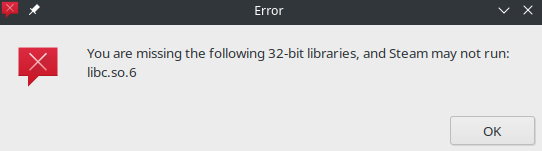
This is with Wayland or/and X11 on a RX6400 which worked fine just two days ago.
you have to disable mangohud
see before
Not its not mangohud. Uninstalled it and all. No change this happens when I start steam - at that point no mangohud is yet loaded. So, can’t be that.
~> steam
steam.sh[31246]: Running Steam on manjarolinux 21.2.6 64-bit
steam.sh[31246]: STEAM_RUNTIME is enabled automatically
setup.sh[31321]: Steam runtime environment up-to-date!
steam.sh[31246]: Error: You are missing the following 32-bit libraries, and Steam may not run:
libc.so.6
steam.sh[31246]: Steam client's requirements are satisfied
Try maybe this:
LD_PRELOAD=/usr/lib/libc.so.6:/usr/lib32/libc.so.6 steam
Do you have lib32-glibc (2.35-5) installed?
It’s there
~ > ls -lha /usr/lib32/libc.so*
 rw-r--r-- 1 root root  252 May 13 07:57 /usr/lib32/libc.so
-rwxr-xr-x 1 root root 2.2M May 13 07:57 /usr/lib32/libc.so.6

 ~ > sudo ldd /usr/lib32/libc.so.6
/usr/lib32/ld-linux.so.2 => /usr/lib/ld-linux.so.2 (0xf7f02000)
        linux-gate.so.1 (0xf7f00000)

~ > /usr/lib32/libc.so.6

GNU C Library (GNU libc) stable release version 2.35.
Copyright (C) 2022 Free Software Foundation, Inc.
This is free software; see the source for copying conditions.
There is NO warranty; not even for MERCHANTABILITY or FITNESS FOR A
PARTICULAR PURPOSE.
Compiled by GNU CC version 12.1.0.
libc ABIs: UNIQUE IFUNC ABSOLUTE
For bug reporting instructions, please see:
<https://bugs.archlinux.org/>.
Searchpath missing?
Does this show the lib32 folder?
ldconfig -v | grep lib32
sudo ldconfig -v | grep ':'                                                                                                                                                           ldconfig: Path `/usr/lib64' given more than once
(from <builtin>:0 and <builtin>:0)
ldconfig: Can't stat /usr/libx32: No such file or directory
/opt/android-sdk/tools/lib: (from /etc/ld.so.conf.d/android-sdk.conf:1)
/usr/lib/libfakeroot: (from /etc/ld.so.conf.d/fakeroot.conf:1)
/usr/lib32: (from /etc/ld.so.conf.d/lib32-glibc.conf:1)
/usr/lib/opencollada: (from /etc/ld.so.conf.d/opencollada.conf:1)
/usr/lib/openmpi: (from /etc/ld.so.conf.d/openmpi.conf:1)
/usr/lib: (from <builtin>:0)
/opt/android-sdk/tools/lib/x86_64: (hwcap: 0x0000000000000002) (from /etc/ld.so.conf.d/android-sdk.conf:1)
Something fishy going on here, but its there
What if you try steam --reset?
Imagine that. That worked. Thx