I am trying to launch Assassin’s Creed Origins from steam on a plasma system.
However, each time that I attempt to launch the game, steam returns this error :
Error at hooking API "LdrFindResource_U"
Dumping first 32 bytes:
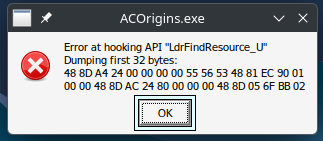
How can I get steam to successfully launch the game ?
According to protondb, the game appears with a Gold rating.
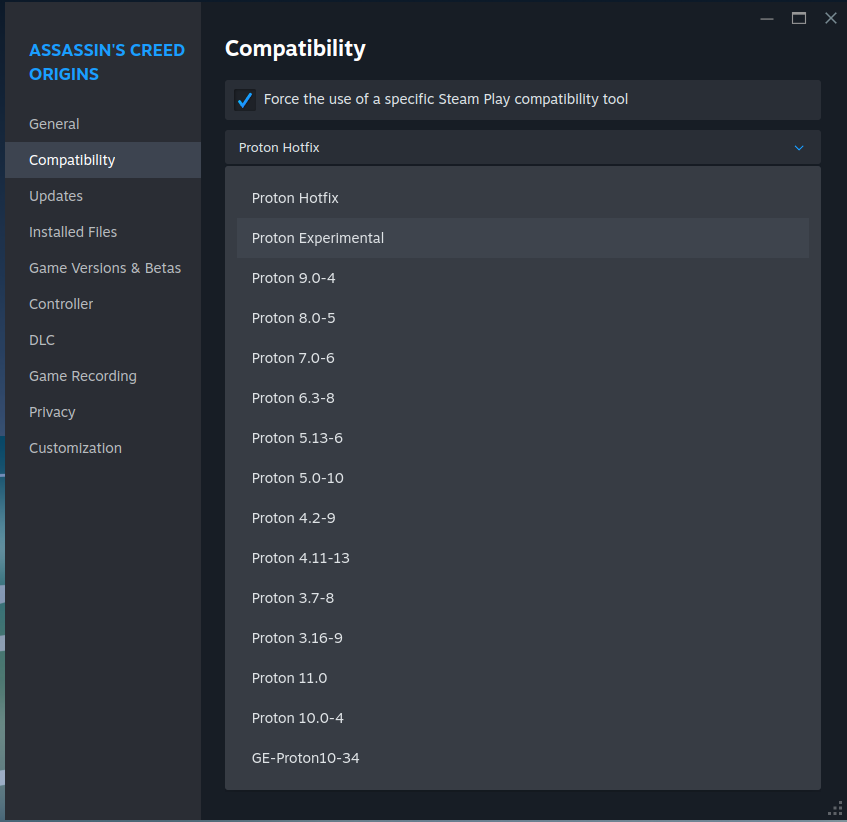
I have tried to launch with the Steam Play compatibility tools below :
Proton Experimental (default)
Proton 11.0
Proton 10.0-4
Proton 9.0-4
Proton 8.0-5
GE-Proton10-34
However, at each launch attempt, I see the same error - the only thing that differs is the list of hex-digits displayed in the third and fourth lines.
Terminal output :
inxi -zv8
System:
  Kernel: 7.1.2-1-MANJARO arch: x86_64 bits: 64 compiler: gcc v: 16.1.1
    clocksource: tsc avail: acpi_pm
    parameters: BOOT_IMAGE=/@/boot/vmlinuz-7.1-x86_64
    root=UUID=eef54979-a745-4cf0-a364-007f782ac3ce rw rootflags=subvol=@
    quiet
    cryptdevice=UUID=74ec4578-9beb-4e4f-9496-2994b6af8a5d:luks-74ec4578-9beb-4e4f-9496-2994b6af8a5d
    root=/dev/mapper/luks-74ec4578-9beb-4e4f-9496-2994b6af8a5d splash
    udev.log_priority=3
  Desktop: KDE Plasma v: 6.6.6 tk: Qt v: N/A info: frameworks v: 6.27.0
    wm: kwin_wayland vt: 2 dm: N/A Distro: Manjaro base: Arch Linux
Machine:
  Type: Desktop System: ASUS product: N/A v: N/A serial: <superuser required>
  Mobo: ASUSTeK model: ROG STRIX B760-I GAMING WIFI v: Rev 1.xx
    serial: <superuser required> part-nu: SKU uuid: <superuser required>
    Firmware: UEFI vendor: American Megatrends v: 1836 date: 04/16/2026
Battery:
  Device-1: ps-controller-battery-dc:0c:2d:00:80:28 model: N/A serial: N/A
    charge: N/A status: discharging
Memory:
  System RAM: total: 32 GiB available: 31.1 GiB used: 4.64 GiB (14.9%)
  Message: For most reliable report, use superuser + dmidecode.
  Array-1: capacity: 128 GiB slots: 2 modules: 2 EC: None
    max-module-size: 64 GiB note: est.
  Device-1: Controller0-DIMM0 type: DDR5 detail: synchronous size: 16 GiB
    speed: 5600 MT/s volts: curr: 1 min: 1 max: 1.25 width (bits): data: 64
    total: 64 manufacturer: Kingston part-no: KF556C40-16 serial: <filter>
  Device-2: Controller1-DIMM0 type: DDR5 detail: synchronous size: 16 GiB
    speed: 5600 MT/s volts: curr: 1 min: 1 max: 1.25 width (bits): data: 64
    total: 64 manufacturer: Kingston part-no: KF556C40-16 serial: <filter>
PCI Slots:
  Permissions: Unable to run dmidecode. Root privileges required.
CPU:
  Info: model: 12th Gen Intel Core i5-12400F bits: 64 type: MT MCP
    arch: Alder Lake gen: core 12 level: v3 note: check built: 2021+
    process: Intel 7 (10nm ESF) family: 6 model-id: 0x97 (151) stepping: 2
    microcode: 0x3E
  Topology: cpus: 1x dies: 1 clusters: 6 cores: 6 threads: 12 tpc: 2
    smt: enabled cache: L1: 480 KiB desc: d-6x48 KiB; i-6x32 KiB L2: 7.5 MiB
    desc: 6x1.2 MiB L3: 18 MiB desc: 1x18 MiB
  Speed (MHz): avg: 800 min/max: 800/4400 scaling: driver: intel_pstate
    governor: powersave cores: 1: 800 2: 800 3: 800 4: 800 5: 800 6: 800 7: 800
    8: 800 9: 800 10: 800 11: 800 12: 800 bogomips: 59904
  Flags: 3dnowprefetch abm acpi adx aes aperfmperf apic arat
    arch_capabilities arch_lbr arch_perfmon art avx avx2 avx_vnni bmi1 bmi2
    bts clflush clflushopt clwb cmov constant_tsc cpuid cpuid_fault cx16 cx8
    de ds_cpl dtes64 dtherm dts epb ept ept_ad erms est f16c flexpriority
    flush_l1d fma fpu fsgsbase fsrm fxsr gfni hfi ht hwp hwp_act_window
    hwp_epp hwp_notify hwp_pkg_req ibpb ibrs ibrs_enhanced ibt ida intel_pt
    invpcid lahf_lm lm mca mce md_clear mmx monitor movbe movdir64b movdiri
    msr mtrr nonstop_tsc nopl nx ospke pae pat pbe pcid pclmulqdq pdcm
    pdpe1gb pebs pge pku pln pni popcnt pse pse36 pts rdpid rdrand rdseed
    rdtscp rep_good sdbg sep serialize sha_ni smap smep split_lock_detect ss
    ssbd sse sse2 sse4_1 sse4_2 ssse3 stibp syscall tm tm2 tpr_shadow tsc
    tsc_adjust tsc_deadline_timer tsc_known_freq umip user_shstk vaes vme vmx
    vnmi vpclmulqdq vpid waitpkg x2apic xgetbv1 xsave xsavec xsaveopt xsaves
    xtopology xtpr
  Vulnerabilities:
  Type: gather_data_sampling status: Not affected
  Type: ghostwrite status: Not affected
  Type: indirect_target_selection status: Not affected
  Type: itlb_multihit status: Not affected
  Type: l1tf status: Not affected
  Type: mds status: Not affected
  Type: meltdown status: Not affected
  Type: mmio_stale_data status: Not affected
  Type: old_microcode status: Not affected
  Type: reg_file_data_sampling status: Not affected
  Type: retbleed status: Not affected
  Type: spec_rstack_overflow status: Not affected
  Type: spec_store_bypass mitigation: Speculative Store Bypass disabled via
    prctl
  Type: spectre_v1 mitigation: usercopy/swapgs barriers and __user pointer
    sanitization
  Type: spectre_v2 mitigation: Enhanced / Automatic IBRS; IBPB:
    conditional; PBRSB-eIBRS: SW sequence; BHI: BHI_DIS_S
  Type: srbds status: Not affected
  Type: tsa status: Not affected
  Type: tsx_async_abort status: Not affected
  Type: vmscape mitigation: IBPB before exit to userspace
Graphics:
  Device-1: NVIDIA GA104 [GeForce RTX 3070 Ti] vendor: ZOTAC driver: nvidia
    v: 610.43.02 alternate: nouveau,nvidia_drm non-free: 550-6xx.xx+
    status: current (as of 2026-07) arch: Ampere code: GAxxx
    process: TSMC n7 (7nm) built: 2020-2023 pcie: gen: 4 speed: 16 GT/s
    lanes: 16 ports: active: HDMI-A-1 empty: DP-1,DP-2,DP-3 bus-ID: 01:00.0
    chip-ID: 10de:2482 class-ID: 0300
  Display: wayland server: X.org v: 1.21.1.23 with: Xwayland v: 24.1.12
    compositor: kwin_wayland driver: X: loaded: nvidia
    gpu: nv_platform,nvidia,nvidia-nvswitch display-ID: 0
  Monitor-1: HDMI-A-1 model: Union TV serial: <filter> built: 2018 res:
    mode: 1920x1080 hz: 60 scale: 100% (1) dpi: 40 gamma: 1.2 chroma: red:
    x: 0.627 y: 0.341 green: x: 0.278 y: 0.596 blue: x: 0.153 y: 0.071 white:
    x: 0.282 y: 0.298 size: 1209x680mm (47.6x26.77") diag: 1387mm (54.6")
    ratio: 16:9 modes: 1920x1080, 1600x1200, 1600x900, 1280x1024, 1280x960,
    1366x768, 1280x720, 1024x768, 800x600, 720x576, 720x480, 640x480
  API: EGL v: 1.5 hw: drv: nvidia platforms: device: 0 drv: nvidia device: 2
    drv: swrast gbm: drv: nvidia surfaceless: drv: nvidia wayland: drv: nvidia
    x11: drv: nvidia inactive: device-1
  API: OpenGL v: 4.6.0 compat-v: 4.6 vendor: nvidia mesa v: 610.43.02
    glx-v: 1.4 direct-render: yes renderer: NVIDIA GeForce RTX 3070 Ti/PCIe/SSE2
    memory: 7.81 GiB display-ID: :0.0
  API: Vulkan v: 1.4.350 layers: 11 device: 0 type: discrete-gpu name: NVIDIA
    GeForce RTX 3070 Ti driver: nvidia v: 610.43.02 device-ID: 10de:2482
    surfaces: N/A
  Info: Tools: api: clinfo, eglinfo, glxinfo, vulkaninfo
    de: kscreen-console,kscreen-doctor gpu: nvidia-settings,nvidia-smi
    wl: wayland-info x11: xdpyinfo, xprop, xrandr
Audio:
  Device-1: Intel 700 Series Family HD Audio vendor: ASUSTeK
    driver: snd_hda_intel v: kernel alternate: snd_soc_avs,snd_sof_pci_intel_tgl
    bus-ID: 00:1f.3 chip-ID: 8086:7a50 class-ID: 0403
  Device-2: NVIDIA GA104 High Definition Audio vendor: ZOTAC
    driver: snd_hda_intel v: kernel pcie: gen: 4 speed: 16 GT/s lanes: 16
    bus-ID: 01:00.1 chip-ID: 10de:228b class-ID: 0403
  API: ALSA v: k7.1.2-1-MANJARO status: kernel-api with: aoss
    type: oss-emulator tools: alsactl,alsamixer,amixer
  Server-1: sndiod v: N/A status: off tools: aucat,midicat,sndioctl
  Server-2: JACK v: 1.9.22 status: off tools: N/A
  Server-3: PipeWire v: 1.6.7 status: active with: 1: pipewire-pulse
    status: active 2: wireplumber status: active 3: pipewire-alsa type: plugin
    tools: pactl,pw-cat,pw-cli,wpctl
Network:
  Device-1: Intel 700 Series Family CNVi Wi-Fi driver: iwlwifi v: kernel
    bus-ID: 00:14.3 chip-ID: 8086:7a70 class-ID: 0280
  IF: wlp0s20f3 state: up mac: <filter>
  IP v4: <filter> type: dynamic noprefixroute scope: global
    broadcast: <filter>
  IP v6: <filter> type: noprefixroute scope: link
  Device-2: Intel Ethernet I226-V vendor: ASUSTeK driver: igc v: kernel
    pcie: gen: 2 speed: 5 GT/s lanes: 1 port: N/A bus-ID: 05:00.0
    chip-ID: 8086:125c class-ID: 0200
  IF: enp5s0 state: down mac: <filter>
  Info: services: NetworkManager, sshd, systemd-timesyncd, wpa_supplicant
  WAN IP: <filter>
Bluetooth:
  Device-1: Intel AX211 Bluetooth driver: btusb v: 0.8 type: USB rev: 2.0
    speed: 12 Mb/s lanes: 1 mode: 1.1 bus-ID: 1-14:6 chip-ID: 8087:0033
    class-ID: e001
  Report: rfkill ID: hci0 rfk-id: 2 state: up address: see --recommends
Logical:
  Message: No logical block device data found.
  Device-1: luks-74ec4578-9beb-4e4f-9496-2994b6af8a5d maj-min: 253:0
    type: LUKS dm: dm-0 size: 953.57 GiB
  Components:
  p-1: nvme0n1p2 maj-min: 259:2 size: 953.57 GiB
RAID:
  Hardware-1: Intel Volume Management Device NVMe RAID Controller driver: vmd
    v: 0.6 port: N/A bus-ID: 00:0e.0 chip-ID: 8086:467f rev: class-ID: 0104
Drives:
  Local Storage: total: 1.86 TiB used: 478.43 GiB (25.1%)
  SMART Message: Unable to run smartctl. Root privileges required.
  ID-1: /dev/nvme0n1 maj-min: 259:0 vendor: Kingston model: SKC3000S1024G
    size: 953.87 GiB block-size: physical: 512 B logical: 512 B speed: 63.2 Gb/s
    lanes: 4 tech: SSD serial: <filter> fw-rev: EIFK31.6 temp: 37.9 C
    scheme: GPT
  ID-2: /dev/nvme1n1 maj-min: 259:3 vendor: Kingston model: SKC3000S1024G
    size: 953.87 GiB block-size: physical: 512 B logical: 512 B speed: 63.2 Gb/s
    lanes: 4 tech: SSD serial: <filter> fw-rev: EIFK31.6 temp: 34.9 C
    scheme: GPT
  Message: No optical or floppy data found.
Partition:
  ID-1: / raw-size: 953.57 GiB size: 953.57 GiB (100.00%)
    used: 478.4 GiB (50.2%) fs: btrfs dev: /dev/dm-0 maj-min: 253:0
    mapped: luks-74ec4578-9beb-4e4f-9496-2994b6af8a5d label: N/A
    uuid: eef54979-a745-4cf0-a364-007f782ac3ce
  ID-2: /boot/efi raw-size: 300 MiB size: 299.4 MiB (99.80%)
    used: 32.6 MiB (10.9%) fs: vfat dev: /dev/nvme0n1p1 maj-min: 259:1
    label: N/A uuid: 9147-3752
  ID-3: /home raw-size: 953.57 GiB size: 953.57 GiB (100.00%)
    used: 478.4 GiB (50.2%) fs: btrfs dev: /dev/dm-0 maj-min: 253:0
    mapped: luks-74ec4578-9beb-4e4f-9496-2994b6af8a5d label: N/A
    uuid: eef54979-a745-4cf0-a364-007f782ac3ce
  ID-4: /swap raw-size: 953.57 GiB size: 953.57 GiB (100.00%)
    used: 478.4 GiB (50.2%) fs: btrfs dev: /dev/dm-0 maj-min: 253:0
    mapped: luks-74ec4578-9beb-4e4f-9496-2994b6af8a5d label: N/A
    uuid: eef54979-a745-4cf0-a364-007f782ac3ce
  ID-5: /var/cache raw-size: 953.57 GiB size: 953.57 GiB (100.00%)
    used: 478.4 GiB (50.2%) fs: btrfs dev: /dev/dm-0 maj-min: 253:0
    mapped: luks-74ec4578-9beb-4e4f-9496-2994b6af8a5d label: N/A
    uuid: eef54979-a745-4cf0-a364-007f782ac3ce
  ID-6: /var/log raw-size: 953.57 GiB size: 953.57 GiB (100.00%)
    used: 478.4 GiB (50.2%) fs: btrfs dev: /dev/dm-0 maj-min: 253:0
    mapped: luks-74ec4578-9beb-4e4f-9496-2994b6af8a5d label: N/A
    uuid: eef54979-a745-4cf0-a364-007f782ac3ce
Swap:
  Kernel: swappiness: 60 (default) cache-pressure: 100 (default) zswap: yes
    compressor: zstd max-pool: 20%
  ID-1: swap-1 type: file size: 6 GiB used: 1008 KiB (0.0%) priority: -1
    file: /swap/swapfile
Unmounted:
  ID-1: /dev/nvme1n1p1 maj-min: 259:4 size: 16 MiB fs: <superuser required>
    label: N/A uuid: N/A
  ID-2: /dev/nvme1n1p2 maj-min: 259:5 size: 953.08 GiB fs: bitlocker
    label: WINDOWS C: 28/05/2026 uuid: b09e8fc3-6df0-4d8e-969a-939eeb7f7fcd
  ID-3: /dev/nvme1n1p3 maj-min: 259:6 size: 793 MiB fs: ntfs label: N/A
    uuid: 1694EA3594EA1751
USB:
  Hub-1: 1-0:1 info: hi-speed hub with single TT ports: 16 rev: 2.0
    speed: 480 Mb/s (57.2 MiB/s) lanes: 1 mode: 2.0 chip-ID: 1d6b:0002
    class-ID: 0900
  Device-1: 1-2:2 info: ASUSTek AURA LED Controller type: HID
    driver: hid-generic,usbhid interfaces: 2 rev: 2.0 speed: 12 Mb/s (1.4 MiB/s)
    lanes: 1 mode: 1.1 power: 16mA chip-ID: 0b05:19af class-ID: 0300
    serial: <filter>
  Hub-2: 1-3:3 info: ASMedia ASM1074 High-Speed hub ports: 4 rev: 2.1
    speed: 480 Mb/s (57.2 MiB/s) lanes: 1 mode: 2.0 power: 100mA
    chip-ID: 174c:2074 class-ID: 0900
  Device-1: 1-11:4 info: Lenovo Essential Wireless Keyboard and Mouse Combo
    type: keyboard,mouse,HID driver: hid-generic,usbhid interfaces: 4 rev: 2.0
    speed: 12 Mb/s (1.4 MiB/s) lanes: 1 mode: 1.1 power: 100mA
    chip-ID: 17ef:60a9 class-ID: 0300
  Device-2: 1-14:6 info: Intel AX211 Bluetooth type: bluetooth driver: btusb
    interfaces: 2 rev: 2.0 speed: 12 Mb/s (1.4 MiB/s) lanes: 1 mode: 1.1
    power: 100mA chip-ID: 8087:0033 class-ID: e001
  Hub-3: 2-0:1 info: super-speed hub ports: 9 rev: 3.1
    speed: 20 Gb/s (2.33 GiB/s) lanes: 2 mode: 3.2 gen-2x2 chip-ID: 1d6b:0003
    class-ID: 0900
  Hub-4: 2-2:2 info: ASMedia ASM1074 SuperSpeed hub ports: 4 rev: 3.0
    speed: 5 Gb/s (596.0 MiB/s) lanes: 1 mode: 3.2 gen-1x1 power: 8mA
    chip-ID: 174c:3074 class-ID: 0900
Sensors:
  System Temperatures: cpu: 36.2 C mobo: N/A
  Fan Speeds (rpm): N/A
Repos:
  Packages: pm: pacman pkgs: 1507 libs: 419 tools: pamac pm: flatpak pkgs: 0
  Active pacman repo servers in: /etc/pacman.d/mirrorlist
    1: https://mirrors.cicku.me/manjaro/testing/$repo/$arch
    2: https://mirrors.manjaro.org/repo/testing/$repo/$arch
    3: https://mirrors2.manjaro.org/testing/$repo/$arch
Processes:
  CPU top: 5 of 395
  1: cpu: 8.9% command: firefox pid: 28162 mem: 774.4 MiB (2.4%)
  2: cpu: 7.8% command: firefox pid: 28616 mem: 393.6 MiB (1.2%)
  3: cpu: 6.0% command: kwin_wayland pid: 1024 mem: 360.4 MiB (1.1%)
  4: cpu: 4.9% command: steamwebhelper pid: 33982 mem: 575.6 MiB (1.8%)
  5: cpu: 3.0% command: steamwebhelper pid: 33895 mem: 360.3 MiB (1.1%)
  Memory top: 5 of 395
  1: mem: 774.4 MiB (2.4%) command: firefox pid: 28162 cpu: 8.9%
  2: mem: 575.6 MiB (1.8%) command: steamwebhelper pid: 33982 cpu: 4.9%
  3: mem: 460.3 MiB (1.4%) command: ./steamwebhelper pid: 33863 cpu: 1.0%
  4: mem: 458.8 MiB (1.4%) command: plasmashell pid: 1166 cpu: 0.3%
  5: mem: 393.6 MiB (1.2%) command: firefox pid: 28616 cpu: 7.8%
Info:
  Processes: 395 Power: uptime: 2h 47m states: freeze,mem,disk suspend: deep
    avail: s2idle wakeups: 0 hibernate: platform avail: shutdown, reboot,
    suspend, test_resume image: 12.34 GiB services: org_kde_powerdevil,
    power-profiles-daemon, upowerd Init: systemd v: 261 default: graphical
    tool: systemctl
  Compilers: clang: 22.1.6 gcc: 16.1.1 Shell: Zsh v: 5.9.1 default: Bash
    v: 5.3.15 running-in: konsole inxi: 3.3.41
steam
steam.sh[23797]: Running Steam on manjarolinux 26.1.0-pre 64-bit
steam.sh[23797]: STEAM_RUNTIME is enabled automatically
setup.sh[23850]: Steam runtime environment up-to-date!
steam.sh[23797]: Log already open
steam.sh[23797]: Steam client's requirements are satisfied
CProcessEnvironmentManager is ready, 6 preallocated environment variables.
[2026-07-09 18:52:31] Startup - updater built Jun 24 2026 23:24:37
[2026-07-09 18:52:31] Startup - Steam Client launched with: '/home/rousseau/.local/share/Steam/ubuntu12_32/steam' '-srt-logger-opened'
07/09 18:52:31 minidumps folder is set to /tmp/dumps
07/09 18:52:31 Init: Installing breakpad exception handler for appid(steam)/version(1782866176)/tid(23907)
CProcessEnvironmentManager is ready, 6 preallocated environment variables.
[2026-07-09 18:52:31] Process started with command-line: '/home/rousseau/.local/share/Steam/ubuntu12_32/steam' '-child-update-ui' '-child-update-ui-socket' '9' '-srt-logger-opened'
07/09 18:52:31 minidumps folder is set to /tmp/dumps
[2026-07-09 18:52:31] Loading cached metrics from disk (/home/rousseau/.local/share/Steam/package/steam_client_metrics.bin)
[2026-07-09 18:52:31] Using update UI: xwin
07/09 18:52:31 Init: Installing breakpad exception handler for appid(steam)/version(0)/tid(23908)
[2026-07-09 18:52:31] Create window
[2026-07-09 18:52:31] Using the following download hosts for Public, Realm steamglobal
[2026-07-09 18:52:31] 1. https://client-update.fastly.steamstatic.com, /, Realm 'steamglobal', weight was 900, source = 'update_hosts_cached.vdf'
[2026-07-09 18:52:31] 2. https://client-update.akamai.steamstatic.com, /, Realm 'steamglobal', weight was 400, source = 'update_hosts_cached.vdf'
[2026-07-09 18:52:31] 3. https://client-update.steamstatic.com, /, Realm 'steamglobal', weight was 1, source = 'baked in'
[2026-07-09 18:52:31] Verifying installation...
[2026-07-09 18:52:31] Verifying file sizes only
[2026-07-09 18:52:31] Verification complete
UpdateUI: skip show logo

Steam logging initialized: directory: /home/rousseau/.local/share/Steam/logs

[2026-07-09 18:52:31] ProcessNextMessage: socket disconnected
[2026-07-09 18:52:31] No more messages are expected - exiting
XOpenIM() failed, LANG = fr_FR.UTF-8
XOpenIM() failed, LANG = fr_FR.UTF-8XRRGetOutputInfo Workaround: initialized with override: 0 real: 0xf642c370
XRRGetCrtcInfo Workaround: initialized with override: 0 real: 0xf642acc0
07/09 18:52:31 minidumps folder is set to /tmp/dumps
07/09 18:52:31 Init: Installing breakpad exception handler for appid(steamsysinfo)/version(1782866176)/tid(23916)
Running query: 1 - GpuTopology
Response: gpu_topology {
  gpus {
    id: 1
    name: "NVIDIA GeForce RTX 3070 Ti"
    vram_size_bytes: 8589934592
    driver_id: k_EGpuDriverId_NvidiaProprietary
    driver_version_major: 610
    driver_version_minor: 43
    driver_version_patch: 2
    luid: 0
  }
  default_gpu_id: 1
}

Exit code: 0
Saving response to: /tmp/steammklemn - 53 bytes
steamwebhelper.sh[23921]: Starting steamwebhelper under bootstrap steamrt steam runtime via: /home/rousseau/.local/share/Steam/steamrt64/pv-runtime/steam-runtime-steamrt/_v2-entry-point
steamwebhelper.sh[23921]: Starting steamwebhelper with steamrt steam runtime at /home/rousseau/.local/share/Steam/steamrt64/pv-runtime/steam-runtime-steamrt/_v2-entry-point
Steam Runtime Launch Service: starting steam-runtime-launcher-service
Steam Runtime Launch Service: steam-runtime-launcher-service is running pid 24087
bus_name=com.steampowered.PressureVessel.LaunchAlongsideSteam
exec ./steamwebhelper -nocrashdialog -lang=en_US -cachedir=/home/rousseau/.local/share/Steam/config/htmlcache -steampid=23907 -buildid=1782866176 -steamid=0 -logdir=/home/rousseau/.local/share/Steam/logs -uimode=7 -startcount=0 -steamuniverse=Public -realm=Global -clientui=/home/rousseau/.local/share/Steam/clientui -steampath=/home/rousseau/.local/share/Steam/ubuntu12_32/steam -launcher=0 -use_xcomposite_workaround --valve-enable-site-isolation --enable-smooth-scrolling --disable-gpu-compositing --disable-gpu --password-store=basic --log-file=/home/rousseau/.local/share/Steam/logs/cef_log.txt --disable-quick-menu --disable-component-update --gaia-url=http://disabled.invalid --disable-features=WinRetrieveSuggestionsOnlyOnDemand,SpareRendererForSitePerProcess,DcheckIsFatal,BlockPromptsIfIgnoredOften,WebUsbDeviceDetection,ValveFFmpegAllowLowDelayHEVC
/usr/share/themes/Breeze-Dark/gtk-2.0/widgets/entry:70: error: unexpected identifier 'direction', expected character '}'
/usr/share/themes/Breeze-Dark/gtk-2.0/widgets/styles:36: error: invalid string constant "combobox_entry", expected valid string constant
Desktop state changed: desktop: { pos:    0,   0 size: 1920,1080 } primary: { pos:    0,   0 size: 1920,1080 }
Caching cursor image for , size 32x32, serial 3, cache size = 0
ProtonFixes[24457] WARN: Skipping fix execution. We are probably running a unit test.
ProtonFixes[24457] WARN: Skipping fix execution. We are probably running a unit test.
wineserver: NTSync up and running!
Fossilize INFO: Overriding serialization path: "/home/rousseau/.local/share/Steam/shader_cache_temp_dir_d3d11_64/fozpipelinesv6/steamapprun_pipeline_cache".
ProtonFixes[24712] WARN: Skipping fix execution. We are probably running a unit test.
ProtonFixes[24712] WARN: Skipping fix execution. We are probably running a unit test.
wineserver: NTSync up and running!
reaping pid: 23908 -- steam
Fossilize INFO: Overriding serialization path: "/home/rousseau/.local/share/Steam/shader_cache_temp_dir_d3d12_64/fozpipelinesv6/steamapprun_pipeline_cache".
[2026-07-09 18:54:32] Background update loop checking for update. . .
[2026-07-09 18:54:32] Checking for available updates...
[2026-07-09 18:54:32] Downloading manifest: https://client-update.fastly.steamstatic.com/steam_client_ubuntu12
[2026-07-09 18:54:32] Manifest download: send request
[2026-07-09 18:54:32] Manifest download: waiting for download to finish
[2026-07-09 18:54:33] Manifest download: finished
[2026-07-09 18:54:33] Download skipped: /steam_client_ubuntu12 version 1782866176, installed version 1782866176, existing pending version 0
[2026-07-09 18:54:33] Nothing to do
Proton: Upgrading prefix from None to 11.0-100 (/home/rousseau/.local/share/Steam/steamapps/compatdata/582160/)
ntsync: up and running.
ntsync: up and running.
chdir "/home/rousseau/.local/share/Steam/steamapps/common/Assassins Creed Origins"
ERROR: ld.so: object '/home/rousseau/.local/share/Steam/ubuntu12_32/gameoverlayrenderer.so' from LD_PRELOAD cannot be preloaded (wrong ELF class: ELFCLASS32): ignored.
Game Recording - would start recording game 582160, but recording for this game is disabled
Adding process 27930 for gameID 582160
ERROR: ld.so: object '/home/rousseau/.local/share/Steam/ubuntu12_32/gameoverlayrenderer.so' from LD_PRELOAD cannot be preloaded (wrong ELF class: ELFCLASS32): ignored.
ERROR: ld.so: object '/home/rousseau/.local/share/Steam/ubuntu12_64/gameoverlayrenderer.so' from LD_PRELOAD cannot be preloaded (wrong ELF class: ELFCLASS64): ignored.
ERROR: ld.so: object '/home/rousseau/.local/share/Steam/ubuntu12_32/gameoverlayrenderer.so' from LD_PRELOAD cannot be preloaded (wrong ELF class: ELFCLASS32): ignored.
ERROR: ld.so: object '/home/rousseau/.local/share/Steam/ubuntu12_32/gameoverlayrenderer.so' from LD_PRELOAD cannot be preloaded (wrong ELF class: ELFCLASS32): ignored.
Adding process 27931 for gameID 582160
Adding process 27932 for gameID 582160
Adding process 28029 for gameID 582160
ntsync: up and running.
Adding process 28030 for gameID 582160
Adding process 28031 for gameID 582160
Adding process 28032 for gameID 582160
Adding process 28035 for gameID 582160
Adding process 28037 for gameID 582160
Adding process 28040 for gameID 582160
Adding process 28050 for gameID 582160
Adding process 28056 for gameID 582160
Adding process 28063 for gameID 582160
Adding process 28089 for gameID 582160
Adding process 28099 for gameID 582160
Adding process 28101 for gameID 582160
Adding process 28111 for gameID 582160
pid 28033 != 28032, skipping destruction (fork without exec?)
Game Recording - game stopped [gameid=582160]
Removing process 28111 for gameID 582160
Removing process 28101 for gameID 582160
Removing process 28099 for gameID 582160
Removing process 28089 for gameID 582160
Removing process 28063 for gameID 582160
Removing process 28056 for gameID 582160
Removing process 28050 for gameID 582160
Removing process 28040 for gameID 582160
Removing process 28037 for gameID 582160
Removing process 28035 for gameID 582160
Removing process 28032 for gameID 582160
Removing process 28031 for gameID 582160
Removing process 28030 for gameID 582160
Removing process 28029 for gameID 582160
Removing process 27932 for gameID 582160
Removing process 27931 for gameID 582160
Removing process 27930 for gameID 582160
ntsync: up and running.
chdir "/home/rousseau/.local/share/Steam/steamapps/common/Assassins Creed Origins"
ERROR: ld.so: object '/home/rousseau/.local/share/Steam/ubuntu12_32/gameoverlayrenderer.so' from LD_PRELOAD cannot be preloaded (wrong ELF class: ELFCLASS32): ignored.
ERROR: ld.so: object '/home/rousseau/.local/share/Steam/ubuntu12_32/gameoverlayrenderer.so' from LD_PRELOAD cannot be preloaded (wrong ELF class: ELFCLASS32): ignored.
ERROR: ld.so: object '/home/rousseau/.local/share/Steam/ubuntu12_64/gameoverlayrenderer.so' from LD_PRELOAD cannot be preloaded (wrong ELF class: ELFCLASS64): ignored.
ERROR: ld.so: object '/home/rousseau/.local/share/Steam/ubuntu12_32/gameoverlayrenderer.so' from LD_PRELOAD cannot be preloaded (wrong ELF class: ELFCLASS32): ignored.
ERROR: ld.so: object '/home/rousseau/.local/share/Steam/ubuntu12_32/gameoverlayrenderer.so' from LD_PRELOAD cannot be preloaded (wrong ELF class: ELFCLASS32): ignored.
Game Recording - would start recording game 582160, but recording for this game is disabled
Adding process 29006 for gameID 582160
Adding process 29007 for gameID 582160
Adding process 29008 for gameID 582160
Adding process 29104 for gameID 582160
ntsync: up and running.
Adding process 29105 for gameID 582160
Adding process 29106 for gameID 582160
Adding process 29107 for gameID 582160
Adding process 29110 for gameID 582160
Adding process 29112 for gameID 582160
Adding process 29115 for gameID 582160
Adding process 29125 for gameID 582160
Adding process 29131 for gameID 582160
Adding process 29138 for gameID 582160
Adding process 29167 for gameID 582160
Adding process 29177 for gameID 582160
Adding process 29179 for gameID 582160
Adding process 29187 for gameID 582160
pid 29108 != 29107, skipping destruction (fork without exec?)
Game Recording - game stopped [gameid=582160]
Removing process 29187 for gameID 582160
Removing process 29179 for gameID 582160
Removing process 29177 for gameID 582160
Removing process 29167 for gameID 582160
Removing process 29138 for gameID 582160
Removing process 29131 for gameID 582160
Removing process 29125 for gameID 582160
Removing process 29115 for gameID 582160
Removing process 29112 for gameID 582160
Removing process 29110 for gameID 582160
Removing process 29107 for gameID 582160
Removing process 29106 for gameID 582160
Removing process 29105 for gameID 582160
Removing process 29104 for gameID 582160
Removing process 29008 for gameID 582160
Removing process 29007 for gameID 582160
Removing process 29006 for gameID 582160
ntsync: up and running.
chdir "/home/rousseau/.local/share/Steam/steamapps/common/Assassins Creed Origins"
ERROR: ld.so: object '/home/rousseau/.local/share/Steam/ubuntu12_32/gameoverlayrenderer.so' from LD_PRELOAD cannot be preloaded (wrong ELF class: ELFCLASS32): ignored.
ERROR: ld.so: object '/home/rousseau/.local/share/Steam/ubuntu12_32/gameoverlayrenderer.so' from LD_PRELOAD cannot be preloaded (wrong ELF class: ELFCLASS32): ignored.
ERROR: ld.so: object '/home/rousseau/.local/share/Steam/ubuntu12_64/gameoverlayrenderer.so' from LD_PRELOAD cannot be preloaded (wrong ELF class: ELFCLASS64): ignored.
ERROR: ld.so: object '/home/rousseau/.local/share/Steam/ubuntu12_32/gameoverlayrenderer.so' from LD_PRELOAD cannot be preloaded (wrong ELF class: ELFCLASS32): ignored.
ERROR: ld.so: object '/home/rousseau/.local/share/Steam/ubuntu12_32/gameoverlayrenderer.so' from LD_PRELOAD cannot be preloaded (wrong ELF class: ELFCLASS32): ignored.
Game Recording - would start recording game 582160, but recording for this game is disabled
Adding process 29495 for gameID 582160
Adding process 29496 for gameID 582160
Adding process 29497 for gameID 582160
Adding process 29594 for gameID 582160
ntsync: up and running.
Adding process 29595 for gameID 582160
Adding process 29596 for gameID 582160
Adding process 29597 for gameID 582160
Adding process 29600 for gameID 582160
Adding process 29602 for gameID 582160
Adding process 29605 for gameID 582160
Adding process 29614 for gameID 582160
Adding process 29620 for gameID 582160
Adding process 29626 for gameID 582160
Adding process 29651 for gameID 582160
Adding process 29661 for gameID 582160
Adding process 29663 for gameID 582160
Adding process 29671 for gameID 582160
pid 29598 != 29597, skipping destruction (fork without exec?)
Game Recording - game stopped [gameid=582160]
Removing process 29671 for gameID 582160
Removing process 29663 for gameID 582160
Removing process 29661 for gameID 582160
Removing process 29651 for gameID 582160
Removing process 29626 for gameID 582160
Removing process 29620 for gameID 582160
Removing process 29614 for gameID 582160
Removing process 29605 for gameID 582160
Removing process 29602 for gameID 582160
Removing process 29600 for gameID 582160
Removing process 29597 for gameID 582160
Removing process 29596 for gameID 582160
Removing process 29595 for gameID 582160
Removing process 29594 for gameID 582160
Removing process 29497 for gameID 582160
Removing process 29496 for gameID 582160
Removing process 29495 for gameID 582160
Proton: Upgrading prefix from 11.0-100 to 10.1000-105 (/home/rousseau/.local/share/Steam/steamapps/compatdata/582160/)
Proton: Removing newer prefix
fsync: up and running.
chdir "/home/rousseau/.local/share/Steam/steamapps/common/Assassins Creed Origins"
ERROR: ld.so: object '/home/rousseau/.local/share/Steam/ubuntu12_32/gameoverlayrenderer.so' from LD_PRELOAD cannot be preloaded (wrong ELF class: ELFCLASS32): ignored.
ERROR: ld.so: object '/home/rousseau/.local/share/Steam/ubuntu12_32/gameoverlayrenderer.so' from LD_PRELOAD cannot be preloaded (wrong ELF class: ELFCLASS32): ignored.
ERROR: ld.so: object '/home/rousseau/.local/share/Steam/ubuntu12_64/gameoverlayrenderer.so' from LD_PRELOAD cannot be preloaded (wrong ELF class: ELFCLASS64): ignored.
ERROR: ld.so: object '/home/rousseau/.local/share/Steam/ubuntu12_32/gameoverlayrenderer.so' from LD_PRELOAD cannot be preloaded (wrong ELF class: ELFCLASS32): ignored.
ERROR: ld.so: object '/home/rousseau/.local/share/Steam/ubuntu12_32/gameoverlayrenderer.so' from LD_PRELOAD cannot be preloaded (wrong ELF class: ELFCLASS32): ignored.
Game Recording - would start recording game 582160, but recording for this game is disabled
Adding process 29993 for gameID 582160
Adding process 29994 for gameID 582160
Adding process 29995 for gameID 582160
Adding process 30091 for gameID 582160
fsync: up and running.
Adding process 30092 for gameID 582160
Adding process 30093 for gameID 582160
Adding process 30094 for gameID 582160
Adding process 30097 for gameID 582160
Adding process 30099 for gameID 582160
Adding process 30102 for gameID 582160
Adding process 30111 for gameID 582160
Adding process 30116 for gameID 582160
Adding process 30123 for gameID 582160
Adding process 30148 for gameID 582160
Adding process 30173 for gameID 582160
pid 30095 != 30094, skipping destruction (fork without exec?)
Game Recording - game stopped [gameid=582160]
Removing process 30173 for gameID 582160
Removing process 30148 for gameID 582160
Removing process 30123 for gameID 582160
Removing process 30116 for gameID 582160
Removing process 30111 for gameID 582160
Removing process 30102 for gameID 582160
Removing process 30099 for gameID 582160
Removing process 30097 for gameID 582160
Removing process 30094 for gameID 582160
Removing process 30093 for gameID 582160
Removing process 30092 for gameID 582160
Removing process 30091 for gameID 582160
Removing process 29995 for gameID 582160
Removing process 29994 for gameID 582160
Removing process 29993 for gameID 582160
Proton: Upgrading prefix from 10.1000-105 to 9.0-203 (/home/rousseau/.local/share/Steam/steamapps/compatdata/582160/)
Proton: Removing newer prefix
wine: using kernel write watches, use_kernel_writewatch 1.
fsync: up and running.
wine: using kernel write watches, use_kernel_writewatch 1.
wine: using kernel write watches, use_kernel_writewatch 1.
wine: using kernel write watches, use_kernel_writewatch 1.
wine: using kernel write watches, use_kernel_writewatch 1.
wine: using kernel write watches, use_kernel_writewatch 1.
wine: using kernel write watches, use_kernel_writewatch 1.
wine: using kernel write watches, use_kernel_writewatch 1.
wine: using kernel write watches, use_kernel_writewatch 1.
wine: using kernel write watches, use_kernel_writewatch 1.
wine: using kernel write watches, use_kernel_writewatch 1.
wine: using kernel write watches, use_kernel_writewatch 1.
wine: using kernel write watches, use_kernel_writewatch 1.
wine: using kernel write watches, use_kernel_writewatch 1.
wine: using kernel write watches, use_kernel_writewatch 1.
wine: using kernel write watches, use_kernel_writewatch 1.
wine: using kernel write watches, use_kernel_writewatch 1.
wine: using kernel write watches, use_kernel_writewatch 1.
wine: using kernel write watches, use_kernel_writewatch 1.
wine: using kernel write watches, use_kernel_writewatch 1.
chdir "/home/rousseau/.local/share/Steam/steamapps/common/Assassins Creed Origins"
ERROR: ld.so: object '/home/rousseau/.local/share/Steam/ubuntu12_32/gameoverlayrenderer.so' from LD_PRELOAD cannot be preloaded (wrong ELF class: ELFCLASS32): ignored.
ERROR: ld.so: object '/home/rousseau/.local/share/Steam/ubuntu12_32/gameoverlayrenderer.so' from LD_PRELOAD cannot be preloaded (wrong ELF class: ELFCLASS32): ignored.
ERROR: ld.so: object '/home/rousseau/.local/share/Steam/ubuntu12_64/gameoverlayrenderer.so' from LD_PRELOAD cannot be preloaded (wrong ELF class: ELFCLASS64): ignored.
ERROR: ld.so: object '/home/rousseau/.local/share/Steam/ubuntu12_32/gameoverlayrenderer.so' from LD_PRELOAD cannot be preloaded (wrong ELF class: ELFCLASS32): ignored.
ERROR: ld.so: object '/home/rousseau/.local/share/Steam/ubuntu12_32/gameoverlayrenderer.so' from LD_PRELOAD cannot be preloaded (wrong ELF class: ELFCLASS32): ignored.
Game Recording - would start recording game 582160, but recording for this game is disabled
Adding process 30469 for gameID 582160
Adding process 30470 for gameID 582160
Adding process 30471 for gameID 582160
Adding process 30568 for gameID 582160
wine: using kernel write watches, use_kernel_writewatch 1.
fsync: up and running.
Adding process 30569 for gameID 582160
Adding process 30570 for gameID 582160
wine: using kernel write watches, use_kernel_writewatch 1.
wine: using kernel write watches, use_kernel_writewatch 1.
wine: using kernel write watches, use_kernel_writewatch 1.
Adding process 30571 for gameID 582160
Adding process 30574 for gameID 582160
wine: using kernel write watches, use_kernel_writewatch 1.
Adding process 30576 for gameID 582160
Adding process 30579 for gameID 582160
Adding process 30589 for gameID 582160
wine: using kernel write watches, use_kernel_writewatch 1.
Adding process 30603 for gameID 582160
wine: using kernel write watches, use_kernel_writewatch 1.
Adding process 30613 for gameID 582160
wine: using kernel write watches, use_kernel_writewatch 1.
wine: using kernel write watches, use_kernel_writewatch 1.
wine: using kernel write watches, use_kernel_writewatch 1.
Adding process 30626 for gameID 582160
Setting breakpad minidump AppID = 582160
Steam_SetMinidumpSteamID:  Caching Steam ID:  76561198677766600 [API loaded no]
wine: using kernel write watches, use_kernel_writewatch 1.
Adding process 30643 for gameID 582160
pid 30572 != 30571, skipping destruction (fork without exec?)
Game Recording - game stopped [gameid=582160]
Removing process 30643 for gameID 582160
Removing process 30626 for gameID 582160
Removing process 30613 for gameID 582160
Removing process 30603 for gameID 582160
Removing process 30589 for gameID 582160
Removing process 30579 for gameID 582160
Removing process 30576 for gameID 582160
Removing process 30574 for gameID 582160
Removing process 30571 for gameID 582160
Removing process 30570 for gameID 582160
Removing process 30569 for gameID 582160
Removing process 30568 for gameID 582160
Removing process 30471 for gameID 582160
Removing process 30470 for gameID 582160
Removing process 30469 for gameID 582160
pressure-vessel-wrap[30760]: Internal error: _srt_architecture_read_elf: assertion 'error == NULL || *error == NULL' failed
pressure-vessel-wrap[30760]: W: Unable to determine architecture of runtime's ldconfig: Unable to acquire exclusive lock on .ref: file is busy
Proton: Upgrading prefix from None to 8.0-103 (/home/rousseau/.local/share/Steam/steamapps/compatdata/2348590/)
Proton: Upgrading prefix from 9.0-203 to 8.0-103 (/home/rousseau/.local/share/Steam/steamapps/compatdata/582160/)
Proton: Removing newer prefix
fsync: up and running.
fsync: up and running.
wine: RLIMIT_NICE is <= 20, unable to use setpriority safely
wine: RLIMIT_NICE is <= 20, unable to use setpriority safely
Initializing D3D11.
Unable to read VR Path Registry from C:\users\steamuser\AppData\Local\openvr\openvrpaths.vrpath
Fossilize INFO: Overriding serialization path: "/home/rousseau/.local/share/Steam/shader_cache_temp_dir_d3d11_64/fozpipelinesv6/steamapprun_pipeline_cache".
fsync: up and running.
wine: RLIMIT_NICE is <= 20, unable to use setpriority safely
Initializing D3D12.
Unable to read VR Path Registry from C:\users\steamuser\AppData\Local\openvr\openvrpaths.vrpath
Fossilize INFO: Overriding serialization path: "/home/rousseau/.local/share/Steam/shader_cache_temp_dir_d3d12_64/fozpipelinesv6/steamapprun_pipeline_cache".
chdir "/home/rousseau/.local/share/Steam/steamapps/common/Assassins Creed Origins"
ERROR: ld.so: object '/home/rousseau/.local/share/Steam/ubuntu12_32/gameoverlayrenderer.so' from LD_PRELOAD cannot be preloaded (wrong ELF class: ELFCLASS32): ignored.
ERROR: ld.so: object '/home/rousseau/.local/share/Steam/ubuntu12_32/gameoverlayrenderer.so' from LD_PRELOAD cannot be preloaded (wrong ELF class: ELFCLASS32): ignored.
ERROR: ld.so: object '/home/rousseau/.local/share/Steam/ubuntu12_64/gameoverlayrenderer.so' from LD_PRELOAD cannot be preloaded (wrong ELF class: ELFCLASS64): ignored.
ERROR: ld.so: object '/home/rousseau/.local/share/Steam/ubuntu12_32/gameoverlayrenderer.so' from LD_PRELOAD cannot be preloaded (wrong ELF class: ELFCLASS32): ignored.
ERROR: ld.so: object '/home/rousseau/.local/share/Steam/ubuntu12_32/gameoverlayrenderer.so' from LD_PRELOAD cannot be preloaded (wrong ELF class: ELFCLASS32): ignored.
Game Recording - would start recording game 582160, but recording for this game is disabled
Adding process 31471 for gameID 582160
Adding process 31472 for gameID 582160
Adding process 31473 for gameID 582160
Adding process 31579 for gameID 582160
Adding process 31580 for gameID 582160
fsync: up and running.
wine: RLIMIT_NICE is <= 20, unable to use setpriority safely
Adding process 31581 for gameID 582160
Adding process 31582 for gameID 582160
Adding process 31585 for gameID 582160
Adding process 31587 for gameID 582160
Adding process 31590 for gameID 582160
Adding process 31600 for gameID 582160
Adding process 31614 for gameID 582160
Adding process 31621 for gameID 582160
Adding process 31634 for gameID 582160
Setting breakpad minidump AppID = 582160
Steam_SetMinidumpSteamID:  Caching Steam ID:  76561198677766600 [API loaded no]
Adding process 31653 for gameID 582160
pid 31583 != 31582, skipping destruction (fork without exec?)
Game Recording - game stopped [gameid=582160]
Removing process 31653 for gameID 582160
Removing process 31634 for gameID 582160
Removing process 31621 for gameID 582160
Removing process 31614 for gameID 582160
Removing process 31600 for gameID 582160
Removing process 31590 for gameID 582160
Removing process 31587 for gameID 582160
Removing process 31585 for gameID 582160
Removing process 31582 for gameID 582160
Removing process 31581 for gameID 582160
Removing process 31580 for gameID 582160
Removing process 31579 for gameID 582160
Removing process 31473 for gameID 582160
Removing process 31472 for gameID 582160
Removing process 31471 for gameID 582160
Proton: Upgrading prefix from 8.0-103 to GE-Proton10-34 (/home/rousseau/.local/share/Steam/steamapps/compatdata/582160/)
Proton: Prefix has an invalid version?! You may want to back up user files and delete this prefix.
wineserver: NTSync up and running!
regsvr32: Successfully unregistered DLL 'C:\windows\\Microsoft.NET\Framework\v4.0.30319\diasymreader.dll'
regsvr32: Successfully unregistered DLL 'C:\windows\\Microsoft.NET\Framework64\v4.0.30319\diasymreader.dll'
chdir "/home/rousseau/.local/share/Steam/steamapps/common/Assassins Creed Origins"
ERROR: ld.so: object '/home/rousseau/.local/share/Steam/ubuntu12_32/gameoverlayrenderer.so' from LD_PRELOAD cannot be preloaded (wrong ELF class: ELFCLASS32): ignored.
ERROR: ld.so: object '/home/rousseau/.local/share/Steam/ubuntu12_32/gameoverlayrenderer.so' from LD_PRELOAD cannot be preloaded (wrong ELF class: ELFCLASS32): ignored.
ERROR: ld.so: object '/home/rousseau/.local/share/Steam/ubuntu12_64/gameoverlayrenderer.so' from LD_PRELOAD cannot be preloaded (wrong ELF class: ELFCLASS64): ignored.
ERROR: ld.so: object '/home/rousseau/.local/share/Steam/ubuntu12_32/gameoverlayrenderer.so' from LD_PRELOAD cannot be preloaded (wrong ELF class: ELFCLASS32): ignored.
Game Recording - would start recording game 582160, but recording for this game is disabled
Adding process 31979 for gameID 582160
ERROR: ld.so: object '/home/rousseau/.local/share/Steam/ubuntu12_32/gameoverlayrenderer.so' from LD_PRELOAD cannot be preloaded (wrong ELF class: ELFCLASS32): ignored.
Adding process 31980 for gameID 582160
Adding process 31981 for gameID 582160
ProtonFixes[32077] INFO: Running protonfixes on "GE-Proton10-34", build at 2026-03-23 03:55:11+00:00.
ProtonFixes[32077] INFO: Running checks
ProtonFixes[32077] INFO: All checks successful
ProtonFixes[32077] INFO: Using early stage global defaults for "Assassin's Creed Origins" (582160)
ProtonFixes[32077] INFO: No early stage global protonfix found for "Assassin's Creed Origins" (582160)
Adding process 32077 for gameID 582160
ProtonFixes[32077] INFO: Running protonfixes on "GE-Proton10-34", build at 2026-03-23 03:55:11+00:00.
ProtonFixes[32077] INFO: Running checks
ProtonFixes[32077] INFO: All checks successful
ProtonFixes[32077] INFO: Using main stage global defaults for "Assassin's Creed Origins" (582160)
ProtonFixes[32077] INFO: No main stage global protonfix found for "Assassin's Creed Origins" (582160)
Adding process 32079 for gameID 582160
wineserver: NTSync up and running!
Adding process 32085 for gameID 582160
Adding process 32086 for gameID 582160
Adding process 32087 for gameID 582160
Adding process 32090 for gameID 582160
Adding process 32092 for gameID 582160
Adding process 32095 for gameID 582160
Adding process 32104 for gameID 582160
Adding process 32109 for gameID 582160
Adding process 32116 for gameID 582160
Adding process 32140 for gameID 582160
Adding process 32150 for gameID 582160
Adding process 32152 for gameID 582160
Adding process 32161 for gameID 582160
pid 32088 != 32087, skipping destruction (fork without exec?)
Game Recording - game stopped [gameid=582160]
Removing process 32161 for gameID 582160
Removing process 32152 for gameID 582160
Removing process 32150 for gameID 582160
Removing process 32140 for gameID 582160
Removing process 32116 for gameID 582160
Removing process 32109 for gameID 582160
Removing process 32104 for gameID 582160
Removing process 32095 for gameID 582160
Removing process 32092 for gameID 582160
Removing process 32090 for gameID 582160
Removing process 32087 for gameID 582160
Removing process 32086 for gameID 582160
Removing process 32085 for gameID 582160
Removing process 32079 for gameID 582160
Removing process 32077 for gameID 582160
Removing process 31981 for gameID 582160
Removing process 31980 for gameID 582160
Removing process 31979 for gameID 582160
Proton: Upgrading prefix from GE-Proton10-34 to 11.0-100 (/home/rousseau/.local/share/Steam/steamapps/compatdata/582160/)
Proton: Prefix has an invalid version?! You may want to back up user files and delete this prefix.
ntsync: up and running.
chdir "/home/rousseau/.local/share/Steam/steamapps/common/Assassins Creed Origins"
ERROR: ld.so: object '/home/rousseau/.local/share/Steam/ubuntu12_32/gameoverlayrenderer.so' from LD_PRELOAD cannot be preloaded (wrong ELF class: ELFCLASS32): ignored.
ERROR: ld.so: object '/home/rousseau/.local/share/Steam/ubuntu12_32/gameoverlayrenderer.so' from LD_PRELOAD cannot be preloaded (wrong ELF class: ELFCLASS32): ignored.
ERROR: ld.so: object '/home/rousseau/.local/share/Steam/ubuntu12_64/gameoverlayrenderer.so' from LD_PRELOAD cannot be preloaded (wrong ELF class: ELFCLASS64): ignored.
ERROR: ld.so: object '/home/rousseau/.local/share/Steam/ubuntu12_32/gameoverlayrenderer.so' from LD_PRELOAD cannot be preloaded (wrong ELF class: ELFCLASS32): ignored.
ERROR: ld.so: object '/home/rousseau/.local/share/Steam/ubuntu12_32/gameoverlayrenderer.so' from LD_PRELOAD cannot be preloaded (wrong ELF class: ELFCLASS32): ignored.
Game Recording - would start recording game 582160, but recording for this game is disabled
Adding process 32494 for gameID 582160
Adding process 32495 for gameID 582160
Adding process 32496 for gameID 582160
Adding process 32593 for gameID 582160
ntsync: up and running.
Adding process 32594 for gameID 582160
Adding process 32595 for gameID 582160
Adding process 32596 for gameID 582160
Adding process 32599 for gameID 582160
Adding process 32601 for gameID 582160
Adding process 32604 for gameID 582160
Adding process 32614 for gameID 582160
Adding process 32619 for gameID 582160
Adding process 32627 for gameID 582160
Adding process 32663 for gameID 582160
Adding process 32673 for gameID 582160
Adding process 32675 for gameID 582160
Adding process 32683 for gameID 582160
pid 32597 != 32596, skipping destruction (fork without exec?)
Game Recording - game stopped [gameid=582160]
Removing process 32683 for gameID 582160
Removing process 32675 for gameID 582160
Removing process 32673 for gameID 582160
Removing process 32663 for gameID 582160
Removing process 32627 for gameID 582160
Removing process 32619 for gameID 582160
Removing process 32614 for gameID 582160
Removing process 32604 for gameID 582160
Removing process 32601 for gameID 582160
Removing process 32599 for gameID 582160
Removing process 32596 for gameID 582160
Removing process 32595 for gameID 582160
Removing process 32594 for gameID 582160
Removing process 32593 for gameID 582160
Removing process 32496 for gameID 582160
Removing process 32495 for gameID 582160
Removing process 32494 for gameID 582160


 Excellent!