And you are probably on amd? I have read for some similar problems with recent kernels, not sure if it is fixed yet in 7.2. Did you try kernel 6.18?
1 Like
Tonights update to print-manager 1:6.6.6-2 repaired the plasma printer settings. Thanks!
3 Likes
I must admit I was quite worried when I saw the nvidia 57x driver being replaced, but nothing to complain here on the Cinnamon edition.
Congrats maintainers and thanks for all your work 
2 Likes
I have the same problem with AMD on 7.1 kernel. Switching back to 6.18 fixed it.
1 Like
Yes, after noticing that my NumLock was gone at the LightDM login screen from my Cinnamon DE, I also saw that /etc/lightdm/slick-greeter.conf is now a .pacsave file.
Sadly, that’s just a temporary fix, as it will surely become a .pacsave again in a next update, because of this change:
[cinnamon] remove slick-greeter.conf
As said on this page, you have now to
use schema override in manjaro-cinnamon-settings instead
That is in this file /usr/share/glib-2.0/schemas/10_slick-greeter-cinnamon.gschema.override which is identical in content to a standard old slick-greeter.conf (so, minus any customizations).
So, just add your customizations in this file (in my case, it was only activate-numlock=true) and then you will have to run sudo glib-compile-schemas /usr/share/glib-2.0/schemas to validate the changes.
After a reboot, my NumLock was back again at the login screen!
Source of this solution here: [Testing Update] 2026-07-04 - Kernels, Firefox, Thunderbird, KDE Gear, COSMIC, QEmu
To the mods: as we are now going from editing a simple text file with an editor to compiling GSettings XML schema files with a program that IMHO is not the most well known (never heard of or had to use it before, personally), it would be great to add a few words about this in the Known issues and solutions post. I know it’s a wiki and it can be edited, but I have no clue how…
Thanks in advance!
No, it won’t since it’s no longer part of a package. You can continue using it for customizations as settings in that file takes priority and will overwrite dconf settings.
Do not modify the schema override as it will be overwritten the next time the package updates. Either add your customizations to slick-greeter.conf, use the dconf Editor GUI or via Gsettings; i.e., to activate NumLock:
gsettings set x.dm.slick-greeter activate-numlock true
1 Like
Thanks for the quick reply and the 3 possible solutions!
FYI, I reverted my changes in /usr/share/glib-2.0/schemas/10_slick-greeter-cinnamon.gschema.override to default, run again sudo glib-compile-schemas /usr/share/glib-2.0/schemas after that to get back to the previous state, rebooted and tested then the Dconf editor method first.
Even with activate-numlock selected, that didn’t survive a reboot…
Same thing with gsettings set x.dm.slick-greeter activate-numlock true, no NumLock at the login screen after a reboot…
The only thing that actually worked was reverting the file /etc/lightdm/slick-greeter.conf.pacsave!
That’s weird, but I’m back where I want to be and will stick to that for now, as you said it wont become a .pacsave again…
If the automatic activation of NumLock is your main concern, then, depending on whether you’re using the busybox-based hooks in /etc/mkinitcpio.conf or the systemd-based hooks, you can install either mkinitcpio-numlock or mkinitcpio-sd-numlock from the AUR and add the pertinent hook to your hooks line. This will then enable NumLock all across the board from within the initramfs.
More information can be found at the Arch Wiki… 
4 Likes
The update for KDE Manjaro, precisely the breeze theme, now has missing icons for mime text-x-shellscript.
If you use Manjaro KDE and after the update suddenly no longer have proper icons for your shell scripts, use this non-invasive fix:
root shell:
for dir in /usr/share/icons/breeze/mimetypes/*/; do
	if [ -f "${dir}application-x-shellscript.svg" ] && [ ! -f "${dir}text-x-shellscript.svg" ]; then
		ln -s application-x-shellscript.svg "${dir}text-x-shellscript.svg"
	fi
	if [ -f "${dir}application-x-shellscript.svgz" ] && [ ! -f "${dir}text-x-shellscript.svgz" ]; then
		ln -s application-x-shellscript.svgz "${dir}text-x-shellscript.svgz"
	fi
done
for dir in /usr/share/icons/breeze-dark/mimetypes/*/; do
	if [ -f "${dir}application-x-shellscript.svg" ] && [ ! -f "${dir}text-x-shellscript.svg" ]; then
		ln -s application-x-shellscript.svg "${dir}text-x-shellscript.svg"
	fi
	if [ -f "${dir}application-x-shellscript.svgz" ] && [ ! -f "${dir}text-x-shellscript.svgz" ]; then
		ln -s application-x-shellscript.svgz "${dir}text-x-shellscript.svgz"
	fi
done
gtk-update-icon-cache -f /usr/share/icons/breeze 2>/dev/null || true
gtk-update-icon-cache -f /usr/share/icons/breeze-dark 2>/dev/null || true
user shell:
kbuildsycoca6 --noincremental
Result:
Before:
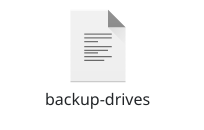
After - this is how it was before this update:
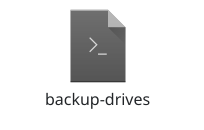
2 Likes
Thanks for the tip, I’m not using full-disk encryption right now and I’m not so fond of adding another AUR package to the 5 I really need (even if having also numlock activated by default on the virtual consoles would be a nice bonus), but it’s good to know if I ever change my mind.
Thanks also for remembering me what I’ve should have done from the beginning, meaning looking at the Arch Wiki, because I’ve found an even better solution with this link:
LightDM - NumLock on by default
Just adding greeter-setup-script=/usr/bin/numlockx on to /etc/lightdm/lightdm.conf did the trick!
So, as I don’t use any other customizations and the defaults of Slick Greeter are OK with me, I can safely get rid of the /etc/lightdm/slick-greeter.conf file now…
Issue solved!
2 Likes
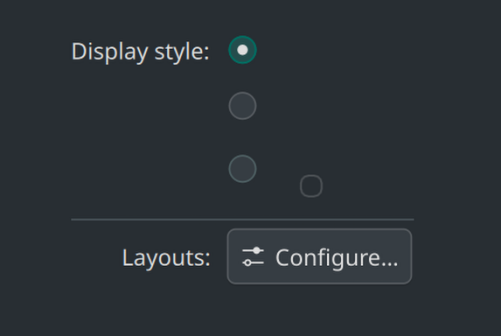
I had the stated minor issue with the keyboard layout reset, I solved it via adding my layout in the System Settings.
When I first tried to do that via right click on the (empty) keyboard layout icon in the System Tray → “Configure Kayboard Layout”, I noticed that the GUI for “Display Style” (whatever that is) is broken if no layout is defined.
KDE Plasma
Since a several years, I’ve been using .desktop files added to the KDE taskbar to open scripts or programs with specific parameters.
After this update, they no longer work. They don’t work even if I drag the .desktop file back to the taskbar. I can launch the .desktop file from within Dolphin.
Is this behavior known, or has it been intentionally disabled in KDE/Plasma, or is this a bug?
Update: I found a solution. It’s not possible to drag the .desktop file to the taskbar. As written at the ArchWiki the Desktop entries needs to be installed (desktop-file-install --dir=$HOME/.local/share/applications ~/app.desktop)
A post was split to a new topic: The global keyboard shortcut for Quake stopped working
A post was split to a new topic: Which OpenCL driver should I use?
All KDE ISO Previews are buggy like hell. But KDE Previews are working with strange workarounds, they just required a lot more TTY logins till you get a monitor signal again.
I could successfull install it, few days ago and i use a 9070 also.
You can also change your Keyboard layouts more easily when you open taskbar>System>Manjaro Settings Manager>Keyboard Settings
seems like nobody mentioned the issues with fontconfig 2.18 yet: it breaks fonts for chromium based browsers. i had to downgrade to 2.17 for now which solved my problems. cf. e.g.
Did you clean the font cache?.. although there is a hook to happen automatically i think.
Although it is probably technically a bug, the major question is: why would one have to use microshait proprietary fonts at all? What’s wrong with the foss fonts from those families, notofonts, etc. On the current install, now 3 years old, i have never had the MS fonts. Try to install some more fonts is my advice (maybe you uninstalled the default noto fonts in the past?).
there are more complaints than just the 2 i linked in. for some ppl cleaning the font cache helps, often it does not. it did not help in my case. the MS font issue is not caused by MS fonts, just an example/manifestation of the core problem.
i had set everything to FOSS fonts and was affected by the monospace problem: menu and tooltips were all rendered in monospace. downgrading to fontconfig 2.17.1 fixed this.
Interesting why it only affects some users and not all, if we knew we would know what a workaround would be until it gets fixed upstream (besides downgrading). I also wonder if it is fontconfig or chromium issue…or a combination of both.
I’ve had one issue on KDE Plasma. Don’t remember when it started, this update, the previous one? Dolphin took ~10-20 secs to load, same with other filemanagers. Finally decided to look into it, found this: (RESOLVED) Dolphin takes 8 seconds to load / Applications & Desktop Environments / Arch Linux Forums
I used Nordic Darker-icons. That was the problem. Changed icon set in System Settings → Colours & Themes → Icons. Everything is back to normal. Switched to Nordic-bluish. Don’t remember where I got the Nordic icons from, don’t see them when I click “Get new…”.