[Stable Update] 2026-02-23 - Kernels, Mesa, Wine, COSMIC, GNOME, KDE Frameworks

I don’t think so, at least the grub entries were there, both of them. What’s weird is that the symptom is exactly the same I had when I was trying to fix the Nvidia driver stuff - the boot just hangs and I can’t even change TTY. But there were no Nvidia updates this time and I’m still on the correct version, so I don’t know.

$ nvidia-smi
Fri Feb 27 21:43:14 2026       
+-----------------------------------------------------------------------------------------+
| NVIDIA-SMI 575.64.05              Driver Version: 575.64.05      CUDA Version: 12.9     |
|-----------------------------------------+------------------------+----------------------+
| GPU  Name                 Persistence-M | Bus-Id          Disp.A | Volatile Uncorr. ECC |
| Fan  Temp   Perf          Pwr:Usage/Cap |           Memory-Usage | GPU-Util  Compute M. |
|                                         |                        |               MIG M. |
|=========================================+========================+======================|
|   0  NVIDIA GeForce GTX 1060 3GB    Off |   00000000:01:00.0  On |                  N/A |
| 24%   58C    P8             10W /  120W |     481MiB /   3072MiB |      1%      Default |
|                                         |                        |                  N/A |
+-----------------------------------------+------------------------+----------------------+
                                                                                         
+-----------------------------------------------------------------------------------------+
| Processes:                                                                              |
|  GPU   GI   CI              PID   Type   Process name                        GPU Memory |
|        ID   ID                                                               Usage      |
|=========================================================================================|
|    0   N/A  N/A            1305      G   /usr/lib/Xorg                           128MiB |
|    0   N/A  N/A            1833      G   xfwm4                                     2MiB |
|    0   N/A  N/A           23299      G   /usr/lib/librewolf/librewolf            224MiB |
|    0   N/A  N/A           24069      G   ./firefox.real                          115MiB |
+-----------------------------------------------------------------------------------------+

The last update has set my Mouse cursor Theme back to default. ..I could switch it back

Report issues if you find some:

Anh-Linh 26.0.3 (2026-02-28)

Download XFCE

Full

https://download.manjaro.org/xfce/26.0.3/manjaro-xfce-26.0.3-260228-linux618.iso
https://download.manjaro.org/xfce/26.0.3/manjaro-xfce-26.0.3-260228-linux618.iso.sig
https://download.manjaro.org/xfce/26.0.3/manjaro-xfce-26.0.3-260228-linux618.iso.sha1
https://download.manjaro.org/xfce/26.0.3/manjaro-xfce-26.0.3-260228-linux618.iso.sha256
https://download.manjaro.org/xfce/26.0.3/manjaro-xfce-26.0.3-260228-linux618.iso.torrent
https://download.manjaro.org/xfce/26.0.3/manjaro-xfce-26.0.3-260228-linux618.iso.pkgs

Minimal

https://download.manjaro.org/xfce/26.0.3/manjaro-xfce-26.0.3-minimal-260228-linux618.iso
https://download.manjaro.org/xfce/26.0.3/manjaro-xfce-26.0.3-minimal-260228-linux618.iso.sig
https://download.manjaro.org/xfce/26.0.3/manjaro-xfce-26.0.3-minimal-260228-linux618.iso.sha1
https://download.manjaro.org/xfce/26.0.3/manjaro-xfce-26.0.3-minimal-260228-linux618.iso.sha256
https://download.manjaro.org/xfce/26.0.3/manjaro-xfce-26.0.3-minimal-260228-linux618.iso.torrent
https://download.manjaro.org/xfce/26.0.3/manjaro-xfce-26.0.3-minimal-260228-linux618.iso.pkgs

Minimal (linux66)

https://download.manjaro.org/xfce/26.0.3/manjaro-xfce-26.0.3-minimal-260228-linux66.iso
https://download.manjaro.org/xfce/26.0.3/manjaro-xfce-26.0.3-minimal-260228-linux66.iso.sig
https://download.manjaro.org/xfce/26.0.3/manjaro-xfce-26.0.3-minimal-260228-linux66.iso.sha1
https://download.manjaro.org/xfce/26.0.3/manjaro-xfce-26.0.3-minimal-260228-linux66.iso.sha256
https://download.manjaro.org/xfce/26.0.3/manjaro-xfce-26.0.3-minimal-260228-linux66.iso.torrent
https://download.manjaro.org/xfce/26.0.3/manjaro-xfce-26.0.3-minimal-260228-linux66.iso.pkgs

Minimal (linux612)

https://download.manjaro.org/xfce/26.0.3/manjaro-xfce-26.0.3-minimal-260228-linux612.iso
https://download.manjaro.org/xfce/26.0.3/manjaro-xfce-26.0.3-minimal-260228-linux612.iso.sig
https://download.manjaro.org/xfce/26.0.3/manjaro-xfce-26.0.3-minimal-260228-linux612.iso.sha1
https://download.manjaro.org/xfce/26.0.3/manjaro-xfce-26.0.3-minimal-260228-linux612.iso.sha256
https://download.manjaro.org/xfce/26.0.3/manjaro-xfce-26.0.3-minimal-260228-linux612.iso.torrent
https://download.manjaro.org/xfce/26.0.3/manjaro-xfce-26.0.3-minimal-260228-linux612.iso.pkgs

Download GNOME

Full

https://download.manjaro.org/gnome/26.0.3/manjaro-gnome-26.0.3-260228-linux618.iso
https://download.manjaro.org/gnome/26.0.3/manjaro-gnome-26.0.3-260228-linux618.iso.sig
https://download.manjaro.org/gnome/26.0.3/manjaro-gnome-26.0.3-260228-linux618.iso.sha1
https://download.manjaro.org/gnome/26.0.3/manjaro-gnome-26.0.3-260228-linux618.iso.sha256
https://download.manjaro.org/gnome/26.0.3/manjaro-gnome-26.0.3-260228-linux618.iso.torrent
https://download.manjaro.org/gnome/26.0.3/manjaro-gnome-26.0.3-260228-linux618.iso.pkgs

Minimal

https://download.manjaro.org/gnome/26.0.3/manjaro-gnome-26.0.3-minimal-260228-linux618.iso
https://download.manjaro.org/gnome/26.0.3/manjaro-gnome-26.0.3-minimal-260228-linux618.iso.sig
https://download.manjaro.org/gnome/26.0.3/manjaro-gnome-26.0.3-minimal-260228-linux618.iso.sha1
https://download.manjaro.org/gnome/26.0.3/manjaro-gnome-26.0.3-minimal-260228-linux618.iso.sha256
https://download.manjaro.org/gnome/26.0.3/manjaro-gnome-26.0.3-minimal-260228-linux618.iso.torrent
https://download.manjaro.org/gnome/26.0.3/manjaro-gnome-26.0.3-minimal-260228-linux618.iso.pkgs

Minimal (linux66)

https://download.manjaro.org/gnome/26.0.3/manjaro-gnome-26.0.3-minimal-260228-linux66.iso
https://download.manjaro.org/gnome/26.0.3/manjaro-gnome-26.0.3-minimal-260228-linux66.iso.sig
https://download.manjaro.org/gnome/26.0.3/manjaro-gnome-26.0.3-minimal-260228-linux66.iso.sha1
https://download.manjaro.org/gnome/26.0.3/manjaro-gnome-26.0.3-minimal-260228-linux66.iso.sha256
https://download.manjaro.org/gnome/26.0.3/manjaro-gnome-26.0.3-minimal-260228-linux66.iso.torrent
https://download.manjaro.org/gnome/26.0.3/manjaro-gnome-26.0.3-minimal-260228-linux66.iso.pkgs

Minimal (linux612)

https://download.manjaro.org/gnome/26.0.3/manjaro-gnome-26.0.3-minimal-260228-linux612.iso
https://download.manjaro.org/gnome/26.0.3/manjaro-gnome-26.0.3-minimal-260228-linux612.iso.sig
https://download.manjaro.org/gnome/26.0.3/manjaro-gnome-26.0.3-minimal-260228-linux612.iso.sha1
https://download.manjaro.org/gnome/26.0.3/manjaro-gnome-26.0.3-minimal-260228-linux612.iso.sha256
https://download.manjaro.org/gnome/26.0.3/manjaro-gnome-26.0.3-minimal-260228-linux612.iso.torrent
https://download.manjaro.org/gnome/26.0.3/manjaro-gnome-26.0.3-minimal-260228-linux612.iso.pkgs

Download KDE

Full

https://download.manjaro.org/kde/26.0.3/manjaro-kde-26.0.3-260228-linux618.iso
https://download.manjaro.org/kde/26.0.3/manjaro-kde-26.0.3-260228-linux618.iso.sig
https://download.manjaro.org/kde/26.0.3/manjaro-kde-26.0.3-260228-linux618.iso.sha1
https://download.manjaro.org/kde/26.0.3/manjaro-kde-26.0.3-260228-linux618.iso.sha256
https://download.manjaro.org/kde/26.0.3/manjaro-kde-26.0.3-260228-linux618.iso.torrent
https://download.manjaro.org/kde/26.0.3/manjaro-kde-26.0.3-260228-linux618.iso.pkgs

Minimal

https://download.manjaro.org/kde/26.0.3/manjaro-kde-26.0.3-minimal-260228-linux618.iso
https://download.manjaro.org/kde/26.0.3/manjaro-kde-26.0.3-minimal-260228-linux618.iso.sig
https://download.manjaro.org/kde/26.0.3/manjaro-kde-26.0.3-minimal-260228-linux618.iso.sha1
https://download.manjaro.org/kde/26.0.3/manjaro-kde-26.0.3-minimal-260228-linux618.iso.sha256
https://download.manjaro.org/kde/26.0.3/manjaro-kde-26.0.3-minimal-260228-linux618.iso.torrent
https://download.manjaro.org/kde/26.0.3/manjaro-kde-26.0.3-minimal-260228-linux618.iso.pkgs

Minimal (linux66)

https://download.manjaro.org/kde/26.0.3/manjaro-kde-26.0.3-minimal-260228-linux66.iso
https://download.manjaro.org/kde/26.0.3/manjaro-kde-26.0.3-minimal-260228-linux66.iso.sig
https://download.manjaro.org/kde/26.0.3/manjaro-kde-26.0.3-minimal-260228-linux66.iso.sha1
https://download.manjaro.org/kde/26.0.3/manjaro-kde-26.0.3-minimal-260228-linux66.iso.sha256
https://download.manjaro.org/kde/26.0.3/manjaro-kde-26.0.3-minimal-260228-linux66.iso.torrent
https://download.manjaro.org/kde/26.0.3/manjaro-kde-26.0.3-minimal-260228-linux66.iso.pkgs

Minimal (linux612)

https://download.manjaro.org/kde/26.0.3/manjaro-kde-26.0.3-minimal-260228-linux612.iso
https://download.manjaro.org/kde/26.0.3/manjaro-kde-26.0.3-minimal-260228-linux612.iso.sig
https://download.manjaro.org/kde/26.0.3/manjaro-kde-26.0.3-minimal-260228-linux612.iso.sha1
https://download.manjaro.org/kde/26.0.3/manjaro-kde-26.0.3-minimal-260228-linux612.iso.sha256
https://download.manjaro.org/kde/26.0.3/manjaro-kde-26.0.3-minimal-260228-linux612.iso.torrent
https://download.manjaro.org/kde/26.0.3/manjaro-kde-26.0.3-minimal-260228-linux612.iso.pkgs

3 Likes

No linux619-nvidia-575xx. nvidia-575xx-dkms can’t install module for 6.19 too :pensive_face:

580xx from AUR working

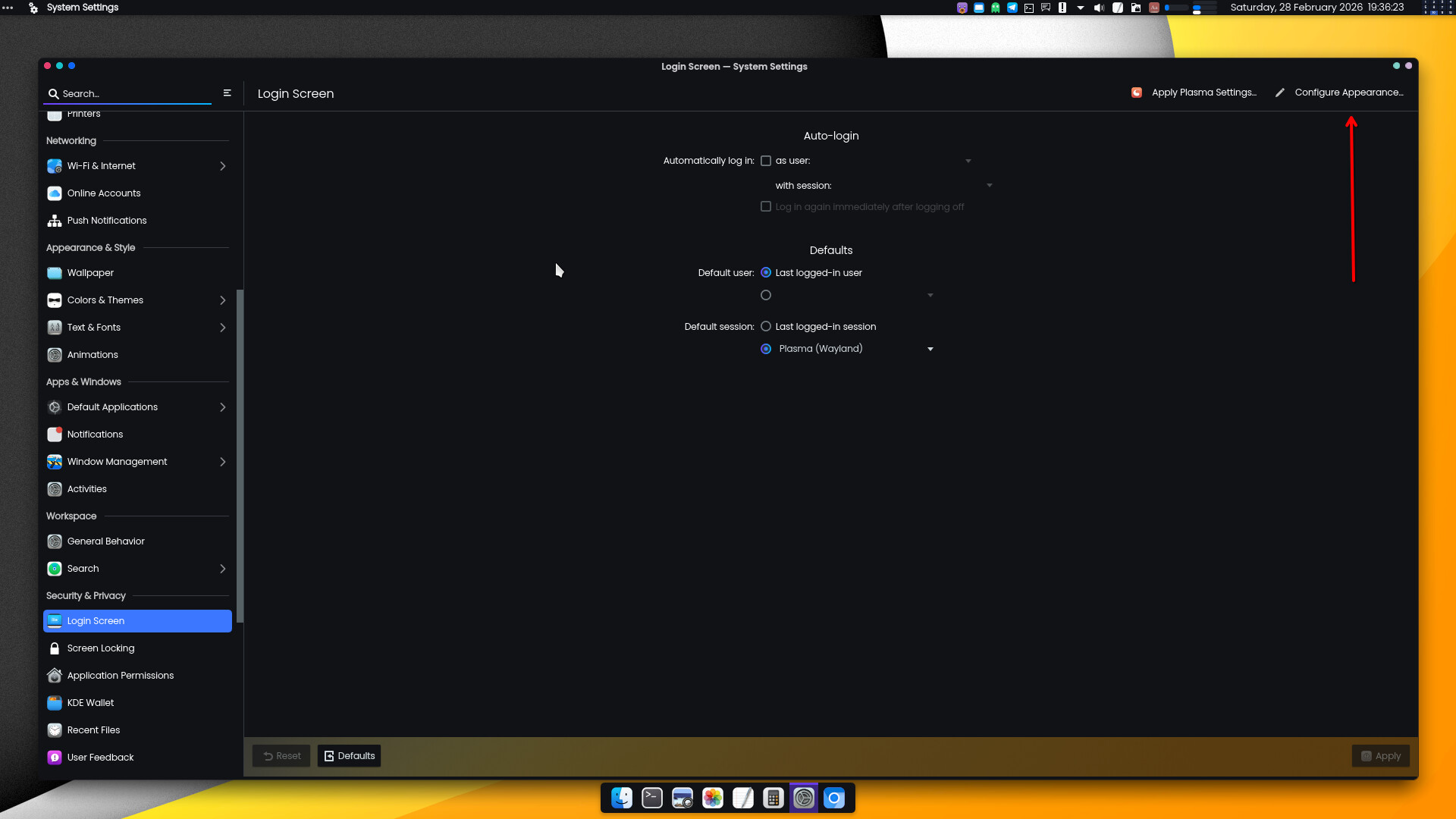
how do i change the login wallpaper in kde plasma now?

the problem was the login screen was not in the settings. i had to go to reddit to find a fix.

sudo find /var/lib/plasmalogin/ -type d -exec chmod +x {} +

after i did this and rebooted the login screen was back in settings.

1 Like

Got a new one with this update. I can no longer display audio tracks in Dolphin. Before i used to be able to see audio tracks under the data track. That is gone.

KDE seems to be in a loop with audio CD’s now:

Do you have audiocd-kio installed?

If I go to the audiocd:/?device=/dev/sr1 it sees the tracks just fine.

Something really odd here.

Almost certainly because previously cdemu’s virtual drive was appearing as /dev/sr0 and your real Blu-ray drive wasn’t present or wasn’t enumerated — so audiocd-kio only saw one drive and had no ambiguity.

Something changed that caused the drive ordering to shift — either:

  • A kernel update changed the enumeration order
  • A udev rule changed
  • Your real Blu-ray drive started being detected earlier at boot

So now cdemu gets /dev/sr1 instead of /dev/sr0, and audiocd-kio sees two drives and falls apart.

It is in some sort of infinite loop:

It is completely borked. Infinite loop.

Any ideas about what changed to cause this? Used to work great a few weeks back.

What I am really trying to do is run old games with redbook audio, but if cdemu does not mount the audio properly, then the game has no music. I played this same game probably about 3 months ago just fine. Note cdemu used to have 2 mount points, one for data, and a second for audio. Now it only shows a single data mountpoint and the audio no longer shows.

If I point audiocd: to dev/sr1 (audiocd:/?device=/dev/sr1), it can then find the audio again, but the game can’t find it with this method.

I highly suspect audiocd-kio. I see it has a build date of Feb 3rd, so it has changed recently.

Or, you could have simply used the settings provided – note the red arrow in the previous posted image. Click that, and select your preferred image along with other parameters.

The settings are assuredly there;
one only has to look for them.

3 Likes

Hey everyone,
I just wanted to shout out a warning, that Kernel 6.19.2 has a bootstopper concerning at least certain NVME controllers in conjunction with IOMMU (which can be especially important, when running VMS). So if anyone fails to boot after uprading to 6.19.2 (stuck at “triggering uevents” for a couple of minutes, then spitting an error about “/dev/nvmexx/your-device not found” and falling back to rootfs) there are two ways to circumvent that bug:

  1. Fall back to the latest LTS (recommended)
  2. Disable iommu in your bootloader. Example for grub (with AMD processor) would be:
    GRUB_CMDLINE_LINUX_DEFAULT=‘…other_flags… amd_iommu=off

Cheers.

Off-site discussions about this:
https://www.reddit.com/r/NixOS/comments/1r8v3g4/nixos_unstable_boot_stage_1_fail_rebuildupdate_to/

2 Likes

I tried updating using console

 pamac update --dry-run  

gave no errors so I run it again without dry-run, it started downloading stuff and then I got this error:

zsh: terminated pamac update

I use kde, system monitor said it was downloading, I gave it some time, then the UI froze, REISUB, at boot I had to restore a timeshift backup.

It is breeze-cursors

[teo@teo-lenovo-v15 ~]$ cat /etc/lightdm/lightdm-gtk-greeter.conf 
[greeter]
theme-name = Matcha-dark-sea
icon-theme-name = Papirus-Maia
cursor-theme-name = breeze-cursors
font-name = Sans 16
clock-format = %H:%M %A, %d.%m.%y
indicators = ~host;~spacer;~clock;~spacer;~language;~layout;~session;~a11y;~power
hide-user-image = true
panel-position = top
user-background = false

Adding the cursor theme line fixes lightdm greeter. I still have not found a way to fix the cursor in, for example, Timeshift. Luckily it does not happen with other gui apps started as root from pkexec.

1 Like

Open a new support thread, and supply full system information using inxi -zv8, post the cli output using </> button in the editor.

Post any other additional information, that might be helpful.

1 Like

After this stable update I had a cursor issue on XFCE related to the replacement of xcursor-breeze with breeze-cursors on my XFCE DE.

Cause:
The update removed the old xcursor-breeze package and replaced it with breeze-cursors5. However, existing configs (LightDM and XFCE) still referenced xcursor-breeze, so the system fell back to the default cursor.

Symptoms:

  • Login screen using default cursor

  • XFCE session cursor reset to default

  • Cursor size changes

Fix:

  1. Update LightDM greeter config:
    Edit /etc/lightdm/lightdm-gtk-greeter.conf and set:

    cursor-theme-name = breeze-cursors
    
  2. Update XFCE session theme:
    Either via GUI:
    Settings → Mouse and Touchpad → Theme → select Breeze

    Or via terminal:

    xfconf-query -c xsettings -p /Gtk/CursorThemeName -s breeze-cursors
    

After logout/login everything works correctly again.

Just sharing in case other XFCE users hit the same issue after the cursor package transition.

5 Likes

Due to the high incidence where pamac — be it the pamac GUI, the pamac command-line tool, or both — crashes during a system update, I am including a section in the Known Issues and Solutions to advise our members to either run the update by way of pacman, or to use octopi for doing it graphically.

9 Likes

This update pulls in gvim 9.2.0010-1, which has this bug where the CPU is always pinned to 100% in Wayland. It should be fixed by pulling in 9.2.0018 or later.

It’s already in the Unstable branch right now. :wink:

1 Like

Unfortunately, I have come across a headscratcher:
Since the last update, my bluetooth audio speaker (Anker Soundcore2) connects and is recognized as "Audio Gateway (A2DP Source & HSP/HFP AG) - but not as a sound device. Meaning, I can’t select it as audio output.

Did anyone else came across these kind of problems?

EDIT
Found two ways to circumvent the bug:

  1. (works for some)
    Create an audio.conf file in /etc/bluetooth/ with the following contents:
    [General]
    Enable=Control,Gateway,Headset,Media,Sink,Socket,Source
    then execute $ systemctl restart bluetooth.service

  2. manually apply the A2DP sink (works for me)
    $ sudo dbus-send --print-reply --system --dest=org.bluez /org/bluez/hci0/dev_F4_4E_FC_81_F0_1D org.bluez.Device1.ConnectProfile string:0000110b-0000-1000-8000-00805f9b34fb

Note that you have to alter the MAC adresse to that of your device for the second option.

2 Likes