I did this and it solved the issue. Could do it on plain ol’ Konsole.
1 Like
I have a very interesting observation on my system. All of my proton games now run native Wayland, even If I run them via Proton 9.
Normally to run games with Wayland I used Proton-GE and PROTON_ENABLE_WAYLAND=1 env variable, but now it runs Wayland no matter what I do.
What is even more interesting is that Steam overlay used to not work on wayland, however it (steam overlay) does work when running via implicit wayland (no settings) but it does not work when running via explicit wine-wayland (PROTON_ENABLE_WAYLAND=1) so clearly there is some difference.
I am using NVIDIA and I suspect the new driver or egl-wayland2 is the culprit.
Everything works great, just an observation.
EDIT: By the “run native Wayland” I mean xlsclients does not show them anymore
EDIT2: xprop seems to show their window id though, so not native wayland, but still weird
I got a Geforce 1060 so was in it for problems. I updated as usual then did exactly this before rebooting :
sudo pacman -Rns linux-nvidia-meta linux617-nvidia
sudo pacman -Rdd nvidia-utils lib32-nvidia-utils
sudo mhwd -r pci video-nvidia
sudo mhwd -i pci video-nvidia-575xx
sudo mkinitcpio -P
But it resulted in Manjaro unable to boot kernel 6.17 with a black screen. Luckily I was able to boot on an old kernel 6.6 which used nvidia-575 with no problem. Then I installed kernel 6.18:
sudo mhwd-kernel -i linux618
and now it boots correctly.
Sorry but main info given was not very clear. Thanks @Bananagang
That is easy to explain since 6.17 is EOL. It’s written right at the beginning of this page. Twice actually 
3 Likes
WhoopS! I forgot to do this step! I was wondering if I might’ve missed something important… 
Thanks & Cheers! 

Same here, but I upgraded via the GUI, so when this error occured, I had the gnome credentials screen but due to the error the credentials screen was unable to cancel or accept my password (its buttons weren’t functioning). I had to do a hard reset and restart the upgrade, which then worked fine.
Perhaps a result of performing an update from within the GUI, and not rebooting straight away.
You’ll find REISUB/REISUO is generally safer:
1 Like
Hi,
The issue I have is that when I connect Bluetooth buds those work fine (Sony WF-C700N), alas if I disconnect them by storing them away, as soon as gnome notifies that those have disconnected, the whole gnome session restarts, killing all my processes.
It’s not a showstopper but it’s definitely blocking my flow.
Pascal user here.
I just had a look at the Hardware Configuration menu inside the Manjaro Settings Manager, and can someone tell me what the difference is between the video-hybrid-intel-nvidia and video-nvidia series of drivers?
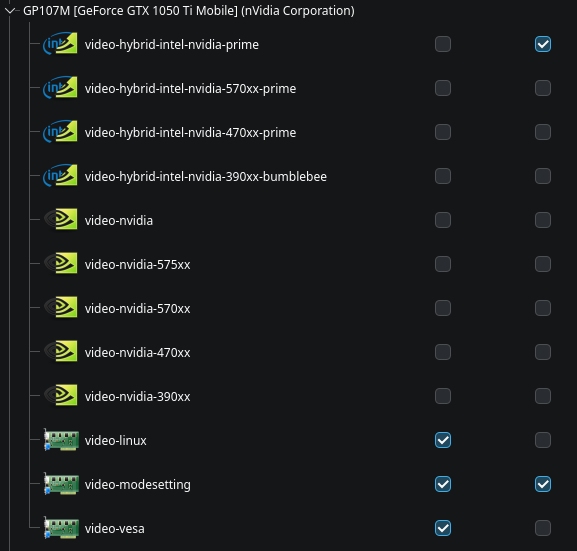
When I used other distros like Ubuntu or Arch in the past, there was only ever an nvidia driver, so I have never seen a hybrid graphics option be listed separately like that, which is why I’m unsure here.
Would video-nvidia also work, but without hybrid graphics, or is it only for desktop systems?
If 580 is not available, I would prefer to run 575 if I can, but there is no such option in the hybrid series.
Also, is there a timeline for when the 580 driver will be available?
Personally I had no issues with it, while 570 will only be maintained by Nvidia for another 3 weeks, and 575 for another 5 months, while 580 will end in 2+ years.
Hi there,
I have an issue withe the current update and I don’t want to mess things up, here’s the error message :
looking for conflicting packages...
error: failed to prepare transaction (could not satisfy dependencies)
:: installing pacman (7.1.0.r7.gb9f7d4a-1) breaks dependency 'libalpm.so=15' required by libpamac
:: installing nvidia-utils (590.48.01-1) breaks dependency 'nvidia-utils=580.82.09' required by linux612-nvidia
:: installing nvidia-utils (590.48.01-1) breaks dependency 'nvidia-utils=580.82.09' required by linux66-nvidia
I don’t know whether I can remove libpamac
I have tried but it breaks other dependencies so it won’t let me -Rs.
As for the Nvidia Driver I had once had a problem were I had no GUI after an update so I prefer to ask before doing anything.
My Graphic Card is a Turing NVIDIA GeForce RTX 2060
So it shouldn’t be impacted by the out of supports cards.
My Kernel Currently running: 6.12.48-1-MANJARO (linux612)
Thanks for any hints or help
Mod edit:- Please see:
[MiniHowTo] Present code or command output
Note: Grave accent (or, backtick) characters are used. 
For inline code or to show a single command:
- please follow this simple example:
code here.
For multi-line command output:
- place text beween two rows of three (```) backtick characters to form a scrollable text box, or …
- use the </> button in the Compose window to achieve the same result.
The empty row between these rows of backtick characters is where to paste any multi-line command output (such as inxi).
An example of a pre-formatted text enclosure:
What is a Quark?

A. In Physics, an elementary particle and fundamental constituent of matter.
B. A character from the Star Trek: "Deep Space Nine" television series.
C. A soft, creamy, usually unsalted cheese traditional to central Europe.
Strart by refreshing your mirrors.
sudo pacman-mirrors -f
That should eliminate the pacman problem.
After this update I’m unable to log in using Gnome/GDM, however I can work around it by logging in using LightDM. The details are in a separate post here.
I did it before and I had to change mirrors because I was (and still) getting this error about PGP key for checking package checksum.
error: pacman-mirrors: signature from "Frede Hundewadt <fh@manjaro.org>" is unknown trust
:: File /var/cache/pacman/pkg/pacman-mirrors-5.3-1-any.pkg.tar.zst is corrupted (invalid or corrupted package (PGP signature)).
Do you want to delete it? [Y/n] Y
error: failed to commit transaction (invalid or corrupted package)
Errors occurred, no packages were upgraded.
Moderator edit: In the future, please use proper formatting: [HowTo] Post command output and file content as formatted text
Sometimes this is easily solved installing manjaro keyring before the update.
sudo pacman -S manjaro-keyring
And then sudo pacman -Syu.
2 Likes
Then start with fixing the key issue preventing you to use pacman mirrors. The 2nd post with the common problems was updated because of this.
2 Likes
Uuups… I hadn’t seen the second post had been updated. Sorry. 
Reinstalling the whole bunch online as you suggest or offline are also 2 valid options. Or downloading only this key, as showed in the second post. Or as a last possibility temporarily disabling the signing in pacman.conf. 4 different ways to go that should fix it.
thanks
it worked flawlessly after installing the Keyrings
3 Likes
All went fine with pacman-mirrors, but I have now a pip check error:
[h2@h2-imedias1800 ~]$ pip check | grep -i pacman
pacman-mirrors 5.3 has requirement npyscreen<5.0.0,>=4.10.5, but you have npyscreen 5.0.2.
Hi there.
Its my first time during 3 years when something has gone the wrong way.
I’m running XFCE and after upgrade pamac gives me authentication error and can’t install/remove/modify anything.
journalctl -xe shows me that something is not quite right with polkit.
░▒▓ ~ journalctl -xe
янв 06 21:00:43 LENOVO-V570-LIN systemd[1]: Starting Authorization Manager Agent Helper (PID 20208/UID 1000)...
░░ Subject: Начинается запуск юнита polkit-agent-helper@42-8200-20208-1000.service
░░ Defined-By: systemd
░░ Support: https://forum.manjaro.org/c/support
░░
░░ Начат процесс запуска юнита polkit-agent-helper@42-8200-20208-1000.service.
янв 06 21:00:44 LENOVO-V570-LIN polkit-agent-helper-1[39412]: Pidfd not supported on this platform, disable polkit-agent-helper.socket and use setuid helper
янв 06 21:00:44 LENOVO-V570-LIN polkit-agent-helper-1[39412]: polkit-agent-helper-1: pidfd not supported on this platform, disable polkit-agent-helper.socket and use setuid helper.
янв 06 21:00:44 LENOVO-V570-LIN systemd[1]: polkit-agent-helper@42-8200-20208-1000.service: Main process exited, code=exited, status=1/FAILURE
░░ Subject: Unit process exited
░░ Defined-By: systemd
░░ Support: https://forum.manjaro.org/c/support
░░
░░ An ExecStart= process belonging to unit polkit-agent-helper@42-8200-20208-1000.service has exited.
░░
░░ The process' exit code is 'exited' and its exit status is 1.
янв 06 21:00:44 LENOVO-V570-LIN systemd[1]: polkit-agent-helper@42-8200-20208-1000.service: Failed with result 'exit-code'.
░░ Subject: Unit failed
░░ Defined-By: systemd
░░ Support: https://forum.manjaro.org/c/support
░░
░░ The unit polkit-agent-helper@42-8200-20208-1000.service has entered the 'failed' state with result 'exit-code'.
янв 06 21:00:44 LENOVO-V570-LIN polkitd[1039]: Operator of unix-session:8 FAILED to authenticate to gain authorization for action org.manjaro.pamac.commit for system-bus-name::1.257 [/usr/bin/pamac-manager --gapplication-service] (owned by unix-user:geser)
янв 06 21:00:44 LENOVO-V570-LIN systemd[1]: Failed to start Authorization Manager Agent Helper (PID 20208/UID 1000).
░░ Subject: Ошибка юнита polkit-agent-helper@42-8200-20208-1000.service
░░ Defined-By: systemd
░░ Support: https://forum.manjaro.org/c/support
░░
░░ Произошел сбой юнита polkit-agent-helper@42-8200-20208-1000.service.
░░
░░ Результат: failed.
Any help is appreciated!