For those with the same problem, I fixed this by changing the “Legacy applications” Appearance in Gnome Tweaks to Adw-gtk3
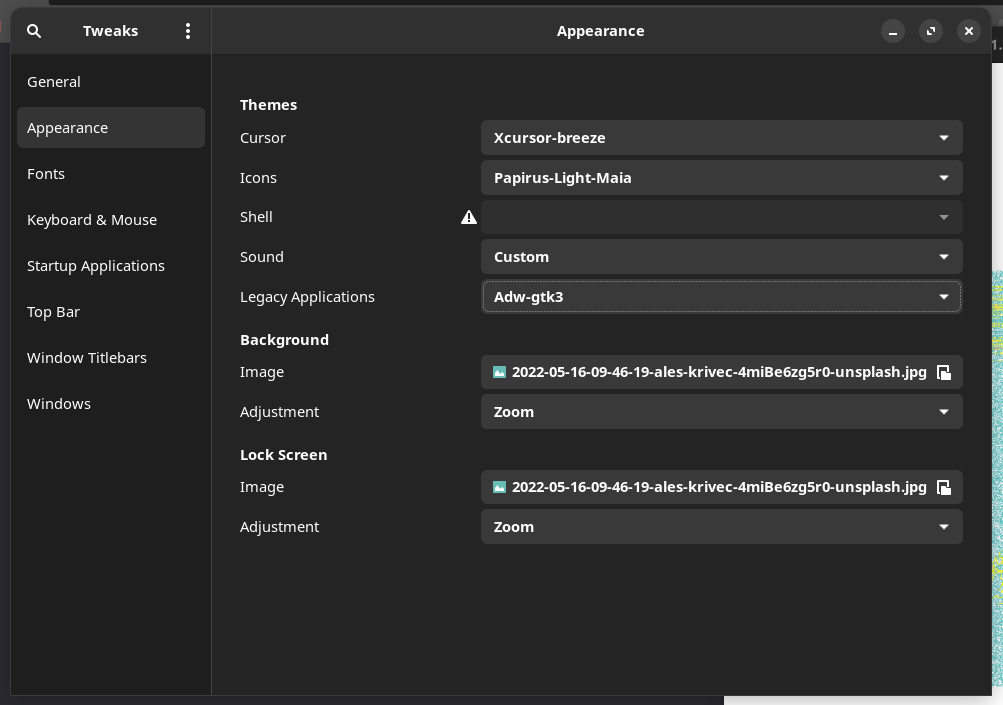
I got a blackscreen after the update. Couldnt even ctrl-alt-f3. Used recovery usb and chroot, downgraded sddm to 0.19 and still got the same issue.
My solution has been to just ignore them, and then when this update announcement thread mentions things that need to be done, take action. Has worked perfectly for over 5 years, but i keep in mind that i might need to chroot and troubleshoot eventually.
1 Like
As MrLavender just said, he was checking pacnew files and that he couldnt find anything in 18 month that was leading to breakage if not merged.
And i had a AMD Laptop and Intel+Nvidia PC for the entire 36 month on both systems (never reinstalled in the whole time) with total differend hardware and i didnt run into issue.
I also was checking and compared a few pacnew files in the last few hours and the most changes i could find was mainly hidden behind a #
Im just wondering why this is (out of nowhere) a big deal now? i never heared or read about this pacnew files till today and even when i look at some video guides on youtube about it, all i could find was a 5years old video (beside a actual pacman.con merge video for arch linux) and when i want to hear and listen about stuff about it, everything what that guy on the video was doing to remove .pacnew files with vim and he said he dont want to mess something up in his system with merging the files.

Why isnt any famous or random youtube streamer talking about it today, if this is really needed to maintain Arch Linux?
Im actually use regulary Timeshift befor i update my system and when i really run into issue, i can restore my snapshot and could then merge this pacnew files, if something really breaks…
Is there something wrong, with going this direction and only merging files in the last second?
If i really have to, i would accept it… even if i dislike to put a few more hours to maintain my two systems. Im just wondering why this Topic never comes up… maybe you can give me a good example where someone actually run into problems because of this and that he couldnt cure his problem with a timeshift snapshot.
What an update 
Here it seems that everything is working properly now.
2 Likes
As I mentioned, and will continue to say, this is pure luck,
I guess not, but why wait until something break, and then possibly spend hours trying to fix it, failing, restoring, and do all the updates again and then only merge the .pacnew files, when you can take 10 minutes while upgrading to not have the issue in the first place?
It has never taken me more than 10 minutes. If it takes you this long, then I’m thinking there’s something else the matter.
I can think of two reason, 1 of which is only slightly tongue-in-the-cheek (guess which one):
- It has been this way with Arch Linux for such a long time, that it’s considered common knowledge. And we know that common knowledge is not all that common; and
- doing it results in a stable, working system without reason to bash it. And it’s popular to bash something, especially something good.
It is very much a mentioned thing on the forums. If you’ve never seen it, then you don’t read the forum much, apparently.
That’s not curing the problem. That, quite literally, resetting everything to before 5the problem was there, and quite the possibility of introducing it again. a Problem, mind you, that might not even have existed if the files were merged properly.
If that happens, he’s doing something wrong and shouldn’t proclaim it to the whole wold.
See here in the Arch wiki on .pacnew and .pacsave files:
https://wiki.archlinux.org/title/Pacman/Pacnew_and_Pacsave#Why_these_files_are_created
These files require manual intervention from the user and it is good practice to handle them right after every package upgrade or removal. If left unhandled, improper configurations can result in improper function of the software or the software being unable to run altogether.
And it’s also in the Manjaro Wiki:
These files require manual intervention from the user and it is good practice to handle them regularly.
I’m not  sure on this, only 99%, but I had a problem on my first install that was quite possibly because I was ignorant of this. It left me unable to log back in after my screen has been locked for as while. It regularly happened when I went for lunch. Learned about
 .pacnew files there. Unfortunately I stripped myself and did a reinstall before I could test if it was the cause.
That caused me to read up on it, to learn more and be less inorant and go from there.
2 Likes
@cscs Pamac starts with pamac-manager %U
There is no GTK version defined
Thanks for the detailed explanation. I’ve been using Manjaro for 3+ years and didn’t encounter any problem like this until now. Having a backup system like you mentioned would be great at a time time like this. From now on, I will definitely use a backup system. Seems like other people have more serious problems with this update, i don’t think mine will be solved for a while. Maybe a fresh install will fix the problem.
same issue, please try:
sudo mv /etc/pacman.conf /etc/pacman.conf.pacsave
sudo mv /etc/pacman.conf.pacnew /etc/pacman.conf
EberhardThanks alot for going into detail here.
Do you know a detailed guide/tutorial, how to merge this files with meld and how to install meld and config it in a detailed way?
I always think that this arch wikis “always” skips alot of steps and are not really user friendly.
With that point you misunderstand me, i mean cure related to rollback and then merge the files.
Of course im aware that using the last working snapshot dont give magic cure to files that break after the same update again and again.
Nope. That’s how I understood it, and my point remains the same.
Sadly, I have none. At the moment I still wing it when it’s time for a merge. Sometimes I find it easier than others. If someone can give me advice here that’s be awesome!
But there is this pacman hook that lets you know if there are .pacnew files to merge:
/etc/pacman.d/hooks/pacnew-notifier.hook:
[Trigger]
Operation = Install
Operation = Upgrade
Operation = Remove
Type = Package
Target = *

[Action]
Description = Checking for .pacnew and .pacsave files...
When = PostTransaction
Exec = /usr/bin/bash -c 'pacfiles=$(pacdiff -o); if [[ -n "$pacfiles" ]]; then echo -e "\e[1m.pac* files found:\e[0m\n$pacfiles\n\e[1mPlease check and merge\e[0m"; fi'
This let’s you know, in the terminal where you run the update, that there are .pacnew and/or .pacsave files that need handling.
Shameless plug:
I made a little script that does all this for you. It’s still not even close to perfect and thus still very much a W.I.P., but you can find it here:
1 Like
But how do I do this most cleverly?
I use Manjaro KDE/Plasma (Just checked … GTK design: Breeze).
For fonts, I have anti-aliasing disabled system-wide (with hinting enabled), and use Verdana as the system font.
So far I have only updated in the VM.
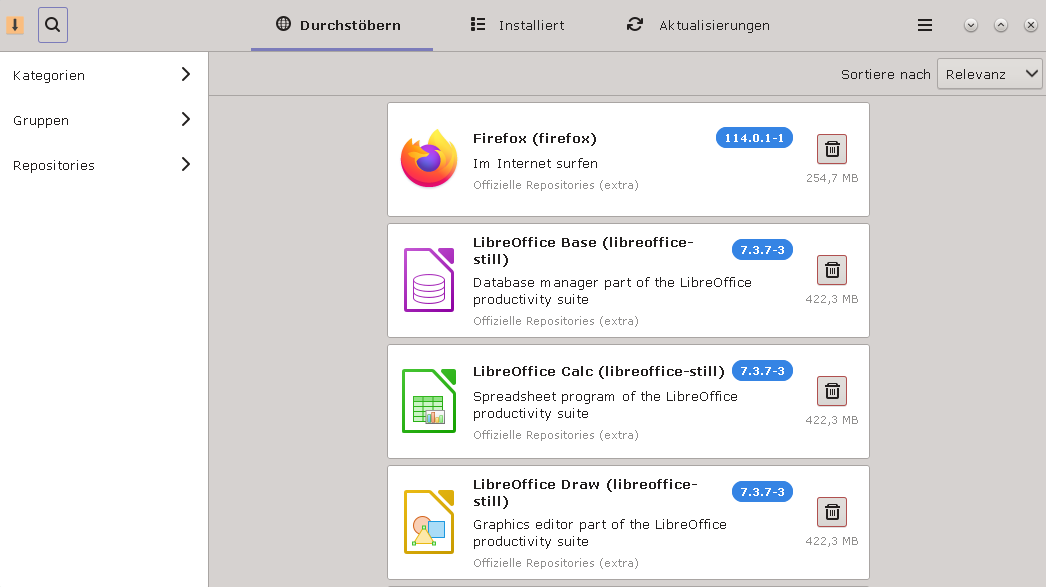
Before update, the Pamac GUI looked like this on my system:
After the update it looks like this:
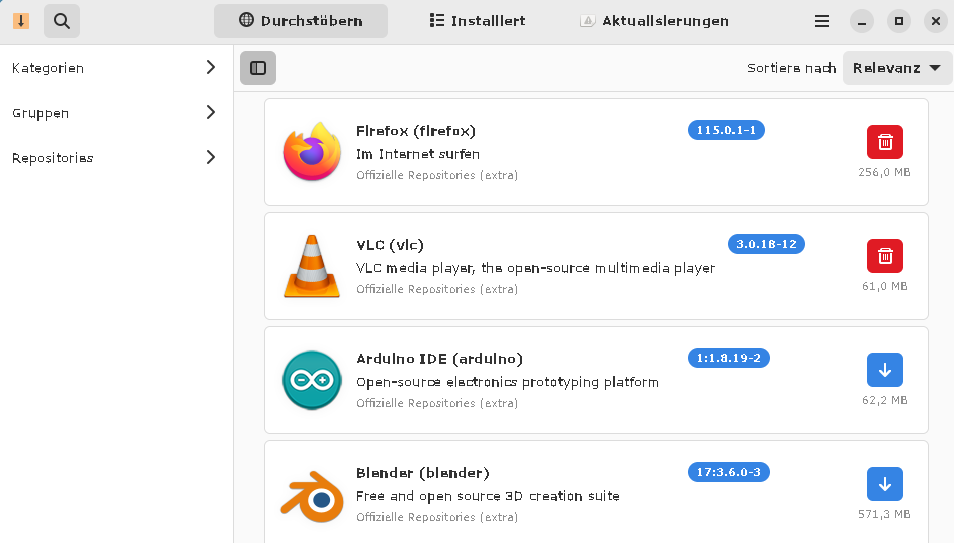
Only very badly readable (in the original and in original size you can see the differences even better)!
Currently installed is pamac-gtk 10.5.1-2.
This will/would be updated to pamac-gtk 11.0-1-2.
After that I would “downgrade” again to pamac-gtk3 10.5.3-4.
I did so in the VM, but after that the libpamac-snap-plugin previously installed in Pamac was gone.
An installation attempt of libpamac-snap-plugin aborted with an error message that not all packages could be loaded.
The exact error message is (unfortunately) in German:
~ pamac install pamac-gtk3 ✔
Vorbereitung...
Wähle die optionalen Abhängigkeiten für pamac-gtk3:
1: pamac-gnome-integration: for integration into GNOME
2: libpamac-snap-plugin: for Snap support
Auswahl eingeben (Standard=keine): 2
Abhängigkeiten werden aufgelöst...
Interne Konflikte werden überprüft...
Wird installiert (6):
pamac-gtk3 10.5.3-4 extra 197,4 KB
apparmor 3.1.6-1 (Benötigt von: libpamac-snap-plugin) extra 1,2 MB
squashfs-tools 4.6.1-1 (Benötigt von: libpamac-snap-plugin) extra 223,5 KB
snapd 2.60.1-1 (Benötigt von: libpamac-snap-plugin) extra 26,5 MB
snapd-glib 1.63-3 (Benötigt von: libpamac-snap-plugin) extra 1,0 MB
libpamac-snap-plugin 11.5.6-1 extra 30,8 KB
Wird entfernt (1):
pamac-gtk 11.0.1-2 (Konflikt mit: pamac-gtk3) extra
Download-Größe gesamt: 29,3 MB
Gesamtgröße installiert: 78,6 MB
Gesamtgröße entfernt: 585,6 KB
Transaktion anwenden ? [j/N] j
==== AUTHENTICATING FOR org.manjaro.pamac.commit ====
Eine Authentifizierung ist erforderlich, um Pakete zu installieren, aktualisieren oder zu entfernen
Authenticating as: john
Password:
==== AUTHENTICATION COMPLETE ====
Herunterladen von apparmor (3.1.6-1) gestartet
Herunterladen von squashfs-tools (4.6.1-1) gestartet
Herunterladen von squashfs-tools (4.6.1-1) beendet
Herunterladen von snapd (2.60.1-1) gestartet
Herunterladen von apparmor (3.1.6-1) beendet
Herunterladen von pamac-gtk3 (10.5.3-4) gestartet
Herunterladen von pamac-gtk3 (10.5.3-4) beendet
Herunterladen von snapd-glib (1.63-3) gestartet
Herunterladen von snapd-glib (1.63-3) beendet
5,7 MB/29,3 MB
https://mirror.alpix.eu/manjaro/stable/extra/x86_64/libpamac-snap-plugin-11.5.6-1-x86_64.pkg.tar.zst: Fehler 404
6,6 MB/29,3 MB
https://ftp.halifax.rwth-aachen.de/manjaro/stable/extra/x86_64/libpamac-snap-plugin-11.5.6-1-x86_64.pkg.tar.zst: Fehler 404
8,7 MB/29,3 MB
https://ftp.gwdg.de/pub/linux/manjaro/stable/extra/x86_64/libpamac-snap-plugin-11.5.6-1-x86_64.pkg.tar.zst: Fehler 404
Herunterladen von snapd (2.60.1-1) beendet
29,2 MB/29,3 MB
https://mirror.alpix.eu/manjaro/stable/extra/x86_64/libpamac-snap-plugin-11.5.6-1-x86_64.pkg.tar.zst: Fehler 404
https://ftp.halifax.rwth-aachen.de/manjaro/stable/extra/x86_64/libpamac-snap-plugin-11.5.6-1-x86_64.pkg.tar.zst: Fehler 404
https://ftp.gwdg.de/pub/linux/manjaro/stable/extra/x86_64/libpamac-snap-plugin-11.5.6-1-x86_64.pkg.tar.zst: Fehler 404
Fehler: Vorgang konnte nicht abgeschlossen werden: konnte ein paar Dateien nicht empfangen
After a
sudo pacman-mirrors --geoip
it worked after all. (I don’t know if this command could have helped to solve the problem at all, maybe it was just a coincidence that it suddenly worked after all).
After that, the Pamac GUI looks the same as before!
Is this the way? Do I really have to do it this way?
Or is it somehow more elegant to replace pamac-gtk with pamac-gtk3 before the update?
And: Depending on how I install pamac-gtk3 (e.g. if I do it via pamac from the console) I am asked if I want to install two optional dependencies:
1: pamac-gnome-integration: for integration into GNOME
2: libpamac-snap-plugin: for Snap support
- is clear, I want to install, but fails at first, as described above.
But what’s up with 1), should I install this, what can this be good for?
And for future reinstallations, do I then always have to uninstall pamac-gtk and install pamac-gtk3 (if I want to have a clear readable font)?
Sorry, this is partially translated with deepl.com!
It seems to be an issue on Turing GPU’s when they switch power states. NVidia already knows about it and is working on a fix.
For now it seems that manually setting your GPU to “Prefere Max Performance” via the NVidia Settings Manager “fixes” the flickering.
This will also almost double your power draw when in idle ( from 20W to 40W for me ) and may make your fans run by default.
But its better then having this black flicker stuff every 30s.
1 Like
:: installing zfs-utils (2.1.12-1) breaks dependency 'zfs-utils=2.1.11' required by linux62-zfs
Have exactly the same problem. ZFS on root. Any solution?
6.2 is EOL … you must remove it before continuing.
(make sure to boot into another kernel first)
https://kernel.org/
Hello guys,
while migrating pacman.conf using pacdiff -s on one of my computers, I made a mistake by accidentally pressing wrong keys. Is there any way to restore an original and working version of pacman.conf or is it enough to just delete the incorrect lines? What is the best way to proceed?
#
# /etc/pacman.conf
#
# See the pacman.conf(5) manpage for option and repository directives

#
# GENERAL OPTIONS
#
[options]
# The following paths are commented out with their default values listed.
# If you wish to use different paths, uncomment and update the paths.
#RootDir     = /
#DBPath      = /var/lib/pacman/
CacheDir = /var/cache/pacman/pkg/
#LogFile     = /var/log/pacman.log
#GPGDir      = /etc/pacman.d/gnupg/
#HookDir     = /etc/pacman.d/hooks/
HoldPkg      = pacman glibc manjaro-system
# If upgrades are available for these packages they will be asked for first
SyncFirst    = manjaro-system archlinux-keyring manjaro-keyring
#XferCommand = /usr/bin/curl -L -C - -f -o %o %u
#XferCommand = /usr/bin/wget --passive-ftp -c -O %o %u
#CleanMethod = KeepInstalled
#UseDelta    = 0.7
Architecture = auto

#IgnorePkg   =
#IgnorePkg   =
#IgnoreGroup =

#NoUpgrade   =
#NoExtract   =

# Misc options
#UseSyslog
#Color
#NoProgressBar
# We cannot check disk space from within a chroot environment
CheckSpace
#VerbosePkgLists
#ParallelDownloads = 5

# By default, pacman accepts packages signed by keys that its local keyring
# trusts (see pacman-key and its man page), as well as unsigned packages.
SigLevel    = Required DatabaseOptional
LocalFileSigLevel = Optional
#RemoteFileSigLevel = Required

# NOTE: You must run `pacman-key --init` before first using pacman; the local
# keyring can then be populated with the keys of all official Manjaro Linux
# packagers with `pacman-key --populate archlinux manjaro`.

#
# REPOSITORIES
#   - can be defined here or included from another file
#   - pacman will search repositories in the order defined here
#   - local/custom mirrors can be added here or in separate files
#   - repositories listed first will take precedence when packages
#     have identical names, regardless of version number
#   - URLs will have $repo replaced by the name of the current repo
#   - URLs will have $arch replaced by the name of the architecture
#
# Repository entries are of the format:
#       [repo-name]
#       Server = ServerName
#       Include = IncludePath
#
# The header [repo-name] is crucial - it must be present and
# uncommented to enable the repo.
#

# The testing repositories are disabled by default. To enable, uncomment the
# repo name header and Include lines. You can add preferred servers immediately
# after the header, and they will be used before the default mirrors.

[core]
SigLevel = PackageRequired
Include = /etc/pacman.d/mirrorlist

[extra]
SigLevel = PackageRequired
Include = /etc/pacman.d/mirrorlist

<<<<<<< /etc/pacman.conf
[community]
SigLevel = PackageRequired
Include = /etc/pacman.d/mirrorlist

||||||| /tmp/pacdiff-merge-pacman.conf.LWM/pacman.conf.base.pcO
[community]
Include = /etc/pacman.d/mirrorlist

=======
>>>>>>> /etc/pacman.conf.pacnew
# If you want to run 32 bit applications on your x86_64 system,
# enable the multilib repositories as required here.

[multilib]
SigLevel = PackageRequired
Include = /etc/pacman.d/mirrorlist

# An example of a custom package repository.  See the pacman manpage for
# tips on creating your own repositories.
#[custom]
#SigLevel = Optional TrustAll
#Server = file:///home/custompkgs
These look like the offending bits.
You can just remove those parts as they are either incompatible (=======) or part of the community repo that should be removed.
After update, system now completely locks up (with fans at max speed) whenever Plasma goes to turn the screen off after being away from the machine long enough (at least I think).
All I really know is that since updating, every time I walk away from my computer long enough I inevitably hear the fans going at max speed after a while, come back and see my screens are blank, and the keyboard and mouse are unresponsive (can’t turn on caps lock for example, and it doesn’t bring the displays back). I end up having to hard power off.
Haven’t yet had it freeze while I’m using it.
I did also update to the latest kernel (6.4), but I’m still running the LTS 6.1 which I’ve had installed since it was released to us so the kernel shouldn’t be the issue.
Edit: I just came back to my computer with the screens off, but no issue. So at the very least if it is related to that, it’s not a consistent thing.
Edit 2: It happened again and only after a much longer time away from my laptop. So perhaps it is something that comes after the screen dim? But I don’t have Plasma set to suspend (sleep) the machine under any cirumstances…
You can try to boot one of these ISOs which include this update: Release 202307100755 · manjaro/release-review · GitHub
2 posts were split to a new topic: How can I unzip the two ISO ZIP files?