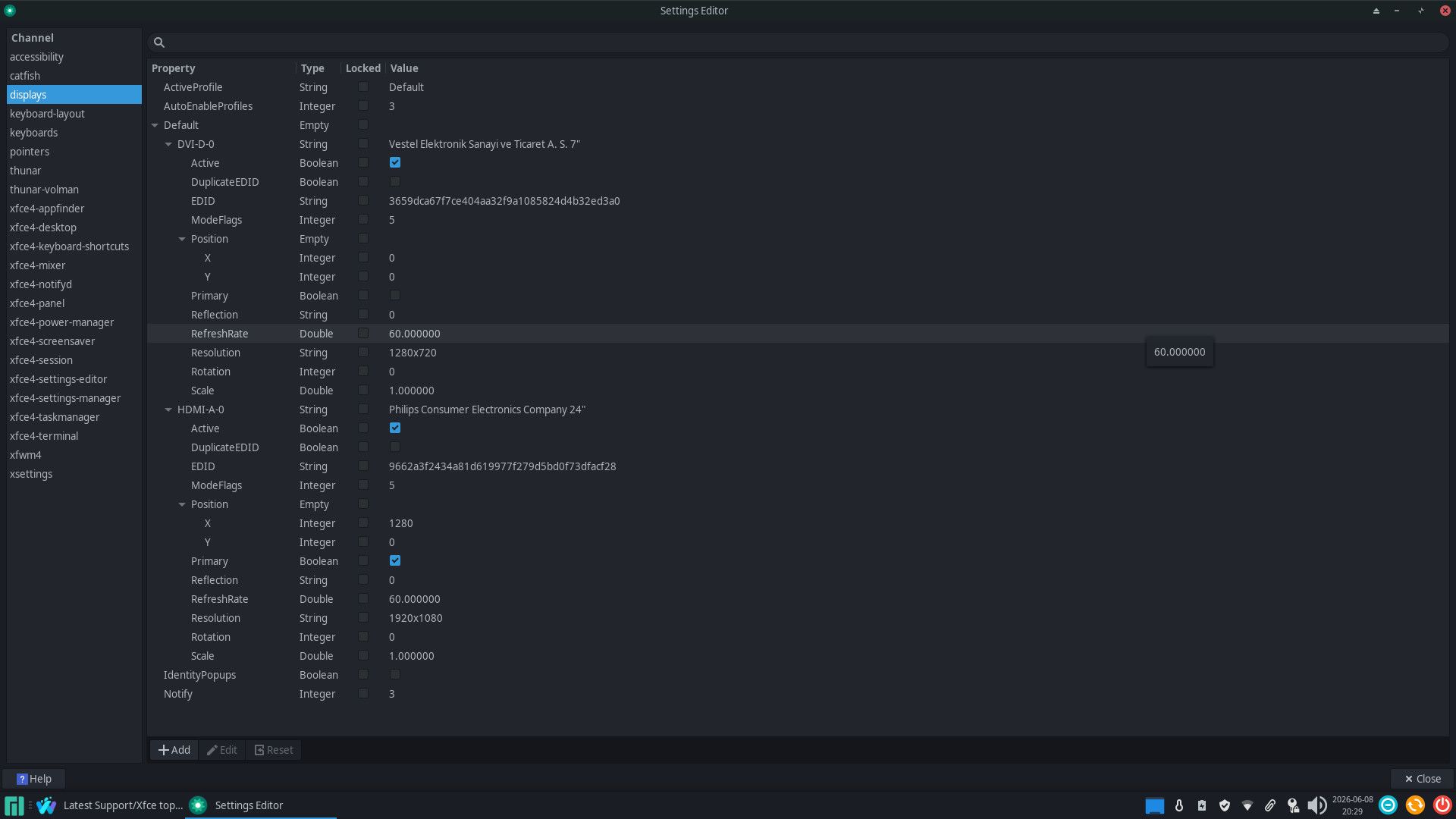
The secondary monitor is purely for OBS and that never gets opened before the monitor is turned on. Everything else however decides to move from the main monitor to the lower quality secondary monitor the instant I turn it on. Furthermore any new window decides to spawn on that monitor also. It persists until I pull out the cable connecting the monitor to my gfx card. A side issue is that secondary monitor ends up getting all the audio too when I plug it in and I cannot find my main monitor in the audio options. The audio thing is not too big a deal since it fixes itself after I’m done recording my YT vid and unplugged the monitor again. It is however really annoying to have to move my windows back to the main monitor when I plug it in and equally annoying to have to get up to unplug it. When I check the settings with the editor I find the monitors in the wrong order. I’ll post a screenshot after I crop off the useless extra display space but I expect that if I can fix that order my issues will resolve themselves so I’d like help with that 1st.
So to be clear I want the default display everything goes through to be the Philips one, not the Bush one
Edit 2: BTW gonna start recording in a minute so will be at least an hour before I respond to anything
Edit 3: The audio output has finally been solved, just the WM spawning on wrong monitor /moving to said monitor that needs to be resolved now. The audio thing had a configuration for HDMI output 4 which turned out to be the option I needed to move the audio from the secondary to the primary.
You should be able to switch the displays via the Xfce configuration as it looks to me like the Philips one is set to the right of the Bush one, from those settings.
I don’t regularly use Xfce but I’m assuming the left-most monitor is being preferred for new windows etc. in a dual-monitor setup.
Does it make a difference regarding which display your mouse pointer is on?
Well the philips monitor is physically to the right and it would be a tad annoying to have to move it. Either way that should not effect which monitor is chosen to spawn windows and shove audio through when the philips one has been directly set as the primary. Virtual location has no relevance to display ID and whichever monitor is set to primary should likewise be set to ID 0 to ensure apps, the WM, etc pick the primary monitor correctly if they’re not told to pick another (like in OBS’s case where I moved it to the secondary after plugging it in the 1st time). This is not a user error, this is a software error and swapping the order of the monitors in the config file is probably the fix, one of which I can do whilst waiting on the software to be fixed to re-order displays in the config by itself when a primary monitor is set.
Edit: Was directed by gemeni to create /etc/X11/xorg.conf.d/10-monitor.conf and fill it with a variant of this (Identifiers obtained by xrandr --listmonitors):
Section "Monitor"
    Identifier  "HDMI-A-0" # Replace with your primary monitor
    Option      "Primary" "true"
EndSection

Section "Monitor"
    Identifier  "DVI-D-0" # Replace with your secondary monitor
    Option      "Primary" "false"
EndSection
We’ll see by end of tomorrow at the latest if that helped, for now I’m turning of the secondary as I don’t need it on
Edit: Nope, did not help. Moment I re-enabled my secondary display just now, put it back in the correct virtual position, corrected it’s resolution and clicked apply, the WM once again move my windows to the secondary display giving no f**ks about my settings
It’s possible you misunderstood what @BG405 was attempting to impress upon you.
The suggestion was to switch the displays via the XFCE configuration rather than to physically move them.
Try that, and see if that makes a fundamental difference.
As with @BG405, I’m not a frequent user of XFCE; nor do I have a multiple monitor configuration Any suggestions are obviously disadvantaged by these factors.
That defeats the point of the thread though? I wanted to keep the virtual displays aligned the same way as the physical displays. I’d rather not rely on a work around that relies on me moving the mouse in the opposite direction to what my intuition tells me to.
It might be worth an experiment though, as I notice one is HDMI and the Other is DVI.
Section "Monitor"
    Identifier  "HDMI-A-0" # Replace with your primary monitor
    Option      "Primary" "true"
EndSection

Section "Monitor"
    Identifier  "DVI-D-0" # Replace with your secondary monitor
    Option      "Primary" "false"
EndSection
I’m just wondering if that’s not the Issue, the DVI monitor being activated first, in spite of it being flagged as the secondary monitor. I’ve had similar issues with HDMI being activated last, and windows going to the wrong monitor.
Appreciated but it’s not the virtual display shifting back to the right after being re-enabled that bothers me, just the windows deciding to spawn on / move to said display just because it happens to be set to the left of my main monitor