Verified and reinstalled linux612-nvidia 580.119.02-2, no help
nvidia geforce RTX 3060
Found and removed unneeded kernel 6.6
No i,provement
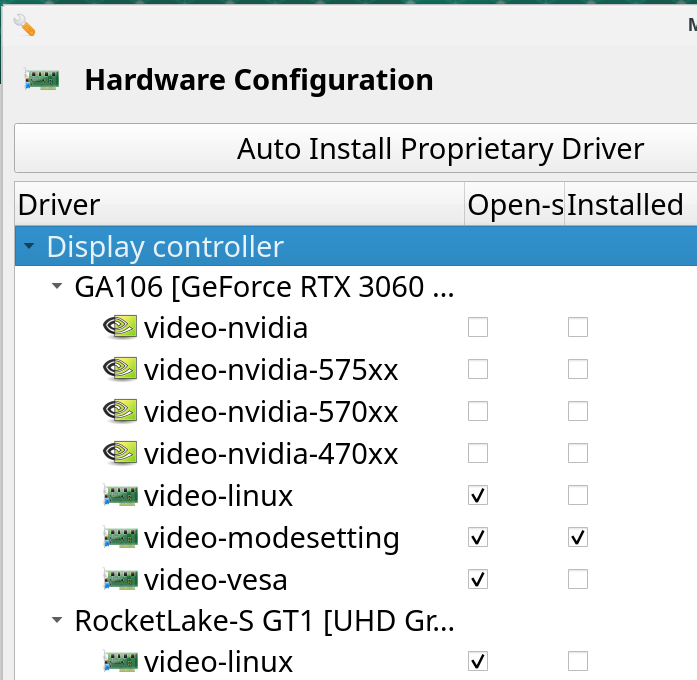
Running “Auto install proprietary driver” produces this result”
Starting
Using config ‘video-nvidia’ for device: 0000:01:00.0 (0300:10de:2504) Display controller nVidia Corporation GA106 [GeForce RTX 3060 Lite Hash Rate]
Error: config ‘video-nvidia’ conflicts with config(s): video-hybrid-intel-nvidia-prime
Done …
and…
[ljohnson@KISE-007 ~]$ inxi -G
Graphics:
Device-1: Intel RocketLake-S GT1 [UHD Graphics 750] driver: i915 v: kernel
Device-2: NVIDIA GA106 [GeForce RTX 3060 Lite Hash Rate] driver: nvidia
v: 580.119.02
Device-3: Logitech Webcam C270 driver: snd-usb-audio,uvcvideo type: USB
Display: x11 server: X.Org v: 21.1.21 driver: X:
loaded: modesetting,nvidia dri: iris gpu: nvidia,nvidia-nvswitch
s-res: 3840x2160 resolution: 3840x2160
API: EGL v: 1.5 drivers: iris,nvidia,swrast
platforms: gbm,x11,surfaceless,device
API: OpenGL v: 4.6.0 compat-v: 4.5 vendor: nvidia mesa v: 580.119.02
renderer: NVIDIA GeForce RTX 3060/PCIe/SSE2
Info: Tools: api: eglinfo,glxinfo de: xfce4-display-settings
gpu: nvidia-settings,nvidia-smi x11: xdpyinfo,xprop
Note only one display attached to GA106, Intel graphics in CPU unused
???
Mod edit: Corrected code formatting. Please see [HowTo] Post command output and file content as formatted text 
You have to remove video-hybrid-intel-nvidia-prime before you can install video-nvidia.
1 Like
I suspected as much, but, alas….
[ljohnson@KISE-007 ~]$ sudo mhwd -r pci video-hybrid-intel-nvidia-prime
Removing video-hybrid-intel-nvidia-prime…
Sourcing /etc/mhwd-x86_64.conf
Has lib32 support: true
Sourcing /var/lib/mhwd/local/pci/video-hybrid-intel-nvidia-prime/MHWDCONFIG
Processing classid: 0300
Sourcing /var/lib/mhwd/scripts/include/0300
checking dependencies…
error: failed to prepare transaction (could not satisfy dependencies)
:: removing nvidia-utils breaks dependency ‘nvidia-utils’ required by nvidia-prime
:: removing nvidia-utils breaks dependency ‘nvidia-utils’ required by nvidia-settings
Error: pacman failed!
Error: script failed!
Mod edit: Fixed formatting again for you this time. 
So, remove nvidia-utils and nvidia-settings first.
What DE are you running? (Gnome got rid of X11 support.)
My almost identical card works fine..
inxi -Gxxx
Graphics:
  Device-1: Red Hat Virtio 1.0 GPU driver: virtio-pci v: 1 ports:
    active: Virtual-1 empty: none bus-ID: 00:01.0 chip-ID: 1af4:1050
    class-ID: 0300
  Device-2: NVIDIA GA102 [GeForce RTX 3080 Lite Hash Rate] vendor: Gigabyte
    driver: nvidia v: 580.119.02 arch: Ampere pcie: speed: 2.5 GT/s lanes: 8
    ports: active: DP-3 empty: DP-1, DP-2, HDMI-A-1, HDMI-A-2, HDMI-A-3
    bus-ID: 07:00.0 chip-ID: 10de:2216 class-ID: 0300
  Display: wayland server: X.org v: 1.21.1.21 with: Xwayland v: 24.1.9
    compositor: kwin_wayland driver: X: loaded: nvidia
    gpu: nvidia,nvidia-nvswitch,virtio-pci d-rect: 3646x1440 display-ID: 0
On Wayland though.
According to his profile page, he’s on Xfce.
XFCE4 
OK ~ video-hybrid-intel-nvidia-prime is gone latest nvudua installed
Still flicker, so how do I determine if I am running nvidia driver or the free one
BTW thanks for the help - at 80+ and over 30 years of Linux, some of my marbles have rolled away 
2 Likes
If you’ve installed the proprietary driver and you have rebooted, then it’ll be using the proprietary driver. But “inxi -G” could also tell you which one you’re using..
1 Like
…and so it does:
”driver: X: loaded: nvidia”


2 Likes
Issues should be reported to nvidia »»»»»»»»»» If you have a problem, PLEASE read this first «««««««««« - Linux - NVIDIA Developer Forums However their focus might be on wayland and GNOME or Plasma issues. 570xx driver series might be the most stable for X11. We might however not provide a hybrid config for older drivers via mhwd. pci/graphic_drivers · master · Applications / mhwd-db · GitLab
Which means pacman might install a broken driver which doesn’t support the hardware in that case.
575xx changed a lot for wayland Wayland support for the 575 release series - Linux - NVIDIA Developer Forums
Hence always consult Nvidia forum before updating any driver …
2 Likes
Hello, I think I have the same trouble. The active window blink or not refresh.
For example, at start up, xfce4-panel blink. When I use an xfce4-terminal, I type some char, the last one don’t show, and some time the content of the window disappear and show the background image.
In other software, like Firefox, there is no trouble.
My config:
Graphics:
  Device-1: NVIDIA GA107 [GeForce RTX 3050 6GB] driver: nvidia v: 580.119.02
  Device-2: Logitech QuickCam E 3500 driver: snd-usb-audio,uvcvideo
    type: USB
  Display: x11 server: X.org v: 1.21.1.21 driver: X: loaded: nvidia
    gpu: nvidia,nvidia-nvswitch resolution: 2560x1440~60Hz
  API: EGL v: 1.5 drivers: nvidia,swrast
    platforms: gbm,x11,surfaceless,device
  API: OpenGL v: 4.6.0 compat-v: 4.5 vendor: nvidia mesa v: 580.119.02
    renderer: NVIDIA GeForce RTX 3050/PCIe/SSE2
  API: Vulkan v: 1.4.328 drivers: nvidia surfaces: N/A
  Info: Tools: api: eglinfo, glxinfo, vulkaninfo de: xfce4-display-settings
    gpu: nvidia-settings,nvidia-smi x11: xprop,xrandr
Do you find a work around ?
I’m going to have a look at nvidia forum.
Like workaround, I rolled back my Nvidia drivers. It helped.
sudo mhwd -r pci video-nvidia
sudo mhwd -i pci video-nvidia-470xx
Very interesting results:
Flickering occurs when using Mozilla Firefox or some of its derivatives, including Brave. It does not happen with Pale Moon.
It does not occur with Google Chrome, Chromium Vivaldi or Opera. It does not occur with the Zen browser.
It does occur with XFCE terminal when running btop, but does not occur when not running anything.
Just for the record, brave is not a firefox derivative — it’s based upon chromium. palemoon on the other hand is a firefox fork.
Thanks for clearing up my misunderstanding 
1 Like
Worked for me…!
Thanks 
Just adding that the same thing happened to me on a 3080ti. Rolling back to 570xx seemed to solve it.
1 Like