inxi -b
❱inxi -b
System:
  Host: greg-venusseries Kernel: 6.12.1-4-MANJARO arch: x86_64 bits: 64
  Desktop: KDE Plasma v: 6.2.4 Distro: Manjaro Linux
Machine:
  Type: Desktop System: Micro (HK) Tech product: Venus Series v: N/A
    serial: <superuser required>
  Mobo: Shenzhen Meigao Equipment model: AHWSA serial: <superuser required>
    UEFI: American Megatrends LLC. v: AHWSA.1.22 date: 03/12/2024
CPU:
  Info: 14-core (6-mt/8-st) 13th Gen Intel Core i9-13900H [MST AMCP]
    speed (MHz): avg: 400 min/max: 400/5200:5400:4100
Graphics:
  Device-1: Intel Raptor Lake-P [Iris Xe Graphics] driver: i915 v: kernel
  Display: x11 server: X.Org v: 21.1.14 with: Xwayland v: 24.1.4 driver: X:
    loaded: modesetting dri: iris gpu: i915 resolution: 3840x2160~60Hz
  API: OpenGL v: 4.6 compat-v: 4.5 vendor: intel mesa v: 24.2.8-arch1.1
    renderer: Mesa Intel Graphics (RPL-P)
Network:
  Device-1: Intel Ethernet I226-V driver: igc
  Device-2: Intel Ethernet I226-LM driver: igc
  Device-3: MEDIATEK MT7922 802.11ax PCI Express Wireless Network Adapter
    driver: mt7921e
Drives:
  Local Storage: total: 1.84 TiB used: 170.4 GiB (9.0%)
Info:
  Memory: total: 32 GiB note: est. available: 31.07 GiB used: 6.44 GiB (20.7%)
  Processes: 405 Uptime: 54m Shell: fish inxi: 3.3.36
I changed my default font setting (just increased the sise of the fonts) but now all my python scripts that use PyQT are throwing an error
I have reset the fonts in the desktop settings to default and there is no errors but as soon as i change the size of the fonts the python errors come back.
to test i created a simple python script
import sys
from PyQt5.QtWidgets import QApplication, QMainWindow, QLabel
from PyQt5.QtGui import QFont


class TestApp(QMainWindow):
    def __init__(self):
        super().__init__()
        self.setWindowTitle("Font Test App")
        self.setGeometry(100, 100, 400, 200)

        label = QLabel("Testing Font Setup", self)
        label.setFont(QFont("Noto Sans", 14))  # Set font for the label
        label.adjustSize()
        label.move(50, 80)  # Position the label


if __name__ == '__main__':
    app = QApplication(sys.argv)
    default_font = QFont("Noto Sans", 10)
    app.setFont(default_font)
    test_app = TestApp()
    test_app.show()
    sys.exit(app.exec_())
errors i get
❱python test.py
QFont::fromString: Invalid description 'Noto Sans,14,-1,5,400,0,0,0,0,0,0,0,0,0,0,1'
QFont::fromString: Invalid description 'Hack,14,-1,5,400,0,0,0,0,0,0,0,0,0,0,1'
QFont::fromString: Invalid description 'Noto Sans,14,-1,5,400,0,0,0,0,0,0,0,0,0,0,1'
QFont::fromString: Invalid description 'Noto Sans,14,-1,5,400,0,0,0,0,0,0,0,0,0,0,1'
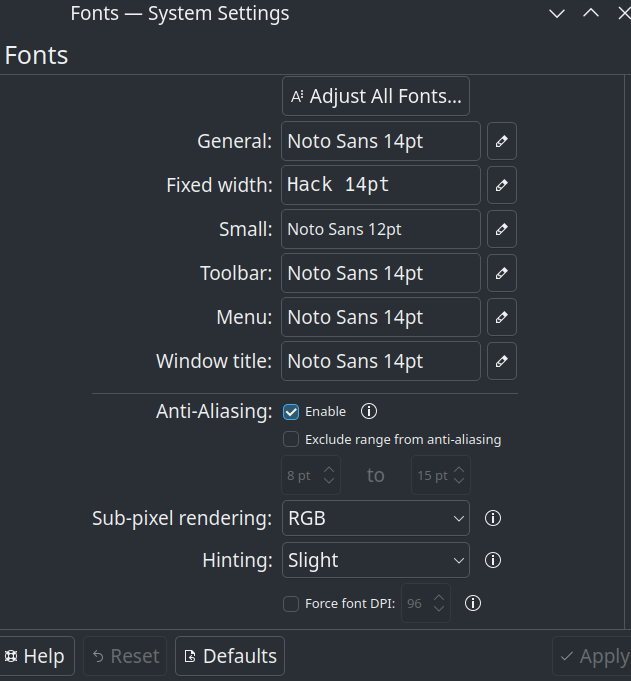
if i reset the fonts then the python scripts runs without errors but if i change the size all my scripts show the error.
i have re-installed these
sudo pacman -S noto-fonts noto-fonts-cjk noto-fonts-emoji ttf-hack