Pulseaudio loading forever

opened my laptop. tried playing audio files on google drive. didnt work. tried youtube. video played but no audio. went to the PulseAudio volume panel plug-in thingy ( im sorry chat im not very good with computer ■■■■ ). says “establishing connection to pulseaudio. please wait…” for forever and does nothing. I tried looking in the forum before but i uh, lack understanding.

if it helps, here’s what i get when i type these two in the terminal:

inxi -A
Audio:
  Device-1: Intel 500 Series Family On-Package High Definition Audio
    driver: sof-audio-pci-intel-tgl
  API: ALSA v: k6.18.45-1-MANJARO status: kernel-api

and

systemctl --user -l --no-pager status pulseaudio.{socket,service}
× pulseaudio.socket - Sound System
     Loaded: loaded (/usr/lib/systemd/user/pulseaudio.socket; enabled; preset: enabled)
     Active: failed (Result: service-start-limit-hit) since Sat 2026-08-29 14:53:02 IST; 30min ago
   Duration: 2.000s
 Invocation: 1fdce65d9d24498f8b4ab2f3b8c21933
   Triggers: ● pulseaudio.service
     Listen: /run/user/1001/pulse/native (Stream)

Aug 29 14:53:00 lenbook systemd[1606]: Listening on Sound System.
Aug 29 14:53:02 lenbook systemd[1606]: pulseaudio.socket: Failed with result 'service-start-limit-hit'.

× pulseaudio.service - Sound Service
     Loaded: loaded (/usr/lib/systemd/user/pulseaudio.service; disabled; preset: enabled)
     Active: failed (Result: start-limit-hit) since Sat 2026-08-29 14:53:02 IST; 30min ago
 Invocation: e0bf78985b75430fa520301d1fedcb04
TriggeredBy: × pulseaudio.socket
    Process: 1987 ExecStart=/usr/bin/pulseaudio --daemonize=no --log-target=journal (code=exited, status=1/FAILURE)
   Main PID: 1987 (code=exited, status=1/FAILURE)
   Mem peak: 2.7M
        CPU: 31ms

Aug 29 14:53:02 lenbook systemd[1606]: pulseaudio.service: Scheduled restart job, restart counter is at 5.
Aug 29 14:53:02 lenbook systemd[1606]: pulseaudio.service: Start request repeated too quickly.
Aug 29 14:53:02 lenbook systemd[1606]: pulseaudio.service: Failed with result 'start-limit-hit'.
Aug 29 14:53:02 lenbook systemd[1606]: Failed to start Sound Service.

if i dont fix this ■■■■ soon, i am cooked because i use my laptop for everything to studying to listening to music so uh. help would be greatly appreciated.

Welcome to the forum! :vulcan_salute:

Is this a fresh installation? I am asking because the default in a fresh installation should now be pipewire instead of pulseaudio.

You can either way easily switch over by installing manjaro-pipewire, which will pull in all of the necessary packages and prompt you to replace the pulseaudio-related stuff.

uh, no, this laptop had manjaro wayyy before i got it.

i installed pipewire, and replaced all the pulseaudio stuff. now what? do i have to set pipewire up and reboot? (how do i do that if yes?)

Well, I believe it should normally already be configured to start at boot, but best is to check first… :backhand_index_pointing_down:

[nx-74205:/dev/pts/3][/home/aragorn]
[aragorn] >  systemctl status --user pipewire.{service,socket}
● pipewire.service - PipeWire Multimedia Service
     Loaded: loaded (/usr/lib/systemd/user/pipewire.service; disabled; preset: enabled)
     Active: active (running) since Mon 2026-08-24 07:50:04 CEST; 5 days ago
 Invocation: 830b25f6260d4935aea55e8a405490ca
TriggeredBy: ● pipewire.socket
   Main PID: 803 (pipewire)
      Tasks: 3 (limit: 18943)
     Memory: 4.3M (peak: 10.9M)
        CPU: 2min 17.191s
     CGroup: /user.slice/user-1000.slice/user@1000.service/session.slice/pipewire.service
             └─803 /usr/bin/pipewire

Aug 24 07:50:04 nx-74205 systemd[688]: Started PipeWire Multimedia Service.

● pipewire.socket - PipeWire Multimedia System Sockets
     Loaded: loaded (/usr/lib/systemd/user/pipewire.socket; enabled; preset: enabled)
     Active: active (running) since Mon 2026-08-24 07:50:03 CEST; 5 days ago
 Invocation: deea0b0cb51f4c9588e8c506d6f4a011
   Triggers: ● pipewire.service
     Listen: /run/user/1000/pipewire-0 (Stream)
             /run/user/1000/pipewire-0-manager (Stream)

Aug 24 07:50:03 nx-74205 systemd[688]: Listening on PipeWire Multimedia System Sockets.

[nx-74205:/dev/pts/3][/home/aragorn]
[aragorn] > 

If they’re not running, then just issue the following commands… :backhand_index_pointing_down:

systemctl enable --now --user pipewire.socket
systemctl enable --now --user pipewire-pulse.socket

There should be no need to reboot. Enabling the sockets with the --now option should normally start the services as needed, and they should be running right away.

well, i checked,

● pipewire.service - PipeWire Multimedia Service
     Loaded: loaded (/usr/lib/systemd/user/pipewire.service; disabled; preset: enabled)
     Active: active (running) since Sat 2026-08-29 21:36:47 IST; 2min 10s ago
 Invocation: 46b99633dae54f5fa1682984fe8581d5
TriggeredBy: ● pipewire.socket
   Main PID: 2176 (pipewire)
      Tasks: 3 (limit: 18873)
     Memory: 1.5M (peak: 2.5M)
        CPU: 17ms
     CGroup: /user.slice/user-1001.slice/user@1001.service/session.slice/pipewire.service
             └─2176 /usr/bin/pipewire

Aug 29 21:36:47 lenbook systemd[1604]: Started PipeWire Multimedia Service.

● pipewire.socket - PipeWire Multimedia System Sockets
     Loaded: loaded (/usr/lib/systemd/user/pipewire.socket; enabled; preset: enabled)
     Active: active (running) since Sat 2026-08-29 21:36:45 IST; 2min 12s ago
 Invocation: aec8358e45e140b3a40fa77cd79ff8b5
   Triggers: ● pipewire.service
     Listen: /run/user/1001/pipewire-0 (Stream)
             /run/user/1001/pipewire-0-manager (Stream)

Aug 29 21:36:45 lenbook systemd[1604]: Listening on PipeWire Multimedia System Sockets.
~

looks likes its running… but still, there’s no audio. tried rebooting for the fun of it. still not working.

so i tried the commands you mentioned, and got:

[crown@lenbook ~]$ systemctl enable --now --user pipewire.socket
[crown@lenbook ~]$ systemctl enable --now --user pipewire-pulse.socket
Failed to enable unit: Unit pipewire-pulse.socket does not exist

am i cooked

Try this command for now… :backhand_index_pointing_down:

systemctl start --user pipewire-pulse

If it works, then check whether it persists across reboots. (In theory, it should.)

Could you give us an overview of the installed packages:
pacman -Q | grep -E "pulse|pipewire|alsa"

@Aragorn

i, uh, well. welp.

[crown@lenbook ~]$ systemctl start --user pipewire-pulse
Failed to start pipewire-pulse.service: Unit pipewire-pulse.service not found.

@pwx

sure thing

[crown@lenbook ~]$ pacman -Q | grep -E "pulse|pipewire|alsa"
alsa-card-profiles 1:1.6.8-1
alsa-firmware 1.2.4-4
alsa-lib 1.2.16.1-1
alsa-oss 1.1.8-6
alsa-plugins 1:1.2.12-6
alsa-topology-conf 1.2.5.1-4
alsa-ucm-conf 1.2.16.1-1
alsa-utils 1.2.16-1
lib32-alsa-lib 1.2.16.1-1
lib32-alsa-plugins 1.2.12-1
lib32-libpipewire 1:1.6.8-1
lib32-libpulse 17.0+r98+gb096704c0-1
lib32-pipewire 1:1.6.8-1
libpipewire 1:1.6.8-1
libpulse 17.0+r98+gb096704c0-1
manjaro-alsa 20221002-1
manjaro-pulse 20240817-1
pipewire 1:1.6.8-1
pulseaudio 17.0+r98+gb096704c0-1
pulseaudio-alsa 1:1.2.12-6
pulseaudio-bluetooth 17.0+r98+gb096704c0-1
pulseaudio-ctl 1.70-1
pulseaudio-jack 17.0+r98+gb096704c0-1
pulseaudio-lirc 17.0+r98+gb096704c0-1
pulseaudio-rtp 17.0+r98+gb096704c0-1
pulseaudio-zeroconf 17.0+r98+gb096704c0-1
vlc-plugin-alsa 3.0.23_2-10
vlc-plugin-pulse 3.0.23_2-10
xfce4-pulseaudio-plugin 0.5.1-1
zita-alsa-pcmi 0.6.1-3

Mod edit: Consecutive posts merged, @mentions added..

That’s bizarre. The manjaro-pipewire package should have pulled all of that in. :face_with_raised_eyebrow:

so im cooked :sob:

Apparently you did not install manjaro-pipewire, as I had told you. :backhand_index_pointing_down:

sudo pacman -Syu manjaro-pipewire

It will tell you that the package conflicts with manjaro-pulse. You should allow it to remove manjaro-pulse.

i’ll be honest with you i’ve been using -S instead of -Syu 'cause that’s just what i’ve been using since i was a kid and i honestly dont know the difference since it seemed to work?

anyways, ran the command. did the prompts. got this:

[crown@lenbook ~]$ sudo pacman -Syu manjaro-pipewire
[sudo] password for crown: 
:: Synchronizing package databases...
 core is up to date
 extra is up to date
 community is up to date
 multilib is up to date
:: Starting full system upgrade...
resolving dependencies...
looking for conflicting packages...
:: manjaro-pipewire-20231009-1 and manjaro-pulse-20240817-1 are in conflict. Remove manjaro-pulse? [y/N] y
:: manjaro-pipewire-20231009-1 and pulseaudio-jack-17.0+r98+gb096704c0-1 are in conflict. Remove pulseaudio-jack? [y/N] y
:: manjaro-pipewire-20231009-1 and pulseaudio-lirc-17.0+r98+gb096704c0-1 are in conflict. Remove pulseaudio-lirc? [y/N] y
:: manjaro-pipewire-20231009-1 and pulseaudio-rtp-17.0+r98+gb096704c0-1 are in conflict. Remove pulseaudio-rtp? [y/N] y
:: manjaro-pipewire-20231009-1 and pulseaudio-zeroconf-17.0+r98+gb096704c0-1 are in conflict. Remove pulseaudio-zeroconf? [y/N] y
:: pipewire-pulse-1:1.6.8-1 and pulseaudio-17.0+r98+gb096704c0-1 are in conflict. Remove pulseaudio? [y/N] y
error: failed to prepare transaction (could not satisfy dependencies)
:: removing pulseaudio breaks dependency 'pulseaudio=17.0+r98+gb096704c0-1' required by pulseaudio-bluetooth
:: removing pulseaudio breaks dependency 'pulseaudio' required by pulseaudio-ctl

do i gotta completely remove pulseaudio for this? (manually)

-Syu performs a full system update in the process. Manjaro is a (curated) rolling-release distribution and must be kept up-to-date.

I wasn’t sure whether your system was fully updated, and that is why I told you to use -Syu.

sudo pacman -Rns manjaro-pulse pulseaudio-ctl pulseaudio-bluetooth && sudo pacman -S manjaro-pipewire

If he has any concerns, could we check to see if he has btrfs and timeshift?

I don’t think OP could break anything if they do as we tell them. :wink:

ok. i ran the command. checked. and did some of the other commands again.

[crown@lenbook ~]$ systemctl status --user pipewire.{service,socket}
● pipewire.service - PipeWire Multimedia Service
     Loaded: loaded (/usr/lib/systemd/user/pipewire.service; disabled; preset: enabled)
     Active: active (running) since Sat 2026-08-29 21:36:47 IST; 40min ago
 Invocation: 46b99633dae54f5fa1682984fe8581d5
TriggeredBy: ● pipewire.socket
   Main PID: 2176 (pipewire)
      Tasks: 3 (limit: 18873)
     Memory: 1.5M (peak: 2.5M)
        CPU: 17ms
     CGroup: /user.slice/user-1001.slice/user@1001.service/session.slice/pipewire.service
             └─2176 /usr/bin/pipewire

Aug 29 21:36:47 lenbook systemd[1604]: Started PipeWire Multimedia Service.

● pipewire.socket - PipeWire Multimedia System Sockets
     Loaded: loaded (/usr/lib/systemd/user/pipewire.socket; enabled; preset: enabled)
     Active: active (running) since Sat 2026-08-29 21:36:45 IST; 40min ago
 Invocation: aec8358e45e140b3a40fa77cd79ff8b5
   Triggers: ● pipewire.service
     Listen: /run/user/1001/pipewire-0 (Stream)
             /run/user/1001/pipewire-0-manager (Stream)

Aug 29 21:36:45 lenbook systemd[1604]: Listening on PipeWire Multimedia System Sockets.
[crown@lenbook ~]$ systemctl enable --now --user pipewire.socket
[crown@lenbook ~]$ systemctl enable --now --user pipewire-pulse.socket
Created symlink '/home/shm/.config/systemd/user/sockets.target.wants/pipewire-pulse.socket' → '/usr/lib/systemd/user/pipewire-pulse.socket'.

opened yt. volume control panel works now! audio mixer loads! yey! one problem: still no ■■■■■■■ audio :sob:

rebooted. tried again yt again. still no audio.

what am i doing wrong :broken_heart:

Is your volume control muted?

nope. that was the first thing i checked.

Things to check…

  • Run pavucontrol and look at the sliders

  • If you have a hardware volume control, see if it’s turned up far enough.

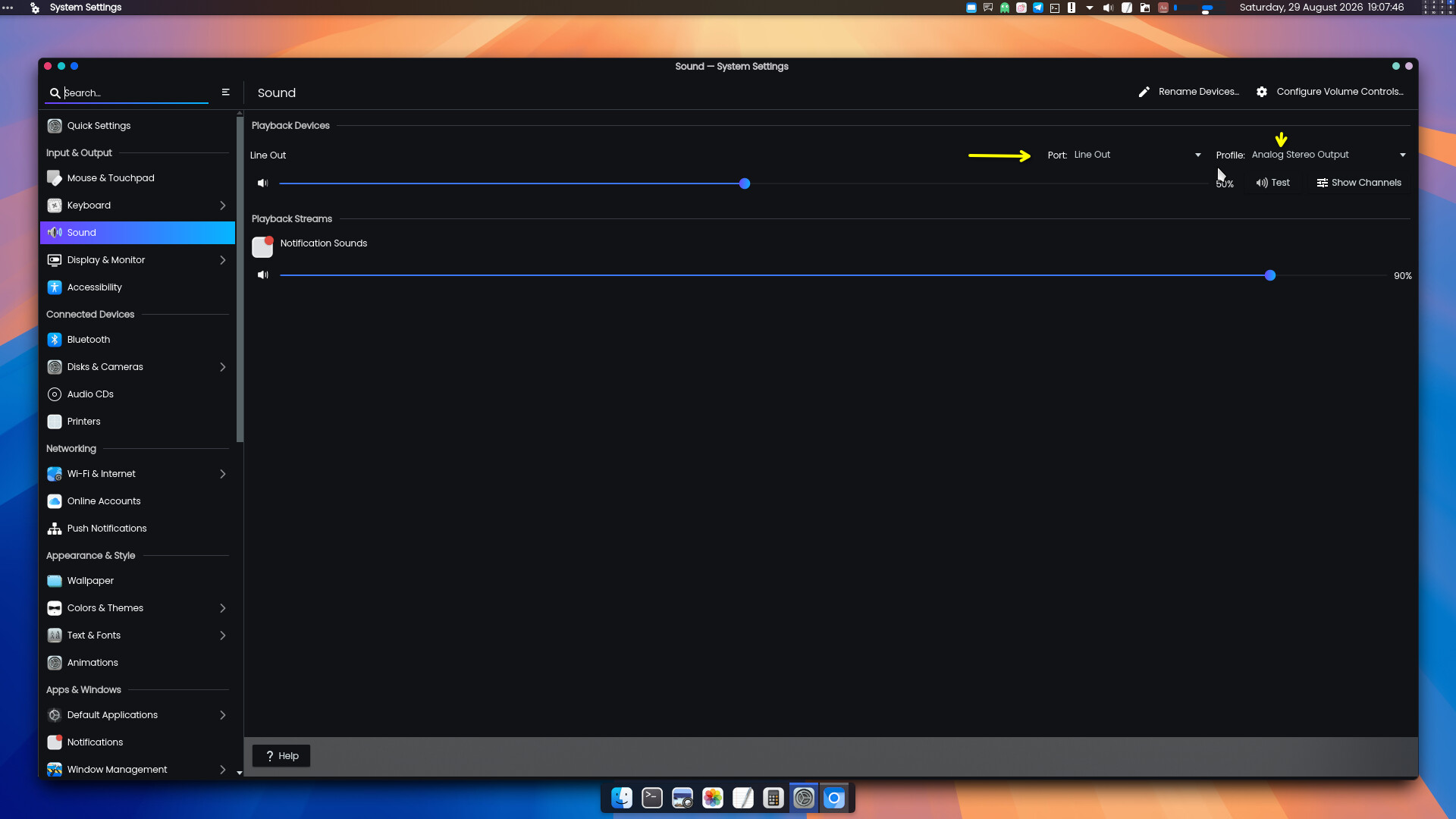
  • Depending on what desktop environment you’re using, right-click the volume control widget and see whether you’re using the correct sink. In Plasma, this is called a “profile”. You probably want it set to “Analog Stereo Output”. :backhand_index_pointing_down:

(why’s your desktop so beautiful damn. and clean, compared to mine.)

i have xfce. (look, man i didnt get a choice in ts so thats why i know jack ■■■■ about anything lol :broken_heart:)

the volume control panel thingy is the only thing for configuring sound and stuff in xfce, i guess? cause i cant find anything else. it’s showing a moving volume meter for audio but actually giving out no audio. and no such options for sinks or profiles either. i would attach a screenshot but i cant.