Problems installing Moodle and Figma-Linux

Hi all,

I am trying to install Moodle and Figma-linux on my PC to teach myself how to use these - or at least learn the basics in these environments.

For Moodle, I have been following the steps in this article: How To Install Moodle on Manjaro - idroot but after a few attempts, something always go wrong.

On my latest attempt, I was unable to initialize the MariaDB. I have tried removing the packages the article instructs to install, in order to start afresh when I go wrong, but there may still be some components or changed permissions that conflict:

[manupc@manupc-2 ~]$ sudo mariadb-install-db --user=/mysql --basedir=/usr --datadir=/var/lib/mysql 
chown: invalid user: ‘/mysql’
Cannot change ownership of the database directories to the '/mysql'
user.  Check that you have the necessary permissions and try again.

I was reluctant to remove mysql ( I would go sudo pacman -S mysql) in case mysql is used for other things in manjaro.

Please can someone assist me in installing Moodle on my PC?

Thank you.

I think you would probably be easiest off just installing it from the AUR. It should pull in the needed dependencies and set up the basic configuration. :point_down:

pamac build moodle

Usernames may not start with a slash. The correct username would be mysql. But see my comment above. :point_up:

It is, usually.

2 Likes

Thank you, Aragorn.

When I build with pamac or sudo pacman -S moodle, I can’t find the package on my start menu under All Applications. The article suggests I need to set up Maria Database and PHP.

[manupc@manupc-2 ~]$ pamac build moodle
Preparing...
Cloning moodle build files...
Generating moodle information...
Checking moodle dependencies...
cp: cannot access '/var/lib/pacman/sync/download-sC2LOP': Permission denied
Resolving dependencies...
Checking inter-conflicts...

To build (1):
 moodle  4.4.1-2    AUR


Edit build files : [e] 
Apply transaction ? [e/y/N] y

==== AUTHENTICATING FOR org.manjaro.pamac.commit ====
Authentication is required to install, update, or remove packages
Authenticating as: ManUPC (manupc)
Password: 
==== AUTHENTICATION COMPLETE ====
cp: cannot access '/var/lib/pacman/sync/download-sC2LOP': Permission denied

Building moodle...
==> Making package: moodle 4.4.1-2 (Fri 11 Jul 2025 12:14:10)
==> Checking runtime dependencies...
==> Checking buildtime dependencies...
==> Retrieving sources...
 -> Found moodle-4.4.1.tgz
==> Validating source files with sha256sums...
   moodle-4.4.1.tgz ... Passed
==> Removing existing $srcdir/ directory...
==> Extracting sources...
 -> Extracting moodle-4.4.1.tgz with bsdtar
==> Entering fakeroot environment...
==> Starting package()...
==> Tidying install...
 -> Removing libtool files...
 -> Purging unwanted files...
 -> Removing static library files...
 -> Compressing man and info pages...
==> Checking for packaging issues...
==> Creating package "moodle"...
 -> Generating .PKGINFO file...
 -> Generating .BUILDINFO file...
 -> Generating .MTREE file...
 -> Compressing package...
==> Leaving fakeroot environment.
==> Finished making: moodle 4.4.1-2 (Fri 11 Jul 2025 12:14:22)
==> Cleaning up...

Checking keyring...                                                        [1/1]
Checking integrity...                                                      [1/1]
Loading packages files...                                                  [1/1]
Checking file conflicts...                                                 [1/1]
Checking available disk space...                                           [1/1]
Installing moodle (4.4.1-2)...                                             [1/1]
Transaction successfully finished.
[manupc@manupc-2 ~]$ 


That won’t work, because pacman does not access the AUR, and moodle is an AUR package.

Well, I’m not familiar with that software. It may just be a back-end for something else, or maybe it’s not even a graphical application at all.

It appears to be a web-based thing, and so you would need to enable a web server and PHP, indeed.

However, I’ve just noticed that the package has been flagged out-of-date in the AUR.

1 Like

Thanks, Aragorn.

I think if I have to enable a web server, it may be more complex and time-consuming than I’d imagined. Perhaps it isn’t worth it right now just to explore it at a basic level.

Thank you for looking at it for me.

1 Like

By the way, figma-linux is also available from the AUR, in several versions … :point_down:

[nx-74205:/dev/pts/3][/home/aragorn]
[aragorn] >  pamac search figma-linux
figma-linux-git  0.11.4.r10.gd9a7a03-1                                                                                                                                                                                                  AUR
    The collaborative interface design tool. Unofficial Figma desktop client for Linux.(Use system-wide electron)
figma-linux-font-helper  0.1.5-1                                                                                                                                                                                                        AUR
    Font Helper for Figma for Linux OS.
figma-linux-dev-git  0.11.4.r2.gd4a3b97-3                                                                                                                                                                                               AUR
    The collaborative interface design tool. Unofficial Figma desktop client for Linux
figma-linux-bin  0.11.5-0                                                                                                                                                                                                               AUR
    The collaborative interface design tool. Unofficial Figma desktop client for Linux
figma-linux  0.11.5-0                                                                                                                                                                                                                   AUR
    The collaborative interface design tool. Unofficial Figma desktop client for Linux

[nx-74205:/dev/pts/3][/home/aragorn]
[aragorn] >  

The figma-linux-bin version is already precompiled, so it’ll install a lot quicker than any of the others. :point_down:

pamac build figma-linux-bin
1 Like

I shall drop this here in case it’s useful;

Note that XAMPP is generally considered one of the most user friendly methods to setup a local web server; including Apache, PHP, MariaDB, etc.

As @Aragorn suggests, once you have a working web server, you can begin to focus on ways you can use it; easily create basic websites locally; install wordpress or other CMS systems; and yes, even install Moodle (which I vaguely recall playing with some thrirty years ago when it was new).

Alternately, you might like to look here:

Regards.

2 Likes

Thank you for this information, soundofthunder.

1 Like

Thank you, Aragorn.

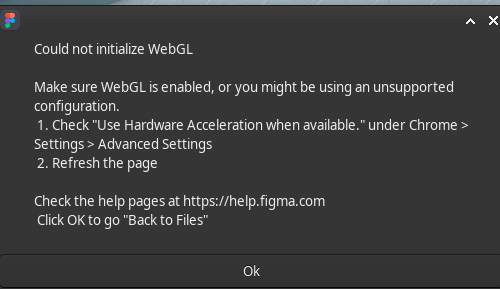
I have successfully installed Figma-LInux now but when I try open a file I get a message:

WebGL is enabled in my browser and Hardware Acceleration is checked.

Well, I’m afraid I can’t be of more help here. I don’t use either of those software titles, and the AUR isn’t even officially supported in Manjaro — nor in Arch proper, for that matter — because its content is uploaded by regular users, not by any distro developers. So there is no guarantee that it’ll work, or — worst case scenario — that it won’t even be anything malicious.

Software on the AUR — actually, they are not software packages but build scripts that pull in the software (usually as source code) from elsewhere — regularly gets flagged out-of-date. Somebody decides to upload a build script to the AUR, but then they lose interest and nobody takes over, leading to what we call abandonware.

Perhaps someone with more knowledge of, or experience with these packages can offer you more help, but I’m afraid I myself cannot do anything more at this point. :man_shrugging:

No worries, I am really grateful for all your support, Aragorn.

1 Like