Problems installing Manjaro

Problems installing Manjaro

Because the “calamares” and “QA” sections are currently write-protected, I’m forced to post this here:

I’m currently reinstalling my system. I’ve gotten stuck at a few points because Calamares hasn’t been behaving consistently.

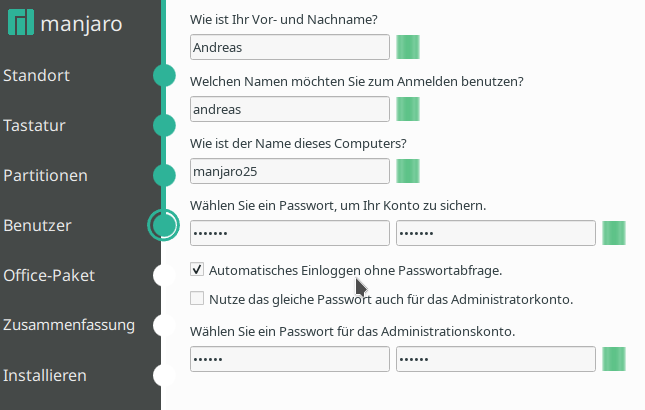
  1. During the first installation attempt, I selected passwordless login because that would be quite practical for a disaster recovery system, as it would allow me to jump straight to the GUI.
  • After the installation, I did indeed jump straight to the GUI.
  • Then I tried to install a few programs I like to have on hand using Pacman. However,
  • I couldn’t gain root privileges with sudo. My password was rejected.
  • Then I tried su root, but the root password was also rejected.
    No, no typo, no mixed-up password, no Caps Lock. The terminal itself displayed all the letters correctly. And no, the password doesn’t contain any characters that are located in different places on an English keyboard. I was able to type the password as text in the terminal.
  • While I was still wondering what the problem could be, the screensaver appeared. It also didn’t accept my password.

A fresh installation without passwordless login now doesn’t have the problem.

There is no such thing as passwordless installation with Calamares.

IF you are able to force it by not entering a password (this is likely not the intention) and you have selected to login with the same user - I think both user and root is left in a disabled state.

I also have to ask - is it a custom ISO build of some sort?

You could use chroot and check the file /etc/shadow on the installed system.

I have a note going back to 2020 (the original link mentioned is no longer valid)

I am quite surprised - I just did a test using a local ISO built from default.

It is possible to install leaving empty passwords for both root and user.

Quite strange I think - because this makes the system completely unmanageable.

Before I restarted after the installation I mounted the root and checked /etc/shadow.

The root account is disabled as I suspected.

For the user, credentials has been created, but as nothing was provided it is only possible to use the account for trivial task - next level security - you cannot do anything - even if you would :grin:

Speculation warning:

Some thought on the user credentials.

To verify this it would require some deep dive into source - so this is just a thought.

Since it is not possible to use the passwd command inside the installer to generate the actual credentials entry - my thought is that it uses openssl to generate the password.

If the password is empty - which should have been validated as an error - possibly an upstream bug - but I don’t know - a password is generated using a random salt and an empty string - which returns a value - let’s call it autopass - this value is then supplied to

useradd -mUG wheel --password $autopass

This creates a valid credential that is impossible to use…

I think you’re not quite up to date.

I did enter 2 passwords (user, root) and they are not the same.
The GUI started without password, But none of these passwords worked in the installed system

(this is no passwordless installation, but only a passwordless login)

It’s the latest ISO for XFCE.

Yes i could, But

No, unfortunately I can’t do that anymore,

as I reinstalled immediately afterward without checking the relevant box. (I’m currently reinstalling my system, not troubleshooting Calamares in general.)

Nevertheless, this reminded me of some threads in the forum where people had similar problems right after reinstalling.

In those cases, every “expert” (myself included) assumed the user had made the mistake.

Since it happened to me too, I think that back then, the user wasn’t actually making the mistake, but rather that they simply encountered a bug in Calamares. But if no one believes it’s a bug, it won’t get fixed :wink:

Please excuse my bluntness:

Unfortunately, at that moment, you don’t have any concrete proof. And neither the time nor the inclination to prove to the programmer that there’s a bug,( and possibly even to show them exactly where it is). After all, you just want to complete the installation successfully.

## No proof

But an indication that it is indeed a bug :beetle:
:footprints:

Oh - that one…

I never pay any attention to that field - never use passwordless login - and I completely misunderstood the passwordless login - I understood as, in not supplying any text at all - my mistake - sorry.

Nonetheless - my test was done leaving all password fields empty and no ticked boxes - creating yet another mystery :grin:

I will check the other scenario you describe - just to satisfy my curiosity.

EDIT:

Now I have tested - using the same ISO - locally build xfce on unstable branch using linux618 (virtual machine).

I entered password for user and root plus ticked the box autologin.

Reboot - login - test

sudo pacman -Syu
sudo umount /dev/vda1
sudo mount /dev/vda1 /boot/efi
su -l root

Everything work as expected.

Just thinking out load - I use ext4 - did you use btrfs as usual?

EDIT2:

The installer’s configuration contains

---
defaultGroups:
    - lp
    - network
    - power
    - sys
    - wheel
autologinGroup:  autologin
doAutologin:     false
displayAutologin:   true
sudoersGroup:    wheel
passwordRequirements:
    nonempty: true
setRootPassword: true
doReusePassword: false
availableShells: /bin/bash, /bin/zsh
avatarFilePath:  ~/.face
userShell:       /usr/bin/zsh
user:
  shell: /usr/bin/zsh
  forbidden_names: [ root ]
  home_permissions: "o700"

I understand this as empty passwords is not allowed or do I misunderstand?

passwordRequirements:
    nonempty: true

The schema defines passwordRequirements as part of users.schema.yaml

    passwordRequirements:
        additionalProperties: false
        type: object
        properties:
            minLength: { type: number }
            maxLength: { type: number }
            libpwquality: { type: array, items: { type: string } }  # Don't know what libpwquality supports

src/modules/users/users.schema.yaml · development · Applications / calamares · GitLab

I see no mention of a nonempty property - so perhaps because the util-yaml.sh from the tools package generates invalid configuration for the users module ?

2 Likes